
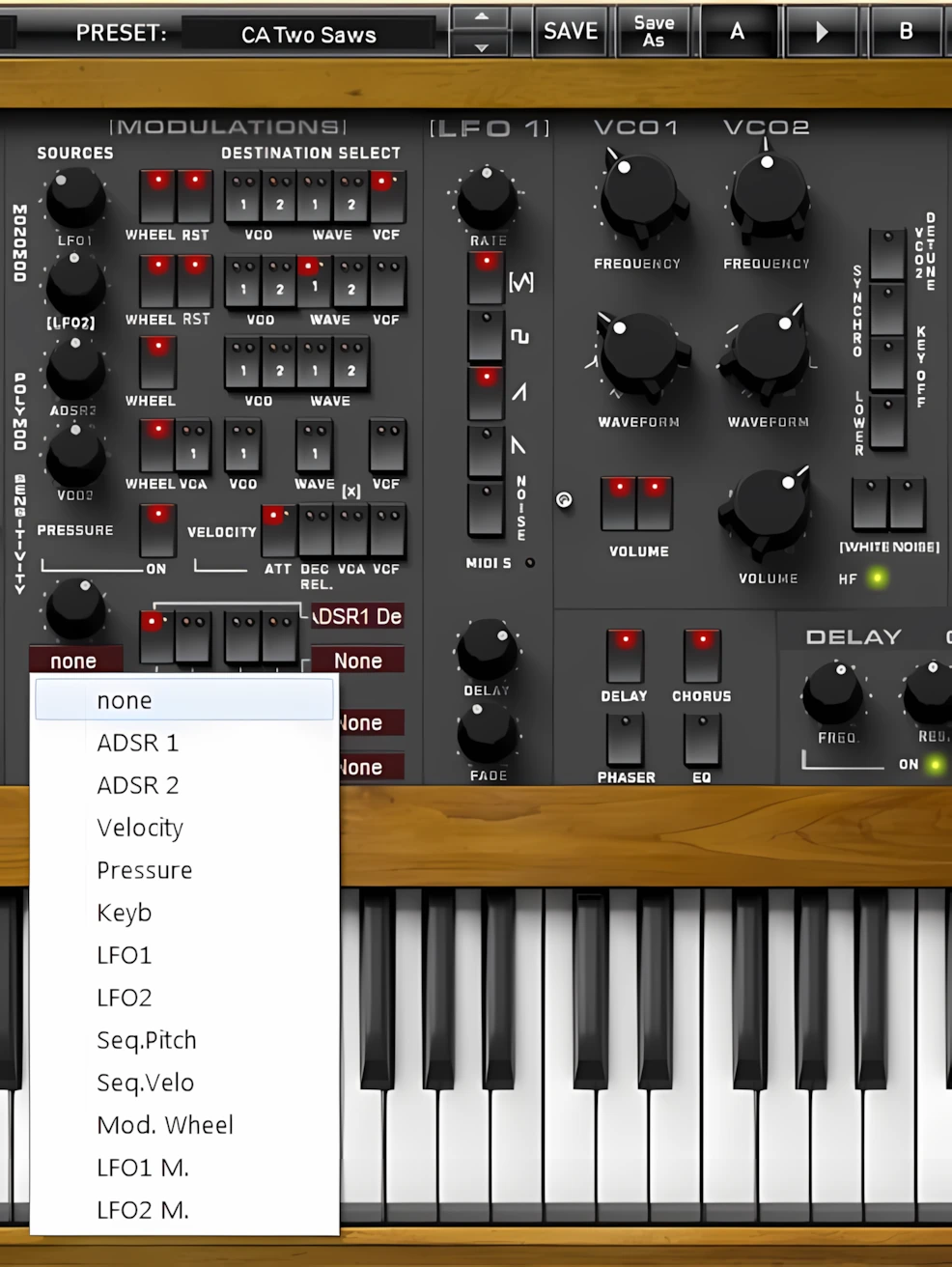
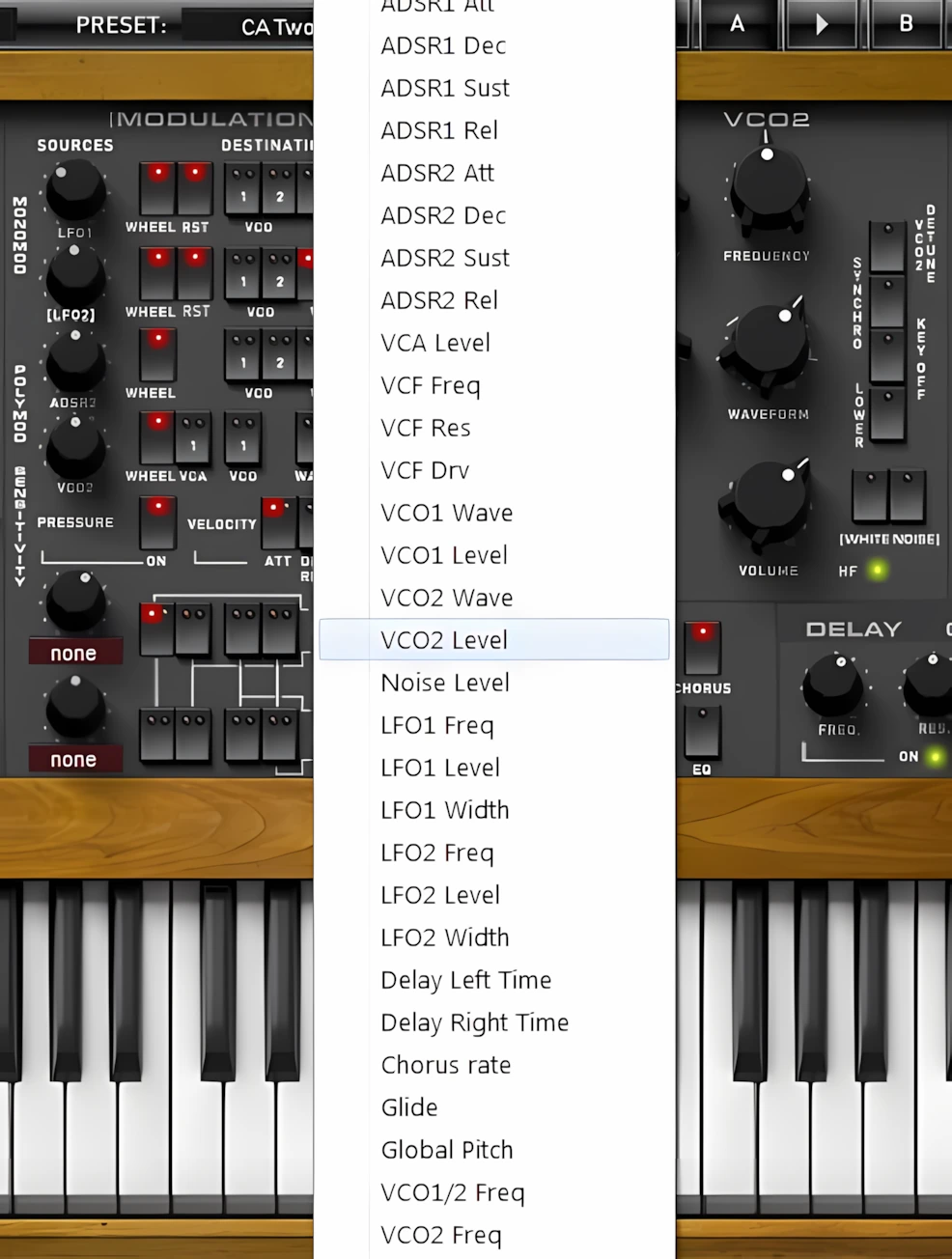
Modulation Assignments:
You assign the sources and destinations by clicking on the dark red assignment menus. Just as in the upper modulation area, you can set the switches to one of three states. Red and green LEDs clearly indicate their status. Green means a positive modulation. Red means a negative modulation. When the LED is off, no modulation is active.
You also get two knobs that control the strength of the modulation used by the sources in their respective rows. In addition, each modulation destination offers its own range of control. This combination gives you tremendous flexibility. It lets you decide exactly how subtle or how pronounced your modulation choices will be.
[ LFOs ]
XILS-Lab uses clever space-saving design to place both LFOs in a single control strip. You access each LFO simply by clicking its label. You can use each Low Frequency Oscillator as a powerful modulation source. It can generate extremely complex and highly unique oscillations. In addition, you can assign multiple waveform types at the same time. You can then apply different degrees of waveform morphing to shape the result even further.
What’s more, you can finely control the timing behavior of each LFO. You can set how long a note-on event takes to fade the LFO in. You can also adjust how long the LFO output takes to rise from zero to maximum. This level of control makes the LFO section both expressive and deeply configurable.
[ VCOs ]
Moving on to VCO 1 and VCO 2, you immediately get satisfying control with the Frequency and Waveform knobs. You could easily call the Frequency controls “Transpose” knobs. Just like the global TUNE knob, they range from 0 to ±48 semitones. This gives you two full octaves of upward or downward tuning.
You can also perform very fine detuning in steps as small as one cent. However, this level of precision can be tricky to achieve quickly and smoothly. Mouse movements work very well for broad, coarse adjustments.
For even greater control, this instrument would clearly benefit from one additional feature. A future version should let you type exact values directly from the computer keyboard. This simple addition would make an already fantastic instrument even more powerful and efficient.
The group of switches directly to the right of the Waveform knobs gives you special control over how the second oscillator responds. These switches let you quickly shape the relationship between the two VCOs.
When you engage the Synchro switch, you activate hard sync between the oscillators. The red LED lights up to confirm that sync is active. When you switch it off, both oscillators run independently and no longer lock to each other.
The Key Off switch completely disconnects the second oscillator from the keyboard. As a result, it no longer tracks keyboard pitch. In practical terms, the oscillator simply runs wild on its own, which can create bold, unconventional sounds.
Does PolyKB II supply good low frequency LFO options?
Yes, it sure does! Activate the “Lower” switch, and Oscillator 2 transforms into an additional LFO operating at very low frequencies, unless the “Key Off” switch remains active. Next, engage the “Audio Noise” feature to inject white noise into the audio path at one of three precise levels.
Thirdly, select level 1/3 by turning on Noise Switch 1, choose 2/3 with Noise Switch 2, or select full intensity (1) by activating both switches simultaneously. Finally, mute all noise instantly by setting both switches to the “OFF” position.
Hi, you! If you like these kinds of reviews,
be sure to subscribe.
Click the “Noise” label to toggle between white and pink noise types. Refine your sound further by engaging “Limited Noise Mode.” This feature drastically reduces harsh, high-frequency energy for a smoother texture. Simply click the small “HF” LED to activate this mode and watch the light turn green.
[ VCFs ]
Wow! Mr. Oudin and his team at XILS-Lab have absolutely mastered the art of synthesis. They crafted a rich, Creole-inspired analog experience just for us. PolyKB’s VCF delivers a precise 4-pole self-oscillating low-pass filter.
Turn the large “Frequency” knob to sweep the cut-off from ultra-low sub-bass cycles up to 18kHz. Rotate the “Resonance” knob fully clockwise, and the filter achieves complete self-oscillation. You will appreciate this smooth control range immensely. It allows you to generate everything from subtle, pleasing tones to extreme, powerful filtering effects.
The “Drive” control emulates a smooth overdrive circuit that eliminates abrasive, harsh jaggedness. Assign this drive to either pre-filtering or post-filtering stages instantly. Twist the knob to dial in anything from soft saturation to searing overdrive effects.
I created a preset called “CA Synth Cello” that utilizes a low VCF cut-off paired with slight post-stage drive. This subtle saturation provides the perfect finishing touch to the patch.
Complete this section with the “Keyb Ctrl” and “Adsr2 Ctrl” knobs. Set “Keyb Ctrl” to define the keyboard follow amount for cut-off modulation. Adjust “Adsr2 Ctrl” to determine the envelope shaping applied to that same cut-off modulation.
[ ADSRs ]

Yepper doodle, Neighborly-abor, XILS-Lab have dang-diddly-done given us a pair of handy-me-dandy Attack/Decay/Sustain/Release strip-a-doodles.
*It’s late at night as I’m writing this, I couldn’t help but entertain myself with a bit of Ned Flanders lingo . . .
Each ADSR parameter works exceptionally well, driving smooth, incremental changes throughout the signal path. Pay close attention to the strip of three switches nestled between the two ADSR sections. The “MUL” switch multiplies ADSR parameters by factors of two, three, or four. Leverage this feature to craft lush, extended attack and decay times effortlessly.
Focus specifically on the second ADSR strip and its unique “Loop” switch. Activate this switch to force the Envelope Generator to cycle continuously from attack to release, effectively bypassing the sustain stage. This behavior mimics the classic Matrix 12 synth, which relied solely on Attack-Decay parameters. Consequently, the PolyKB II Envelope Generator proves incredibly extensive and versatile.
Finally, engage the “Key Track” switch to connect keyboard-follow directly to the Envelope Generator’s parameter modulation. With “Key Track” active, higher notes trigger the shortest attack times automatically. This ensures responsive, natural articulation across the entire keyboard range.
[ OUTPUTS ]
Here, the developers provide a large and easily adjustable Output-level knob, along with a Pitch-bend range spanning from zero to four octaves. They also include controls for Modulation Velocity and Pressure, which sets the level of polyphonic aftertouch used by the modulation section.
Most notably, the Drift control delivers an impressively effective way to recreate authentic analogue-style instability. When turned fully counter-clockwise, all voices remain perfectly aligned and consistent. However, as the knob rotates clockwise, the synth gradually introduces random noise and subtle detuning for a far more organic character. In my experience, settings between 52 and 60 percent produce exceptionally realistic results.
Furthermore, users can access massive unison sounds ranging from two to six voices, provided their systems can comfortably handle the increased CPU load. To complete the package, the synth offers an excellent selection of keyboard modes, including several mono variations and the highly versatile POLY circular mode.
[ EFFECTS ]
PolyKB II delivers four great-sounding, easy-to-use effects. You can easily configure each effect by clicking its tab at the bottom right of the interface.
Delay:
To start, the effects section offers a lush stereo delay. This feature provides independent “Time” and “Feedback” controls for each channel. Finally, the Dry/Mix knob perfectly blends your processed and unprocessed sounds.
Chorus:
The second tab opens the CHORUS FX panel. This beautiful-sounding chorus easily rivals almost any competitor on the market.
Admittedly, TAL’s famous Roland “Juno” chorus recreation remains the gold standard for synth effects. Nonetheless, XILS-Lab excels at DSP programming. Because of this expertise, you will thoroughly enjoy this specific chorus. Best of all, you can easily dial in your sound using just three knobs: Mix/Dry, Rate, and Amount.
Phaser:
PolyKB’s PHASER effect delivers an exceptionally pleasing sound. Like any quality phaser, it can become delightfully rambunctious and wonderfully warbly when pushed harder. Nevertheless, I still subscribe firmly to the “less is more” philosophy.
With the “Dry/Wet” Mix and “Speed” controls positioned around the ten O’clock mark, the effect immediately becomes lush, rich, and beautifully deep. Meanwhile, higher settings on the “Amount” and “Resonance” knobs add impressive movement and character without overwhelming the sound.
Unlike some phaser effects that boost output volume, this one slightly reduces the overall level. Consequently, users may need to raise the global “Output” control to compensate. Alternatively, they can activate the EQ section and apply additional gain directly within that module.
EQ:
The EQ FX section elegantly completes this collection of powerful effects. On this tab, you gain access to a pair of exceptionally smooth High/Low shelf filters.
Notably, XILS-Lab engineered these EQ filters with meticulous precision. The design suppresses artifacts and unwanted ‘ringing’ near the Nyquist frequency. Consequently, the resulting EQ delivers pristine, transparent performance—it adjusts frequencies with surgical accuracy while remaining completely neutral.
In summary, there are some synths, such as Rob Papen’s “Predator”, which include show-stopping numbers of built-in effects. In contrast, PolyKB II is an emulation of a rare, vintage synth. It includes only four common effects.
However, these are four superbly-coded effects and each of them sounds wonderful. The effects’ parameters don’t “jump” all over the place; each of the effects can be dialed in smoothly and easily.
Sound Quality:
After months of checking out online audio samples and extensively investigating this synth, I can confirm one thing: PolyKB II is genuinely a HUGE, truly analogue-sounding soft-synth.
The morphing waveforms deliver absolutely the coolest feature imaginable. Equally impressive, you can set unique waveforms statically for maximum precision.
Admittedly, some would argue that “a saw is a saw” and “a triangle is a triangle”—and they’re absolutely right. Yet, here’s what separates PolyKB II: the true magic emerges in how precisely it processes each waveform. That’s where this synth genuinely shines.
Xavier Oudin channels 25 years of hardcore VSTi C++ programming expertise into every aspect of PolyKB II. You’ll immediately hear his mastery every time you play or listen to this synth.
Moreover, XILS-Lab engineered a High Frequency “tamer” specifically for the “NOISE” waveforms—transforming even noise into genuinely musical textures. This attention to detail sets PolyKB II apart from competitors.
Watch the accompanying video below to experience the GINORMOUS analogue-esque quality that defines PolyKB II.
The factory presets reveal the platinum quality inherent in PolyKB II. You get excellent CS80, Mini Moog, and Prophet styled sounds right out of the box. Additionally, PolyKB delivers a massive assortment of unique analogue tones that few competitors match.
Are there add on Sound Sets available too?
Absolutely!
To expand your sonic palette further, XILS-Lab offers two exceptional add-on sound sets: “Analog Bags 1 & 2”. Priced at just €17 each, these packs dramatically increase PolyKB II’s value and versatility.
CPU Consumption:
This synth delivers impressive performance without crushing your CPU. That might seem surprising at first. After all, it is a highly evolved C++ powerhouse that produces deep, lush, and convincingly analog-style sounds.
Of course, it is no secret that high polyphony and multiple unison voices demand a strong, modern CPU. On top of that, this instrument packs in dynamic waveform morphing, rich modulation options, animated stereo movement, and high-quality effects.
Yet, despite all of this complexity, its CPU footprint stays firmly in the moderate range. In other words, you enjoy a luxurious, modern sound engine while still keeping your system comfortably responsive. Five Stars!
When I kept the number of polyphonic voices at eight or fewer, and unison at two or off, my six‑year‑old AMD X2 dual‑core laptop handled the synth without overheating. Even more reassuring, my second‑generation Intel i3 laptop ran it with relative ease, which proves the instrument remains very playable on modest systems.
Concluding Remarks:
What drives Rob Papen’s “Predator” or U-HE’s “DIVA” to sound so alive and analogue? Honestly, if I could crack that formula, I’d be creating $200 soft-synths myself. 😀
Yet here’s what I know with absolute certainty: PolyKB II stands equally heroic and inspired. Hopefully, this deep-dive Xils-Lab PolyKB II review helps to reveal how it delivers the sonic richness that matches any competitor in its class. Dollar-for-dollar, I rank this synth squarely in the TOP THREE within the VA category—and I stand by that assessment without hesitation.
I genuinely thank God — and XILS-lab — for bringing such a rare vintage synthesizer back to life with this remarkable emulation. While the market certainly offers many respected recreations of legendary classic synths, very few developers have ventured into territory this obscure and ambitious.
Today, musicians can choose from countless emulations and deeply scripted sample libraries that recreate the beloved sounds of iconic Jupiters, Junos, Oberheims, and many others. Nevertheless, only one developer has faithfully recreated the legendary RSF Poly Kobol: XILS-Lab with PolyKB II.
More importantly, XILS-Lab approached this project with extraordinary care and dedication. The developers clearly spared no effort in capturing both the spirit and sonic personality of the original instrument.
In many ways, their process resembles the meticulous craftsmanship of a professional painter or sculptor. The only difference is that, instead of working from a traditional easel, XILS-Lab creates its artistry through a C++ development environment.
4 out of 5 Stars


:: Pros
- Lush, expensive, analogue sound.
- Innovative, industry-leading modulation and morphing features.
- Beautiful GUI.
- Resizable interface. **
- Quality Effects.
- Robust, full-featured preset management.
- Smooth, easy-to-adjust knobs.
- Easy-to-use GUI layout.
- User’s manual available in PDF.
- Friendly, proactive product support.
- Moderate CPU and memory consumption.
- Available for both MAC/PC 32 & 64 bit.
- 15 Day, fully functioning demo available upon request. (Requires iLok or eLicenser)
::Cons
- Real-time parameter value display is a little quirky.
- The textual labels seriously need anti-aliasing applied. The upscaled images I’ve shared throughout this article make it clear just how pronounced the issue is.
- Ughh! Dongle protection (I much prefer watermarked or serial code protected plug-ins).
Visit the Xils-Lab website. Xils-Lab.com
Intellectual Copyright – 2013 – All rights Reserved. This review may not be copied or reproduced in whole, nor in part, without express written permission from the author.

Leave a Reply