
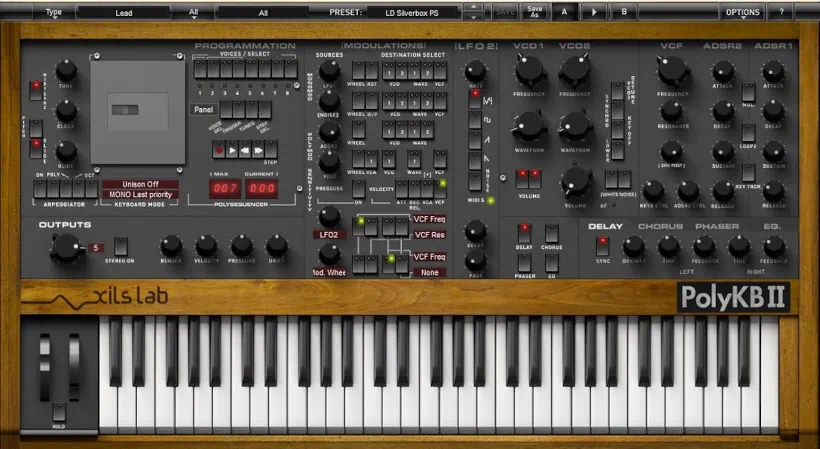
What is PolyKB II?
PolyKB II is a VA (virtual-analog) synthesizer plugin that accurately emulates the rare early-1980s French RSF PolyKobol. The PolyKobol is legendary for its distinctive, unusual sound. Throughout this in-depth Xils-Lab PolyKB II review, I’ll tell you about PolyKB’s rich, authentic analog tone. Moreover, it captures the character of the original French synthesizer while adding modern conveniences for contemporary workflows.
Here are some key characteristics:
- Morphable analog oscillators – This is the iconic feature inherited from the original RSF PolyKobol, allowing unique oscillator morphing capabilities
- Polyphonic operation – Unlike many vintage emulations, it supports multiple notes simultaneously
- Enhanced modulation section – Significantly upgraded compared to the original hardware
- Improved graphical user interface – Modernized visual design for easier workflow
- Four built-in effects – High-quality effects processing included
Introduction:
Synths aplenty – which to choose?
PolyKB, Diva, SynthMaster, Dune, Predator, Tone2 Saurus, and Z3TA+ all share one defining trait. They rule the industry as leading soft synths. Crucially, most of these powerhouses bypass simple emulation of vintage gear. Instead, they stand alone as modern classics. Furthermore, instruments like Dune and SynthMaster perfectly dominate modern dance and electronica production.
I will not boldly label any single synth as “The Best.” After all, every single one delivers exceptional quality in its own way. Naturally, most synth players cherish a personal favorite or two. For me, the PolyKB II captures a top spot in my heart. Significantly, this instrument actually emulates a classic hardware synth. Yet, it defies the standard fare by a long shot.
Do you regularly visit developer websites just to ogle a favorite plug-in or VSTi? Admit it freely because you are among friends. 😉
Long before owning PolyKB II, I constantly visited the XILS-Lab website.
I eagerly devoured the remarkable audio samples of this incredible synth. Ultimately, this instrument commands a vibe, a sound, and a character uniquely its own. It sounds deep, lush, alive, and decidedly analog. I couldn’t help myself – I succumbed to its charm and finally acquired it.
As a result, I am thrilled to share this review of the astounding PolyKB II with my friends and visitors here on Reviewer’s Revival.
Q: Who is Xils-Lab?
A: Musicians and producers worldwide highly respect and admire XILS-Lab. Since 2008, the company has consistently produced exquisite virtual instruments and innovative plug-ins.
Crucially, these products withstand the most exacting scrutiny. Rather than resting on his laurels, founder Xavier Oudin and his specialists diligently pursue excellence. Consequently, customers loyally trust and support the developer.
XILS-Lab launched its digital lineup with a bold, powerful modular analog synth aptly named “XILS 3.” Buzz quickly spread across the wires. Consequently, the entire electronica community sat up and paid attention to this French newcomer. In reality, Xavier Oudin had already worked as a highly regarded developer for over 20 years.The average synth player just didn’t know it yet. Industry synth makers, however, knew his power well.
Q: So, what makes PolyKB II special?
A: High-caliber VA developers produce exceptional vintage hardware emulations, with Arturia immediately coming to mind. Generally, digital showrooms feature fondly remembered, familiar classics. Developers most commonly emulate Moogs, Yamahas, Rolands, and Arps.
Hi, you! If you like these kinds of reviews,
be sure to subscribe.
However, XILS-Lab dug deeper into history to resurrect a rare, highly prized French masterpiece from RSF. XILS painstakingly modeled this impressive VA synth after its hardware inspiration, the RSF PolyKobol II. Refusing to merely clone the original, Mr. Oudin’s team shattered expectations. They innovatively implemented forward-thinking features to keep PolyKB II permanently future-proofed.
Accurately modeling the rare, original hardware synth presents an immense challenge. Specifically, RSF’s oscillator continuously morphs across a wide waveform spectrum. It transitions seamlessly from triangle to pulse waves. Furthermore, the system modulates this complex morphing oscillation simultaneously. Fortunately, XILS-Lab magnificently captured and recreated this unique set of attributes.
Installation and Authorization:
You can download the 23 MB installer directly from the XILS-Lab website without purchasing anything. Hold your excitement for just a moment, though. An iLok or eLicenser hardware dongle unlocks this flagship VA synth.
Personally, my iLok2 handles the authorization. XILS-Lab matches the pricing of other high-end VA synths in this class. It commands an upper-shelf price tag of 149€ or $199 USD. If you need a new eLicenser dongle, XILS-Lab sells them directly for only 12€, including shipping.
I generally dislike dongle and challenge-response copy protections. Furthermore, I never hide my strong opinion about them.

Regrettably, unscrupulous thieves with seared consciences routinely steal software. They take anything not tightly nailed down. Fortunately, eLicenser and iLok protections largely remain safe for both developers and customers. Even better, dongle protection offers immense flexibility. You can use your software on any computer, provided you install the necessary drivers (pace and/or eLicense).
Ultimately, I prefer the dongle method over challenge-response protection. After all, developers occasionally go out of business. Why risk losing your software when you upgrade your PC or replace a failing hard drive?
Furthermore, some support teams treat you like a criminal when you exhaust your authorized activations. Consequently, I praise forward-thinking companies like FXpansion, Toontrack, and XLN Audio. These developers allow you to deactivate a product and easily reactivate it on another computer.
Visuals and Operation:
PolyKB II greets your eyes with a classic, old-school charm. Instantly, this interface showcases the synth’s incredible virtual analog prowess. The finely crafted GUI exudes organic warmth.
Strikingly, this masterful synth looks just as good as it sounds. XILS-Lab eloquently drew every graphical element to look completely photorealistic. In addition, the neat, orderly layout fosters a fluid workflow.
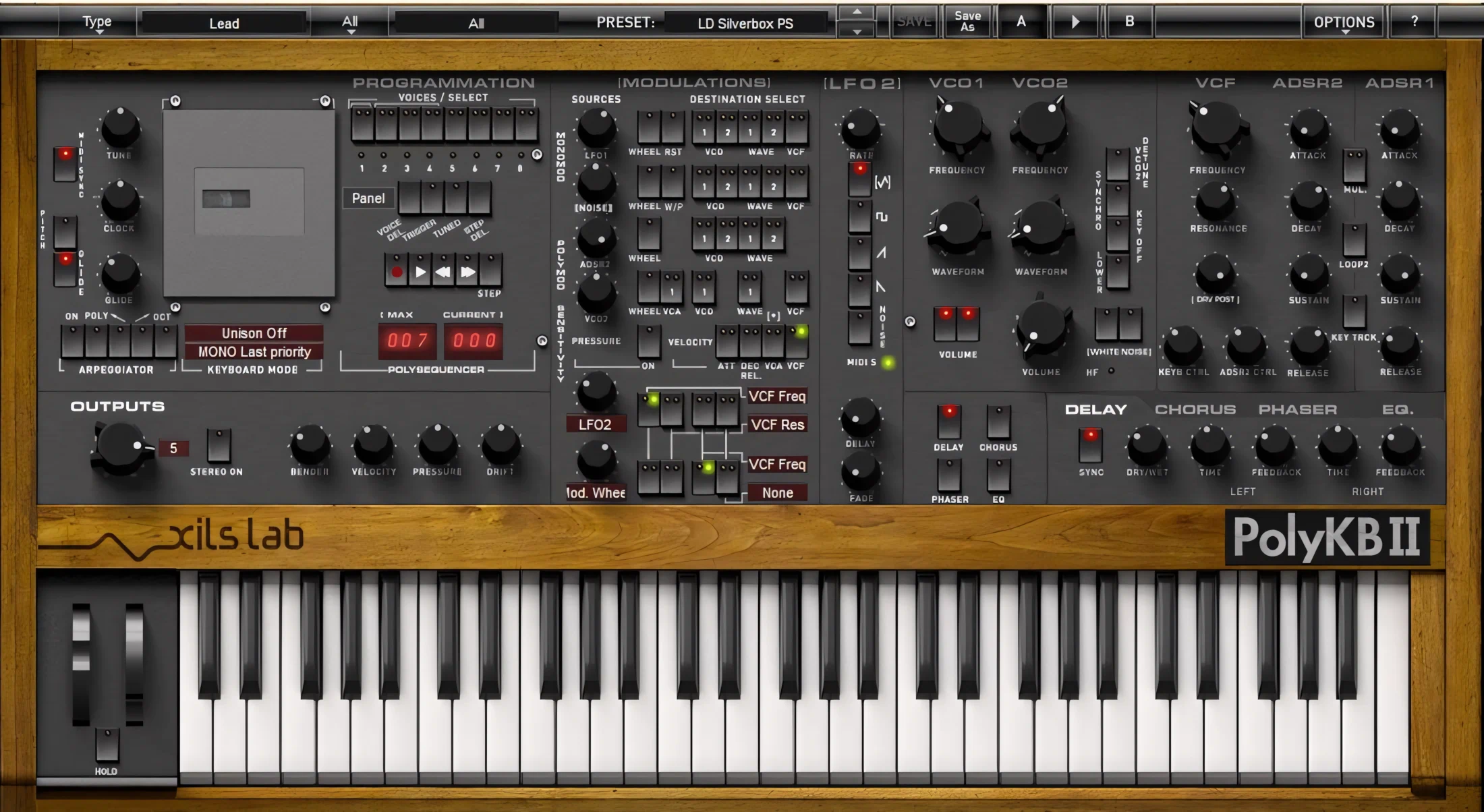
Artistic subtlety defines the design theme here. Generally, the user interface provides a highly pleasing, easy-on-the-eyes color scheme. The faux wooden strip and side panel graphics convincingly depict a polished, high-quality hardwood chassis.
Delicate 3D shadow and lighting effects grace the array of buttons, knobs, and switches. Meanwhile, the medium-gray face of the synth mimics an anodized, burnished metal appearance.
Dark charcoal colors the knobs and rocker switches. Additionally, bright, smartly sized green and red LEDs enhance the overall realism. Finally, the 49 black-and-white keys ooze quality and practically beg you to play them.
All is not perfect, however. For instance, the control labels offer OK-ish legibility, but they seriously need crisper and brighter text. Currently, the text elements are blurry and lack clarity.
Fortunately, XILS-Lab allows you to resize the GUI up to 1400 pixels wide. This flexibility significantly improves visibility. Consequently, you gain much easier navigational access across the entire interface.
I highly appreciate when a plug-in uses standard naming conventions for its control labels. At the very least, non-standard names must remain immediately identifiable and easily understood. Innovative software already challenges users enough. Why make learning harder with obscure, unique names? Fortunately, every XILS-Lab product strictly adheres to standard naming conventions.
Control and User Interaction:
The buttons respond smoothly and accurately to mouse movements. For precise adjustments, use the typical “Shift-click and drag” method. Alternatively, you can reset any knob to its default value by holding “Ctrl” while left-clicking. I also highly appreciate a fantastic bonus feature.
You can establish a new default value by holding “Ctrl” and right-clicking a knob. However, a direct value-typing feature would enhance the GUI even further.Currently, parameter labels appear during adjustments but disappear if you move the mouse beyond 30 pixels.
A slight mechanical delay when clicking switches creates a remarkably realistic hardware feel. In addition, the pitch wheel displays a very cool animation. When you release the mouse, the wheel springs back to its center detent. As a result, this clever mimicry compounds the realness of this exceptionally well-designed instrument.
Options and Functions:
Presets
The preset toolbar crowns the top of this stunning interface. It houses an extensive collection of factory presets, neatly organized into alphabetical categories. Moreover, you can effortlessly browse these sounds by Bank, Author, Project, Type, Style, or Feeling.
The system defaults to the “Type” category for your convenience. These options range from Arps, Bass, and Bells to Brass, FX, and Keys. You will also find Pads, Leads, Drums, Percussion, Plucks, and Sequences. Furthermore, the selection bundles in Strings, Winds, Synths, and Woodwinds too.
Once you select a category, the “Preset” dropdown menu instantly displays every sound in that group. You can find this menu right in the center of the top toolbar.
Simply right-click any preset to access more options. From there, select “Open Preset Information” to view a detailed dialogue box. Accordingly, this window provides the author, date, bank, and all other essential details.
Matrix Modulation – Progammation
Three complete modulation sections empower the PolyKB to produce a massive sound palette. Consequently, the “PROGRAMMATION” section leads this lineup on the far left.
The GLOBAL tuning knob transposes the pitch by up to 48 semitones (-/+), spanning two full octaves. Furthermore, careful adjustments allow you to tune by cents. However, this interface desperately needs direct numeric input via the computer keyboard.
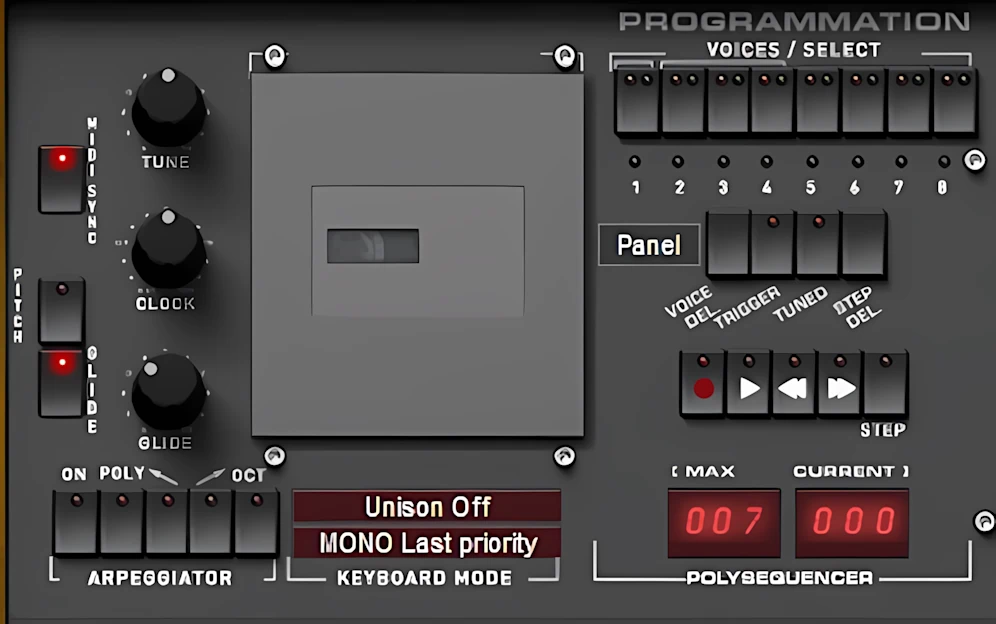
The GLIDE knob produces silky smooth transitions. These values range from a brief 1 millisecond to a whopping 5 full seconds!
The synth provides simple yet powerful arpeggiation. For instance, the polyphonic mode triggers a classic “power chord” pattern from a single note. If you disable all modes, the Arp plays in a random order.
Regarding control, you can choose between Down, Up, and Octave switches. Specifically, the Octave switch forces the arpeggio through a second octave before it restarts.
The DynaMYX Control Pad:
The Cassette panel houses creative tools for stereo-field and modulation control. Here, you will find both the “DynaMYX” stereo pad and the impressive “PolyMYX” polyphonic modulation pad. Simply select the “Panel” drop-down menu to access these interfaces.
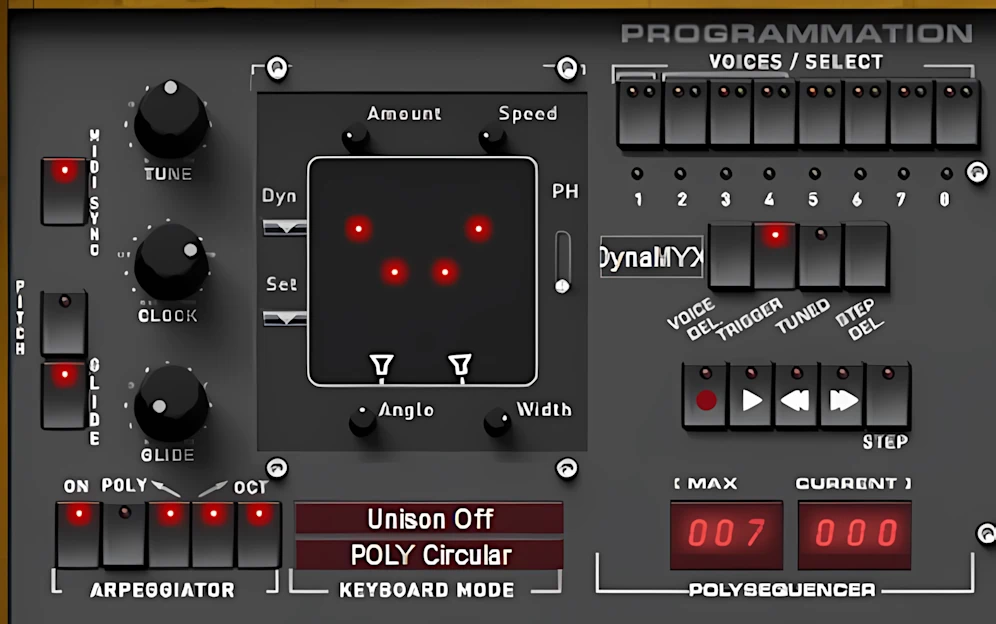
The “DynaMYX” pad lets you assign each voice a unique position on an X/Y axis. Simply drag the bright red node to place each voice anywhere on the pad.
Furthermore, you can adjust the overall stereo width by moving the pair of cardioid microphones. You can also manipulate the microphone angles. Ultimately, this highly customizable processor creates an authentic-sounding room ambience.
The Width, Set, Dyn, and Speed mini-knobs provide total control over stereo width and modulation dynamics. Consequently, you can easily spend twenty minutes exploring the massive range of voice placement effects.
The PolyMYX Control Pad:
The “PolyMYX” utilizes a similar XY pad design. You can freely drag the red nodes to change their positions. Each individual voice appears as a single node. However, unison modes multiply these points.
For example, a two-voice unison configuration displays two modulation nodes per note. You can then assign each axis element—Y1, Y2, X1, and X2—to modulate specific VCO or VCF properties.
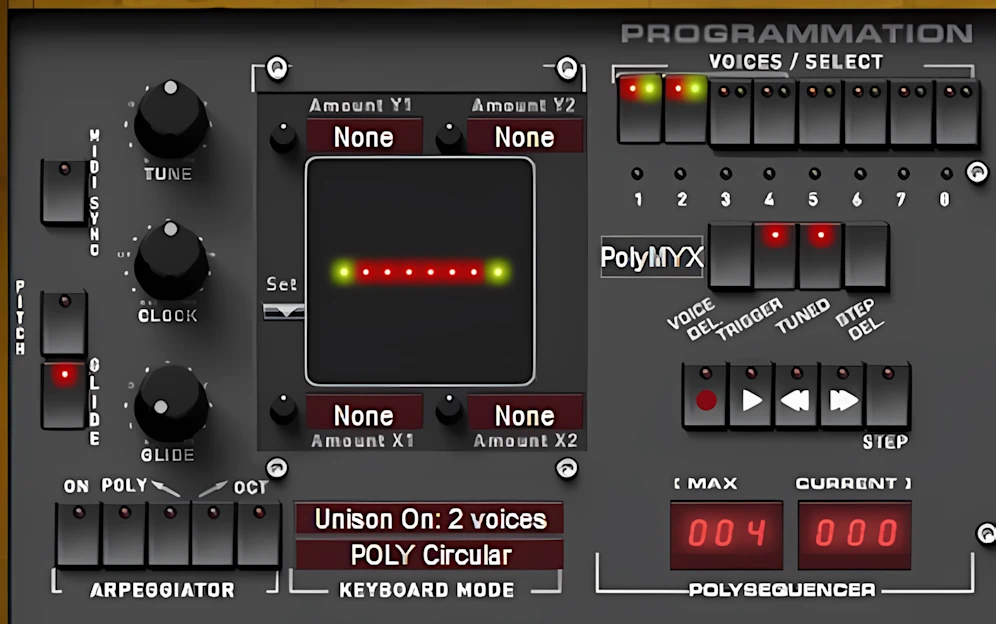
I created a simple preset to showcase this feature. Here are the settings I configured:
- Y1 = LFO1 Width
- Y2 = Filter Resonance
- X1 = Osc1 Wave
- X2 = Noise Level
The “Set” button reveals a drop-down menu of preconfigured arrangements. These options include Center, Around, Raw, Colon, Random Wide, and Random Tiny. Specifically, “Random Wide” distributes voices across the entire available space.
In contrast, “Random Tiny” clusters voices closely together. Furthermore, the built-in sequencer offers incredible creative flexibility. It features fully adjustable clock sync and stereo field placement options.
The sequencer supports up to 128 steps across eight voices. However, I recommend selecting two or three voices for the best musical results. This balance ensures high usability while minimizing CPU stress.
Modulations:
To quote the Xils-Lab PolyKB II review manual:
“This section has five fixed modulation sources: LFO1, Noise (or LFO2), ADSR2, VCO2 and Velocity, as well as different targets for these sources; these being the pitch of the Oscillators, the Filter Cut Off, or the Waveform settings. In this section the assignation use switches, like on the original PolyKB synthesizer.
This kind of Modulation Matrix is called hardwired, since the sources and destinations are predefined and can not be changed by the user. This is the original PolyKB matrix, which in the 80s, may very well have been one of the most powerful modulation matrixes ever provided in a hardware synth.”
Exploring the Modulation Matrix:
Master the Modulation Matrix, and you will find programming becomes effortless. To be honest, I spent a few hours wrapping my head around PolyKB II’s unique synthesis style. Yet, once you grasp its operations, controlling and programming the instrument proves remarkably intuitive.
Assign each modulation switch to one of three distinct positions. Choose Green for positive modulation, Red for negative modulation, or leave the light off to indicate no modulation.
Tip: “Modulating the wave parameter of the oscillators is very specific to the PolyKB. A large amount of modulation can act as a morphing between waveforms (from triangle to pulse). While a small amount of modulation is quite close to the standard pulse width modulation if you choose the Square Waveform, and will give you special results with other waveforms.”
One of PolyKB II’s most impressive functional attributes is its extensive, user-friendly control over assignable modulations. Notice the clever option switches located across the four rows of modulation knobs. These features deserve your immediate attention.
- The “RST” (Reset) switch on the LFO row forces the modulation to reset for each triggered note.
- The “Noise” switch allows the user to choose white or pink noise. Clicking on the knob’s label (directly underneath the knob itself) selects either Noise OR LFO2 as the modulation source.
- The “Wheel” switch on each row causes the modulations to respond to the mod wheel as opposed to automated modulations. This gives the player HUGE amounts of control.
- A “Pressure On” switch enables a well-behaved, polyphonic “Aftertouch” response to the modulation wheel. Very, very cool, don’t you think?
The Bottom makes the Top:
The bottom portion of the Modulation Matrix is completely customizable. It does not remain constrained to the original hardwired assignments.
This design clearly shows XILS-Lab’s programming modus operandi. They start with a very authentic emulation. Then they improve it with high-quality, innovative additional features.
You can choose from a long list of available modulation sources. You can also freely select the modulation destinations. As a result, the instrument actively encourages your creativity and inventiveness. In fact, the range and degree of possible modulation combinations are enormous. Exploring them all would take you a very long time.

Leave a Reply