
What is NetLimiter 4?
NetLimiter 4 is a network traffic control and monitoring software for Windows, developed by Netlimiter sp. z o.o. It is commonly used by power users, IT professionals, and gamers who need precise control over their network resources. I especially rely on this app for its excellent firewall system – completely independent of Windows Defender Firewall. In this definitive NetLimiter 4 review, we’ll uncover wonderful, highly useful features such as:
- Limit bandwidth: Set download/upload speed limits for specific applications or processes.
- Monitor traffic: View real-time and historical data on internet usage per application.
- Prioritize connections: Assign connection priorities to ensure critical apps get necessary bandwidth.
- Block/Firewall internet access: Prevent specific programs from accessing the internet.
- Set rules: Create automated rules based on time of day, IP addresses, or ports.
Introduction:
A Common Family Networking Scenario:
Downstairs in my study, studio, music room, man cave—call it what you like—I bench-test audio products, sample libraries, widgets, gidgets, and gadgets. I also download all those glorious sample libraries and related goodies. It is basically a playground with power outlets.
Then it comes – the dreaded (almost a) yell from upstairs or over in the living room:
“Dad/Honey, are you downloading somethin’?”
“Netflix is blinking out.”
“My game is lagging.”
“Skype and Facetime won’t work right for me . . .”
Unless you live alone, you’ve probably battled the frustrating reality of shared internet bandwidth. And let’s be honest—we love our families. We don’t want to hog the entire household’s bandwidth just to download a 20GB sample library. (Sure, maybe some of us don’t care, but we should.)
Here’s why this matters. Your spouse needs to stream a video call. Your kids want to join an online class. Meanwhile, you’re trying to pull down studio assets at a snail’s pace. Everyone loses. That’s where considerate network management comes in—it keeps the peace and keeps the internet flowing for everyone who shares your router.
On the flip side, we shouldn’t let a baggy-pants teen devour every ounce of family bandwidth with gaming marathons and endless streaming. Sure, he’s trying to save face, but his Netflix binge won’t stop because you’re on a crucial Zoom call! We need fair access for everyone before the router cries, “uncle!”
. . .Or non baggy-pants teens either, for that matter. *Grin.
Is there a solution for household network congestion?
You bet there is!
Windows users have an excellent solution: NetLimiter 4 Pro. For just $29 USD (single-user license), you can spare yourself—or even your entire household—a truckload of bandwidth headaches.
Need more than one license? No problem. The developer offers modest volume discounts. For example, three single-user licenses cost $74.85, while $99 covers four PCs.
Hi, you! If you like these kinds of reviews,
be sure to subscribe.
Once you authorize the software, your license never expires. Better yet, minor updates come free of charge. If you’re outfitting an entire organization instead of just your home, Site and Enterprise licenses are also available. Those range from $1,500 to $4,000, so they’re aimed at businesses rather than the family laptop collection.
I have tested NetLimiter 4 for a few weeks now, and the findings thoroughly impress me. Frankly, it stands out as one of the finest pieces of network software I have ever encountered.
In fact, it easily outperforms the built-in network tools found on FreeBSD, macOS, and Linux. Move over, open-source giants—there’s a new sheriff in town, and it actually has a user interface that doesn’t require a computer science degree to navigate.
Licensing and Authorization:
Installation is a breeze. After you download the small 19 MB installer, simply double-click it to start. Then, as usual, click through the necessary “I agrees” and “Nexts.” You will need to reboot your system to properly initialize NetLimiter 4’s background service.
The program stays fully functional for 30 days, so you have plenty of time to explore its features and get comfortable with how it works. And once you activate the application with your purchased license code, you remove all demo limitations and unlock the full experience.
Functionality:
NetLimiter 4 monitors, manages, limits, and blocks network connectivity across your entire system—or targets individual programs. That Control UI might intimidate you at first glance if you’re not a tech enthusiast. But here’s the plot twist: the software is genuinely easy to use once you dive in.
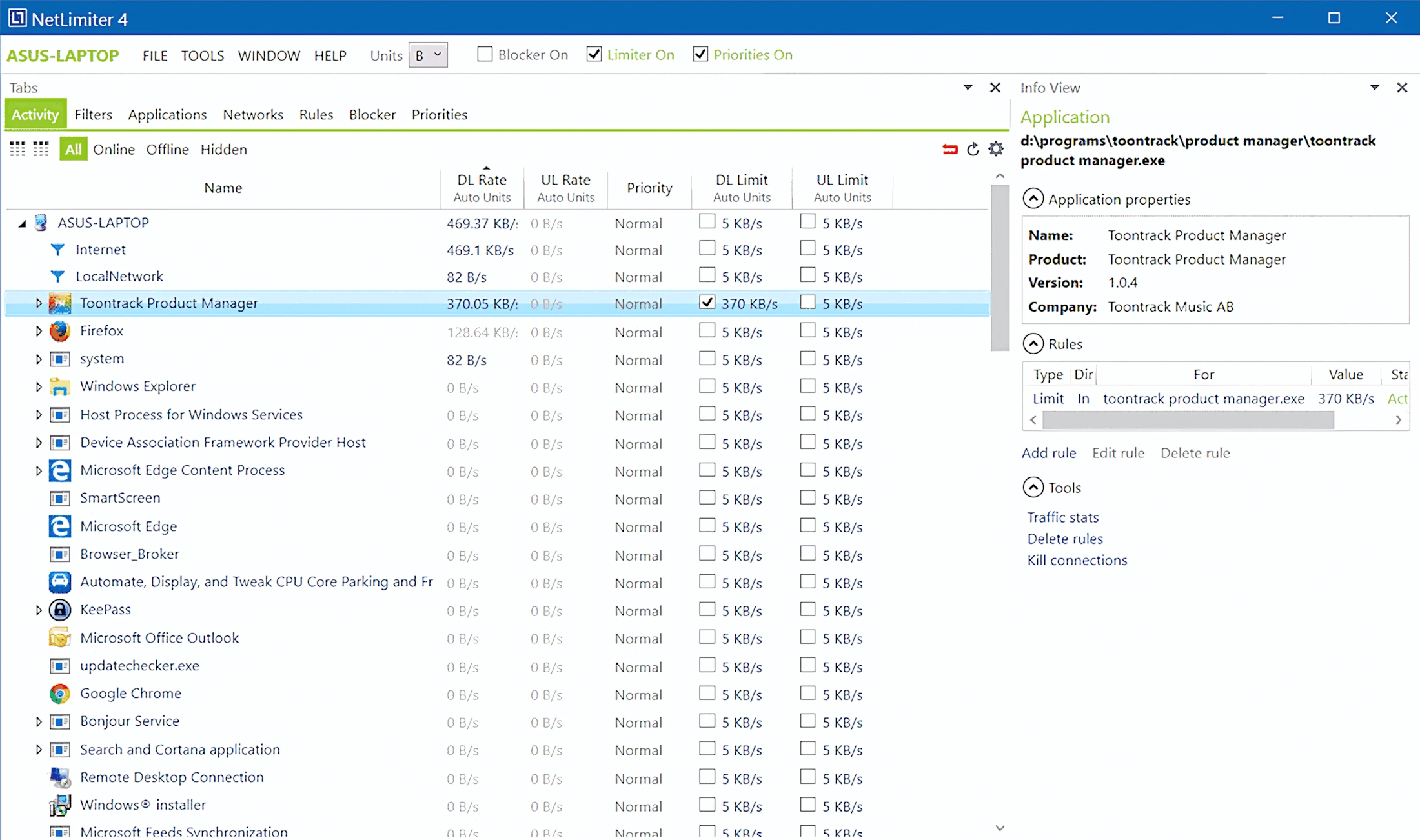
The main application pane’s default “Activity” tab showcases every running process with an active (or capable) network connection. You can drill down through neat, cascaded bullet points to reveal connection rates, process IDs, and destination IP addresses. Meanwhile, the “Info View” panel on the right unpacks those details just enough to satisfy your curiosity—without giving your brain too much homework!
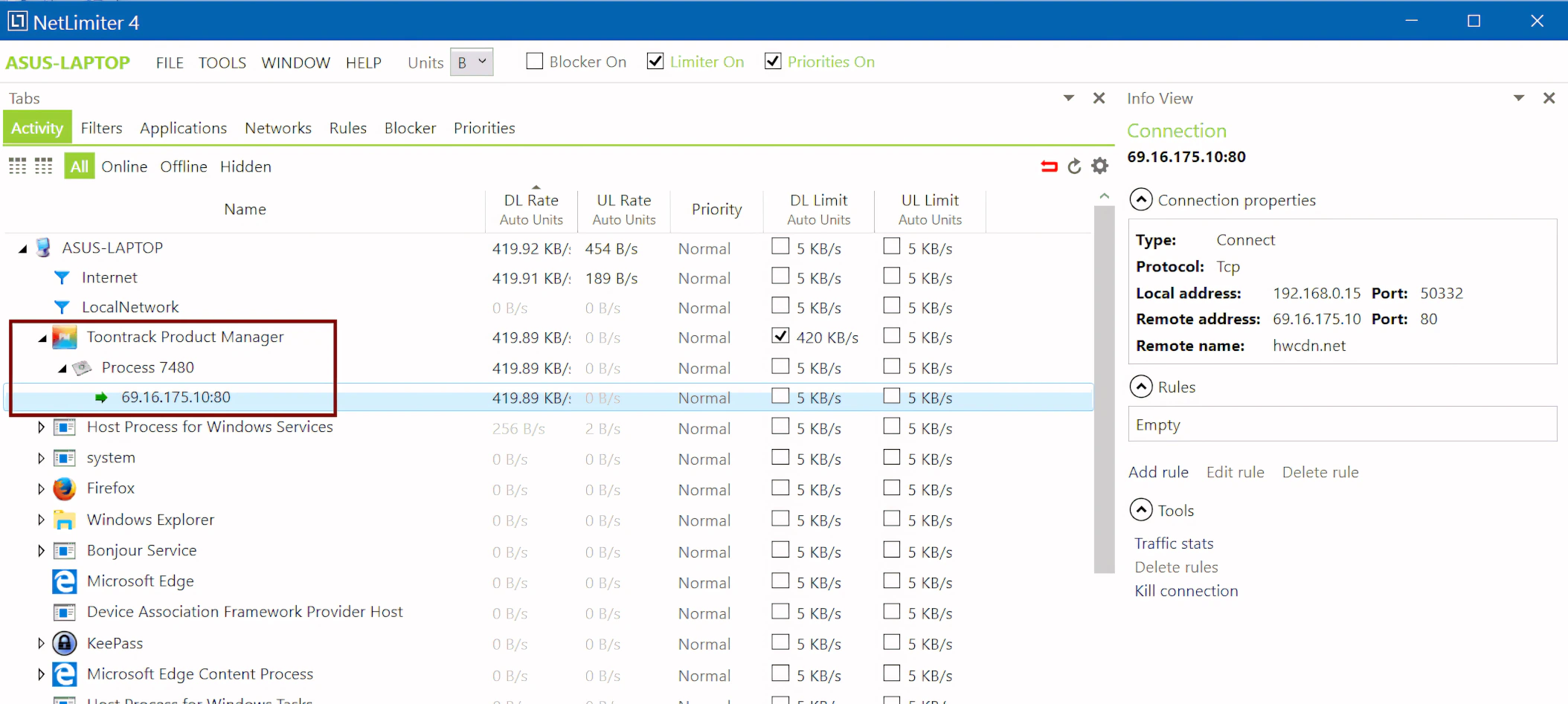
Six additional tabs sit conveniently on the main application panel: Filters, Applications, Networks, Rules, Blocker, and Priorities. Each one provides instant access to the application rules, LAN/Wi-Fi connections, connection priorities, and other settings you’ve configured.
Most home users will likely spend the majority of their time in the default Activity tab. It covers everyday monitoring and bandwidth adjustments with ease. However, if you’re a budding IT expert—or the office’s unofficial “fixer of all things”—and run NetLimiter 4 in client-server mode, you’ll quickly appreciate what the additional tabs bring to the table.
Want more than Windows’ built-in Firewall? NetLimiter 4 for the Win!
NetLimiter 4 does far more than just monitor connections and manage bandwidth. In fact, it hosts a handy firewall apparatus too. The best part is, it doesn’t rely on Windows Defender’s firewall any way, shape of form.
Granted, this “Blocker” won’t replace a specialized (read: expensive) network sentry such as Symantec End Point Security. However, it remains incredibly reliable and convenient. Like the other application functions, the blocker handles both incoming and outgoing traffic over all supported protocols.
Best of all, you might prefer to stop a program from making network connections entirely rather than just throttling its bandwidth. This tool gives you a wonderfully simple way to cut the cord.
I absolutely love that you can configure NetLimiter’s blocker to “ask first” before allowing any process or application to make outbound connections (or inbound if you prefer). Furthermore, if an ‘allowed‘ application (or process) is updated, you will be prompted again before said application is granted network access.
MAC users have been blessed with a powerful firewall application called, “Little Snitch” for quite a few years. Thankfully, Windows users now have a similarly robust and easy-to-use utility: NetLimiter.
Get your priorities straight, Junior!
You can also round out the feature set by prioritizing any program. You simply adjust the values to give an application higher networking preference or reduce its connectivity importance. In plain English: you decide who gets the fast lane and who sits in traffic.
Visuals:
NetLimiter 4 impresses you immediately with its clean, clear interface. The developers wisely avoided cluttering the design. On my Core i7 7700HQ laptop, the NetLimiter service runs snappily. Even better, the client responds without a hint of lag or sluggishness—no frustrating delays to slow your workflow.
The layout gives you breathing room too. Plenty of space separates each element, which makes navigation feel effortless. The designers clearly prioritized real-time, text-based monitoring (and honestly, they nailed it). This focus keeps you constantly aware of what’s happening on your network.
One small caveat: the help documentation lives online only. You won’t find a downloadable PDF link, which means you’ll need an internet connection when you need answers.
At the top of the GUI, you’ll spot a handy dropdown menu right next to the standard file options, letting you switch bandwidth units between bytes, kilobytes, megabytes, and more. Right beside that sit three convenient checkboxes to instantly activate or deactivate “the Blocker,” “the Limiter,” and “the Priorities.” It’s so straightforward that even your grandma could manage her network traffic without calling tech support!
You can configure how the GUI behaves when users minimize or close it. For example, it can either hide or minimize to the system tray instead of closing completely. Additionally, the Tools menu lets you configure startup behavior, enable automatic update checks, and adjust other application settings. In short, if you’re looking for a setting, the Tools menu is a good place to start.
Performance and Usage:
I have thoroughly enjoyed bench-testing this fine little software gem. Throughout my evaluation, I experienced zero usage hiccups, performance issues, or system-memory leaks. The software functions flawlessly.
Furthermore, NetLimiter 4 offers a powerful bonus feature. It can operate in a clever, quasi client-server role. Bright Idea!
To set this up, you simply designate one PC as the main controller. This setup works perfectly for a parent at home or an IT manager at work. Next, you install the application on the remaining family or office machines. The pseudo-server machine can then instantly govern bandwidth, block ports, and prioritize traffic across all connected nodes.
All types of connectivity protocols are supported such as: IP (FTP, Http, etc), UDP, TCP, ICMP, and others.
CPU and Memory Consumption:
CPU consumption stays negligible. Even when I actively limit, prioritize, or block a few programs, the Windows performance meter barely shows a blip. My system almost looks bored.
In terms of memory, the NetLimiter service runs as a TSR process and uses a modest 15 MB of RAM on my machine. The client, on the other hand, can consume up to 60 MB of system memory. Because of that, I usually exit the GUI completely, unless I need to monitor something or set up a new limiting rule.
Licensing and Copy Protection:
You receive a personalized, non-expiring license code. You can freely transfer the license from one machine to another. However, each single license may only run on one machine at a time.
5 out of 5 Stars


:: Pros
- Can be used on a local machine or set up in pseudo client-server mode.
- Convenient, POWERFUL built-in firewall blocking.
- Attractive, easy-to-use GUI.
- Highly configurable.
- Works as expected, NO finicky surprises.
- Affordable – Less expensive than other similar networking applications.
::Cons
- It would be nice if the client (GUI) were lighter on system memory. However, this isn’t really a concern for systems with 16GB of RAM or greater.
Visit the NetLimiter website. www.NetLimiter.com
Intellectual Copyright – 2017 – All rights Reserved. This review may not be copied or reproduced in whole, nor in part, without express written permission from the author.

Leave a Reply