
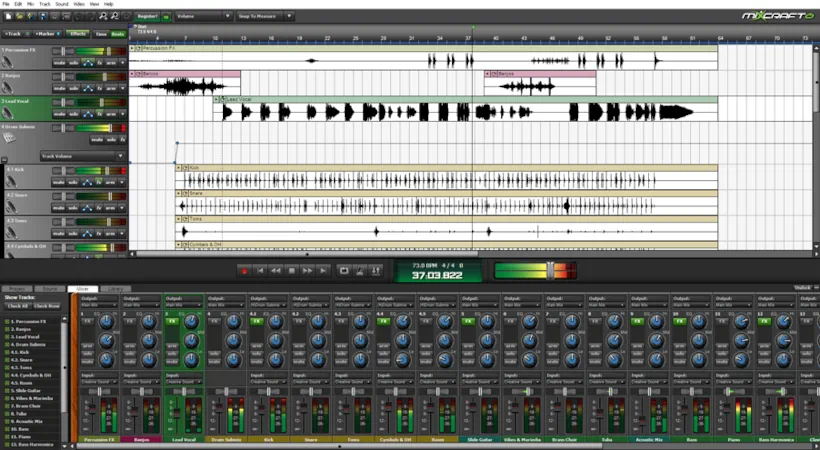
What is Mixcraft Pro Studio 6?
Mixcraft Pro Studio 6 is a full-featured Windows digital audio workstation (DAW). It was designed as an all-in-one music production and audio/video editing environment, particularly popular among home studio users and podcasters. This DAW is to be praised for its user-friendly interface, solid feature set, and competitive pricing compared to major DAWs like Pro Tools or Logic Pro. In this detailed Mixcraft Pro Studio 6 review, we’ll take a close look at many of its standout features such as:
- Unlimited audio and MIDI tracks
- 41 built-in effects processors
- 14 virtual instruments and drum kits
- 6,000+ loops, samples, and presets
- Multiple “lanes” per channel for layered editing, enhanced MIDI/piano-roll tools
- Clip automation for volume, pan, filters (low-pass/high-pass with resonance)
- Punch-in/out, loop-based recording
- Basic Nonlinear video editing capabilities
Introduction:
Since 1997, Acoustica has relentlessly climbed the mountain of audio innovation, turning every challenge into a triumph. Fortunately, this persistent ascent has never been in vain; with each successive release, they have propelled their flagship DAW to unprecedented heights of quality.
Acoustica consistently refines their software through rigorous maintenance releases and targeted bug fixes, ensuring peak performance. Although Mixcraft faced skepticism from seasoned home producers prior to version 4, the landscape has shifted dramatically. While competitors like Cubase and Sonar once dominated the scene with steep price tags, Acoustica wants to prove that Mixcraft stands as a formidable, professional-grade alternative.
That all changed with the fifth iteration of Mixcraft, when Acoustica finally implemented a host of cool, much‑requested features, including automation and send tracks.
Acoustica’s motto is Mixcraft’s GREATEST feature: “Software Should Be Easy To Use!”
Now in its sixth generation, Acoustica has upped the ante considerably. They’ve added the ability to create multiple “lanes” on any single channel, improved VST crash isolation, multi-out VST support, enhanced MIDI/piano roll editing, multiple bus outputs, and full ReWire integration.
The standard version is an incredibly affordable option accessible to anyone from teenage producers to hobbyist retirees. Don’t be fooled, though—Mixcraft delivers a tremendous amount of professional bang for the buck! Subsequently, It is far, far more than a beginner’s novelty app.
Value VS Cost:
The standard edition of the 32-bit powerhouse hailing from sunny California commands a mere $75. However, if you want to elevate your workflow, investing just $149 (USD) unlocks the incredibly lush Acoustica Pro Reverb, IZotope Mastering Essentials suite, a vast library of premium virtual instruments, and a robust arsenal of effects from industry leaders like ToneBoosters and G-Sonique.
Furthermore, Acoustica offers the most generous and equitable upgrade policy in the industry. You can leap from Mixcraft 5 Standard to Mixcraft 6 Standard for only $20, or upgrade from 5 Pro to Pro Studio 6 for just $60. These prices represent exceptional value for professional-grade tools.
Lots of Goodies:
In its current build, Mixcraft Pro Studio 6 delivers outstanding performance, packing a substantial toolset and a comprehensive array of features. It’s positioned as one of the most viable DAW options in its price range. It stands out as fast, stable, visually appealing, and undeniably capable. Moreover, it operates efficiently with minimal system resources while driving a refined audio engine.
Crucially, Mixcraft expertly leverages Windows’ WaveRT audio bus, enabling compatibility with virtually any soundcard or onboard audio chipset. Consequently, Mixcraft distinguishes itself as one of the few professional-grade audio solutions that seamlessly integrates into almost any Windows environment. It frees users from the strict dependency on expensive outboard audio hardware.
Mixcraft happily dispenses an unlimited number of MIDI and audio tracks, submix channels, and send/aux tracks. It also supports unlimited DirectX and VST 2.x plug-ins. In addition, you can stack as many plug-in effects on each track as you like. Version 6 of this powerhouse ups the ante with a robust collection of virtual instruments, including organs, pianos, electric keyboards, drums, basses, and synthesizers.
Hi, you! If you like these kinds of reviews,
be sure to subscribe.
Of particular interest, Mixcraft Pro Studio 6 bundles “Pianissimo,” Acoustica’s high-quality virtual Steinway Model D grand piano, along with all three of MemoryMoon’s great‑sounding VA synths. And for Rhodes and Wurlitzer lovers, Applied Acoustics Systems’ “Lounge Lizard Session” is also part of the package.
Bundled Plugins:
There are plenty of solid, studio-ready effects in the bundle to keep any fledgling or budget-conscious home-recording setup humming along smoothly. Of particular note, Acoustica’s own Pro Studio Reverb and Pro 31‑Band EQ are genuine standouts.
A generous assortment of plug-ins from G‑Sonique significantly boosts the overall value of the effects collection, while select ToneBoosters tools, such as TB Gate and TB ParametricEQ, add even more professional polish. To top it all off, the incredibly straightforward iZotope Mastering Essentials mini-suite rounds out the package beautifully.
Loop Me In:
Adding to the full complement of virtual instruments and effects, Acoustica has bundled over 6,000 good-quality loops. These are all intelligently categorized and tagged by musical style, instrument, key, tempo, and more.
You can instantly reorganize the list simply by choosing one of the sorting options from the dropdown menu. The loops cover a huge range of contemporary genres, from Hip-hop, Latin, Funk, Rock, Jazz, Blues, Heavy Metal, and a wide variety of Electronica styles.
ACME Bar Gig Shred Amp Sim:
Mixcraft also delivers some decent guitar amp simulation thanks to AcmeBarGig’s classic amp suite, “Shred.” In fact, the first couple of tracks I recorded for my upcoming debut Gospel album prominently feature Shred’s superb “Quarter” amp. I paired the head with Shred’s rich vintage Tremelo effect and a virtual 4×10 cabinet. Together, those components produced a wonderfully warm, expressive guitar tone that sat beautifully in the mix.
Years ago, users could freely download Shred directly from the AcmeBarGig website, but tracking it down today has become increasingly difficult. Fortunately, the great folks at Acoustica, along with Ken McLaren of AcmeBarGig, ensured that this fantastic amp suite continues to live on inside Mixcraft. For guitarists, this alone adds tremendous value to the package. I published an in-depth review of Shred’s successor, HeadCase – be sure to check it out.
Licensing and Authorization:
The full 14-day trial version of Mixcraft 6 (Standard) is a modest 139 MB download, and it runs without any feature restrictions during the evaluation period. Once the 14 days are up, saving or “mixing down” project files is disabled until you unlock the software with a purchased license code.
The Pro Studio 6 edition is available exclusively via a secure, private download link. Acoustica emails the personalized link to you after purchase. Understandably, it carries a larger footprint than the Standard version at roughly 260 MB.
Installation is fast, simple, and refreshingly hassle-free. The installer prompts you for the program directory and library paths so you can keep things organized exactly where you want them. To complete the process, you just enter a valid email address and your serial number. Absolutely no clunky call-and-response authorization or dongles required. It’s a streamlined, user-friendly experience from start to finish. 5 STARS!
Updating both the core program and the extensive loops library is effortless: simply click “Check for updates” in the help menu. Should an update be available, the application immediately prompts you to download the 20MB+ file. Furthermore, the automated process intelligently manages the installation, prompting you to close the main application only when necessary.
Attractive and Easy to Use:
Mixcraft doesn’t just look good—it looks really good. I’ve showcased this DAW to several Mac-centric colleagues who rely exclusively on Logic or ProTools, and they were immediately captivated by its attractive, eye-appealing charm.
Similarly, enthusiasts of Cubase and FL Studio find themselves equally impressed. Most notably, the Mixcraft mixer stands out as a masterful blend of vibrant color, genuine charm, and professional class. As a result, it sets a new visual standard for digital audio workstations.
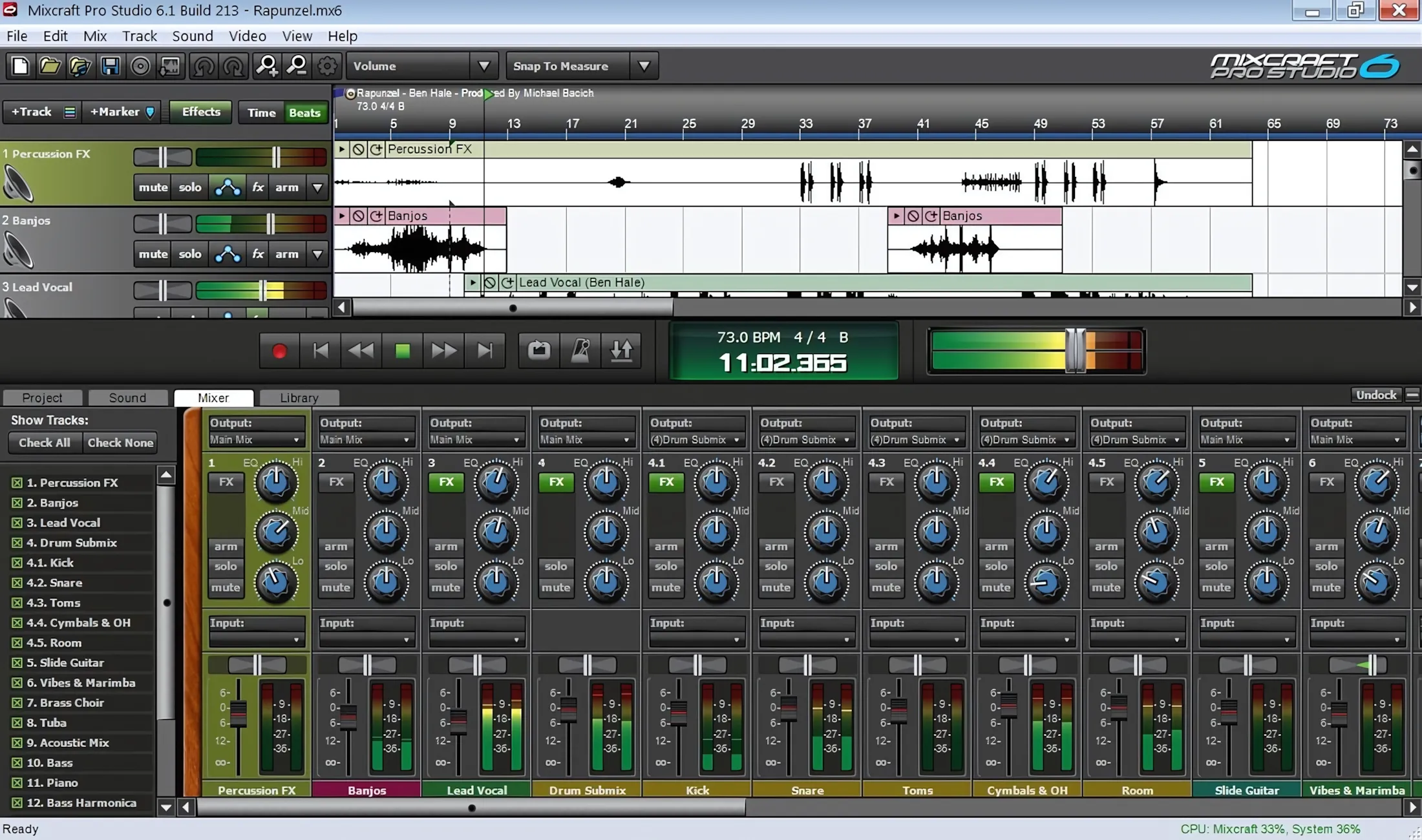
It isn’t merely the vast arsenal of features, plug-in effects, and virtual instruments that renders Mixcraft so desirable. Rather, it stands as arguably the most intuitive and user-friendly DAW available, regardless of price point.
The comprehensive, well-crafted help system guides users effortlessly through every function. Furthermore, Acoustica reinforces this accessibility with a robust library of tutorial videos and guides, all readily accessible on their “acoustica222” YouTube channel.
Q: Why do I recommend MixCraft to non-professionals?
A: When a newcomer is evaluating which platform deserves their primary focus, I encourage them to weigh cost, feature depth, system efficiency, and usability. Although there are a few other DAWs that hold massive reputations for valid reasons, and sit within a comparable price bracket, I often end up recommending Mixcraft. In summary, its excellent balance of power and ease-of-use make it a great starter DAW, but with lots of room to grow.
Over the past couple of months, I have produced truly professional-sounding recordings with Mixcraft, so you can too! As your skills, experience, and budget grow, you can gradually add higher‑end effects and virtual instruments to your setup if you want/need to.
Visuals: Mixcraft in Use:
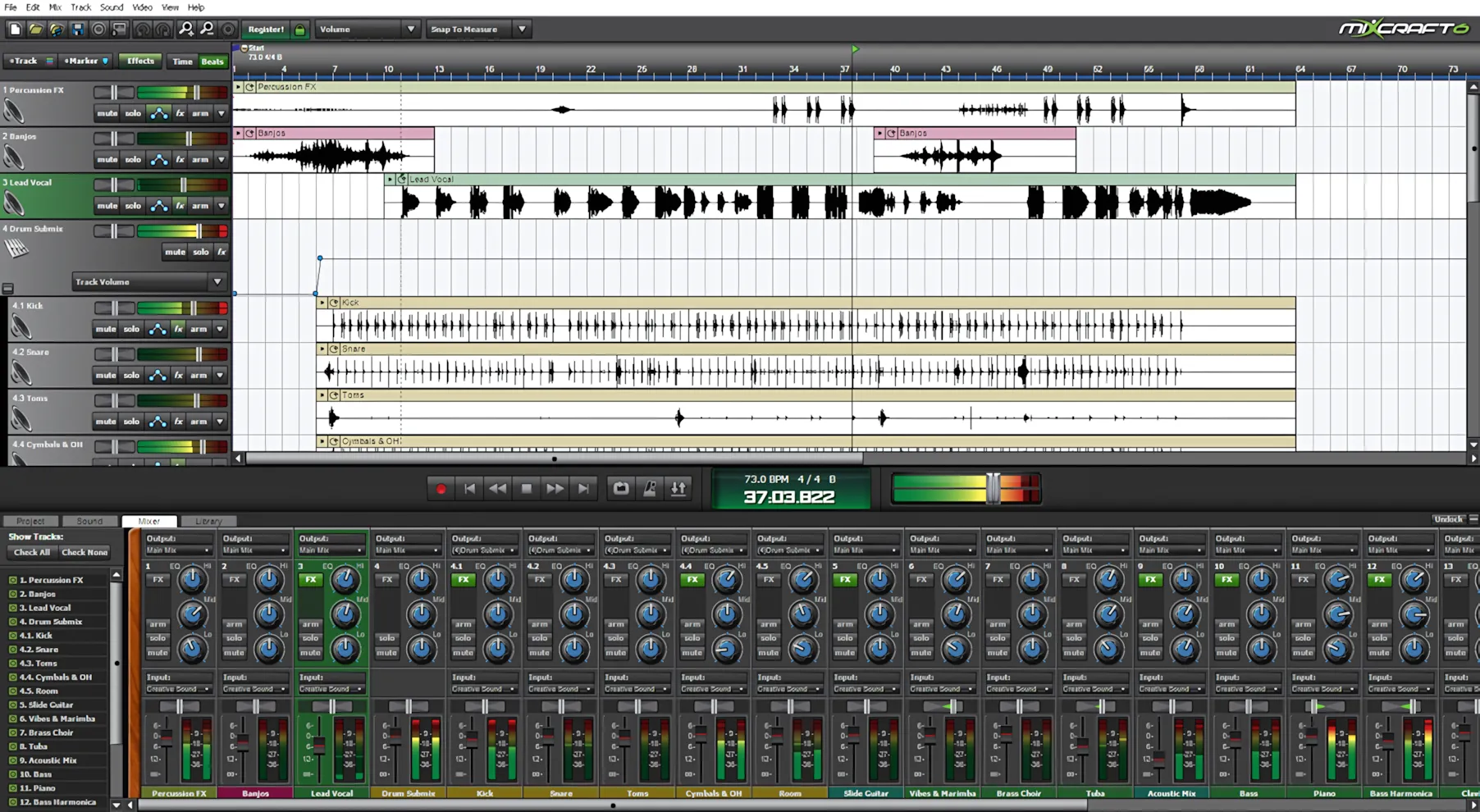
The buttons and sliders deliver exceptionally smooth, highly responsive performance. Every control and graphic element supports direct manual entry, easily accessed via a right-click. Moreover, a simple double-click on any slider or knob in the track or mixer view instantly resets it to its default “zero” position.
For precise work, you can customize the interface to display parameter values in either percentage or decibel formats. As a result, you are ensured of a workflow that adapts perfectly to your specific needs.
Track View:
In track view, the versatile “snap” feature proves indispensable, allowing you to calibrate alignment precision from entire measures down to intricate 64th-note increments. Furthermore, you can fine-tune the sensitivity of audio and MIDI segments to mouse movements, effectively eliminating accidental timeline misalignments. This level of control ensures that your edits remain perfectly precise, streamlining your workflow and safeguarding the integrity of your arrangement.
Zoom Zoom:
Mouse wheel scrolling and the “-/+” keyboard shortcuts let you zoom the timeline quickly and effortlessly. Meanwhile, the playback indicator glides across the screen with impressive smoothness.
Even on my aging six-year-old dual-core AMD review system, the graphics remained fluid, polished, and responsive. Better yet, the software includes a frame-rate limiter to reduce strain on lower-powered machines.
Virtual Keyboard:
Acoustica includes a convenient “Virtual Keyboard” to help you quickly record simple musical parts using your computer keyboard. Map the top two rows of your PC keys directly to piano white and black keys. Adjust the octave range, note scale, and velocity instantly. Lastly, press the Shift key to activate the sustain pedal, while numeric keys “1” and “2” deliver precise pitch bend control.
Access all user-adjustable preferences instantly in one centralized hub, neatly organized by category. You will never waste time navigating convoluted menu labyrinths like a ghost in an abandoned house again.
Unlimited Tracks and Lanes:
Unlike most DAWs in this price range, Mixcraft imposes no limits on audio or MIDI tracks. Version 6 now lets you group channels into submix tracks for drums or backing vocals. Furthermore, adding multiple lanes to a single track is incredibly simple. This feature works for both audio and MIDI.
If you use multi-channel players like Kontakt or VB3, assign each lane to a unique MIDI channel. Tie every lane to a specific instrument element or a distinct instrument within your sample player.
Here is an example using VB3 – a virtual Hammond Organ:
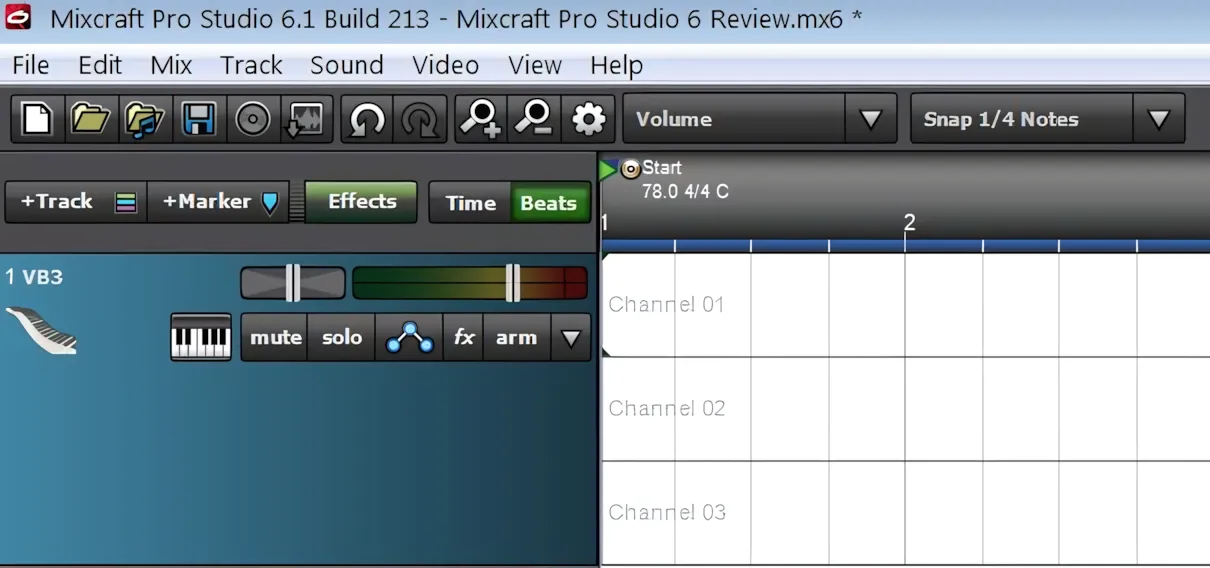
You can configure GSI’s phenomenal VB3 emulation so that bass pedals, lower drawbars, and upper drawbars operate on MIDI channels 3, 2, and 1 respectively. After that, you’ve eliminated the need for three separate tracks, allowing the DAW to conserve valuable RAM.
Track Automation & Built-in Tuner:
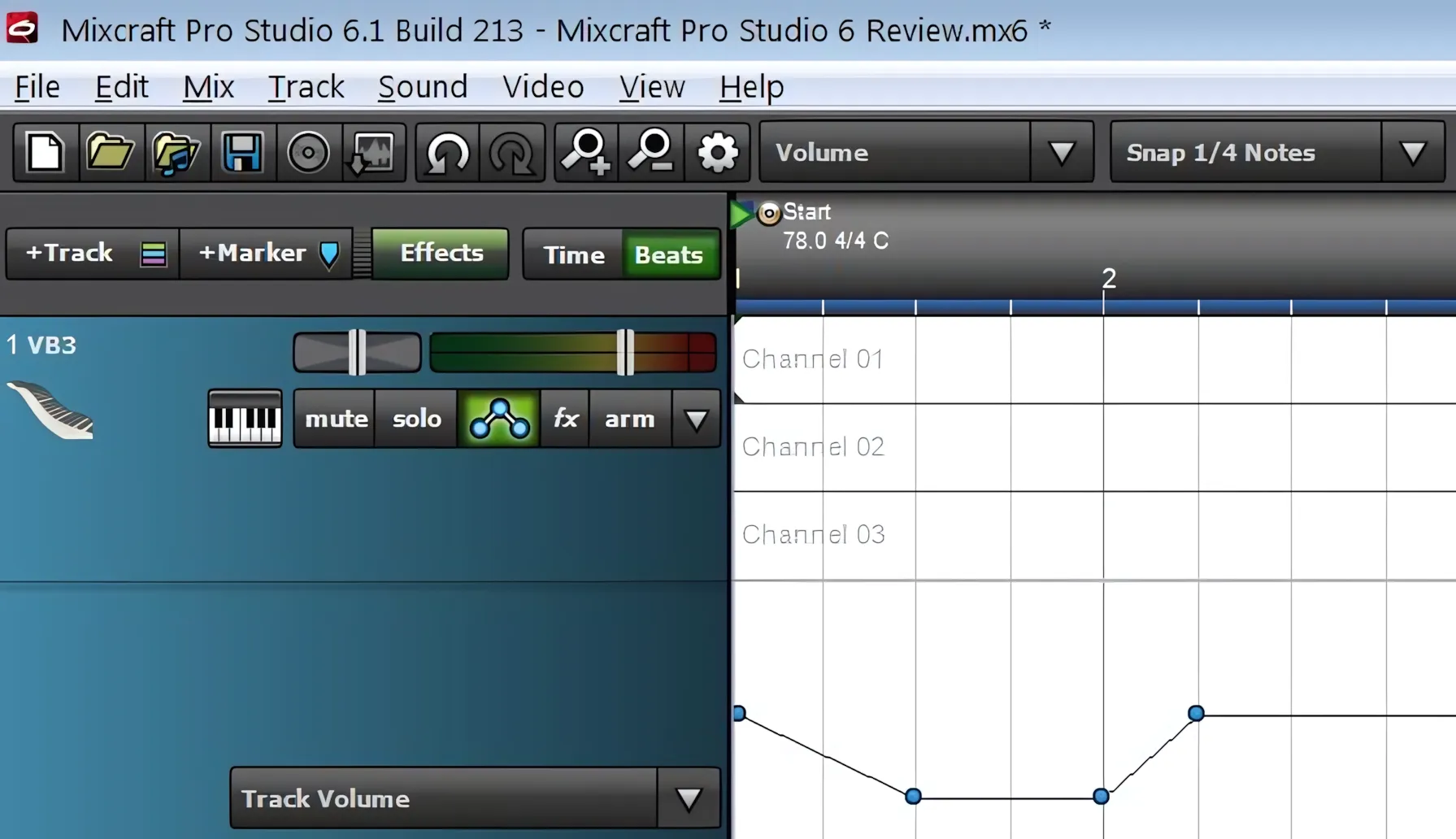
Click the automation button to instantly expand the track’s automation lane. Here, you control track volume, panning, and any automatable plug-in parameter. You can add as many automation moves as you want. Finally, even though each track has a single automation lane, you can quickly switch between parameters using the drop-down box.
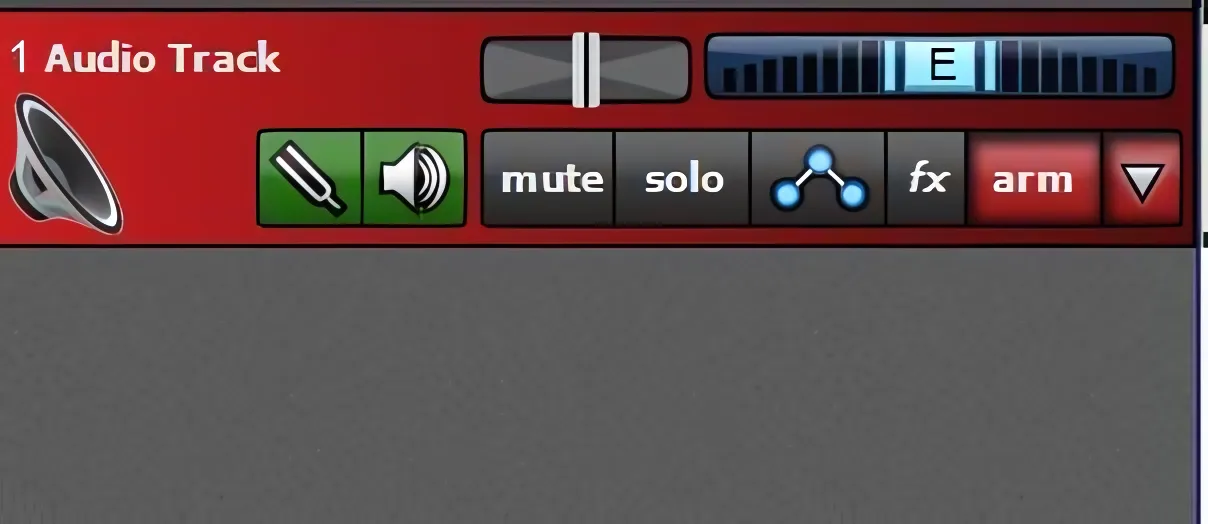
Acoustica includes a brilliantly convenient in-line tuner that you can instantly enable on any audio track. While it is not as surgically precise as dedicated tuners like Guitar Rig Pro or Amplitube, it is incredibly fast and easy to use. For quick, basic tuning between takes, it becomes an absolute lifesaver and a genuinely impressive feature from Acoustica.
Extra Cool Preset Management:
Save your perfect effect chains instantly for future tracks with Mixcraft! Once you tweak your plugin chain to perfection, name it uniquely and recall it later with all settings intact. You can even apply these saved chains to completely different projects months down the road. This incredible flexibility makes your workflow faster and more efficient.
Midi Editing:
When Acoustica released Mixcraft 4, the company introduced a solid MIDI roll editor. However, Mixcraft 6 raises the bar with a far more powerful piano roll and MIDI editing environment packed with useful features. You can quickly move, cut, paste, lengthen, shorten, quantize, humanize, and offset MIDI notes with minimal effort.
One feature I use constantly is “Select by Velocity.” It allows me to target notes within a specific velocity range by setting minimum and maximum values. From there, I can adjust the selected MIDI data either by percentage or by assigning an entirely new static velocity value.
Sound Quality:
Overall, the effects and virtual instruments sound impressively good and are highly usable. This is not a $500 professional producer’s DAW loaded with elite, studio-grade plug-ins like Pro Tools. However, it delivers a best-in-class, affordable solution packed with many professional-style features at a very accessible price. The bundled virtual instruments offer strong, very pleasing sound quality.
Mixcraft works extremely well with other tools. I regularly run Kontakt libraries, Toontrack’s EZdrummer line, and several high-end, studio-grade plug-ins inside Mixcraft without a hitch. At the same time, I still rely on the bundled plug-ins because they work smoothly, sound strong, and deliver polished results quickly.
For example: If you need a solid fretless bass sound and do not want to invest in another big, expensive library, you can simply use Mixcraft’s built-in fretless bass set and get the job done confidently.
Acoustica’s plugin collection isn’t premium, but it delivers surprisingly effective, straightforward results. While you won’t find flashy graphics, you gain simple, powerful basic effects. The respected Kjaerhus effects stand out among them. Honestly, despite owning expensive delays, I consistently choose Kjaerhus Classic Delay first. It sounds fantastic, dials in instantly, and runs light and fast.
I often stick with Mixcraft because I believe you shouldn’t over-complicate your workflow. After all, the goal is producing great music, not drowning in productivity-killing complexity.
Sound Quality vs Cost . .
If you are on a budget, just getting started, or simply refuse to give in to expensive Gear Acquisition Syndrome, Mixcraft’s bundled effects and instruments will absolutely serve you well. More importantly, you should trust your ears, not the price tag or the hype.
Many home-recording enthusiasts love chasing the latest “best ever” compressor, EQ, or reverb plug-in, yet very few can genuinely afford that constant upgrade cycle.
On the other hand, I strongly encourage anyone to put Acoustica’s “Pro Reverb” through a serious test drive. In my experience, it holds its own remarkably well against far more expensive competitors. No, I wouldn’t place it head-to-head with the Lexicon PCM Native Reverb Bundle or Relab LX480, but the price difference speaks volumes.
For just $149, Mixcraft delivers an excellent DAW, a massive collection of virtual instruments and effects, and an impressively rich reverb plug-in. Altogether, the package offers exceptional value and makes the decision remarkably easy.
Even More HQ Audio Extras . .
Pitch Shift:
Mixcraft lets you quickly adjust the pitch of any audio track. Simply select the audio, click the Sound tab, and set the pitch. You can raise or lower it by semitones, up to a full octave in either direction.
You can also make fine-tuned changes in precise 10-cent steps. If you push the pitch too far, you will hear robotic, synthetic artifacts, especially on vocals or complex polyphonic parts. Even so, this tool is wonderfully handy when you need to nudge a backing track into tune.
Apply pitch adjustments to raw, untreated audio before adding delays or reverb for best results. While Acoustica’s pitch feature is handy, it cannot match specialized tools like ZPlane’s “Elastique Pitch” or Celemony’s “Melodyne Editor 2.” However, keep in mind that this DAW comes bundled with extensive goodies for $250 less than Melodyne Editor alone. In conclusion, that price difference makes it a compelling choice for many fledgling producers.
Flex Audio:
Acoustica’s FlexAudio gives you far more power than simple pitch shifting. With FlexAudio, you adjust an audio track’s timing anywhere from 25 percent to 400 percent. This built-in tool becomes indispensable when a voice-over must fit an exact time slot, such as fitting 37 seconds worth of audio into a 30-second radio ad.
CPU Consumption:
Mixcraft Pro Studio 6 stands as the lightest DAW I have ever used. Its base requirements are remarkably low, needing only a 1.5GHz CPU and 2GB of memory. Nevertheless, I strongly recommend doubling these specs to ensure smooth, real-world performance.
Mixcraft conveniently displays real-time CPU consumption in the lower-right corner of the status bar, making system monitoring quick and effortless. Better yet, the software manages memory efficiently and shows no signs of troublesome memory leaks during extended sessions. Simply put, Mixcraft delivers a stable, polished, and highly dependable production experience. Five big, bright stars for Mixcraft!
Concluding Remarks:
I proudly support Acoustica as a long-time customer because they build their products with real care and craftsmanship. They consistently maintain and update their software whenever users report bugs or quirks. Moreover, their online forum features friendly, attentive support staff who genuinely help you solve problems.
I have been in touch with Greg Birkel, head of customer care at Acoustica, and he confirmed that their development team is hard at work on a 64-bit version of Mixcraft. It will most likely arrive with Mixcraft 7, sometime in 2014. Meanwhile, if you are like me and still rely on a healthy collection of 32-bit plug-ins, Mixcraft Pro Studio 6 remains an absolute gold mine.
Mixcraft’s greatest strength is clearly its affordability, but that never translates to feeling “cheap.” Dollar for dollar and feature for feature, Mixcraft Pro Studio 6 stands out as the one to watch. It earns a solid 4 out of 5 stars and a confident two thumbs up.
4 out of 5 Stars


:: Pros
- BEST-in-CLASS plug-in performance.
- Gentle learning curve and Easy-to-Use!
- Unlimited number of tracks (audio and midi).
- No limits on how many VST effects can be loaded per track.
- Affordable.
- Good quality bundle of effects and virtual instruments.
- Unique preset management.
- Natively render output as MP3, OGG, WAV and WMA.
- Load video and work directly with AVI and WMV audio tracks.
- Large loop library.
- Attractive user interface.
- Highly intuitive workflow design.
- Smooth, precise knobs and sliders.
- Well-written user’s manual.
- Friendly, proactive product support.
- Regularly updated and maintained.
- No dongles, call/response challenges, nor invasive piracy protection overhead.
::Cons
- Only available as a 32 bit, Windows only DAW.
- No Side-chaining.
Visit the Acoustica website. Acoustica.com
Here is a series of five videos I made about Mixcraft Pro Studio 6:
Intellectual Copyright – 2013 – All rights Reserved. This review may not be copied or reproduced in whole, nor in part, without express written permission from the author.

Leave a Reply