
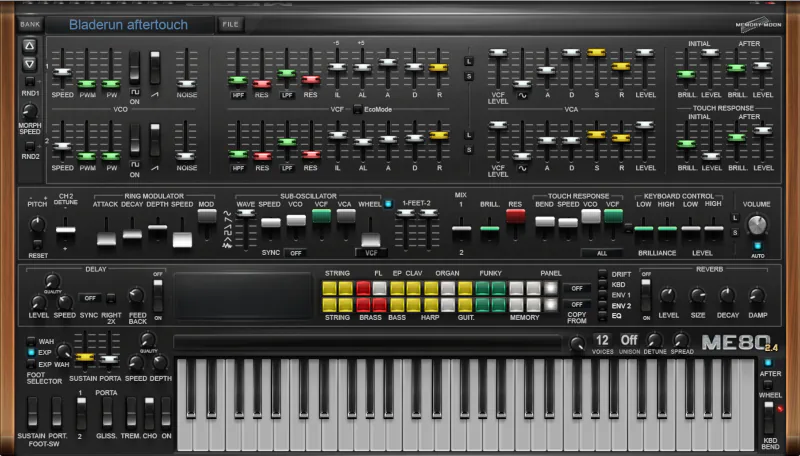
What is ME80 2?
ME80 2 is a virtual instrument/software synthesizer that emulates the legendary Yamaha CS-80 analog synthesizer. Now in available in native 64 bit format, the improved 2.x version takes the convincing CS-80 emulation even higher. I’m excited to present this detailed MemoryMoon ME80 v2 review to you. We’ll cover important features like:
- 64-bit architecture: Completely rebuilt by Chris Kerry using his CK_engine for modern systems
- Improved sound fidelity: Better audio quality than earlier versions
- 512 presets organized into 4 banks
- Aftertouch expression: Extensive polyphonic aftertouch support (highlighted as a main focus)
- Authentic GUI: Interface closely mirrors the original Yamaha CS-80 hardware
- Optimized for performance: Designed for players who want to perform for extended periods
Introduction:
This old-skool, 32-bit Synthedit creation was one of THE MOST authentic-sounding Yamaha CS80 emulations ever made.
Wait! Stop!
MemoryMoon has finally unleashed this delightful nod to analogue synthesis from its original development platform. That’s right—this sumptuous creation of “filtery” prowess now runs on pure, native 64-bit code.
Naturally, they haven’t forgotten their friends living in the 32-bit past. Therefore, MemoryMoon still offers 32-bit builds to maintain backward compatibility.
Ringing in at $40 USD when purchased directly from the developer, this scrumptious delicacy of coding is also bundled with Mixcraft Pro Studio 7. Remember Mixcraft Pro Studio? I reviewed Mixcraft Pro Studio 6 last year (2013).
“I’m pleased to hear subtle audio improvements. There are fewer aliasing artifacts and the overall sound quality has also benefited from the recompilation.”
This Virtual Analogue Synth emulates the famous Yamaha CS80 – extremely well!
Yamaha released the expensive CS80 in late 1976 for a whopping $8,000 USD. However, nobody ever accused this legendary synthesizer of being “versatile.” Instead, it focused on doing a few things spectacularly well. It delivered distinct, iconic sounds, notably massive brass tones and delicate, ambient strings.
MemoryMoon’s ME80 practically drips with those exact, distinctive tones. This software does not just mimic the original hardware. It also realistically reproduces the famous polyphonic aftertouch that made the Yamaha CS80 a prized holy grail.
A Brief History Lesson:
Let’s be honest right off the bat: the MemoryMoon ME80 is to Yamaha what TAL’s U-NO-LX is to Roland. It delivers a deeply faithful emulation. If you consider yourself a connoisseur of classic, vintage analogue synths, you owe yourself a favor. Give the ME80 your full attention and due consideration.
Back in 2008 to 2010, many ITB synth players and home producers embraced MemoryMoon’s synths without hesitation. They loved that the developers wrote them in assembly language. They also enjoyed how Synthedit wrapped them in a cool, retro shell. In fact, many huge chart-topping hits came out of Pro Tools during that time. Producers used versions 7, 8, 9, and 10 to create countless successes.
Hi, you! If you like these kinds of reviews,
be sure to subscribe.
However, things started to change around mid-2011. The industry pushed 64-bit production environments to the front of every conversation. Producers then had to rely on backward compatibility to keep their 32-bit plug-ins alive. And yes, that did feel a bit like clinging to the past with white knuckles.
Fortunately, ME80 no longer suffers from that problem. You can now enjoy it without wrestling with outdated setups or clunky workarounds. If you love classic synths, you truly owe it to yourself to grab ME80. Start playing it and dive straight into pure 1980s synth bliss. Just don’t blame me if you suddenly feel an urge to grow a mullet, Dude.
Q: Perhaps a more expensive CS80 virtual synth would be better. Is this one worth the bother??
A: Abso-freakin-lutely!
Man, just listen to this thing. If this synth doesn’t trigger Blade Runner nostalgia, nothing on Earth ever will. It delivers huge bass with authority. It glides with smooth, expressive glissando. It wraps your ears in lush, gently drifting warmth. Then it adds pools of richly modulated dual oscillation on top.
This is it, Baby, the real deal in virtual form. The ME80 does more than emulate a CS80. MemoryMoon captures its essence with care and precision. Then they seamlessly assimilate that character into a VSTi, turning your DAW into a cinematic playground.
Let me Introduce you to Gunnar Ekornås:
Gunnar Ekornås and his band released ME80 a few years ago, and it’s high time it got the recognition it deserves. I’d argue that it’s still flying under the radar, but I’m here to set off some belated fireworks. You might think this review is a couple of years too late, but I say, don’t worry about it!
ME80 remains a must-listen for classic synth fans. In fact, its greatness is on par with that of a ’69 reissue Strat for lead guitarists – timeless and iconic. After all, great things never fade away. Take Jesus, for instance – two millennia later, and he’s still rocking strong! Similarly, ME80 continues to hold its own, and I’m excited to shine a spotlight on it.
I reviewed the original ME80 back then—a charming creature built on 32-bit architecture inside a SynthEdit wrapper. During that review, I posed a pointed question to Mr. Ekornås. Was a 64-bit version on the horizon?
His response? MemoryMoon was actively working through the challenge. They weren’t sitting idle—they were figuring out the smartest path forward. Because let’s face it: nothing says “we’ve got this” like engineers actually solving the problem instead of just promising a miracle tomorrow.
To quote Mr. Ekornas:
“These synths run on custom modules, so all modules must be ported to 64 bit too. Most of the modules come from Chris Kerry and use assembly language, which is forbidden by Microsoft in 64 bit. Without assembly code, the synths would use higher CPU.”
The Yamaha CS80 was responsible for many a touring roadie’s nightmares; the blessed thing weighed over 200 lbs. It wasn’t only the heavy plywood case, solid wood sides and metal panels that made this analogue beast so weighty, there were also the large transformers, capacitors, PCBs, wiring, and metal heatsinks inside the case.
Best known for its powerful 8-voice polyphony and rich analogue brass and string sounds, many regarded this expressive instrument as Japan’s first truly great synthesizer. As a result, it quickly earned a reputation among musicians and enthusiasts alike.
The synth captivated listeners with its wide, exhilarating, and remarkably organic detuning. It delivered a lush, expansive sound that could make even a single note feel larger than life.
The CS80 featured two powerful analogue oscillators, each assigned to its own synth line. In addition, each synth line provided independent VCA and VCF control, giving players exceptional flexibility over their sound.
To further expand its tonal range, each VCF included both high-pass and low-pass filters. This configuration allowed for detailed sound shaping and contributed to the instrument’s distinctive character. Finally Yamaha’s interesting “Ribbon” controller was a new, unique method of pitch bending.
Unfortunately, every veteran ASM programmer eventually hits a wall: you simply cannot compile 32-bit assembly code as 64-bit. However, hope is not entirely lost. If you painstakingly reproduce that code in C++ or another low-level OOP language, you can absolutely get the job done.
We clearly see the fruits of Chris and Gunnar’s labour well manifested. This review-writer for one, is truly thankful they’ve done so.
Installation and Authorization:
A demo version of ME80 awaits you for download. If you don’t already have it hiding on your hard drive, grab it now. I strongly recommend you do, because your future self will thank you. The installer delivers a neat little VST dll in both 64-bit and 32-bit formats. It also includes the accompanying data folder. All of this arrives in a tiny 6 MB zip file, so even your oldest laptop will not complain.
Stop reading . . . go get the demo, my friend: MemoryMoon ME80 Demo.
Once you download the zip file, you simply extract the contents. Then you move or copy the files into your VST folder. Yes, you do it by hand. You will survive the ordeal, I promise.
And that’s it. You finish the entire process in moments. You enter no registrations. You type no serials. You deal with no online activations. Nothing. Finito. This kind of simplicity feels almost rebellious these days. I honestly wish every plug‑in on the planet installed this easily. This one earns a rock-solid 5 stars.
My mini anti-piracy rant . .

Nasty orcs who steal software on the internet make life a real pain in the noodle for honest guys and gals. I say we tie them down and stick a couple of iLoks up their nose. That should teach them proper digital manners.
In the meantime, when you see software piracy, report it. By doing that, you help protect the developers who pour their hearts into these tools. You also protect the real value of your own hard-earned purchases. Piracy does not just steal from companies; it cheapens every honest customer’s investment.
Visuals:
MemoryMoons’ GUI masterfully captures the authentic retro vibe we’ve come to love. With its charming, weighty presence, it accurately embodies the spirit of late 70s ‘synth-i-ness’. And it’s not just this GUI that nails the aesthetic – each of MemoryMoons’ fabulous VA synths boasts a distinctly genuine look and feel.
The same but different . .
The ME80 comes in two distinct variants. While the sonic engine remains identical in both, the visual experience diverges completely. The default skin faithfully recreates the original hardware, yet it unfortunately carries a touch of dated charm. No, I’m not praising its retro aesthetic; quite the contrary—the graphics feel somewhat clunky.
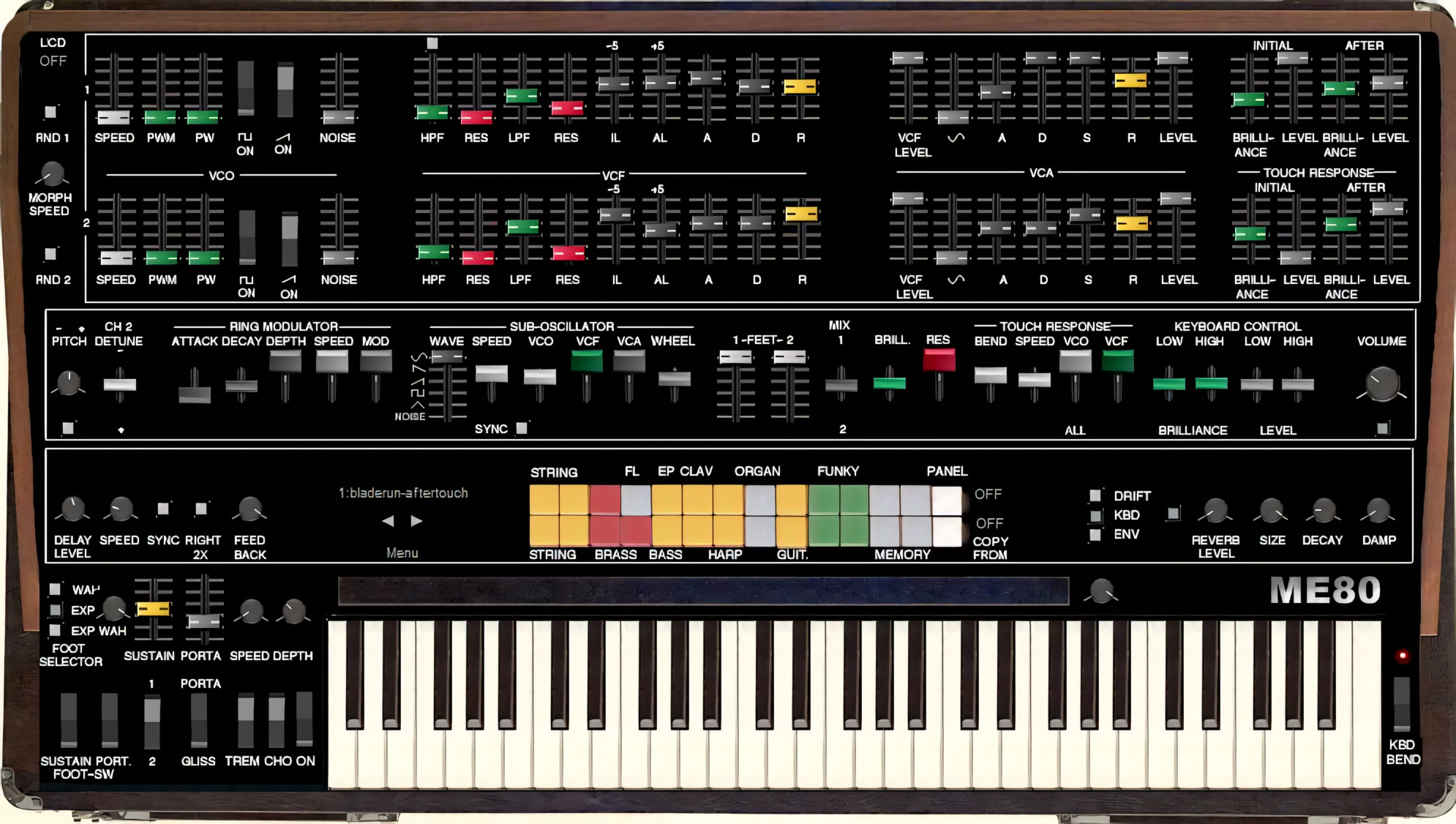
Honestly, the interface feels a bit cramped. Some GUI elements even appear slightly “cludgy,” if that’s a word we can use today. Why not let the developer expand the layout? Increasing the height would work wonders. As it stands, the fader paths seem frustratingly short. Furthermore, consider slimming down those slider caps just a tad. This synth sounds absolutely magnificent, so why shouldn’t its look match that brilliance? It truly deserves to shine as brightly as it sings!
Fortunately, MemoryMoon offers an excellent alternative: Mr. Scott Kane’s “High Tech” skin.
While it may not replicate the ME80’s original interface as faithfully as the default design, it is far easier to navigate and distinguish at a glance. As a result, users can locate parameters more quickly and work more efficiently.
The High Tech skin evokes the look of a CS80 from around 1980 rather than an original 1976–77 model. Even so, it preserves much of the hardware’s iconic visual identity. Rather than introducing a radical departure, it presents a tasteful and slightly more contemporary interpretation.
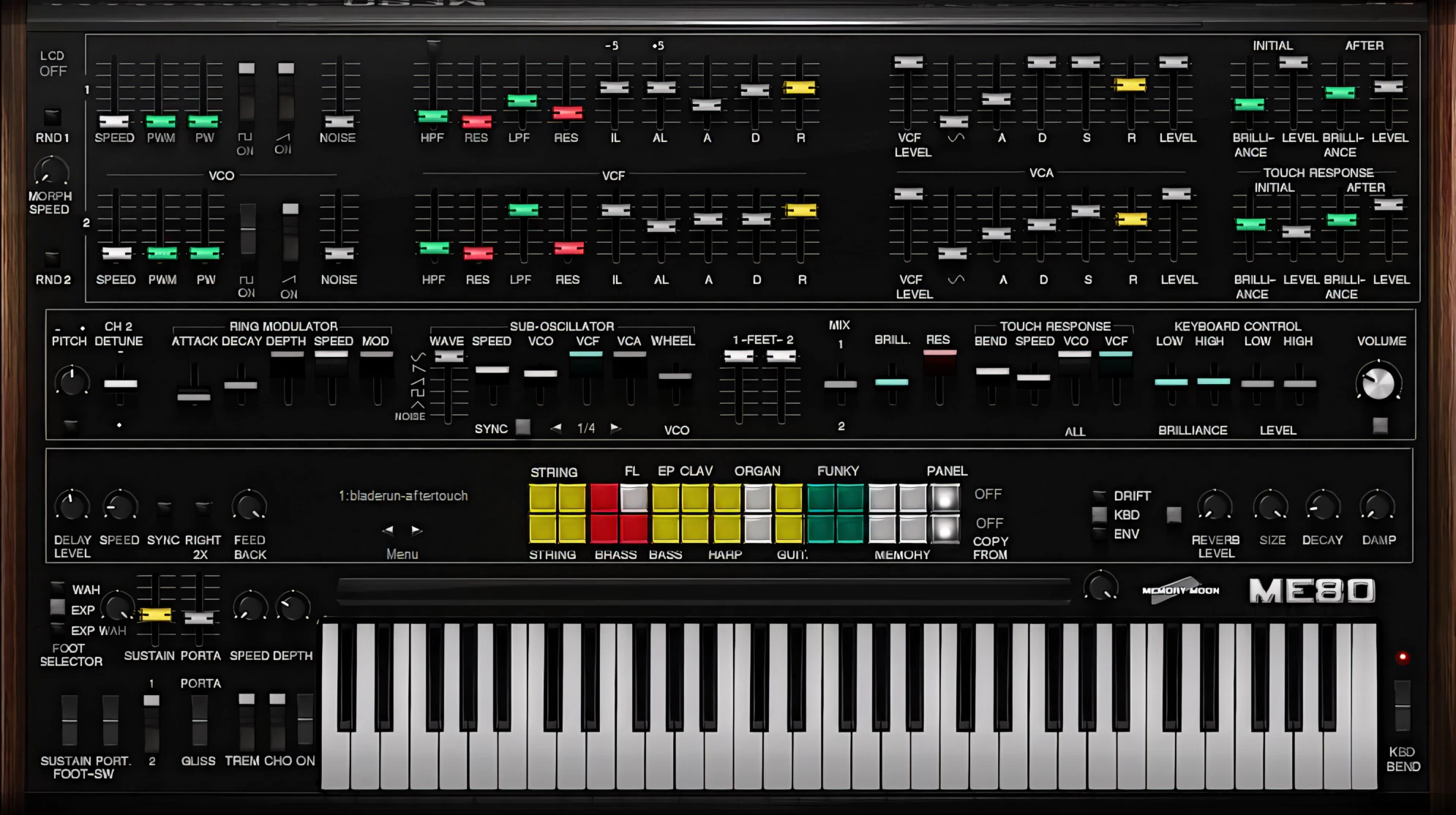
Most importantly, the High Tech skin pays clear homage to its hardware inspiration. At the same time, it enhances the synthesizer’s visual appeal and makes parameter adjustments considerably easier. Your eyes—and perhaps your sanity during a late-night programming session—will thank you.
Pre-Programmed Preset Buttons:
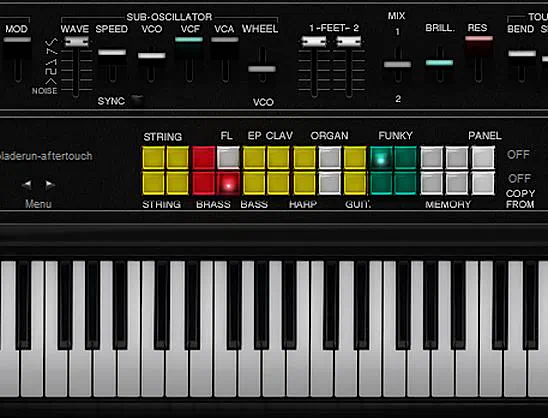
Active preset switches are more easily seen on the “High Tech” interface.
Each slider and knob responds smoothly to mouse movements, making it practically impossible to overshoot a setting. For even finer parameter adjustments, the plugin includes the standard Shift-click feature. As a result, you can dial in values with impressive precision.
However, one issue stands out. The interface does not appear to offer a way to reset a slider or knob to its default zero value. It’s a small omission, but sometimes getting back to square one should take just one click—not a scavenger hunt.
Logical Layout – Easy to Navigate:
As on the original hardware, the interface clearly separates each group of controls into distinct sections. This layout makes navigation intuitive and keeps key functions easy to locate.
Each synth line features four dedicated sections: VCO, VCF, VCA, and Touch Response. Together, these sections provide a logical workflow that mirrors the design of the original instrument.
VCOs:
The Oscillators (VCO) section features intuitive sliders to control VCO speed, pulse modulation, and pulse width. Two robust rocker switches toggle the square and saw waveforms on or off. Finally, a dedicated noise fader rounds out the control panel, letting you dial in the perfect amount of grit.
VCFs:
The VCF control section puts total tone-shaping at your fingertips. Sliders manage high-pass filtering, resonance, low-pass filtering, and initial voltage level. You also get an attack level control, alongside the comforting familiarity of a standard ADR (Attack, Decay, and Release) envelope.
VCAs:
The next control section contains the VCA sliders. These include standard ADSR sliders, a VCF Level slider, and a volume level slider. The VCF slider controls how much of the previous VCF level feeds into the VCA. Think of it as a very obedient gatekeeper with great taste in tone.
Touch Response:
The Touch Response section is where the magic happens – it’s responsible for capturing the iconic CS80 “feel”. Here, you’ll find controls for Initial and After Brilliance and Level, allowing for precise customization. The best part? Each synth line gets its own independent Touch Response settings, giving you total control.
To truly unlock the synth’s potential and deliver an exceptional playing experience, I highly recommend pairing it with a fully polyphonic, aftertouch-enabled keyboard. Trust me, your music (and your fingers) will thank you!
Performance Settings:
Beneath the synth lines, you’ll find essential controls for Pitch Tuning, Detuning, Ring Modulation, a Sub Oscillator, and Octave settings (known as “FEET” per line). On the right side, dedicated sliders let you fine-tune high and low filter cutoffs. You can also adjust independent level controls for lower and higher keys separately.
Why bother with these individual levellers? Well, the original CS80 was notorious for its aggressive filter scaling, so these tweaks might just be necessary to keep things in check. It’s like giving your sound a personalized suit of armor—because one size rarely fits all in the world of synthesis!
The sub-oscillator can generate any of six common synthesizer waveforms, including Brown noise.
The selection covers all the usual suspects: Sine, Saw, Ramp, Pulse, and Triangle. As a result, you can easily add weight, texture, or movement to a sound without much effort.
Onboard Effects:
The fourth lane of controls houses configuration options for delay and reverb. Here, you will also find those bright, funky, square preset buttons that scream late-1970s style.
The delay and reverb effects in this synth are a treat for the ears – open, spacious, and delightfully pleasing. While they might not match the high-end quality of a pricey specialty ambience plug-in (think $150!), they’re more than respectable. In fact, they’re refreshingly free of harshness and obnoxiousness, with none of that nasty “pingy” or “metallic” ugliness that can ruin a sound.
Instead, these time-delay effects have a warm, analogue-like quality that’s reminiscent of a bygone era. They’re lush, wide, and welcoming – the perfect accompaniment to the synth’s rich tones. So, even if they’re not perfect, these effects are a welcome addition that will make your music sound great.
Delay:
You can dial in the Delay rate by hand, or you can sync it automatically to your DAW or host tempo. The sync options range from 1/2 notes down to 1/16th notes. You also get dotted quarter-note delays plus triplets in 1/4 or 1/8 note values. When you press the Right 2X button, the right channel uses double the selected delay time. It is like giving your stereo field a clever, echoing wink.
Reverb:
The built-in reverb sounds pleasant and highly usable, and you must enable it before the Delay will activate. Once it is on, the synth gives you dedicated knobs for Reverb Level, Size, Decay, and Damping. That way, you can shape everything from subtle space to full-on cinematic wash.
Chorus:
Yamaha’s chorusing effects never quite captured the same adoration as their Roland counterparts. Still, they’re surprisingly pleasant. Think of them as the quiet sibling who always brings the best potato salad to family gatherings.

Now for my only minor gripe. The “Speed” and “Depth” controls serve both Tremolo and Chorus effects together. Imagine being asked to share your thermostat with a roommate who runs things differently. Awkward! Wouldn’t it be better if you could configure each effect independently? Just a thought from one audio enthusiast to another!
Presets:
The Presets menu sits clearly in the open area between the Delay knobs and the two rows of Preset Selectors. ME80 delivers a robust collection of well-crafted presets. The library organizes them intelligently into Lead, Riff, Pad, Bass, FX, Keyboards, and General categories.
These sounds do more than just impress out of the box. At the very least, they act as powerful starting points for designing your own unique patches. Think of them as sonic jump‑starts for your personal creativity.
Additional Controls:
Drift Panel:
When you first launch the synth, the “Keyboard” view is front and center. But, hidden from view, are two additional panels waiting to be explored. The first of these is the “Drift” panel – a treasure trove of tweakable goodness.
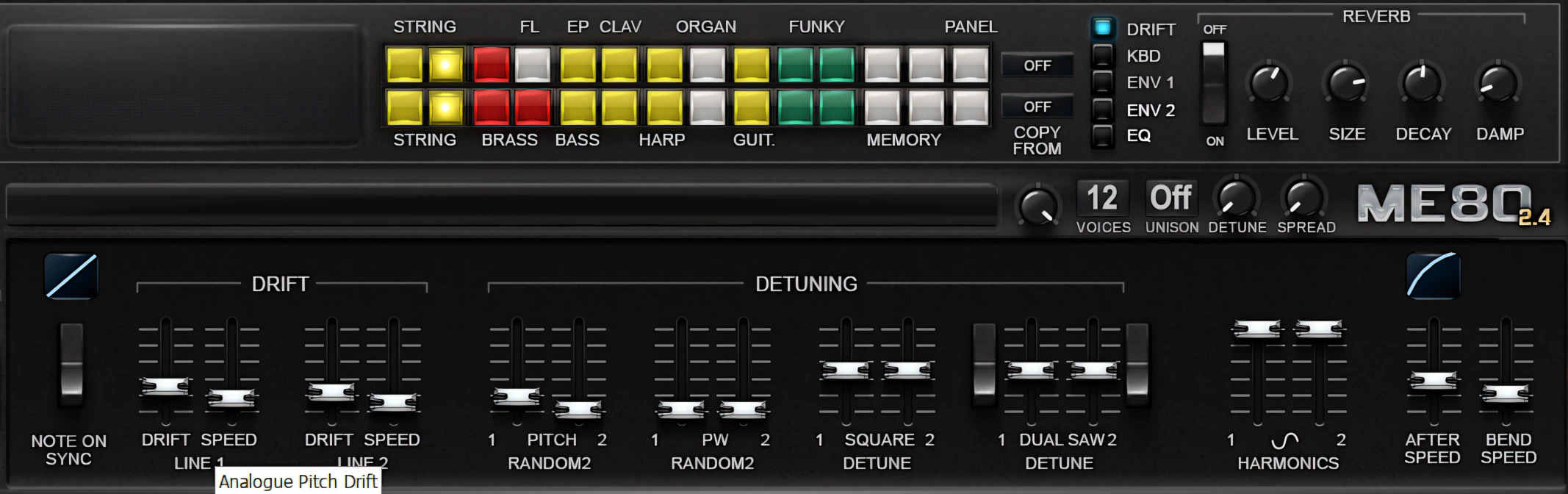
In the Drift panel, you’ll find three sets of 8 knobs, giving you precise control over the “doubled SAW” waveform and the degree of “Drift” for each of the eight voice cards. And here’s the best part: these controls are duplicated for both synth lines. The knobs are cleverly organized, too – the top set adjusts general pitch, the middle row focuses on the VCF section, and the bottom set shapes the drift of Pulse waves. Get ready to dive in and dial in some amazing sounds!
A small button to the left of the button rows lets the user select synth line 1 or synth line 2.
The drift speed is fully variable, ranging from a lightning-fast 1/100th of a second up to a leisurely 40 cycles. This section features two pairs of sliders, giving you precise control over both the level and speed of the drift for each synth line individually. It’s like having your very own sound-altering cruise control!
Move slightly to the right, and you’ll discover another cluster of controls. Here, you can tweak square wave detuning (which affects both lines simultaneously) and flip a switch to activate a second saw wave for that same dual-line punch. You also get dedicated Dual SAW wave detuning plus a harmonics slider. This final tool lets you sprinkle extra harmonics onto a triangular sine wave. Think of it as seasoning your audio soup; a little goes a long way toward making it truly savory!
Envelope Panel:
The ENV (Envelope) panel button displays the current VCF & VCA shapes. These shapes are for display only.
Sound Quality:
Now we get to the part that really matters: the sound. ME80 faithfully recreates the character of the original instrument, and that immediately grabbed my attention. As someone who appreciates old-school synths, I did not have to listen for long before recognizing the quality on offer.
This is far more than an amateur-ish first attempt. The developers have clearly invested considerable time in refining the audio engine. The result is a polished and highly convincing emulation that delivers serious sonic substance.
Naturally, this latest version sounds very similar to the original release. However, I noticed several subtle improvements. The recompilation has reduced aliasing artifacts, and the overall sound quality feels cleaner and more refined. The differences are not dramatic, but they are certainly welcome. Sometimes the smallest tweaks make the biggest noise.
Here’s a little audio snippet featuring some classic “Blade Runner” chords, a mellow lead voice, and a deep, rich bass line. Each element is using both oscillators. I added some pulse wave with slight detuning on the bass line.
Not just Phat – it’s totally sick!
The ME80 gets super thick. So thick, it’s “sick”, as the cool kids say. Simply add additional square waves alongside varying degrees of pulse width and modulation. “Phat” doesn’t even cover it. Old analogue synthesizers could get so thick that you couldn’t fit the notes into a warehouse loading dock. If you dare to dial in some Double-SAW detuning, you will genuinely risk busting the housing of your headphones.
And oh, the fizzy‑fuzzy noise this code contraption can spit out through your audio interface is searing, deep, and rich. The dedicated noise faders let you dial in gritty color without sacrificing that musical, analog warmth. It is perfect for injecting extra vibe into pulsing bass lines, turning simple patterns into smoky, character‑soaked grooves.
The powerful combinations of high‑ and low‑pass filters on each synth line give you an almost absurd amount of control over your tonal shaping. You can easily push them into bold, in‑your‑face resonance for sounds that demand attention, or soften them into gentle, silky curves that melt into smooth, lulling ambient pads.
Superb Resonance!
The VCF resonance delivers wide, dramatic sweeps that make it easy to create evocative, highly expressive sounds for all kinds of musical styles and moods. No matter which waveform you choose, ME80 consistently preserves that wonderfully nostalgic, analog-style character we remember so fondly from the classic era it pays homage to.
Objective Niggles:
I suspect that adding a high-quality oversampling option would further enhance this already impressive synth. While the instrument generally sounds excellent, the upper registers can become slightly harsh if the low-pass filter is not used carefully.
That said, the lower frequencies are where the synth truly shines. They sound warm, rich, and remarkably smooth. As a result, basses and lower-register patches carry plenty of weight and character. In fact, the low end is so satisfying that it almost makes you forgive the occasional sharp edge up top.
Overall, this $40 synth is worth every single penny—and then some. The sound quality simply does not disappoint. The ME80 delivers a stunningly realistic emulation that faithfully honors its legendary, analogue ancestor.
CPU Consumption:
As far as quality VSTi synths go, this one is refreshingly gentle on CPU resources. Just about any reasonably up-to-date computer should be able to run this instrument comfortably on a dozen or more tracks at once without breaking a sweat.
In a world full of bloated plug-ins, this kind of lean efficiency is pure gold. 5 BIG, BRIGHT STARS!
MemoryMoon ME80 v2 Review – Concluding Remarks:
I am absolutely thrilled that Gunnar Ekornås and Chris Kerry took the time and effort to port their magnificent ME80 over to native 64-bit. MemoryMoon ME80 v2 is my all-time favourite CS80 emulation to date. Next, this VSTi is also the most affordable virtual CS80 available. But, even if were just as expensive as Arturia’s offering, its sound quality and ease-of-use still keep it in the lead. (in my honest opinion).
4.5 out of 5 Stars


:: Pros
- Recompiled as native 64-bit.
- Realistic-sounding, faithful Yamaha CS80 emulation.
- Extremely affordable.
- Decent quality interface that closely resembles the original instrument (especially the High Tech skin).
- Authentically recreates the famous CS80 “Aftertouch”.
- Built-in preset management featuring a good variety of sound types.
- Exceptionally smooth, easy-to-adjust knobs and sliders.
- Excellent GUI layout.
- Easy-to-use & Easy-to-learn.
- User’s manual available in PDF.
- Friendly, proactive product support.
- Light on CPU due to well-coded ASM programming.
- No dongles, call/response challenges, nor invasive piracy protection overhead.
::Cons
- Windows only – no OSX version available.
- A quality oversampling feature would be nice.
Visit the MemoryMoon website. www.MemoryMoon.com
Intellectual Copyright – 2015 – All rights Reserved. This review may not be copied or reproduced in whole, nor in part, without express written permission from the author.

Leave a Reply