
What is EZdrummer 2?
EZdrummer 2 is virtual drum instrument and software suite designed for music producers, songwriters, and recording engineers. This impressive program is a streamlined, user-friendly alternative to their more complex flagship product, Superior Drummer. In this exhaustive Toontrack EZdrummer 2 review, we’ll uncover its amazing features and benefits such as:
- Core Functionality: It allows users to create realistic drum performances using high-quality sampled audio. Unlike a simple loop library, it generates MIDI patterns that can be edited, allowing for custom grooves, fills, and variations.
- Sound Library: It comes with a base sound library (typically “Standard Rock”) but is designed to be expandable. Users can purchase additional “Expansion Packs” (like “Pop,” “Metal,” “Jazz,” or genre-specific packs) to access hundreds of new kits, cymbals, and percussion instruments.
- MIDI Grid & Drag-and-Drop: One of its most praised features is the intuitive interface. It includes a vast library of pre-programmed MIDI grooves and fills organized by genre and style. Users can simply drag and drop these patterns onto a timeline or click them to trigger playback.
- Mixing Tools: It includes built-in mixing controls, allowing users to adjust the volume, panning, and EQ of individual drum components (kick, snare, toms, overheads, room mics, etc.) directly within the plugin.
- Integration: It works as a VST, AU, or AAX plugin within Digital Audio Workstations (DAWs) like Logic Pro, Ableton Live, Pro Tools, Cubase, and Studio One.
- It also supports MIDI mapping for external drum controllers.
Introduction:
ToonTrack proves every day that they lead in their field. Their products stand out for ease of use, audio excellence, and constant innovation. And honestly, that is just the tip of the iceberg when it comes to the strengths of the ToonTrack lineup.
Toontrack’s Reign Over Virtual Drums
For over a decade, Toontrack has maintained a “superior” presence in the world of in-the-box drum production. And honestly, they earned that bragging right. Their flagship application, “Superior Drummer,” and its lightweight younger brother, “EZdrummer,” consistently deliver highly realistic drum tracks.
In fact, these plugins have saved countless bedroom producers from having to apologize to their neighbors for mic’ing up a real kit. You can hear these believable virtual performances on a dizzying number of demo and pro-grade recordings. Consequently, both passionate hobbyists and seasoned professionals regularly choose Toontrack as their go-to drum software.
What’s New?
EZdrummer 2 confidently grabs the welterweight championship belt and raises the bar in a big way. It introduces a fresh, attractive tab-based interface, rebuilt from the ground up. Yet it still feels comfortably familiar, much like EZkeys. And, it’s bigger, so it’s easier to see and work with.
Instead of the somewhat tired pop/rock kit, it now greets you with not one, but FIVE new, characterful drum kits. In other words, your default sound just went from “okay” to “Ooo, that’s nice!” the moment you load the plugin.
Modern and Vintage Flavours.
The drum kits in EZD2 are categorized into Modern and Vintage styles, but here’s the best part: you can mix and match them to create your dream “custom” kit. It’s like building your own Frankenstein’s monster, but with drums instead of body parts – and way more rhythmic possibilities!
These kits are sampled from top drum manufacturers like DW, Yamaha, Gretsch, Sonor, Tama, and Ludwig.
And, taking a page from other drum VI contenders, EZD2 also includes a range of great-sounding percussion components: tambourine, cowbell, maracas, shakers, and handclaps. It’s like having a whole percussion section at your fingertips – minus the hassle of actually hiring a percussion section!
Not just a visual makeover, but a whole new engine too!
Toontrack didn’t just give EZdrummer 2 a pretty face and fancy bells and whistles. Instead, they completely overhauled the core audio engine. They packed it with advanced AI and unmatched expressiveness.
Want to find the perfect beat fast? The new “Tap2Find” feature lets you drum a quick groove with your mouse or MIDI controller. The software then instantly gallops off to fetch your perfect rhythm matches.
Hi, you! If you like these kinds of reviews,
be sure to subscribe.
How much does it cost? Is there an upgrade option?
With this powerful second-generation version, Toontrack’s already well-established EZdrummer product breaks even more barriers. EZdrummer 2 still comes in at a reasonable $179 USD for new customers. Meanwhile, loyal existing users can upgrade for a very wallet-friendly $99 USD. In other words, you get a serious creative boost without your wallet staging a protest.
Plus, EZD2 is backwards compatible.
Toontrack’s loyal customers can breathe a sigh of relief – they’ve got you covered. They made sure that EZD2 is fully backwards compatible with your original EZ Drummer add-ons, so you can upgrade without worrying about losing your favorite sounds.
In fact, Toontrack’s development team has gone above and beyond to provide fresh EZX updates.
This means that all your previously purchased EZX expansion packs will work seamlessly within the new EZ Drummer shell – no need to start from scratch.
But that’s not all – the vastly improved audio engine has given your old EZX libraries a new lease on life, delivering even better sound and expressiveness. It’s like a facelift for your favorite sounds.
Standalone App:
EZD2 brings a welcome new feature: stand-alone mode. Now you can create without opening your DAW at all.
Combine this with the fresh sequence timeline, and suddenly song ideas happen on-the-fly. Think of it as musical inspiration without the technical setup dance.
EZD2 borrows this smart principle from its “EZ Keys” cousins. Your creative juices flow freely now. No more wrestling with typical DAW workflows.
Remember “EZ Keys”? — I reviewed it a while ago. Convenient drag-and-drop MIDI blocks work the same way here. Simply arrange them on the Song Builder timeline at the bottom of the interface. It’s like building with musical LEGOs.
Whip up a solid drum track without even launching your DAW. Skip loading the program as a standard plug-in. Your computer fans will thank you for the break.
Which brings me to my next point: Load times.
Despite occupying roughly 4 GB of hard drive space, EZD2 loads its samples quickly and efficiently. On my Intel i5 system, load times typically stay under 20 seconds.
The largest of the new kits, Modern, consumes about 700–800 MB of RAM. While that figure is certainly worth noting, it remains far less demanding than resource-hungry alternatives such as Native Instruments’ Studio Drummer. In other words, your PC will notice it—but it probably won’t file a formal complaint.
On-board Processing:
Toontrack loves a good family resemblance. To keep their product line connected, they built a subset of their “EZmix” effects right into EZdrummer 2. These effects dynamically adapt and morph depending on your active drum kit or preset.

Granted, they didn’t exactly give you the keys to the tech vault. User control over these parameters is conservative at best—tweakers might pull their hair out.
However, the good news is that Toontrack already did the heavy lifting, carefully pre-tuning and polishing every single effect. As a premium bonus, reverb and amp-modeling wizards Overloud provided several of these built-in processors.
Lastly, you can now adjust mic bleed with tunable knobs, rather than the old “ON or OFF” switches in the original EZdrummer Mixer panel. This single feature already gives you far more control. It lets you shape and refine the sound exactly to your taste, well beyond what the first EZdrummer could ever offer. Your ears get the upgrade they deserve.
Installation and Authorization:
ToonTrack uses a “challenge/response” copy protection method, but given their stellar reputation, I’ll give them a pass. As someone who’s not a fan of dongles or challenge/response protection, I have to admit that dealing with them can be a real pain – especially for laptop users who are always on the go.
I’ve had my fair share of frustrations with copy protection, and I’m sure many of you have too. The hassle of juggling dongles or dealing with limited activations can be a real headache. And let’s be honest, there’s always the risk of being left high and dry if the company behind the software goes out of business.
However, I want to give credit where credit is due. Companies like ToonTrack, Moddart, FXpansion, and EAReckon have made a real effort to implement customer-friendly challenge/response protection. They’ve managed to strike a balance between protecting their software and making it easy for customers to use. Kudos to them for making an effort to make their copy protection as painless as possible.
ToonTrack lets you activate your products on two computers simultaneously. You get four total activations before the license runs dry.
Need to free up a slot? Online license management allows the owner to deactivate a license instantly. Just remember one rule: you can only activate the same license twice on a single machine.
Toontrack fights piracy, but they take care of their customers
To discourage occasional or “mild” piracy (or license abuse), Toontrack does not publicly advertise this policy. However, the company will evaluate requests for additional licenses from legitimate customers on a case-by-case basis.
Toontrack lists every authorized product in the customer’s My Products section on its website. This approach makes it easy to track licenses and verify authorized installations.
Toontrack EZdrummer 2 Review -Visuals:
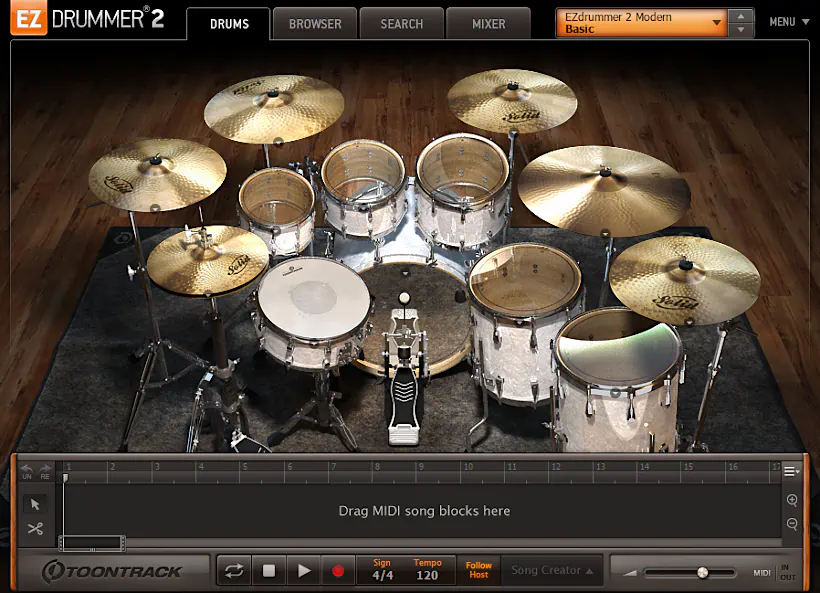
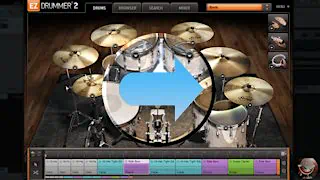
EZdrummer 2 definitely does not disappoint the eyes. The GUI feels comfortably sized at 900 pixels wide by 670 pixels high. It also showcases attractive, detailed 3D graphics that make the interface a pleasure to eyeball.
ToonTrack clearly put serious thought into balancing functionality with visual appeal. They designed a workspace that looks polished yet stays practical and easy to navigate. In short, you get beauty and brains on the same screen—no special glasses required.
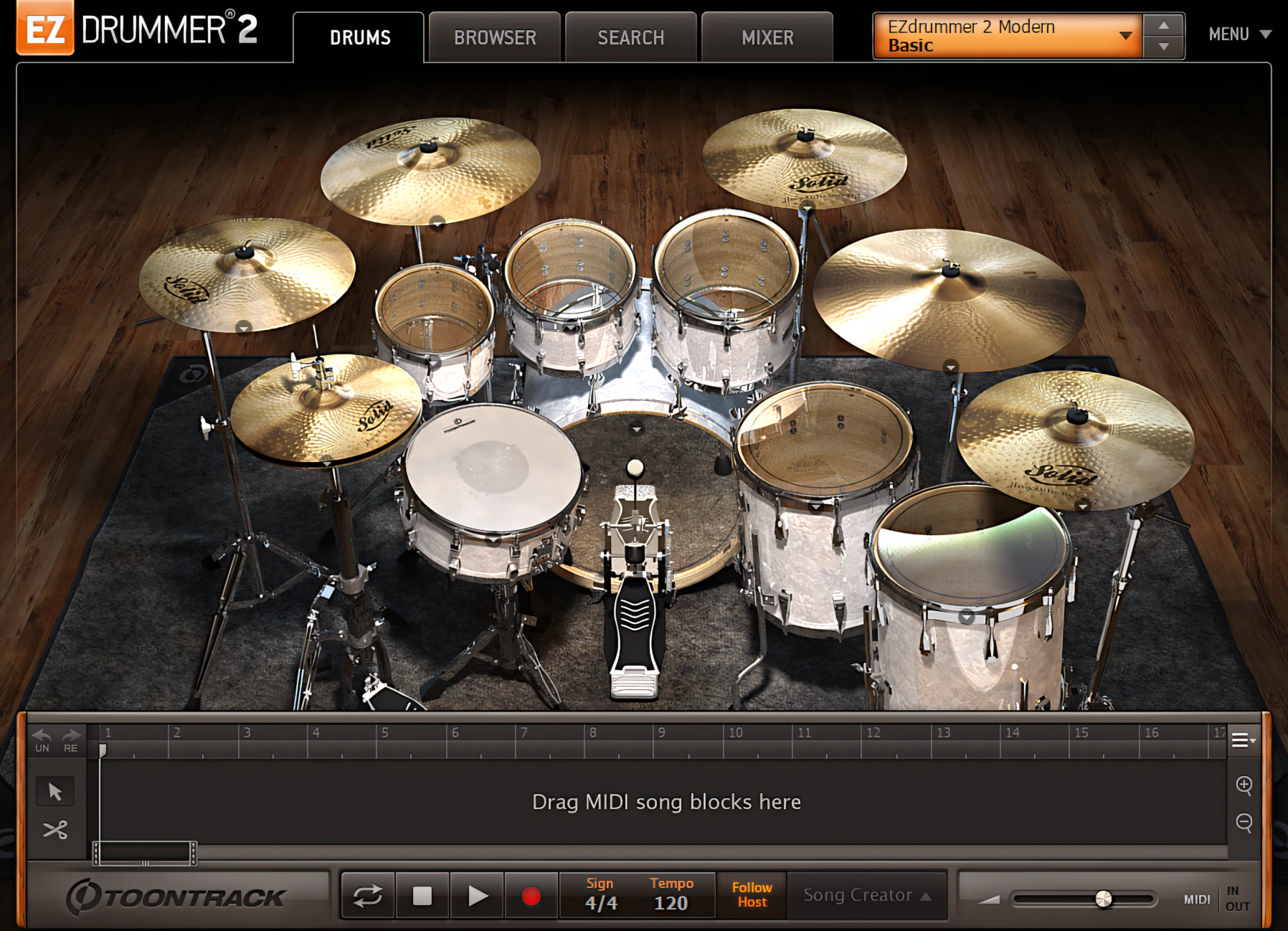
Thoughtfully applied 3D lighting and shadow effects, combined with detailed textures, create a convincing virtual environment. It feels very similar to the immersive graphics you see in modern 3D games.
You will genuinely enjoy looking at EZdrummer 2. Its striking visuals work hand in hand with its rich, high‑quality audio. Together, they deliver a deeply satisfying user experience that both your eyes and ears will happily sign off on.
Set the Knob response to best suit your preference
When it comes to tweaking those knobs, you’ve got three modes to choose from: Linear, Circular, and Circular-relative.
Personally, I’m a Linear mode fan – it just feels more intuitive and gives me the precise mouse control I need for my workflow.
I’ve had to wrestle with Circular and Circular-relative modes in times past, and let’s just say it’s been a bit of pain-in-the-noodle. I’m not saying they’re impossible to master, but I do find myself getting a bit tangled up in them. Give me a straight line any day – Linear mode is my happy place!
Swap n’ Switch
Every kit piece features a drop-down menu for swapping in similar gear. While the original EZdrummer barely scratched the surface with this feature, EZdrummer 2 takes it to the next level. Now, you can raid any core or installed EZX expansion kit to mix and match your dream setup.
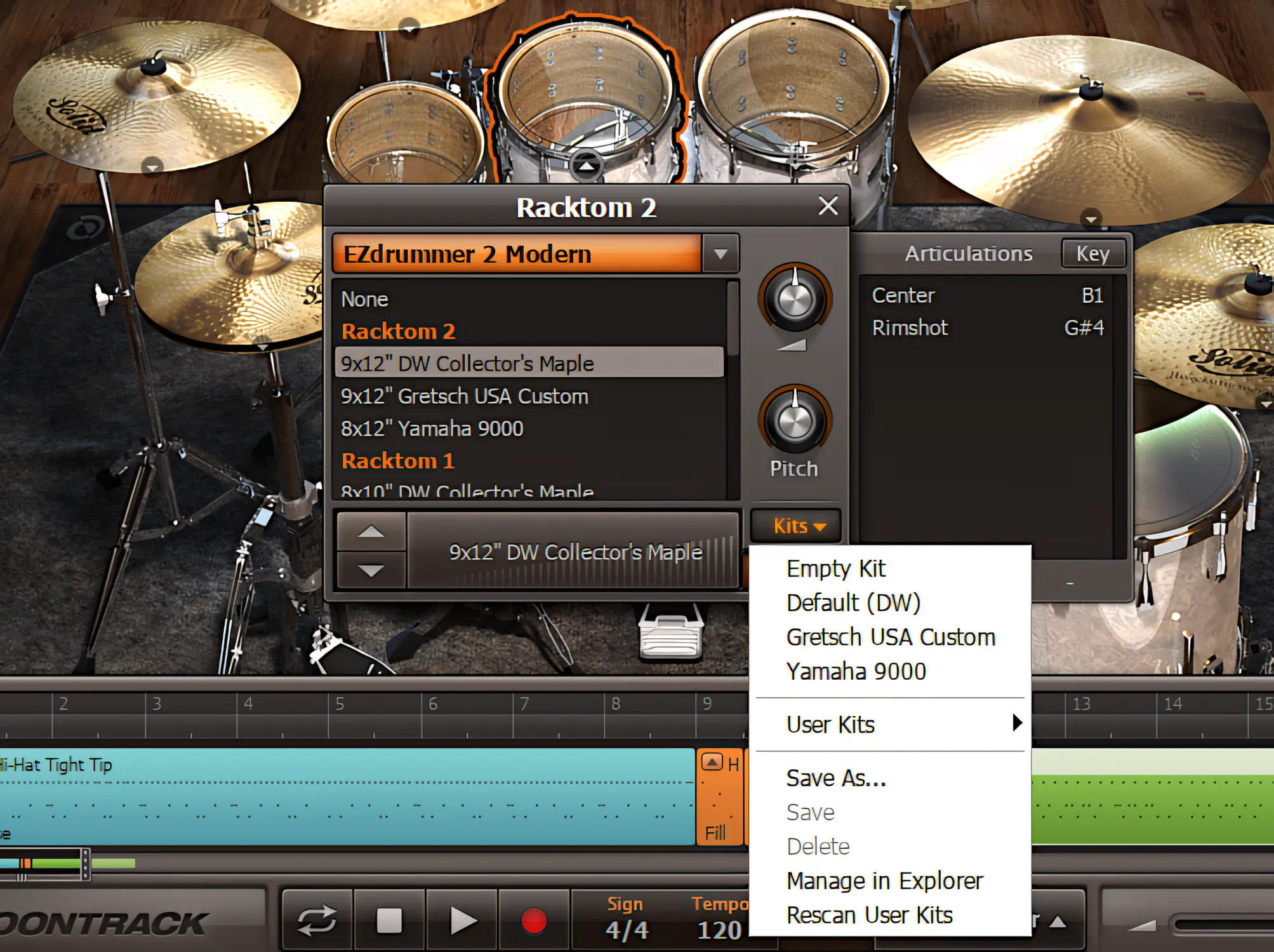
This menu is also your command center for quick tweaks. Right here, you can easily adjust individual drum volumes and pitches. Want to check your sound? Avoid the guesswork and simply click the drum graphic, or bash the corresponding pad on your MIDI controller to hear it instantly.
Oh Noiice – Tabs!
The GUI redesign delivers a welcome upgrade: TABs-based application management. Now switching between sections feels effortless.
This revamped system lets you glide between the four main program areas. You’ll find Drums, Browser, Search, and Mixer all at your fingertips.
Think of it like tabs in your favorite browser—except for music production. No more hunting through menus or clicking endlessly. Just click, switch, and create.
Breaking out the Tabs:
[ Tab – Drums ]
The GUI shines brightest in this area. Subtle yet effective details bring the interface to life. A slight bulge in the carpet, light glinting off faux-chrome cymbal stands, and other clever visual touches add character without becoming distracting.
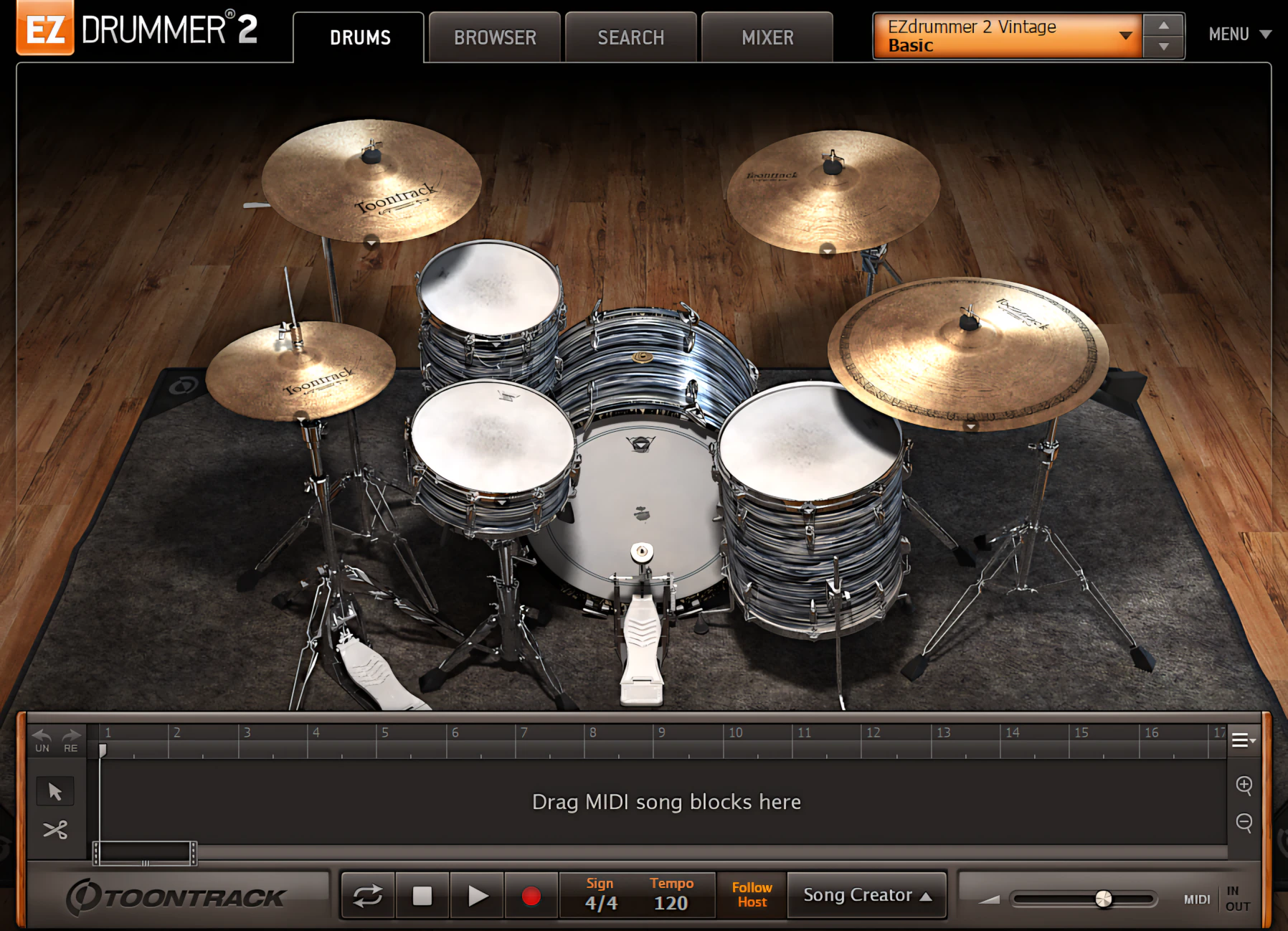
The graphics look polished and inviting. More importantly, they do far more than just look good. Beneath the visual charm lies a thoughtfully designed interface with a solid level of functionality.
[ Tab – Browser ]
Toontrack nailed the layout here. The new Browser mirrors the intuitive MIDI browser from EZkeys, making navigation a breeze. On the left, you choose your core library or EZX expansion. As you move right, the screen cleanly subdivides into styles, time signatures, song elements, and specific pattern variations.
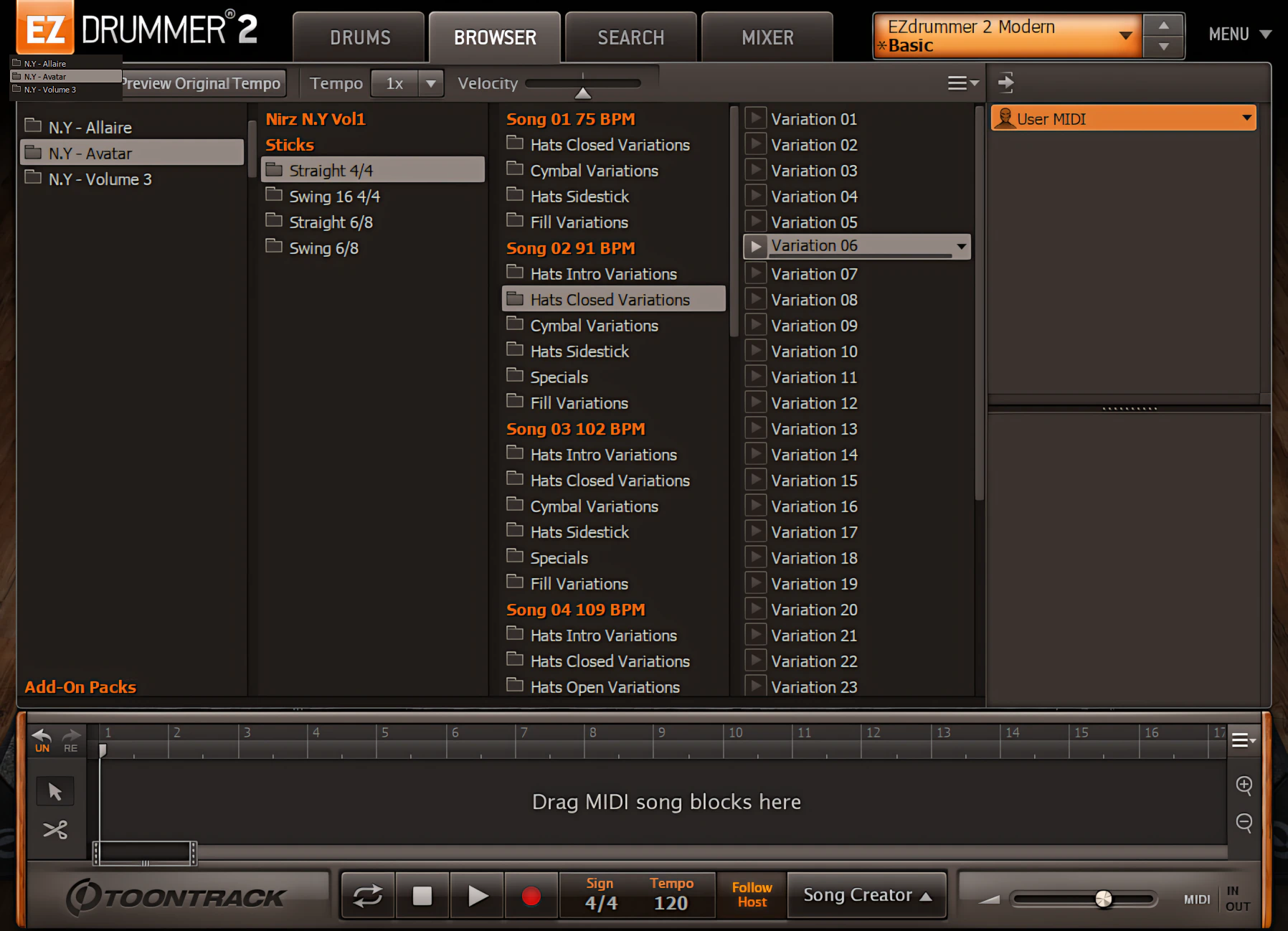
Previewing a beat is incredibly simple. Just click the small play button next to any variation title to hear it instantly. Once you find the right groove, drag and drop it directly into your DAW or EZdrummer 2’s built-in Song Builder. This handy tool acts as a simple, integrated MIDI sequencer—but we will dive deeper into that wizardry later.
[ Tab – Search ]
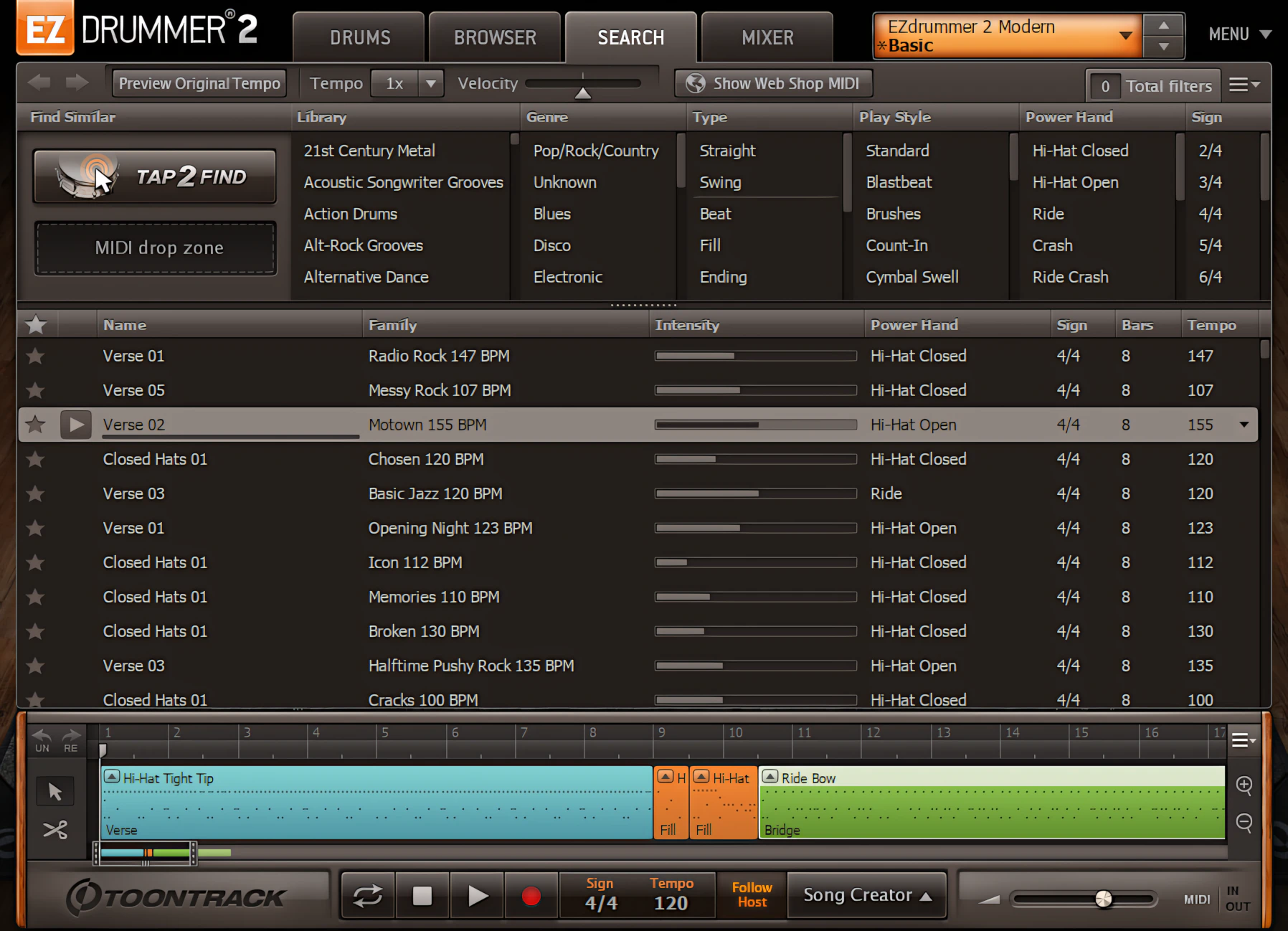
The third tab, “Search,” delivers a dramatic upgrade over the original EZdrummer. First, you can search manually across multiple libraries simultaneously. Next, you can sift through musical genres like country, jazz, or classic rock. Finally, narrow your hunt by selecting a specific pattern type, such as a beat, fill, or ending—because nobody wants a aggressive drum solo when they actually needed a smooth half-time groove.
[ Tab – Mixer ]
Finally, the Mixer tab takes center stage. The original EZdrummer mixer functioned well enough, but this younger, more powerful sibling completely eclipses it. I love the new, expanded layout. It gives you room to breathe and makes adjustments effortless. Furthermore, the sharp, high-contrast interface means you won’t need a magnifying glass just to tweak your various drum channels.
The mixer gives you full control over individual channel levels and panning – a welcome flexibility. However, effects management works differently. ToonTrack has carefully calibrated the effects for each factory preset, so you don’t have to worry about making drastic changes. They’ve got your back! When you adjust a compressor, it only targets the channels that really need it, like the Snare and Kick, for example.
Similarly, reverberation effects are applied with a discerning ear, affecting only specific channels where they can make a real impact. It’s like having a sound engineer who knows exactly where to add a sprinkle of magic.
Unfortunately, this also means that you don’t get fine user control – you can only work with what EZD2 provides. For the most part, this isn’t a negative because Toontrack did a great job preparing mix-ready presets
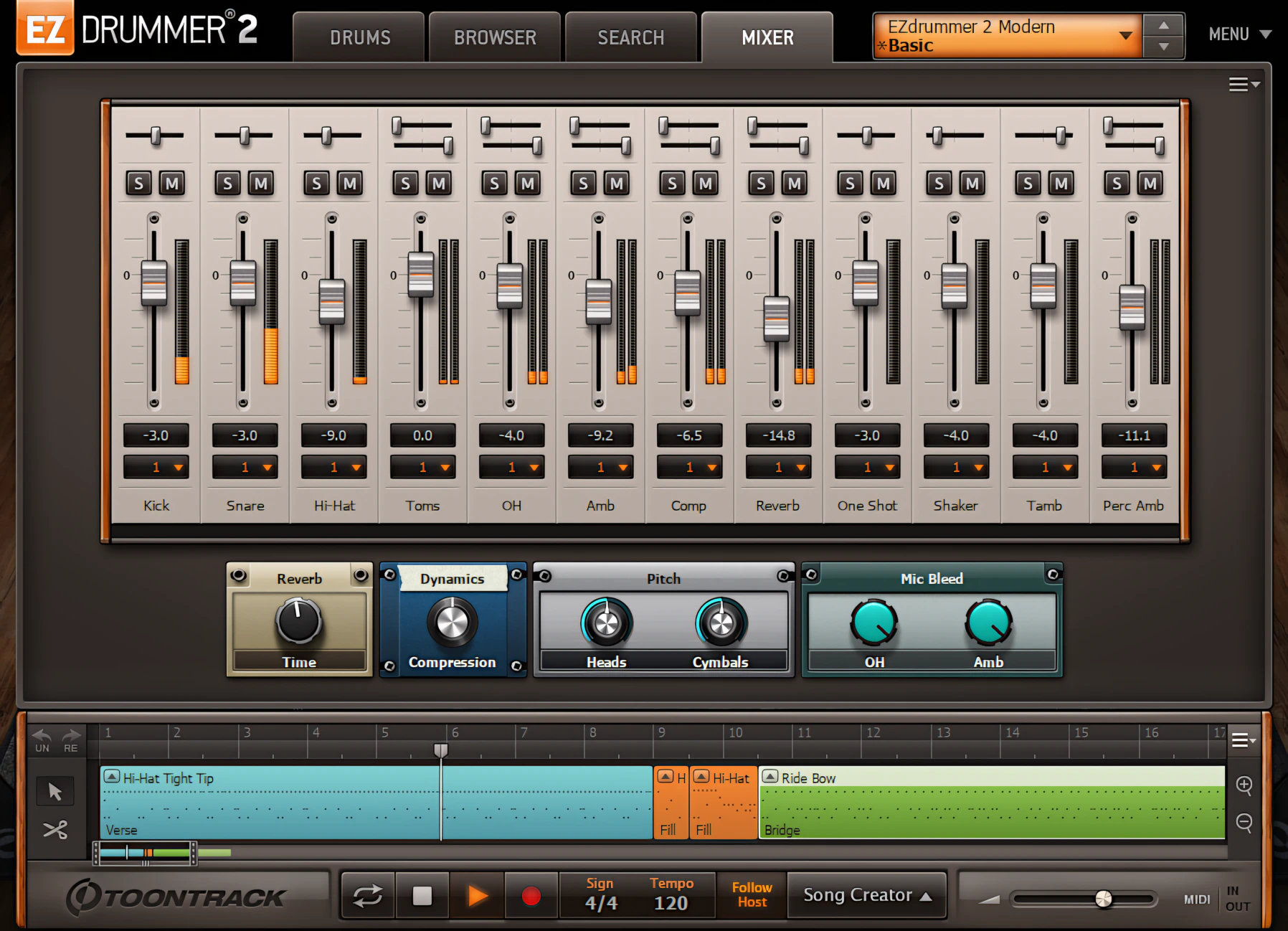
Channel Highlighting
The new mixer stands out for one key reason: it packs its own built-in smart effects.
Each time you load a preset, the mixer instantly gives you the right effect parameters to tweak. You stay in control, without digging through endless menus.
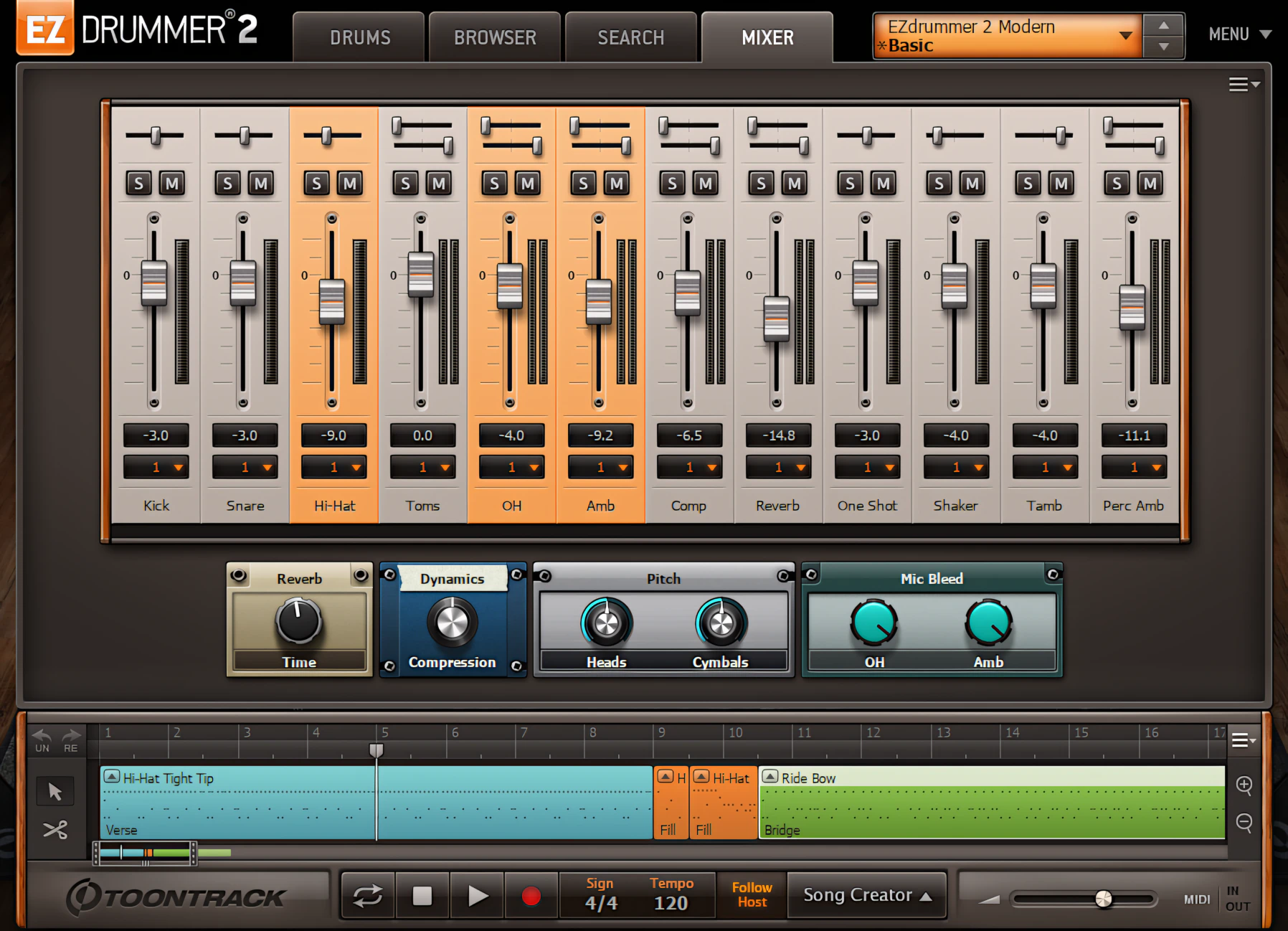
When you click any effects knob, the mixer clearly highlights the channels it affects. No guesswork. No more “what did I just change?” moments. For example, in this case, the High EQ knob shapes the Kick, Snare, Toms, and Cymbals channels. So you see exactly what you are influencing—and you sound like you meant to do it all along.
Rack toms and floor toms are now grouped
I noticed that ToonTrack no longer assigns individual channels to rack-mount and floor toms. Instead, EZD2 groups all toms together on a single channel. While this differs from the original EZ Drummer’s mixer, it isn’t necessarily a drawback since the kits are remarkably balanced “out-of-the-box.”
Honestly, trying to tweak every tom individually is often overkill for most users who just want a great sound fast. ToonTrack clearly prioritizes the “EZ” aspect of the software, yet they haven’t sacrificed sound quality or performance capacity to do so. You get the best of both worlds: simplicity without the compromise.
Many factory presets include granular mic bleed and tuning controls. For now, I’ll hold off on discussing the sound quality of the new 24-bit samples and the benefits of pitch and time shifting. Those topics deserve a closer look, so I’ll cover them in the Sound Quality section later in this article.
Operations and Control:
[ 5 Drum Kits ]
That’s right—Toontrack now gives you even more value for your money. EZdrummer 2 comes equipped with five complete drum kits. The modern lineup includes a DW kit, a Gretsch USA Custom, and a Yamaha 9000. On the vintage side, Toontrack rounds out the collection with two Ludwig kits: the iconic Vistalite and a more traditional 1960s-era Ludwig kit.
The original EZdrummer let you swap drum elements within a single library. Now, EZdrummer 2 blows those walls down. You can mix and match drums and cymbals from any installed Toontrack library. Even better, you can customize specific component articulations, like choosing between the tip or edge of a hi-hat. The massive depth of options might make your head spin, but your drum tracks will thank you.
You can easily adjust the volume level and pitch for each kit piece. Just unfold its properties drop-down box and make your changes.
Then, you can instantly audition the sound of each piece at all available velocities. Simply click on the waveform display at the bottom of the drop-down box.
As you increase the velocity level, the waveform display color becomes darker and more pronounced. In other words, the louder you go, the bolder it looks—just like a drummer who’s had one more coffee than necessary.
[ Song Builder and Track Timeline ]
EZ Drummer 2 now hosts the “Song Builder”, a self contained, integrated midi-sequencer. An immediate and obvious advantage the Song Builder offers is the ability to construct a drum track, or simply assemble drum track ideas, without relying on a DAW.
Within the application itself, you can easily edit individual parts – a huge time-saver. We’ve all been there: manually editing MIDI drum tracks by hand in a typical Piano roll editor can be a tedious task. Thankfully, this feature is a game-changer for those who have had to endure that pain.
The application doesn’t skimp on the basics either. You’ll find essential tools like zoom, cut, copy, paste, and delete at your fingertips.
But that’s not all – you can also tweak each MIDI segment to your heart’s content. Simply shorten it or drag it back out using the handy “drag handles”.
Because we know that mistakes happen, the Song Builder’s got your back. You’ll find convenient undo/redo buttons neatly tucked away in the upper left corner, ready to bail you out whenever you need them.
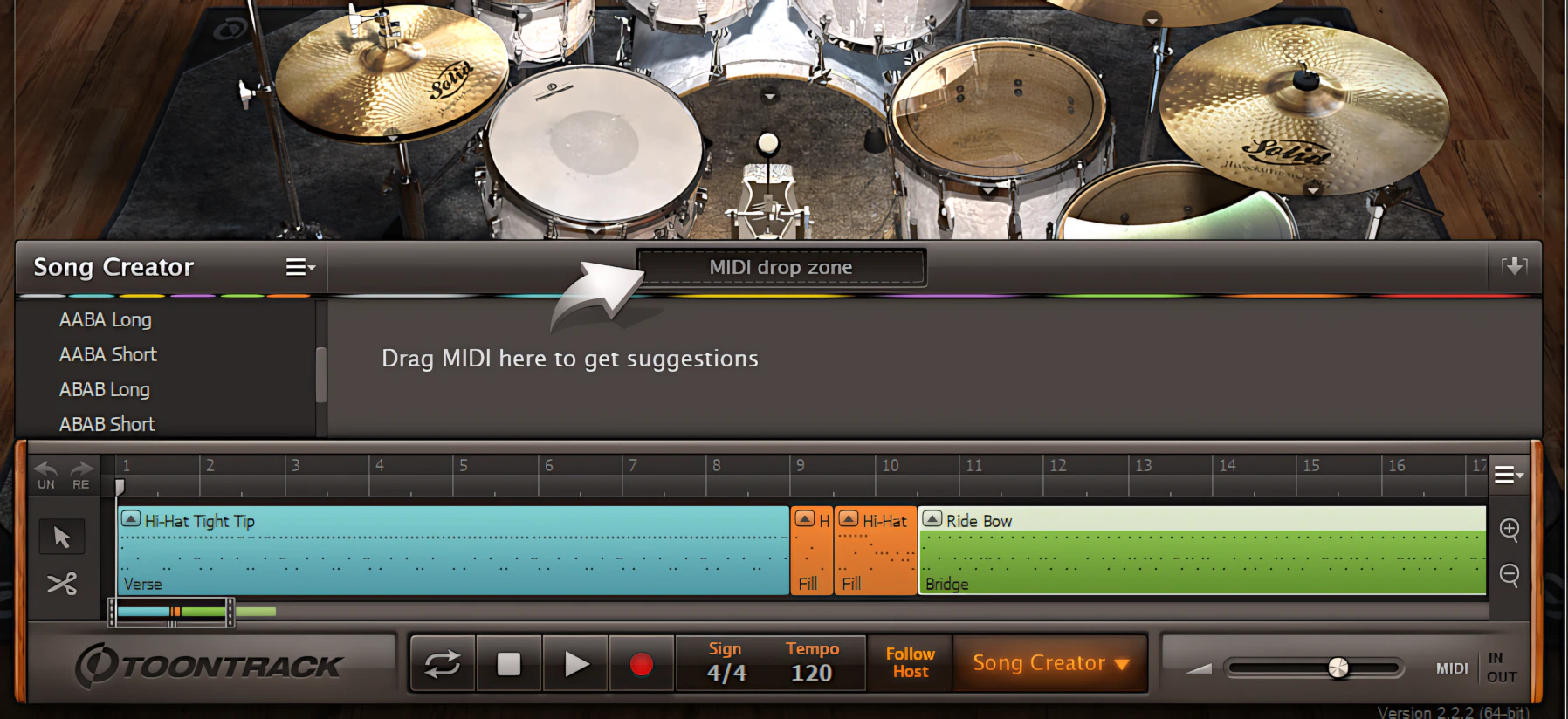
Working with the Song Builder – in Practicum
You simply click the “Song Creator” button to bring up its interface instantly. This button sits conveniently along the bottom of the screen on the transport strip. No hunting required!
Once you open it, just drag a MIDI clip into the “Midi Drop Zone.” ToonTrack’s clever behind-the-scenes coding kicks into gear immediately. The software then delivers appropriately matched results in various song structure formats.
You’ll get everything from 12-Bar Basic structures to AAA, ABBA, and ABAB patterns. Basically, it does the heavy lifting while you enjoy the rewards.
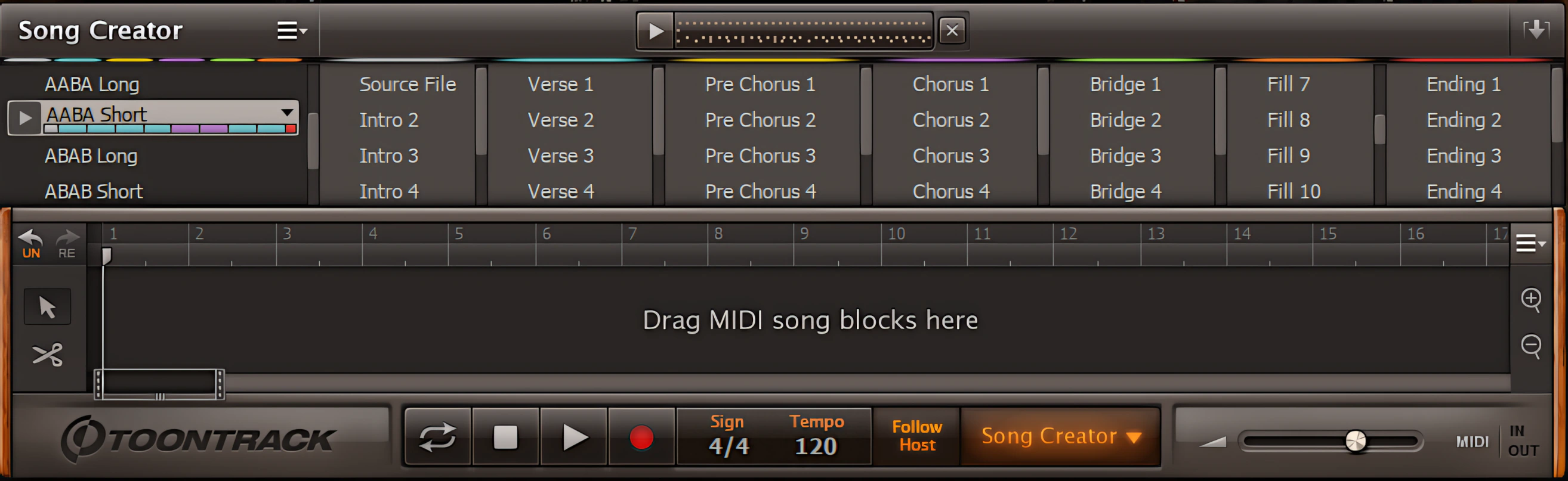
From the Song Structure Results pane, simply drag a song structure template into the timeline. Then, feel free to reorder, edit, and fine-tune the track to match your creative vision.
[ Edit Play Style ]
Double-clicking any MIDI segment on the Song Builder’s timeline launches the “Edit Play Style” window. Here, you instantly assign the clip’s leading “Power Hand” or “Opening Hit.”
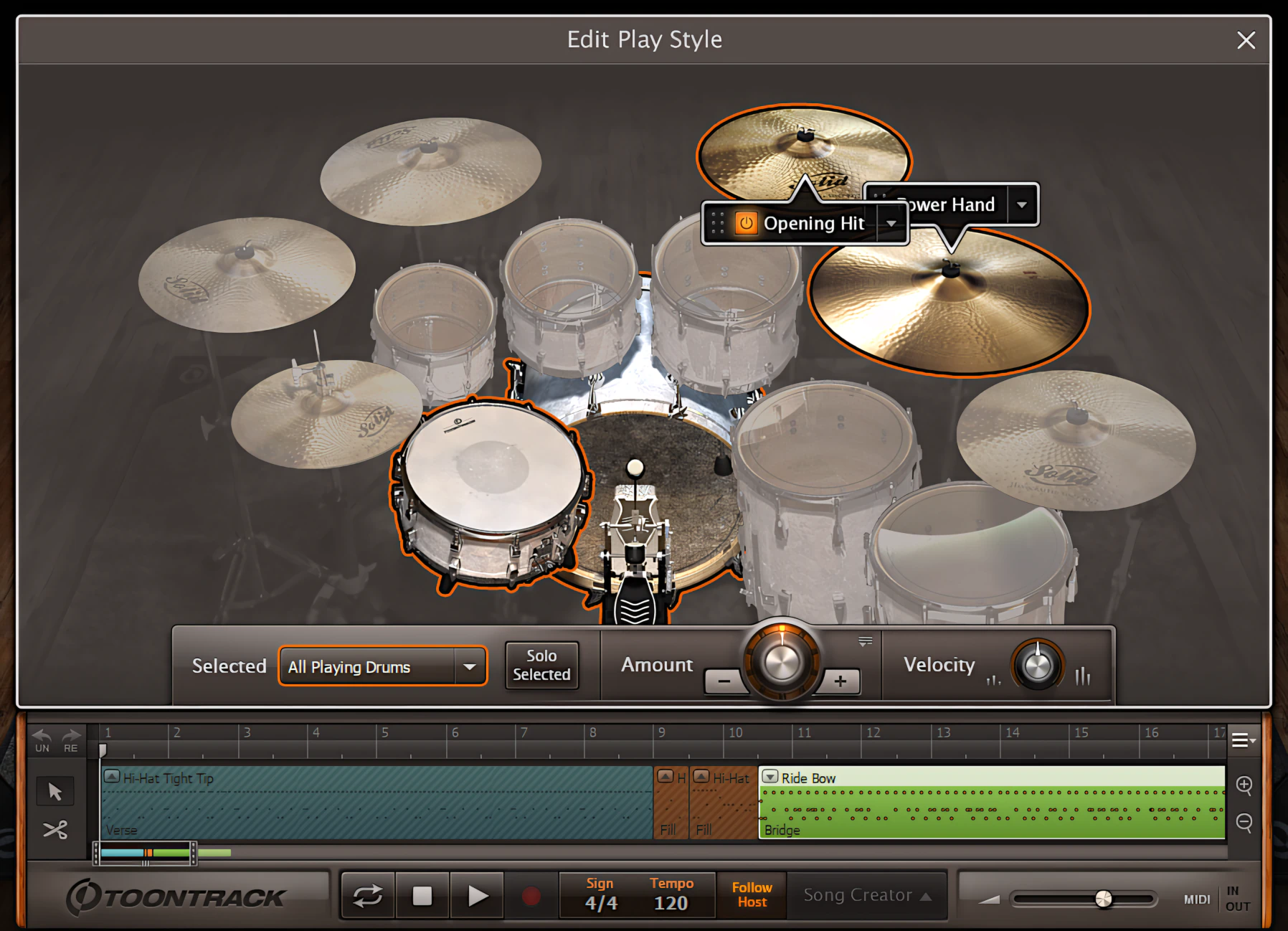
The software defaults the Power Hand to the hi-hats or ride cymbal, but you can easily switch it to a floor tom. Similarly, the Opening Hit function forces EZdrummer 2 to strike a specific drum or crash cymbal right at the start of the clip.
In the original EZdrummer, you had to manually suffer through piano roll editing to achieve this. Now, you get the same result with two clicks and zero headaches.
Need another tom or cymbal? Add drum components easily.
Within the Play Style window, you can add individual drum components to a MIDI segment with just a single, convenient click. EZD2 then intelligently weaves those new elements into the existing MIDI phrase, so everything still feels natural and musical.
The same logic applies when you add percussion elements. Simply click one or more percussion pieces to enable them. EZD2 instantly blends those extra percussion details into the groove, as if they were always meant to be there. No manual stitching. No MIDI surgery.
On a drum-by-drum basis, you can also adjust both velocity and *density levels. That way, you can fine-tune exactly how hard and how often each drum plays—like having a virtual drummer who actually listens to you.
* Density refers to how frequently and/or how aggressively that particular kit piece will be used within the midi clip.
Q: I like the song I built; can I save it??
A: Absolutely you can!
When you feel happy with the final drum track, you can easily export it as either a WAV file or a MIDI clip. With just a couple of clicks, your groove is ready for the outside world.
If you want to keep everything neatly organized, you can also save the entire session as a project file. This saves your drum configuration, mixer settings, and song builder data all in one place. Later, you can reopen the project file anytime you need to make adjustments or tweaks.
Exporting, saving, project loading, application updates, and etcetera, are all readily accessible from the “Menu” button, located in the upper right corner of the GUI.
Très convenient, n’est pas?
EZdrummer’s brilliant new feature: Tap2Find
On the “Search” screen, ToonTrack introduces its crafty Tap2Find utility – and I can’t wait for you to try it out.
Tap2Find is a clever feature that lets you tap out a rhythm pattern with ease. Using either a connected MIDI controller, or your mouse, you can create a beat with the help of a trusty metronome. While I highly recommend using a MIDI controller for the best results, the mouse option does work for simple patterns – it’s not perfect, but it gets the job done.
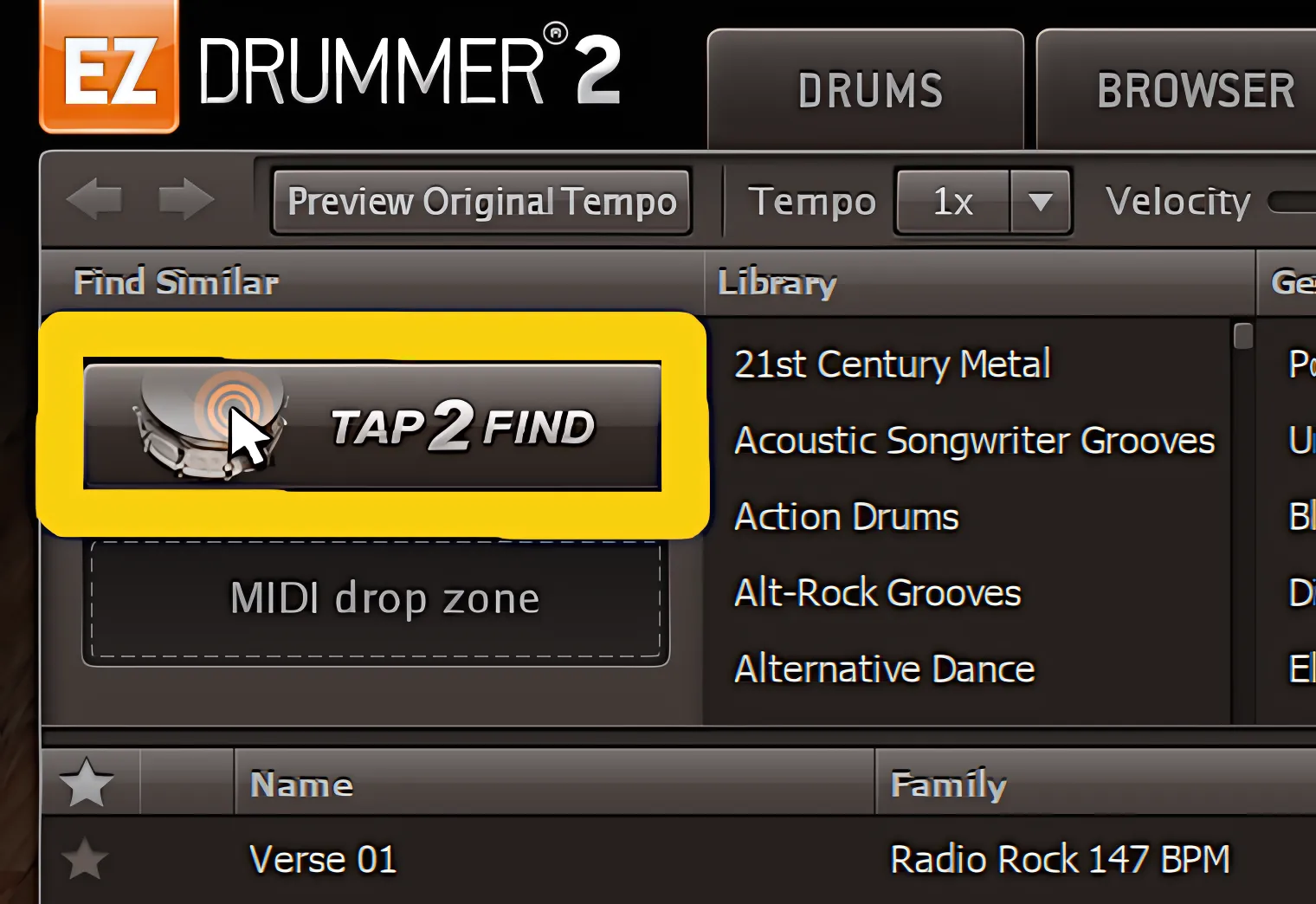
User-adjustable quantizing automatically realigns any off-time taps and puts them in perfect sync. You have full control over this precision! Once you’re satisfied with your tapping, click the “Show Results” button. EZD2 then delivers intelligently-matched approximations instantly.
These results pull from your core library, MIDI add-on packs, or any installed EZX libraries. The software orders everything by match percentage, so you see the best fits first.
You can even audition any matching pattern with ease—just highlight it and hit “Play.” Think of it as having a virtual drumming partner who never misses a beat! It’s like magic, except there’s actual math involved.
I generally find that Tap2Find performs well and delivers dependable results. It doesn’t always handle unusual time-signature patterns perfectly. Then again, I currently have only a limited number of EZXs and MIDI packs installed, so the available pool is relatively small.
Borrowing the idea of an online shop from IK Multimedia, I wonder?
Toontrack appears to have taken inspiration from online stores such as the famous IK Multimedia Custom Shop. They have thoughtfully—or perhaps coyly—implemented their own subtle take on an integrated online storefront. After all, if there’s an opportunity to tempt users with more expansions, why let it go to waste?
You can even include unowned MIDI packs in your searches. The interface conveniently displays and previews these loops for you. If you like a specific pattern, you can purchase the host MIDI pack instantly inside the app. This feature creates a massive win-win for both Toontrack and the customer. Essentially, Toontrack turned their browser into a mini Apple App Store—smart for them, and dangerously convenient for your wallet. 😉
Tap2Find produces higher success rates when additional midi packs or EZX libraries are installed.
Toontrack EZdrummer 2 Review – Sound Quality:
I have admired and used EZdrummer faithfully for quite some time now. Overall, it has consistently impressed me with its sound quality.
This is especially true for my favorite EZX add-ons: Vintage Rock, The Classic, Americana, Jazz, The Blues, and Indie Folk, among others.
These packs really shine and give the instrument a rich, musical personality.
By contrast, I always found the default “Pop/Rock” kit perfectly functional, but a bit too vanilla for my taste. It worked, yes, but it felt somewhat bland and lacking in real character. Let’s just say it got the job done, but it never exactly begged for a standing ovation.
Guess what!?
That is no longer the case!
EZD2 arrives straight from the factory with huge, characterful drum sounds right out of the box. From the moment you launch it, you hear a clear step up in both attitude and and also presence.
When you buy EZD2, it express-ships five distinct, highly capable drum kits directly to your desktop or DAW. You do not wait, you just load and play.
These kits are anything but bland or vanilla. Instead, they practically drip with vibe, class, and coolness in downright ridiculous abundance. It is like opening a drum boutique instead of a drum plug-in.
A whole new audio engine
Beneath EZD2’s sleek, new surface, a powerful audio engine is hard at work. Gone is the 16-bit, fuel-sipper of its predecessor – this new version packs a punch with 24-bit horsepower and plenty of “oomph” to spare.
So, go ahead and turn it up – I dare ya! Plug in some quality headphones or fire up your studio monitors, and you’ll quickly discover that EZD2 has a serious backbone. It’s time to experience the full force of this drum machine, and I’m confident you’ll be impressed!
Loads of character:
Each component stands out with strong articulations, character, and distinctiveness – a winning combination, if I do say so myself.
EZD2 delivers a lively onslaught of snap, crack, and pop with ease, leaving listeners in awe.
But that’s not all – this versatile tool also produces smooth, dulcet tones that are simply divine. Whether you’re crooning a ballad or embracing your mellow side, EZD2’s got you covered.
Zippy sample load-times:
The samples load quickly, and they pack your tracks with genuinely convincing drum sounds. What’s more, you’ll notice increased dynamics and a wider velocity range right away.
Easy pitch adjustments:
When you adjust any kit piece’s pitch, you won’t hear unwanted chirpiness or gurgling. Instead, you gain clean, pleasant tuning control—no sonic side effects. That’s a welcome feature indeed. A single drum kit can work across multiple tracks now. Plus, you can configure each instance to sound slightly different.
Need a low-pitched snare for one song? Go ahead. Want a crisp version for another? You’ve got options. Basically, versatility rules here.
EZD2 delivers impressive tonal flexibility across the board. Your drums sound great, and your workflow stays happy too—which is always a win.
Modern or Vintage? Both Sound Great.
The Modern kits deliver tight, well-controlled sounds, while the Vintage kits offer a more spacious character with rich, ringing resonance.
EZD2’s creators recorded every sample using top-tier studio equipment. For example, the Modern kits were captured through Neve 88R and TG12345 consoles. Meanwhile, Toontrack captured the Vintage kits’ distinctive old-school charms through an exceptionally rare REDD console.
FYI: All recording sessions took place at Mark Knopfler’s British Grove Studios in London, England.
Leading the charge was world-renowned engineer Chuck Ainlay. His expertise helped shape these meticulously recorded samples, proving once again that great ears are every bit as important as great gear.
No jagged sample cuts:
The samples decay smoothly and fully. I never encountered a single sound that abruptly cut off. To my ears, these drums require virtually zero third-party EQ tweaking because they already sound spectacular. Did I mention how incredible they sound?
Oh, and by the way, remember when I said the old EZ Drummer default “Pop/Rock” kit sounded a bit too vanilla and blasé? I now have to happily eat my words.
I am pleased as punch to tell you that the latest version actually sounds pretty darn good. The new “Pop/Rock” kit now takes full advantage of EZD2’s stellar new audio engine. As a result, the good old GMS kit cuts through the mix with far better presence and tone.
In other words, it finally sounds as confident as its name always suggested.
CPU Consumption:
I’ve put various ToonTrack plug-ins and virtual instruments through their paces, and I’ve never found them to be resource-hungry – EZD2 is no exception. In fact, on my trusty 2nd gen Intel i5 laptop, EZD2 uses a mere 3% of the CPU when running in stand-alone mode – a remarkably light footprint!
When I loaded the 64-bit VST into an instrument track in Studio One Pro 2.6, the performance monitor reported a slightly higher usage of 10-17%. However, I’m taking those numbers with a grain of salt, as the Windows Task Manager tells a different story – it shows Studio One using only 5% of available CPU.
Concluding Remarks:
In conclusion of this Toontrack EZdrummer 2 review, I award 5 stars to ToonTrack for this powerful, EZ-to-use drum virtual instrument. This new rollout of EZ Drummer delivers a grandiose collection of highly intelligent, useful features.
In my opinion, ToonTrack has definitely raised the bar with this release.
That lengthy wait for EZ Drummer 2? It was absolutely worth it.
The original EZ Drummer sounded great, especially when paired with EZX expansion packs. However, EZ Drummer 2 smokes its predecessor right off the rails. It delivers tremendously EZ-to-use controls alongside even more authentic-sounding drums.
Basically, if you thought the first version was good, buckle up—this sequel brings the noise in every way that matters!
EZD2 packs an impressive set of features that keeps the creative process engaging from start to finish. Better yet, its intuitive graphical interface inspires experimentation and encourages users to push their musical ideas further.
The included core libraries provide a remarkably strong foundation. They cover a wide range of musical styles with confidence and versatility. As a result, users can tackle most projects without immediately reaching for additional expansions. That’s good news for both your creativity and your wallet.
5 out of 5 Stars


:: Pros
- Winning interface design.
- Hyper realistic-sounding drum libraries oozing with character.
- Ginormous value vs. Cost ratio .
- Flexible and super EZ-to-use.
- Unrivaled drum track construction tool-set.
- Full range of *intelligent effects & features.
- Extremely fluid workflow.
- Modest system requirements.
- Honourable, customer-oriented company.
- Available for both MAC & PC (32 & 64 bit, including AAX)
::Cons
- I appreciate that ToonTrack emphasize ease-of-use in their products, but I would like to see a greater degree of end-user control regarding the built-in effects.
Visit the Toontrack website. www.ToonTrack.com
Intellectual Copyright – 2014 – All rights Reserved. This review may not be copied or reproduced in whole, nor in part, without express written permission from the author.

Leave a Reply