
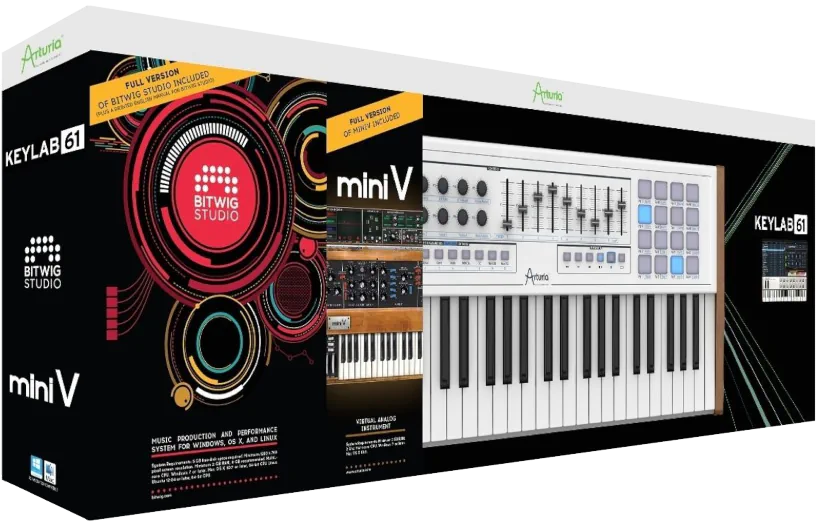
What is the Keylab 61 Producer Pack?
This pack is designed as an all-in-one, hybrid entry point for producers. It combines a good quality, purpose-built 61 key MIDI keyboard with the sound library/production software needed to create music right out of the box. Arturia zeroed in on those who want hands-on control over their virtual instruments, while having immediate access to a wide palette of professional sounds. In this complete Aruria Keylab 61 Producer Pack review, we’ll scope out nifty features such as:
- 61 velocity-sensitive, semi-weighted keys with aftertouch
- 16 RGB pads for triggering clips and samples
- 9 rotary encoders/knobs and 9 faders for DAW control
- A clickable encoder for navigation
- Full-sized keys in a sturdy build
- Analog Lab V — approximately 5,000 factory presets drawn from Arturia’s V Collection, including emulations of classic synthesizers and keyboards
- Bitwig Studio — A licensed copy of the new EDM DAW so you can immediately start sequencing, arranging, and triggering sounds without needing additional software purchases
** VOTRE ATTENTION, S’il Vous Plait!
This review is lengthy and quite broad in scope. The Producer Pack 61 has so much “packed” into it that in order to do it justice, our report is split into three individual segments.
Keylab 61 MIDI Keyboard Controller: the muscles
The KeyLab’s physical controls pre-map directly to parameters within Analog Lab and BitWig. Furthermore, magic happens the moment you plug the Arturia controller into your computer via USB. The software instantly detects the device and maps the controls. Just like that, you are ready to go—no muss, no fuss, and absolutely no hair-pulling required.
Naturally, you can use the KeyLab as a full-featured MIDI controller for almost any third-party software instrument. However, keep in mind that you might need to map those controls yourself.
You can choose from 25, 49, or 61-key configurations with these sturdy, tactile-friendly keyboards. They feature full-sized, semi-weighted keys that respond to both velocity and aftertouch—a nice touch for expressive playing within this price range.
Arturia have dressed it up and you can take it anywhere.
Arturia and Bitwig Software: the brains
The Producer Pack delivers a heaping portion of quality and value. It includes the full version of Bitwig Studio, Arturia’s own Mini V Minimoog emulation, and the richly featured Analog Lab. In other words, you get a serious toolkit, not just another download code you forget about.
Arturia proudly promotes the KeyLab series of controllers as true hybrid synthesizers. They back up that claim by building a line of solid, thoughtfully designed MIDI keyboards. These controllers compete confidently with rival offerings, and in many cases, they outshine them.
When I tested them on the reviewer’s bench, I quickly grew to appreciate Arturia’s commitment here. They’ve genuinely succeeded in integrating hardware and software seamlessly. (Which, let’s be honest, isn’t always a given.)
Pair the KeyLab controller with Analog Lab software, and you’ll experience something genuinely rewarding. This hybrid synth setup delivers real creative potential. Better yet, host everything in BitWig’s DAW, and the whole experience elevates to another level entirely.
Hi, you! If you like these kinds of reviews,
be sure to subscribe.
This sounds very exciting, but expensive – how much does it cost?
From the start, these collaborative Arturia and BitWig Producer Packs deliver a mouthwatering feast of production-ready tools at prices that are hard to resist. Honestly, the value proposition is staggering when you do the math: buying “Bitwig” ($299), “Mini V” ($99), and the “KeyLab 61” controller ($499) separately would cost you nearly $900.
Yet, this review focuses on the KeyLab 61 Producer Pack, which lists for just $549 USD at the time of writing. Talk about getting more bang for your buck—or should I say, more synthesizer for your wallet?
Hardware Inspection:
The KeyLab controller strikes an impressive balance between sophistication and durability. Its hefty aluminum chassis feels solid and dependable. At the same time, sleek lines and gently rounded edges give it a welcoming, approachable character.
Unlike the sea of dark-colored controllers on the market, the KeyLab stands out with its crisp, off-white finish. Dark gray accents provide pleasing contrast and enhance its refined appearance.
The chassis feels perfectly proportioned. It comfortably accommodates a generous selection of thoughtfully arranged knobs, sliders, switches, and pads. As a result, everything appears organized and within easy reach.
Wooden (laminate) side panels add a polished finishing touch. They elevate the design and reinforce the controller’s premium feel.
From the moment you see the KeyLab 61, it communicates quality, confidence, and elegance. Its striking appearance naturally draws players in. After all, some instruments practically beg to be played—the KeyLab does so with exceptional style.
Sure looks pretty . .
This suave, USB bus-powered MIDI controller greets you with tasteful visual charms the moment you switch it on. For starters, subtle indigo-blue backlighting discreetly massages your eyes and practically begs for a second look. The design team also deserves a raise, because they intelligently laid out all the user-adjustable controls to keep everything clutter-free.
Meanwhile, a nicely sized, 32-digit LCD screen displays your key patch and parameter information. It holds that data steady, but it also jumps into action with real-time readouts the second you touch a control. Admittedly, I wouldn’t mind if the screen were a bit larger. Even so, it remains highly effective and gets the job done without a hitch.
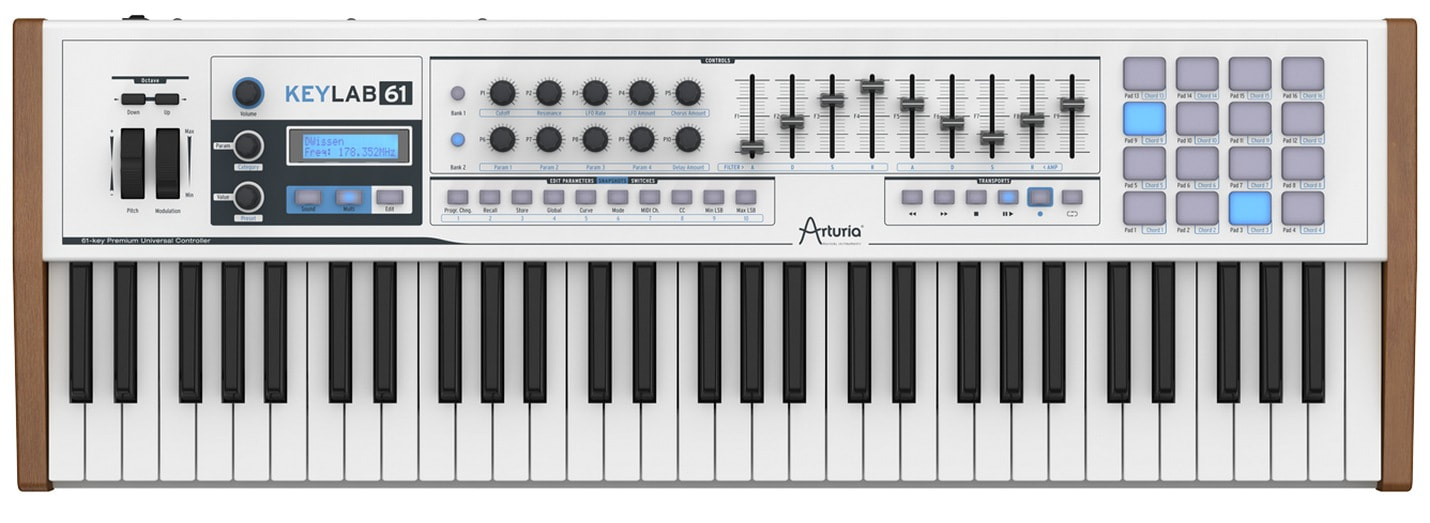
On the top panel of the KeyLab 61, you’ll find the controls neatly arranged from left to right. The layout feels intentionally designed, not randomly scattered like a bargain-bin gadget.
- A pair of octave/semi-tone transposition push buttons
- Tactility-smooth pitch bend and modulation wheels
- Volume, Parameter and Value dials (clickable endless rotary encoders)
- Small LCD panel and a row of three function buttons (Sound, Multi and Edit)
- 10 (endless rotary encoder) knobs and two bank selector buttons
- 10 assignable push button switches
- 9 medium throw sliders
- 6 Transport push-switches
- 16 Backlit pressure-sensitive, rubberized pads arranged in a 4×4 matrix
Operation and Control:
The rotary encoders and sliders operate smoothly and respond instantly. They yield just enough ‘well-oiled’ resistance to deliver genuinely satisfying tactility.
The controls feel solid, though. Nonetheless, handle them with reasonable care—they don’t strike me as heavy-duty workhorses built for studio warfare. (They’re more “treat with respect” than “indestructible.”)
Here’s where things get clever: toggle the second control bank, and those ten rotary encoders perform ‘double duty’. This design effectively doubles your mapped control set. In other words, you get 20 onboard rotary encoders total.
This dual-bank setup truly shines within BitWig. In fact, I have to hand it to the BitWig crew—they’ve engineered some seriously impressive auto-mapping that makes everything work seamlessly right out of the box.
Padding it up . .
A set of 16 rubberized pads delivers exactly what you expect: they feel solid and responsive. Their pressure and velocity sensitivity perform quite well, though a firmware update might squeeze out even more dynamic range for the truly picky among us.
You can easily configure these pads through the “Analog Lab” software to trigger pre-assigned chords like major, minor, and seventh. This feature is genuinely cool because it lets you tap out tonal rhythm parts with fluid, percussive precision. Furthermore, these pads unlock new workflow possibilities within “Bitwig.” Honestly, if your fingers could talk, they’d probably thank you for the upgrade!
The Keybed:
The keybed features a light, distinctly synth-style action. Its response remains consistent across the keyboard, offering a comfortable balance of resistance and responsiveness. As a result, organ and synth performances feel natural and expressive.

Although Arturia markets the KeyLab 61 as a semi-weighted design, I found the action somewhat sproingy rather than actually semi-weighted. The keys return quickly and feel lively under the fingers, which may appeal to players who prioritize speed and agility.
However, musicians seeking a more piano-like semi-weighted experience may prefer other controller options. That said, keyboards with a more authentic weighted feel typically come at a significantly higher price. As always, your wallet may appreciate the KeyLab more than your inner concert pianist.
Fairly sturdy, but not industrial grade . .
The keys feel reasonably solid, though they do run a little thin. Even so, they offer acceptable durability, even if they don’t quite reach “industrial grade.” I deliberately hammered away on my demo unit, and the keybed handled the abuse with flying colors. Consequently, I wouldn’t anticipate any keybed failure in a cozy studio environment.
On the other hand, I lack that same confidence for the road. I doubt the KeyLab 61 would survive a grueling, six-month tour of adrenaline-pumped, Deep Purple-style stage performances. Then again, we aren’t talking about a $2,800 Nord Electro. (Your wallet can breathe a sigh of relief there).
Velocity Control:
The keyboard responds well to velocity and offers a generous range of playing dynamics. Its relatively light keybed action does take some getting used to, though. However, once you adjust to the feel of the KeyLab 61, you can deliver expressive, dynamic performances with confidence.
Aftertouch, not just an afterthought!
This MIDI keyboard controller pulls way ahead of competing products in its price range—and aftertouch capability is the reason why. It’s the real differentiator here.
Here’s what makes that matter: plug it into any software synth designed to respond to aftertouch MIDI messages, and watch the magic happen. The synth transforms into something genuinely dynamic and lively. Your performances gain real expressive depth—something most controllers in this price bracket simply can’t claim.
The Keylab’s aftertouch implementation isn’t just a feature box to tick. It actually changes how you can play and feel the instrument.
Connectivity and Chassis:
Take a quick glance at the rear panel, and you’ll immediately spot “KeyLab” on the far left alongside Arturia’s logo dead center. The controller looks undeniably suave and sexy from this perspective.
Moving right to left, the back features a sturdy rocker power switch, a 5V power input, a USB-B port, an AUX jack, standard sustain and expression pedal jacks, plus dual 5-pin MIDI ports. This setup ensures your controller stays ready for any mission.

Furthermore, sturdy rubberized feet on the bottom keep this weighty keyboard firmly planted on your desk or table. No more slipping or sliding while you play! It won’t slide away even if you get too excited during a solo.
Compared with many competing controllers, the KeyLab 61 emerges as a clear leader in functionality, build quality, visual appeal, and software integration. Arturia has created a controller that feels thoughtfully engineered from top to bottom, with every element contributing to a polished user experience.
Most importantly, the KeyLab 61 feels like a professional instrument. Its solid construction inspires confidence and gives the controller a reassuring sense of substance. In contrast, some competitors in the same price range suffer from lightweight, plastic-heavy designs that can feel less refined.
The KeyLab avoids those pitfalls entirely. Instead, it delivers a premium tactile experience that reinforces its professional credentials. Simply put, it feels built for serious musicians rather than for a brief cameo on your desk.
Still, Arturia skimped in a few ways . .
Firstly, the included USB cable feels pretty flimsy and stretches a mere three or four feet. I really wish Arturia chose a cable that actually matched the stellar value of this bundle. Instead, you get a cord that feels like it belongs to a cheap toaster.
Next, Arturia really missed missed an important mark by failing to include a proper 5V power adapter for the KeyLab 61. USB bus power is certainly simple and convenient, but the keyboard demands its own dedicated USB port. In other words, passive USB hubs are off the guest list.
This setup quickly becomes a headache if you rely on traditional MIDI DIN connections, because the keyboard still needs power. Without an adapter, you end up juggling ports and cables instead of just making music.

Lastly, the key action falls far short of what is promised. The key-travel is quite shallow and decidedly springy feeling. Because the keyboard is advertised as having semi-weighted action, this might prove to be its biggest letdown.
Registeration and Authorization:
Each and every Keylab controller comes bundled with Arturia’s “Analog Lab” software. Alas, the software first needs to be ‘activated’ before it is usable. It’s possible that you’re now thinking, “Oh no! Not another e-Licenser app?!”
Good News! No more eLicenser requirement.
Arturia has officially ditched eLicensed copy protection in their latest software versions. For many, this sparks genuine joy—and for good reason.
Here’s the trade-off, though: if you already own older Arturia products licensed via USB eLicenser, you can stick with what you’ve got. No problems there.

But here’s where things shift: want to upgrade to the latest revision? You’ll need to embrace Arturia’s newest copy protection system instead.
Introducing Arturia Software Center Activation:
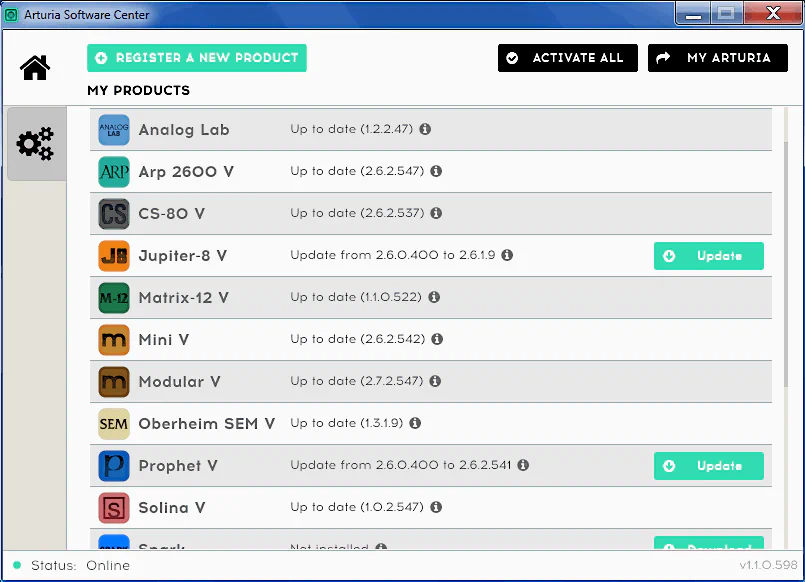
In a nutshell, ‘ASC’ is Arturia’s version of the standard copy protection method known as challenge/response. Customers receive up to five concurrent activations per product or bundle. The activation process runs smoothly through the exclusive ‘Arturia Software Center.’ Honestly, it works well and authorizes your registered/installed programs seamlessly.
Potential Activation Hiccups
Unfortunately, one potential drawback involves license management. Users cannot currently manage activations through the “My Arturia” section of the company’s website. As a result, a crashed hard drive or hardware failure could potentially lead to the loss of an activation.
Arturia may want to reconsider its approach to license management. Allowing customers to view and manage activations online would provide greater flexibility and peace of mind. It would also simplify the recovery process when users replace or repair their systems.
Several software companies already offer this capability. For example, PreSonus and Toontrack allow customers to manage software licenses through online accounts. Adopting a similar model could further strengthen the overall user experience and eliminate a potential source of frustration. After all, musicians generally prefer spending time making music rather than keeping score of software activations.
** UPDATE **
I’m thrilled to report that Arturia took this recommendation to heart and has since implemented a means for users to manage enumerated activations within their personal Arturia account.
4 out of 5 Stars


:: Pros
- Solid, durable build quality.
- Perfect integration with Analog Lab software & BitWig DAW.
- Impressive, sleek appearance.
- Generous number of tactile-friendly controls.
- Good midi dynamics control.
- Well provisioned with all necessary I/O connectivity.
- USB Bus-powered – Conservative power requirements.
::Cons
- Keybed action is a little bit light.
- It would be better if Arturia included an external 5v power adapter.
- A longer, more sturdy USB cable is needed.
Visit the Arturia website. www.Arturia.com
Intellectual Copyright – 2015 – All rights Reserved. This review may not be copied or reproduced in whole, nor in part, without express written permission from the author.

Leave a Reply