
Producer Pack – Part II
What is Analog Lab?
Analog Lab is a streamlined software instrument designed to give users quick access to Arturia’s extensive library of vintage instrument emulations. It serves as an easy-to-use, unified front-end for all the instruments in Arturia’s V Collection suite. Throughout this deep-dive Arturia Analog Lab review, we’ll explore how It prioritizes workflow speed and performance over deep per-instrument sound design.
Analog Lab leads the pack because of its unique, expansive feature set:
- Integrates PERFECTLY with Arturia’s KeyLab MIDI keyboards
- 5000+ Factory Presets: Originally shipped with hundreds of hand-crafted presets drawn from the V Collection instruments
- Streamlined Browser: A fast preset browsing system that let users audition sounds quickly and organize them into playlists
- Global Control Section: Single filter, envelope, LFO, and drive controls that could be mapped to MIDI hardware
- Dual-Part Layering: Ability to layer two instruments together
- Split Keyboard Functionality: Split the keyboard to play different instruments in different ranges
- Built-in Effects: Reverb, delay, chorus, and phaser
- MIDI Learn: Macro knobs assignable to external controllers
- Deep Integration: Could import and edit any V Collection instrument preset while preserving the full parameter set for deeper sound design
** VOTRE ATTENTION, S’il Vous Plait!
This review is lengthy and quite broad in scope. The KeyLab 61 Producer Pack has so much “packed” into it, that in order to do it justice, our report is split into three individual segments.
Introduction:
Arturia’s “Analog Lab” might just be the audio-production community’s best-kept secret. Ironically, it sits wide open to the public. Yes, I threw that oxymoron in there on purpose. Please hold your applause. 😀
This article may be considered Part II of my Arturia KeyLab 61 Producer Pack review. Because the physical keyboard (KeyLab 61) is categorized as the muscles of the hybrid Producer Pack, let’s designate Analog Lab as ‘the brain‘.
Most synth lovers know Arturia’s pedigree. Yet, many producers still haven’t actually experienced these products firsthand. Generally speaking, home producers fall into two camps. You either love to tweak knobs relentlessly, or you just want great sounds without the fuss. Fortunately, Analog Lab caters perfectly to the second group.
You can still adjust the main settings for each preset. However, the software ditches deep editing to keep things simple and convenient.
By the way, you can unlock a cool bonus feature here. If you own a full edition of an Arturia V synth, you can open that specific module right inside Analog Lab. Then, you can tweak to your heart’s content.
No kitchen sink, but there is loads of other stuff crammed in . .
Analog Lab now gives you access to about 6,000 expertly crafted patches from the complete Arturia V Collection of virtual analog synths. So yes, you suddenly have more sounds than most people know what to do with. At the time of this publication, it includes the following:
- ARP 2600 V
- CS-80 V
- Jupiter -8V
- Mini V
- SEM V
- Solina V
- Modular V
- Oberheim SEM V
- Prophet V
- Prophet VS
- Vox Continental V
- Matrix -12 V
Analog Lab gives you the complete collection of Arturia’s virtual analog synth engines in one streamlined, easy-to-use package. You get the power of the full lineup, without the complexity.
Hi, you! If you like these kinds of reviews,
be sure to subscribe.
Even better, you can get it for a fraction of the cost of the full-featured V Collection. In other words, Arturia hands you a budget-friendly, no-fuss gateway into the world of their mighty synth universe.
It’s a GREAT Deal!
This is Arturia’s congenial, cost-effective option for value-conscious users and non-tweakers alike. You skip the deep editing if you want, but you still enjoy the sound.
At only $89 (USD), the price borders on ridiculous. It really feels like one of those deals you grab in a hurry while an accomplice “keeps the car running” outside.
Clearly, you’re looking at a dizzying collection of presets that handles most nearly any musical genre or sound design interest. What’s more, you’ll find all the usual suspects here—and loading them takes just one or two mouse clicks. In fact, it’s a true one-stop-shop that covers everything. Pads, plucks, leads, basses, arps, strings, brass. If you can imagine it, you’ve got it.

Here’s the thing though: Arturia really should have slapped a warning label on this thing. Because honestly, you’ll easily lose yourself in countless hours of experimentation, play, and delightful tom-foolery.
Visuals:
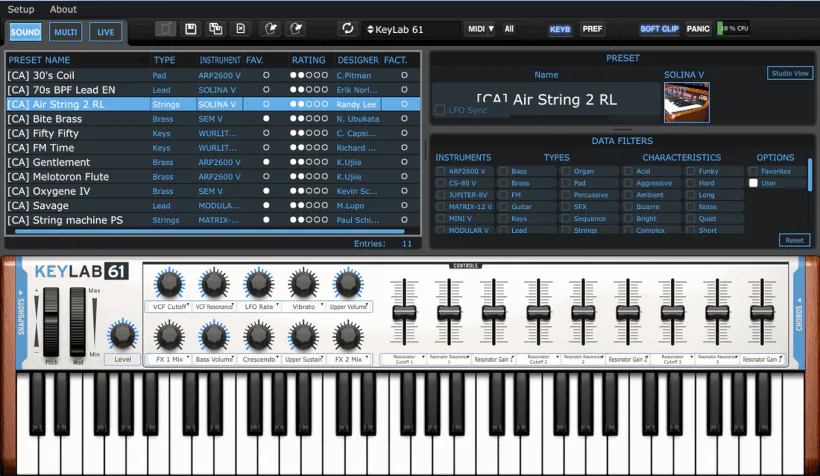
Arturia’s Analog Lab delivers an expansive, multi-paneled interface explicitly designed to sync seamlessly with Arturia’s hardware controllers. You can resize the GUI, yet even at its default minimum size, it boasts generous dimensions of roughly 1250px by 720px.
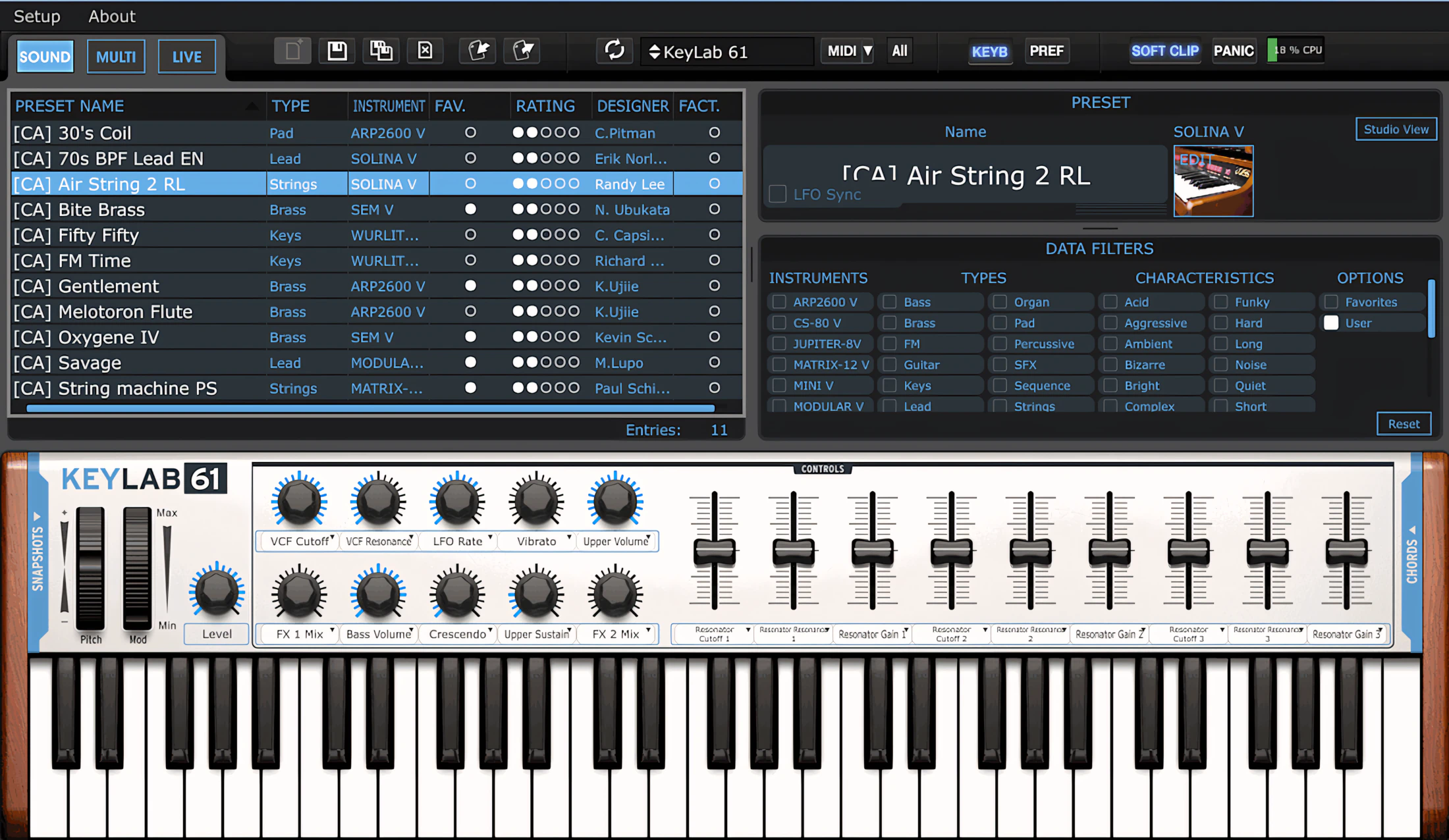
Dark tones dominate the palette, creating a striking contrast against indigo-blue text and tasteful white accents. These fonts remain crystal clear, ensuring effortless readability whether you’re in a dim studio or under bright lights. Consequently, the interface stays easy on the eyes while driving a swift, efficient workflow.
Finally, other design elements perfectly mirror Arturia’s hardware color schemes, especially that virtual “keyboard” anchoring the bottom of the screen.
The array of rotary dials, sliders, and pitch/modulation wheels on the virtual keyboard accurately mirrors the controls found on the physical device. Better yet, the virtual keyboard automatically updates its appearance to match the connected Arturia controller. It’s a thoughtful touch that keeps everything in sync visually—no identity crisis for your hardware.
Main Toolbar:
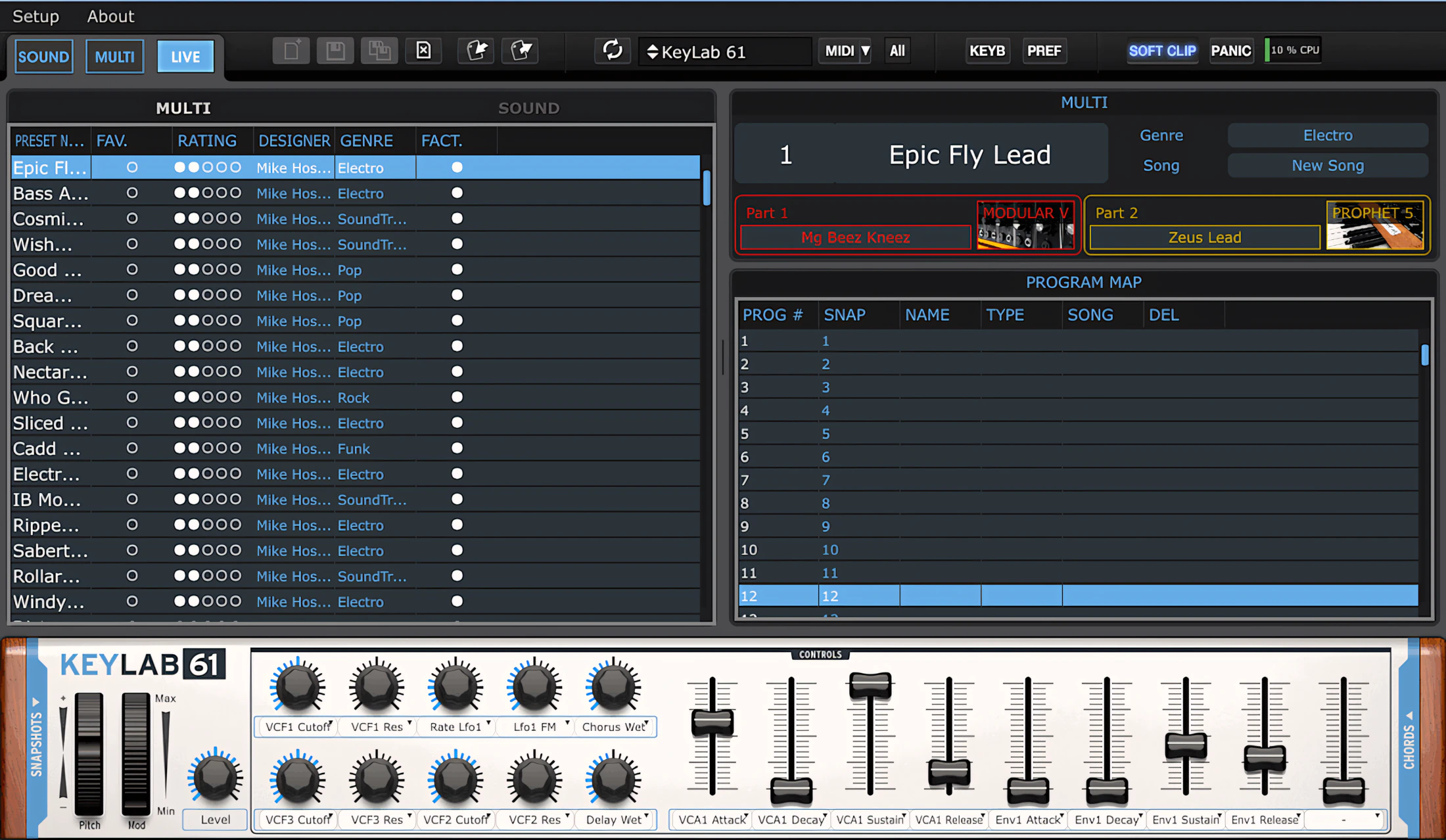
The topmost toolbar houses a preset manager, midi-learn, midi panic, a keyboard display, and general preferences.

Just below that, you will immediately notice the main interface splits into three distinct regions. The upper area hosts a scrollable preset browser on the left, while an instrument filtering section sits on the right.
Want to change the layout? Simply click and drag the dividing bar left or right to dynamically resize them. (No rocket science degree required.)
Virtual Keyboard:
On the lower portion of the screen, you see the virtual keyboard. As you probably hoped, it closely mirrors the control layout of its physical Arturia counterpart.
The designers subtly enhance it with shadows and light 3D-style textures. As a result, the whole interface looks inviting and highly “playable,” not just like another flat software panel.
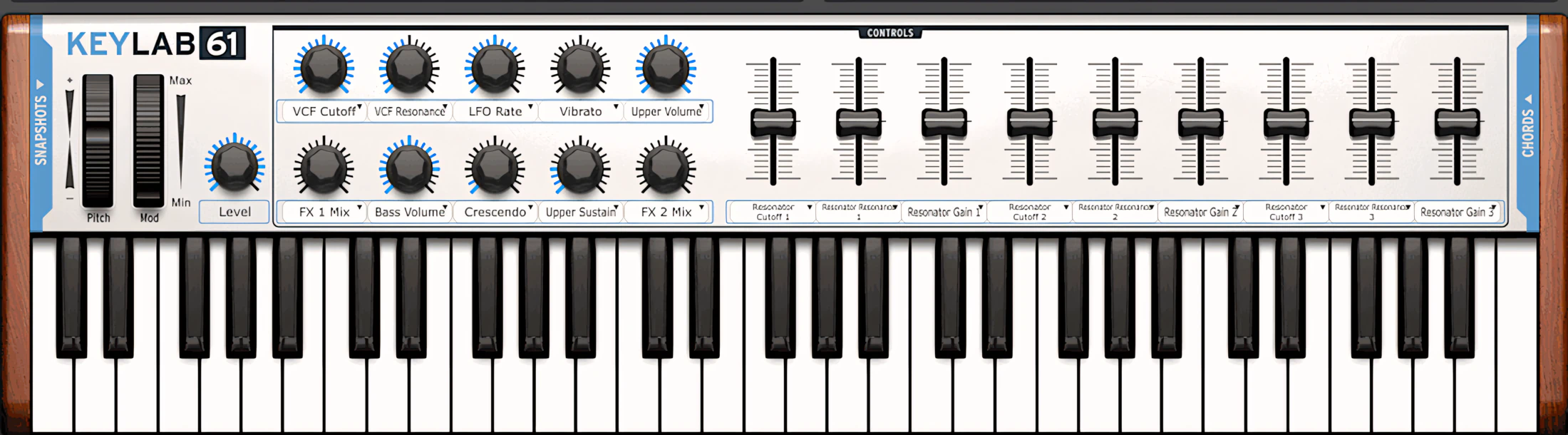
You also avoid the hassle of MIDI mapping or constantly double-checking that the knobs on your physical controller match the right software controls. You just grab a knob, turn it, and it does what you expect. That alone can save your sanity.
And yes, it all comes back to the same powerful idea: hybrid synthesis.
Operation and Control:
Pre-Mapped and Rarin’ to Go!
The magic happens instantly: plug in an Arturia keyboard to a computer running “Analog Lab,” and you’ve got out-of-the-box performance ready to go. What’s more, Arturia pre-maps all the keyboard’s controls straight from the factory—no setup required. Talk about textbook hybrid synthesis in action. This is a perfect example of it working flawlessly.
Here’s the best part though: “Analog Lab” doesn’t need Arturia hardware to shine. It absolutely holds its own as a standalone app or plug-in. Configure it to work beautifully with virtually any MIDI keyboard controller. Simply tap into the app’s smart MIDI-learn functionality, and you’re off to the races.
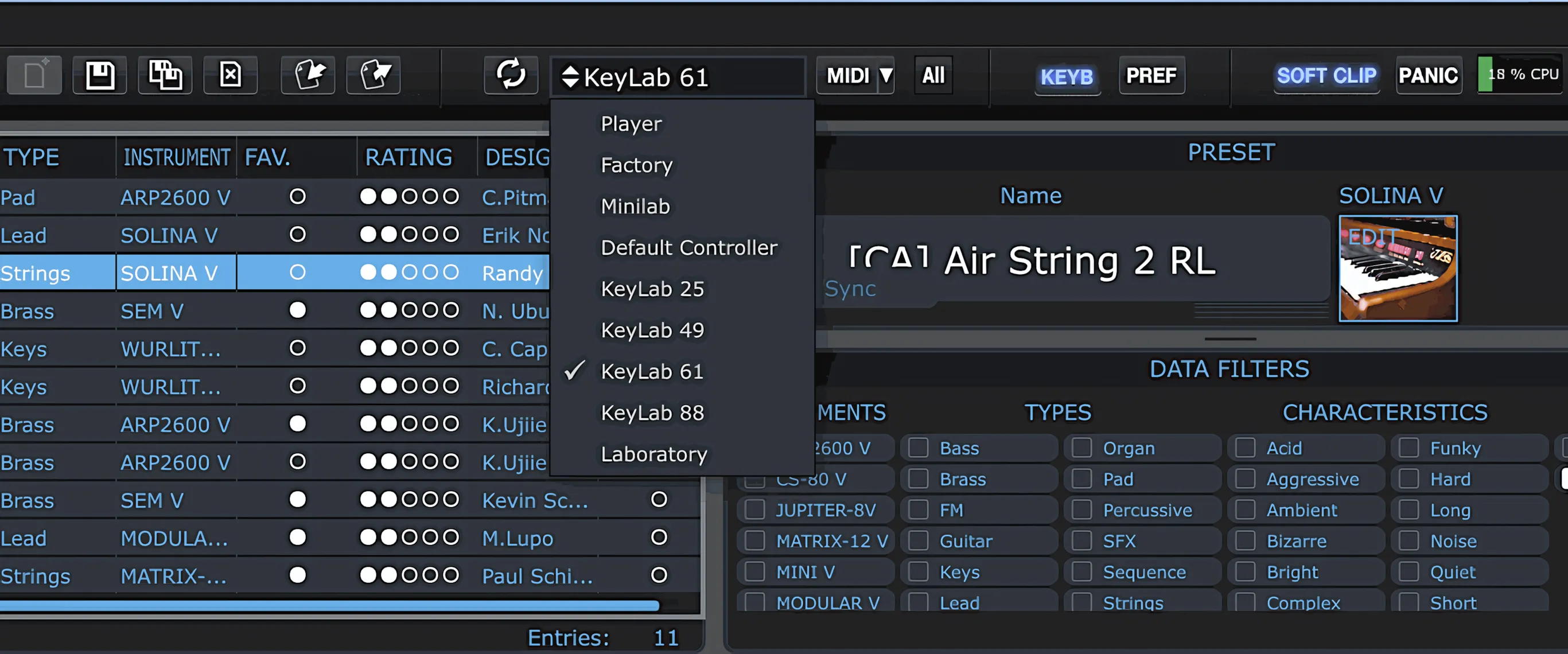
Select your Arturia Keyboard model
You can also manually select an Arturia keyboard layout by clicking the “Controller” drop-down menu in the center of the top toolbar. Next, simply hit the Sync button to instantly refresh the connection. It’s a quick process that saves you from hunting for hidden menus—and it happens so fast, you might miss the spark if you blink!
Each knob, wheel, and slider responds smoothly to mouse movements, although the sensitivity occasionally feels a little conservative. Even so, slightly restrained controls are far preferable to ones that overshoot at the slightest touch. After all, precision inspires confidence, while runaway controls tend to inspire colorful language.
Don’t have a controller connected? You can still preview sounds simply by clicking the on-screen keys.
Granted, using your computer keyboard as a virtual MIDI controller would be incredibly convenient. Unfortunately, Arturia hasn’t implemented that feature yet. (Fingers crossed they will put this feature into a near-future update.)
Snapshots and Chords
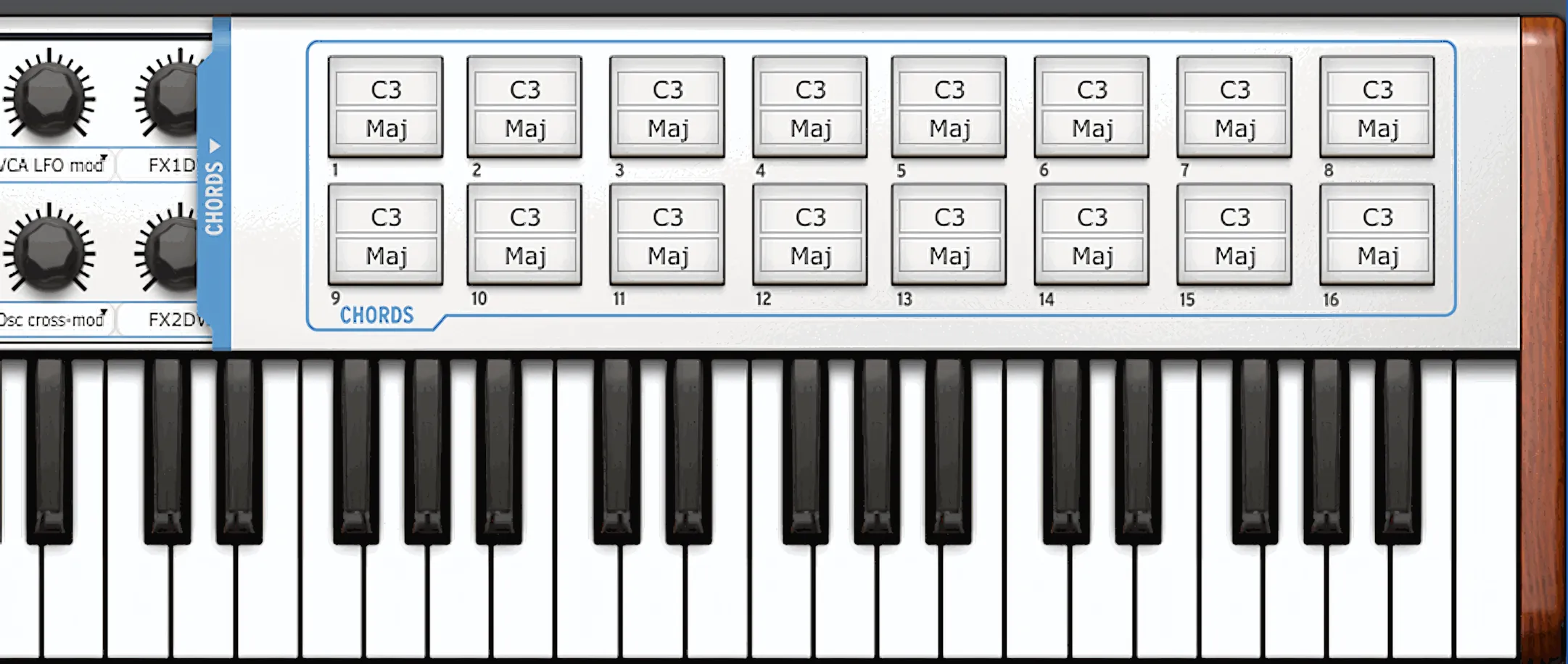
Two expandable panels sit neatly tucked away on both side edges of the virtual keyboard. When you click either of the powder-blue strips, you reveal the Snapshots panel on the left or the Chords panel on the right. Simple, clean, and just one click away from feeling clever.
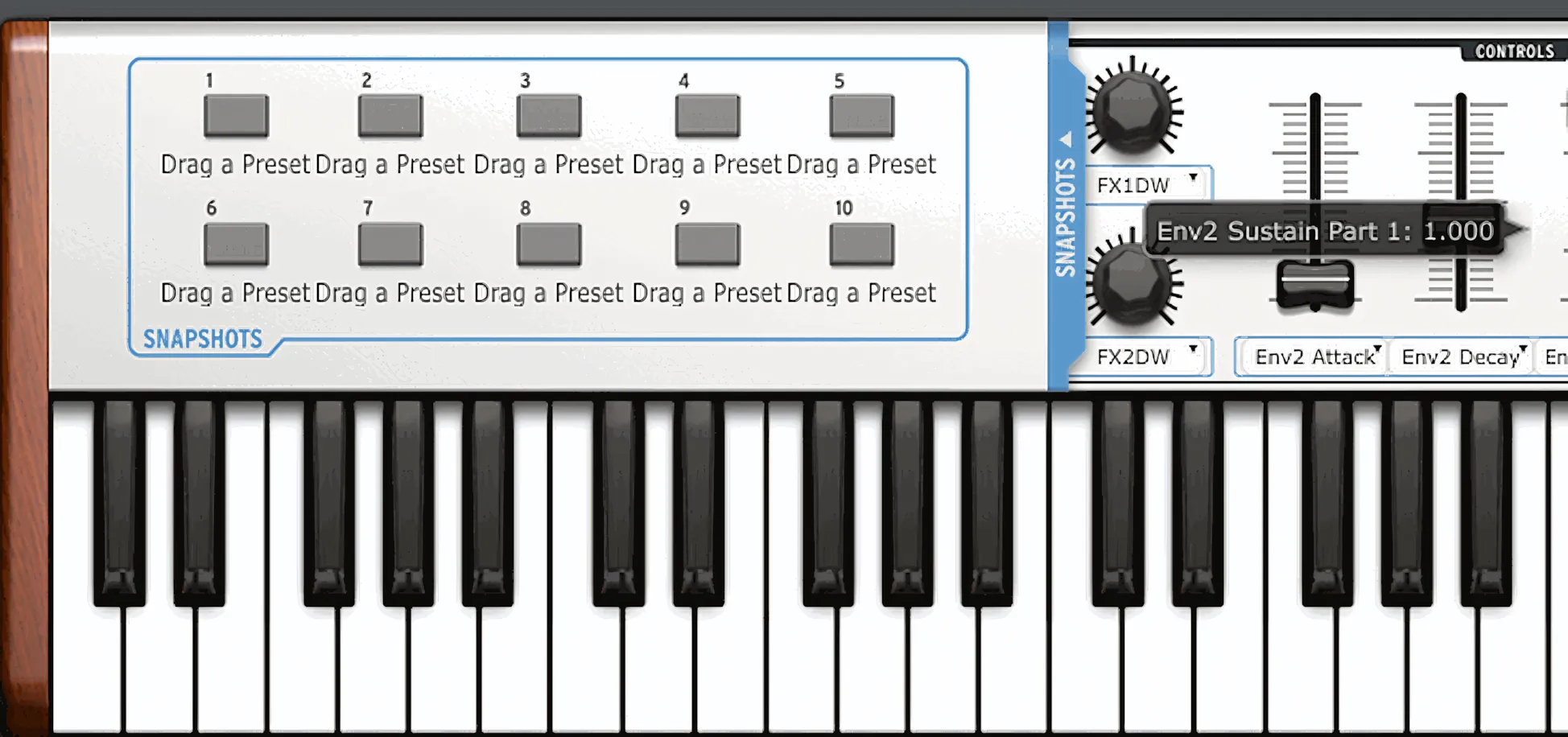
Inside the Snapshots panel, you can freely drag and drop your favorite presets from the Browser, up to a maximum of ten. These ten slots correspond directly to the ten physical push switches beneath the twin rows of rotary dials on the KeyLab 61.
So when you hit a button on the hardware, the matching Snapshot instantly comes to life in the software. No menu diving. No guesswork. Just click, press, and play.
Head to the right and expand the Chords panel to instantly assign your preferred chords to any of the Keylab’s 16 Pads. (Yes, I know—Hybrid synthesis again!)
Here’s where it gets flexible: you can configure chord delegations across all key-signatures, spanning from C-2 all the way up to G8. Better yet, you’ve got plenty of variants to choose from—major, minor, diminished, and beyond. Each pad gives you two clickable fields to work with: Key and Variation.
Sound Panel:
The interface defaults to the “Sound” mode, but “Multi” and “Live” modes wait in the wings just in case you need them. Honestly, “Sound” is where you’ll live 90% of the time in Analog Lab, so it’s good to know your way around.
Within this hub, you can browse individual presets, pick specific instruments, or laser-focus your search by filtering through type, genre, style, and a whole bunch of other options. It’s like a library that actually knows where all its books are—no more wandering aimlessly in the aisles!
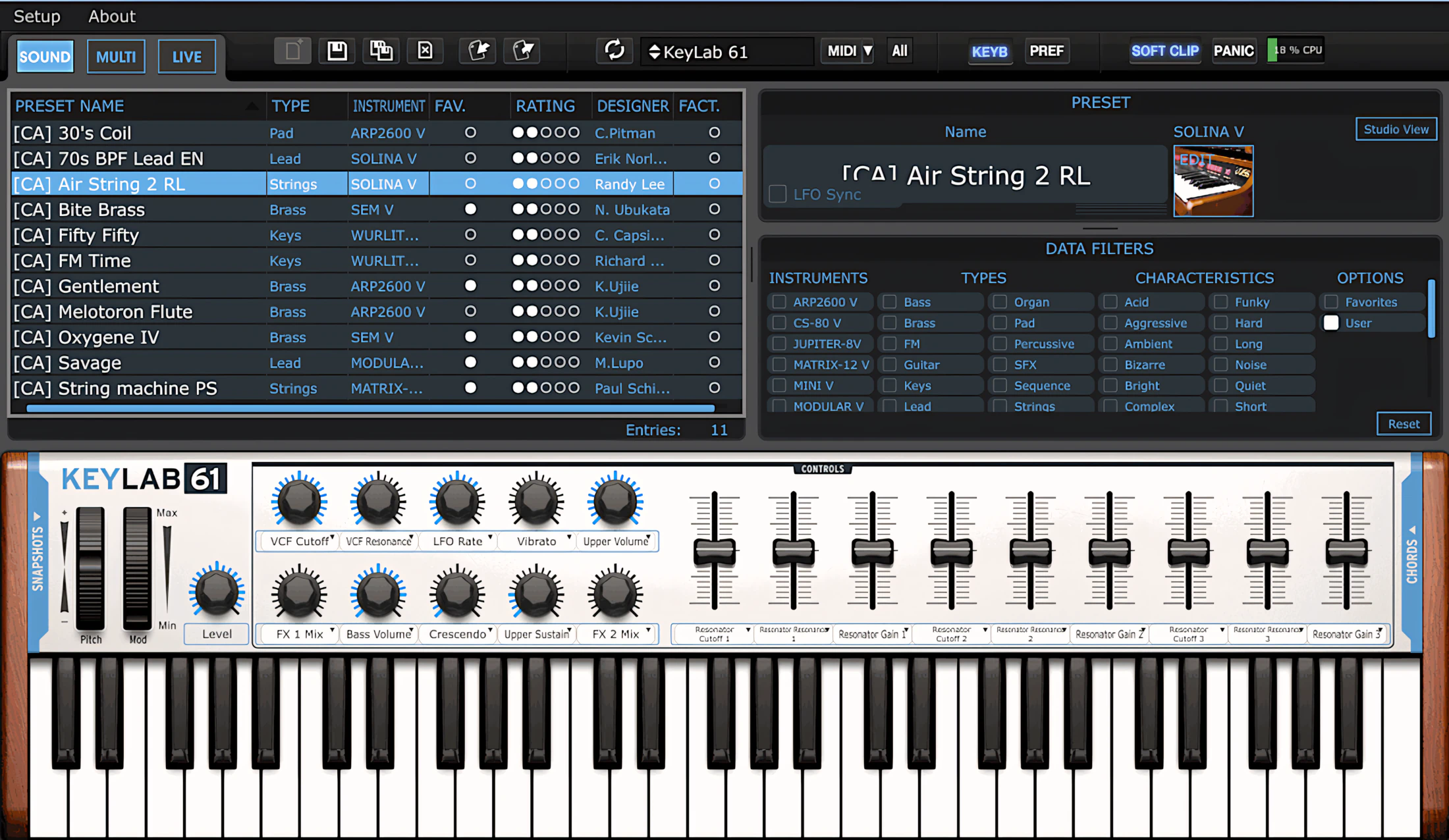
Studio View or Filter View
While configuring settings on the right side, within the Instrument/Data Filtering section, you can choose between two views: Studio View and Filter View. In Studio View, Analog Lab presents a charming graphical representation of a cozy studio packed with the vintage synthesizers featured in the software.
It’s a clever design choice that makes browsing feel more like exploring a musician’s dream workspace than scrolling through a database.
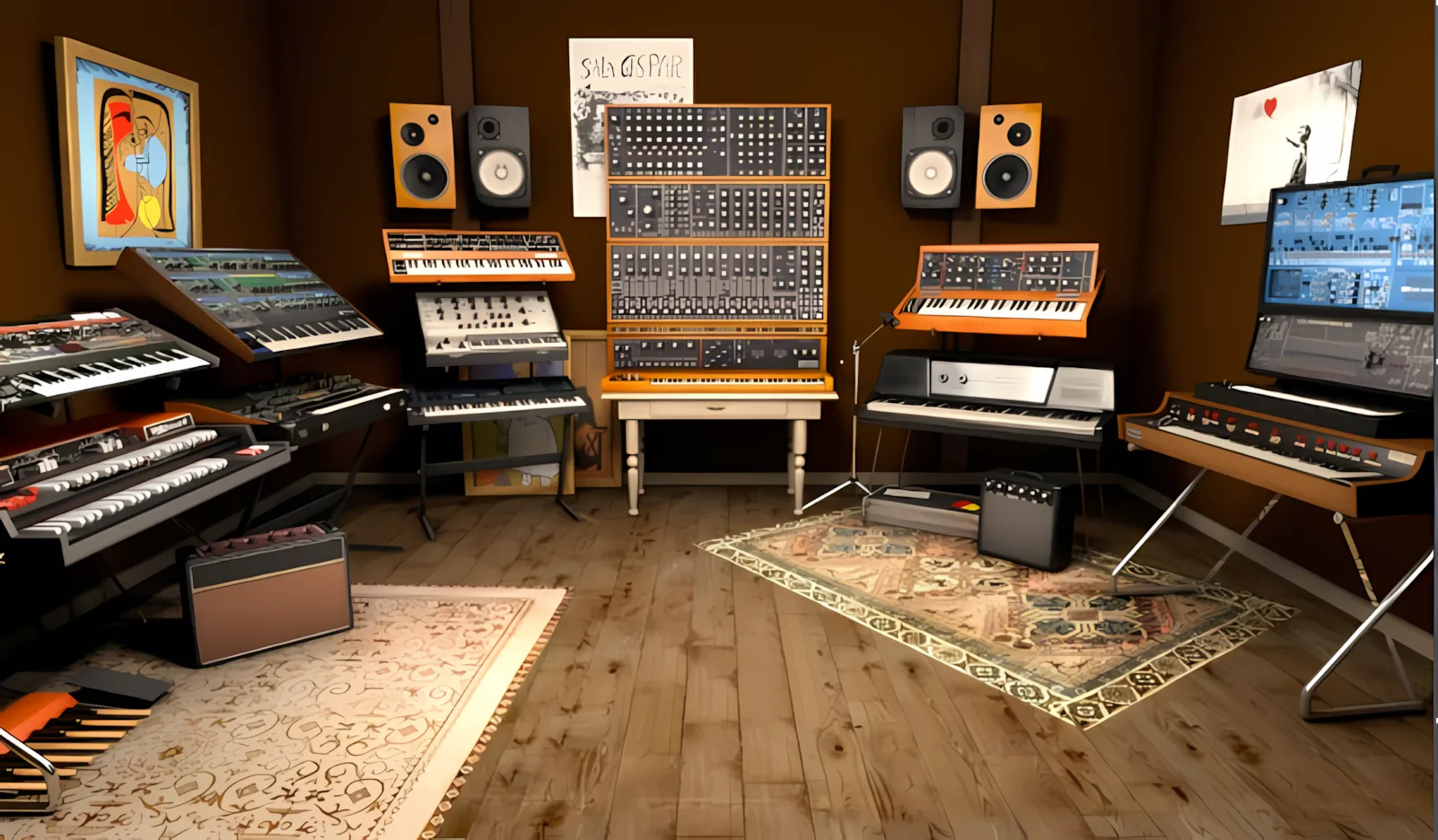
Click any instrument to highlight it. Immediately, the left browser panel populates with presets for that specific gear.
The reverse works just as smoothly. For instance, if you browse the master list and click a preset, the focus instantly shifts to the correct instrument. It’s like magic, but with code.
When you open the Filter view panel, you see a generous set of selectable checkboxes. The system divides them intelligently into four categories: Instrument, Type, Characteristics, and Options. Everything stays organized, so you don’t have to.
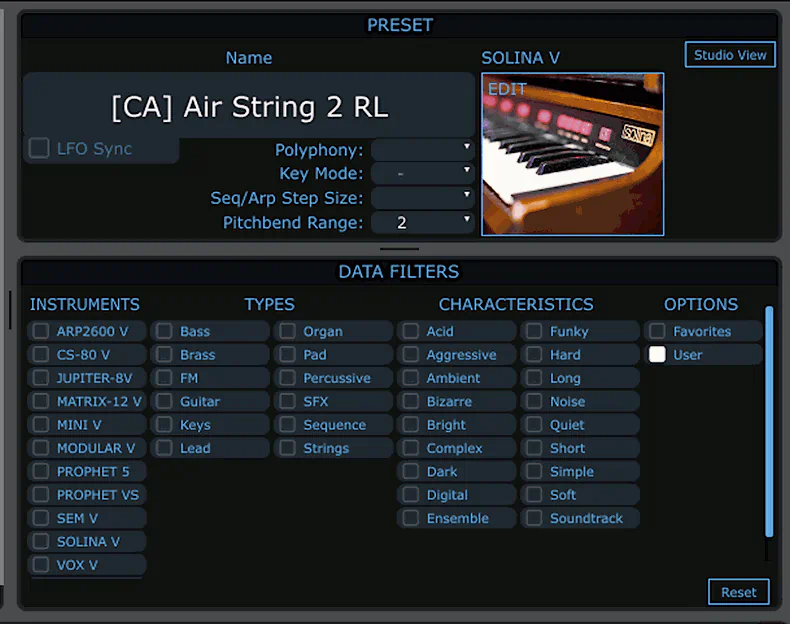
For example, suppose you want to browse only pad presets for Oberheim synths. First, you select “Sem V” and “Matrix-12” in the Instrument column. Next, you click “Pads” in the Types column. Then, you narrow things down even further by choosing the specific sound characteristics you have in mind in the Characteristics column.
Once you do that, the Browser on the left displays only the presets that match your choices. In other words, you spend less time hunting and more time actually making music. Novel concept, right?
Sorting Presets:
Click any header in the browser, and you’ll sort the presets list alphabetically from 0–Z—or flip it into reverse with another click. Here’s the catch though: you can only sort one column at a time. Unfortunately, the browser won’t let you stack sorts, like filtering by Type first and then by Instrument.
** EDITOR’S UPDATE **
I’m pleased to report that Arturia has exstensibly enhanced the search and sorting capabilites within AnalogLab. Consequently, you can now utilize stacked sorting.
Speaking of presets, it’s simple to import and/or export presets using the respective functions located up on the toolbar.
Uh Oh, we have a presets problem, Houston . .

Unfortunately, I must dock a few points from Arturia due to some stubborn quirks I keep encountering in the Standalone application. The program crashes frequently right at startup, or sometimes produces zero sound when loading certain user presets.
After digging deeper, this problem targets only the newer synth engines: Matrix-12 V, Wurlitzer V, and Solina V. Strangely enough, the classic synth engines appear completely unaffected. Honestly, it feels like the old-timers are sitting it out while the new kids learn how to behave properly.
For the record, this glitch persists across both computers where I have the application installed. So unfortunately, it’s not just one rogue machine throwing tantrums—it’s definitely on Arturia’s side of the fence!
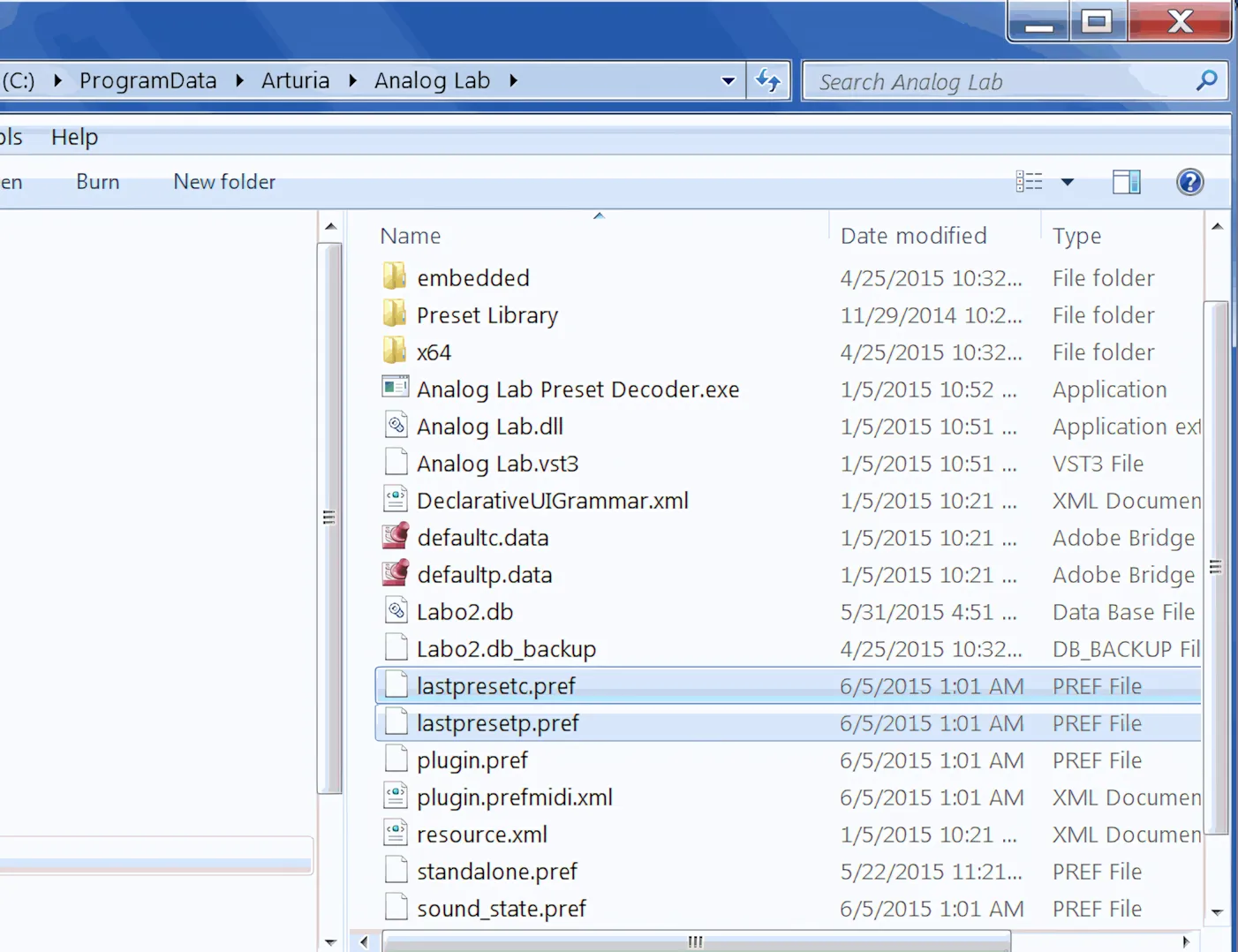
At present, the only reliable fix I have found involves deleting the two preference files shown here. Once I remove those files, the application immediately returns to normal operation. Interestingly, this issue never occurs when Analog Lab runs as a hosted plug-in, which suggests the bug affects only the standalone version.
Multi Panel:
Multi mode is where creativity can truly flourish. It allows you to combine sounds from the same instrument or layer patches from two different synthesizers.
You can stack sounds freely across two parts or create keyboard splits to shape more complex performances. Naturally, you can also adjust the panning and volume of each part independently, giving you precise control over the final mix.
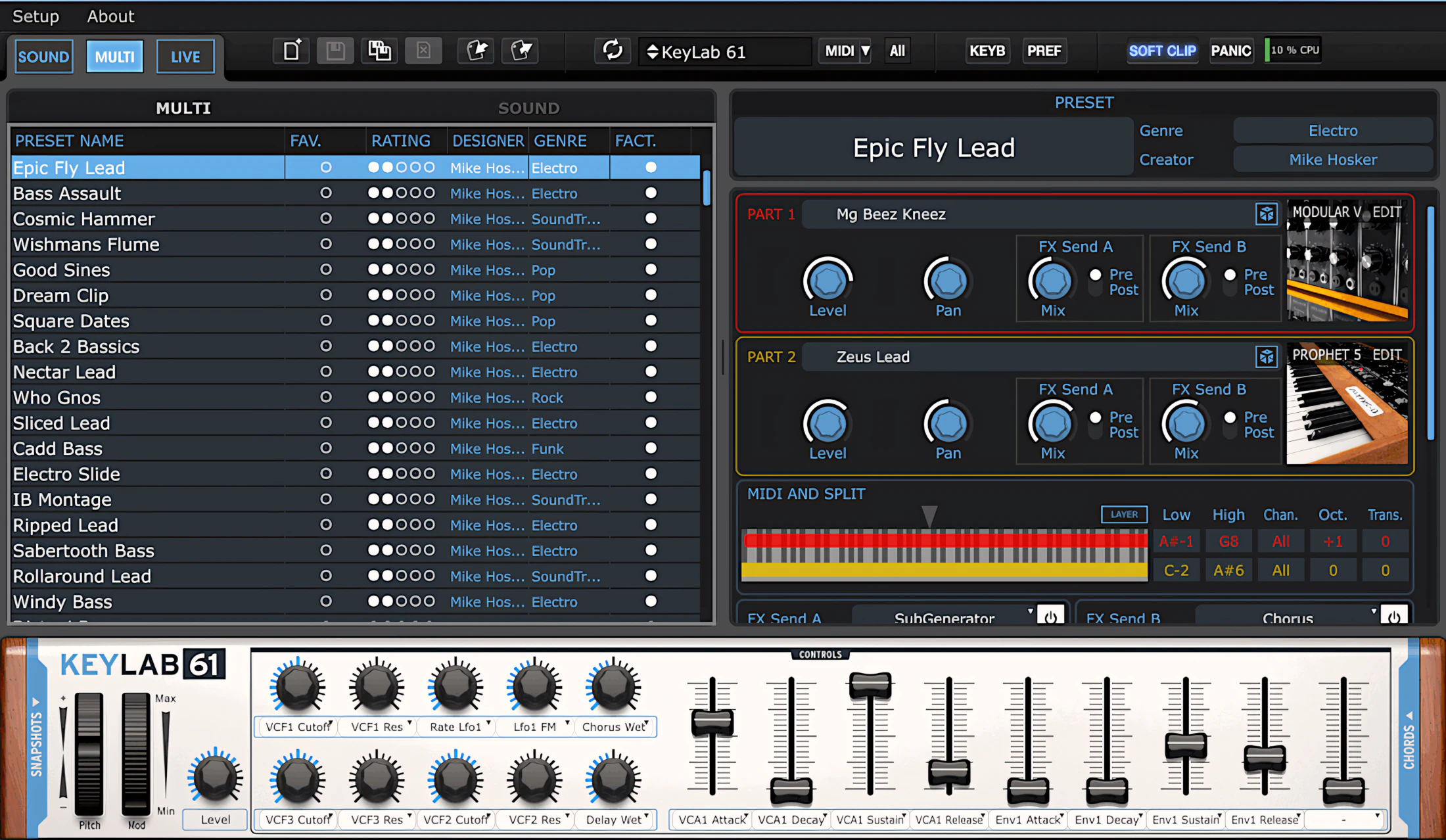
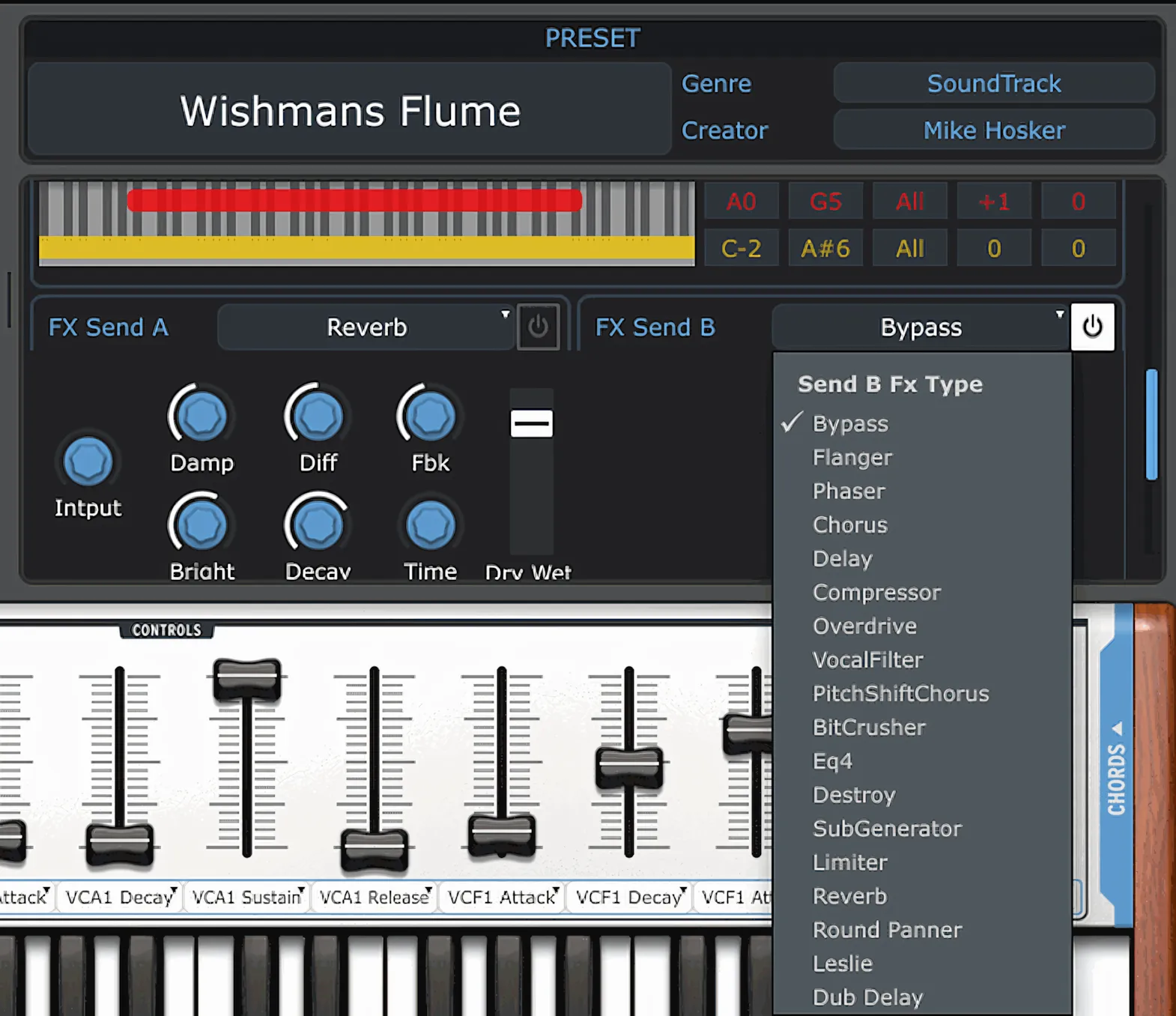
Furthermore, you can route your tracks to a pair of virtual effect sends. The software lets you condition them as either “pre” or “post” fader.
Want to see your options? Check out the image on the left. Conveniently, it displays every single available effect. (Spoiled for choice, really.)
Assign Controller Functions with Ease
You can assign common controller features such as portamento, expression, and the mod wheel to either one or both of the two parts. For example, if you want your keyboard’s mod wheel to affect only one part, you can set that up quickly and easily. No wizardry required, just a few clicks and you are done.
Multi mode gives you a substantial number of pre-configured choices right out of the box. However, just like in standard Sound mode, you can freely save your own custom presets.
Finally, you can also drop Multi mode presets directly into the Snapshots panel. So with a single click or button press, your carefully crafted multi setup is ready to go.
Go Live, Baby!
Live mode puts customization in your hands for live performance. You can pre-configure up to 128 patches here—including multis—which the system divides into groups of 16. Simply drag and drop presets from the browser panel into the Live region. Here’s the kicker: the first 10 patches always directly correspond to any Snapshots you’ve already assigned. With Live mode, quick song-part switches or setlist changes become delightfully doable.
Analog Lab – synthesis for the rest of us:
You’ll find endless videos, written reviews, and forum debates dissecting Arturia’s virtual analogue synthesizers. Some enthusiasts hail them as the greatest invention since sliced bread. Others, however, tear into them with surprising criticism.
Personally, I sit firmly outside both camps. After all, I spent most of my musical life strumming guitars, plucking bass lines, and tinkering with keys, so I bring a slightly different perspective to the table!
I admit it – I’m getting older
Like many of you, I grew up listening to the popular music of the 1970s, 1980s, and 1990s. At the time, I had no idea which magnificent electronic instruments created those sounds. Nevertheless, I thoroughly enjoyed the rich tones pouring out of Junos, Jupiters, DX7s, CS-70s, CS-80s, OB-Xs, Minimoogs, and countless others.
What I didn’t understand, however, was the technology behind them. Terms such as voltage-controlled amplifiers, resonance cutoffs, additive synthesis, and subtractive synthesis might as well have been written in hieroglyphics. For that matter, I couldn’t have told you what ADSR stood for.
Then again, this was an era when only the most dedicated tech enthusiasts had a blazing-fast 28k dial-up modem. Looking up a definition in Netscape Navigator felt less like research and more like a test of patience.
Perfect for non-techie users and synth-challenged newbies
Admittedly, a typical synthesizer’s massive wall of knobs, sliders, and gadgets easily overwhelms non-synth players. I completely empathize. Years ago, I was one of those confused souls, too. For this reason, I will judge Analog Lab’s sound quality using plain English. You won’t find any highly “technical-schmecnical” jargon or cryptic “synthisms” here.
Analog Lab is also a perfect choice for anyone who feels intimidated by synthesizer technology. You do not have to be a synth wizard to get stunning sounds out of it.
It becomes even easier when you pair Analog Lab with an Arturia KeyLab MIDI keyboard. Together, they turn the whole experience into a friendly, hands-on setup that feels more like making music and less like reading an engineering manual.
Analog Lab makes a perfect choice for anyone intimidated by synthesizer technology. Pairing it with an Arturia KeyLab MIDI keyboard? That’s when things get really easy.
Sound Quality:
You’ll absolutely savor this bountiful harvest of virtual vintage sounds. We now have access to a massive collection of the most sought-after synthesized tones ever created.
Sure, the most discriminating ear might spot minor discrepancies between these virtual versions and their original hardware cousins. However, it remains undeniably true that the essence of each instrument is captured with striking accuracy.
If you haven’t spent years tweaking the real knobs or if you don’t own the original hardware synth yourself, you’ll be hard-pressed to tell them apart. Honestly, unless you have a Ph.D. in nostalgia or a very specific memory of a 1978 knob feel, your ears will likely be fooled completely!
The same but different . .
Although minor differences remain in areas such as filter warmth, resonance sweeps, and other subtle characteristics, Arturia’s virtual analog synthesizers deliver remarkable results. For many musicians, they represent the best of both worlds: classic sound without the classic headaches.
After all, when was the last time you hauled a Jupiter-8 or an Oberheim SEM to a rehearsal or studio session? Those instruments sound fantastic, but they certainly don’t travel light. Their oscillators could also be temperamental and sometimes difficult to keep in tune. A little analog drift can add character. Being painfully out of tune, however, adds considerably less charm.
Perhaps the strongest argument in Analog Lab’s favor is practicality. Few keyboardists have the budget, space, or patience to maintain a collection of a dozen vintage synthesizers. Most apartment landlords wouldn’t be thrilled about it. Neighbors might be even less enthusiastic. And convincing your spouse that the living room needs another keyboard museum exhibit can be a challenging sales pitch indeed.
Vintage e-Pianos Too!
When you want to escape obvious virtual-synth tones, dive into the classic vibes of Wurlitzer V and Vox V. These instruments accurately emulate the legendary Wurlitzer 200a and Vox Continental.
Both plugins offer plenty of wild, creative presets. Fortunately, they also include a healthy dose of traditional, meat-and-potatoes patches. In fact, both emulations closely mirror the sonic character of their original hardware ancestors.
The Vox V delivers an incredibly believable simulation right out of the gate.
Meanwhile, the Wurlitzer V sounds great but requires some patient tweaking to truly shine. If your patience is currently running thin, fire up the “fifty-fifty” preset. It serves as a top-notch starting point.
Favourite Old Skool Synths
The Arturia originals still sound great to my ears. Honestly, how can you miss with these? Mini V, Prophet V, Jupiter-8V, Arp2600 V, CS-80 V and Modular V all deliver in a big way.
Not only do musicians revere the hardware originals, but TAE® (True Analog Emulation) virtual analogue series has also stood the test of computer music history. In fact, I suspect that if Arturia hadn’t led the way, we might not have nearly as many options to choose from today.
Yes, you can absolutely find other equally impressive virtual analogue synths, such as TAL’s U-NO-LX and MemoryMoon’s ME-80. They sound excellent and deserve the praise they get. Even so, Arturia still holds the reigning crown in this category.
They practically invented the virtual analogue synth industry, and they continue to lead the field with confidence.
Even better, their later Oberheim-inspired offerings, SEM V and Matrix-12 V, come astonishingly close to nailing the sonic palettes of the originals. It is exciting, and just a little bit scary, how good they have become.
Tones, tones, and more tones!
I genuinely consider the twelve synth engines—yes, 12 distinct instruments—to deliver an obliging blend of warm timbres to clear, airy tones. Everything in between? They nail it too.
These engines offer an impressive sonic palette: sweet, dirty, driven, chaotic, pulsating, sweeping, ambient, rich, harmonic, fractal—basically every color imaginable (which, frankly, is quite a feat to squeeze into 300 MB!).
Here’s where I hit a wall, though: I simply cannot describe what a dark, modulated ambience pad à la Prophet V actually sounds like with words alone. Nor can I paint that searing brightness of a bright, Mini V lead through mere verbiage, no matter how hard I try.
But here’s what I can tell you with absolute certainty: Analog Lab’s 300 MB installer delivers a proverbial avalanche of enthralling sounds.
Sound Quality Wrap Up:
I’ve been experimenting with “Analog Lab” for four months now, and it constantly delivers a quantifiable dose of authenticity. The sounds range from bizarre to soothingly melodic.
I can affirm that musicians of all ages and interests will find something delightful here.
Honestly, this multi-instrument is unpretentious and looks deceptively simple—like a trap for people who just want to make noise without reading a 500-page manual!
CPU Consumption:
This assessment is a little tricky to make. In a nutshell, CPU demands vary from patch to patch and from instrument to instrument.
Generally, I consider most of the older synth engines reasonably light on system resources. These include Mini V, Prophet V, Jupiter-8V, ARP2600 V, CS-80 V, and Modular V.
However, I have noticed that Wurlitzer V and SEM V, both released about two years ago (2013), place a slightly heavier load on my CPU. Meanwhile, the newer instruments—Vox V, Solina V, and Matrix-12 V—can become fairly demanding when you use complex patches. They certainly don’t believe in taking it easy when things get interesting.
Concluding Remarks:
The more I experiment with this turnkey setup, the deeper my appreciation grows.
Typically, home producers and small studio owners assemble their setups piece by piece. They stockpile plugins from various developers and collect sundry bits and bobs from different companies. However, this chaotic approach often hurts the home recordist instead of helping. Too many cooks in the kitchen can easily spoil the audio broth.
Producer Pack 61 gives you a strong sense of assurance. Once you get accustomed to it, you quickly start relying on it. Before long, you abandon the old way of doing things and wonder how you ever coped without it.
Arturia is not the only developer tapping into this mindset and building solutions around it. Native Instruments also pursues similar revenue streams with their Maschine and Komplete Kontrol bundles. So yes, the race is definitely on.
However, Arturia holds a clear advantage. They combine serious cost effectiveness with a luxurious software bundle. Better still, they include the full version of Bitwig Studio as the DAW. At that point, you are not just buying tools. You are buying an entire creative ecosystem that practically begs you to make more music.
When you really stop to consider what the Producer Pack 61 delivers—an impressive keyboard controller, a FULL version of a powerful, contemporary DAW, and a cornucopia of world-class synthesis—the verdict becomes crystal clear.
You’d have to work remarkably hard to pass this up. (Or, if we’re being honest, you’d have to embrace your least favorite cliché: “It’s a “no brainer“.)
4 out of 5 Stars


:: Pros
- 6000 sound presets emulating the world’s favourite classic synths & keys.
- Convenient, well laid out GUI.
- 12 Highly Accurate-sounding virtual instruments.
- Ginormous value vs. Cost ratio .
- Flexible and super EZ-to-use.
- Cool, dual instrument layers and splits.
- Extremely fluid workflow.
- Excellent choice for occasional synth players or those who want great sounds out-of-the box.
- Modest system requirements.
- Available for both MAC & PC (32 & 64 bit, including AAX & VST3)
::Cons
- The most recent synth engines do require a relatively up-to-date computer to perform well.
- No deep editing features without purchasing individual full versions or the one of the V Collection bundles.
The Standalone application can be buggy.
** UPDATE ** I’m pleased to report that whatever snafus were causing startup crashes have been fixed since the time of this publication.
Visit the Arturia website. www.Arturia.com
Intellectual Copyright – 2015 – All rights Reserved. This review may not be copied or reproduced in whole, nor in part, without express written permission from the author.

Leave a Reply