
Producer Pack 61 Review – Part III
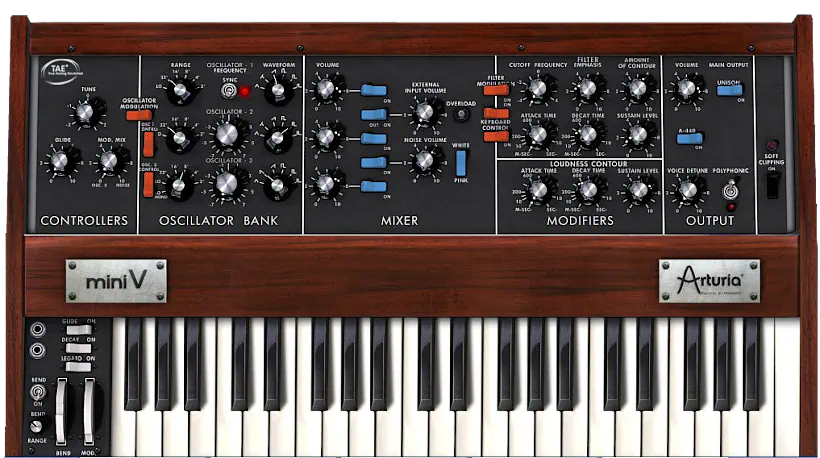
What is Mini V?
Mini V is a software synthesizer that emulates the legendary Moog Minimoog Model D, one of the most iconic analog synthesizers ever made. Arturia’s Mini V (v2) is part of their “V Collection” – a suite of virtual instrument recreations of classic hardware synths. It is also an integral part of their fabulous hybrid Producer Pack. This is a deep-dive Arturia Mini V review. We’ll discover wonderful features such as:
- Faithful emulation of the Minimoog Model D’s oscillators, filter (the famous ladder filter), and envelope structure
- Added modern features: MIDI control, arpeggiator, sequencer, effects, and expanded modulation options
- Cross-platform: Available for Mac and Windows as standalone or plugin (VST/VST3/AU/AAX)
Introduction:
Moog Model D – the GOAT!
Ahh, behold the inimitable aural textures and tri-oscillated magnificence of the princely Minimoog “Model D.” Its distinct sound is instantly recognizable. Even forty (plus) years after its debut, it still reigns as an honored prince of analog synthesizers. It’s basically the rockstar grandfather who never loses his cool—proving that good taste (and great oscillators) truly are timeless!
Over the past two decades, numerous well-intentioned programmers have tried to capture its power in virtual instrument form. However, only a few have come close.
That doesn’t mean their efforts went unappreciated or that they failed to create excellent virtual synths. Quite the opposite. Still, we’re talking about the Minimoog here—a uniquely elusive instrument that seems determined to keep a little mystery to itself.
Then along came French artisans, Arturia.
After conquering the “Everest” of popularity with their industry-changing Moog Modular and Yamaha CS-80 emulations, Arturia brazenly tackled the impossible. Believe it or not, they accurately modeled the iconic Minimoog!
Arturia didn’t just faithfully recreate the original circuitry, filter modes, and tonal characteristics. They also exponentially expanded the digital emulation’s feature set and value. They took a legend and somehow gave it superpowers.
Official stamp of approval
Arturia’s officially Moog-licensed digital reproduction captures the full breadth of Minimoog Model D greatness. It does not just imitate the original; it celebrates it.
At the same time, Arturia revives this time-honored classic as a modern, powerful synthesizer. It feels huge, it sounds huge, and it confidently holds its own on today’s digital landscape.
This is not a museum piece. It is a serious instrument that earns respect in any contemporary setup.
Many current software synthesizers sell for anywhere between $149 and over $200. By contrast, at the time of this publication, Arturia lists Mini V at only $99 (USD). That price makes it very hard to invent an excuse not to own it.
Even better, Arturia includes Mini V in the Producer Pack 61 bundle. In the context of this multi-part review, that generous addition makes the whole offering especially satisfying. You do not just feel like you got a deal. You feel like you got away with something.
Hi, you! If you like these kinds of reviews,
be sure to subscribe.
Q: What is Arturia’s modernization of the Moog Model D?
A: Mini V’s magnanimous deluge of analog-ish-ness springs directly from Arturia’s immaculate circuit modeling. The team faithfully captured the original instrument’s trio of oscillators, filtering, envelopes, and unique feedback design—every sonic detail matters.
Thankfully, Arturia’s engineers didn’t stop there. They propelled Mini V into the 21st century with genuinely enhancing features: 32-note Polyphony, Unison, Sound mapping, Motion recording, and Vocal filtering. Each addition transforms what the synth can do.
Behind a discreetly hidden back panel, you’ll discover a modulation matrix, an arpeggiator, plus chorus and delay effects. Sure, everyone raves about Arturia’s vintage synth modeling—after all, that’s their claim to fame—but it’s a genuine shame their effects often get overlooked in the excitement.
While preparing for this “Producer Pack 61” review, I’ve been equally prepping my upcoming “V Collection 4” exposition. Both projects left me more-than-impressed with the quality of these Arturia synths’ built-in effects.
Kudos to Arturia for such an Excellent Users Manual:
Equally impressive, the product’s manual stands out in its own right. Most people expect a manual to be dry, tedious, and only worth opening in a moment of desperation.
Arturia turns that expectation on its head. They deliver an engaging information resource that actually entertains and keeps your interest from start to finish. You might even read it on purpose, rather than as a last resort.
The manual is exceptionally well documented. It shares compelling historical facts about the original instrument and its creators. It also explains Arturia’s own technology, yes, from a marketing angle—but in a way that feels insightful rather than pushy.
In a word, the manual is a genuinely good read. And how often can you say that about a synth manual without laughing?
Installation and Authorization:
Arturia have officially said goodbye to eLicenser copy protection in the most recent versions of their software. For many users, this change is a genuine reason to celebrate. No more dongles, no more hunting for that one USB stick that vanished right before a session.
If you already own older Arturia products licensed via a USB eLicenser, you can, of course, continue using them as they are. Nothing breaks overnight, and your existing setup remains intact.

However, if you want to update your product to the latest revision, you must adopt Arturia’s new copy protection system. There is no way around it—unless you also enjoy refusing free improvements and new features, which seems highly unlikely.
Introducing Arturia Software Center:
In a nutshell, “ASC” represents Arturia’s take on the all-too-familiar C/R (challenge/response) method of internet-based copy protection. Nothing groundbreaking, but it gets the job done.
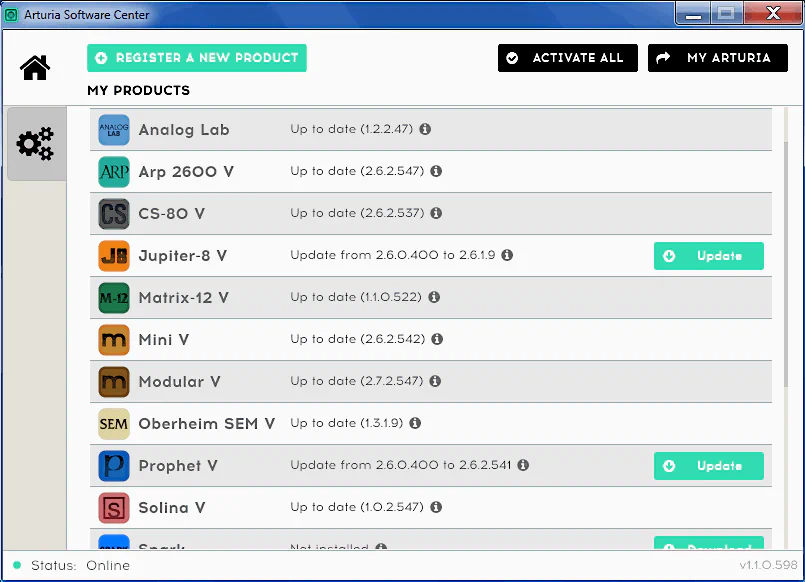
Here’s the practical reality: Arturia grants each customer a maximum of five concurrent activations per product or bundle. That’s a reasonable ceiling for most users—and it respects both your flexibility and Arturia’s interests.
The activation process itself works well. The “Arturia Software Center” application handles everything exclusively, which means you’re not juggling multiple tools or wrestling with confusing workflows.
Plus, ASC updates itself automatically. It notifies you instantly whenever fresh updates land for your Arturia tools. You can even authorize it to download the installers directly. Then the software handles the installation so you avoid tedious setup wizards. Consider it a digital maid for your synths—no tea required.

Unfortunately, one foreseeable drawback remains: users cannot manage activations through the “My Arturia” section of the company’s website. As a result, a crashed hard drive or faulty computer could potentially cost a user an activation for good.
Perhaps Arturia could reconsider its licence management process and allow customers to manage activations online more conveniently. After all, companies such as PreSonus and Toontrack already support this approach. It saves users from treating their computers like fragile museum exhibits.
** UPDATE **
Thankfully, you can now delete unneeded/unavailable activations within the “My Products” area of your Arturia user account. For instance, if your HDD or SSD drive were replaced, or you retired an old PC, you can now free up that old license count to make room for your new drive or system.
Visuals:
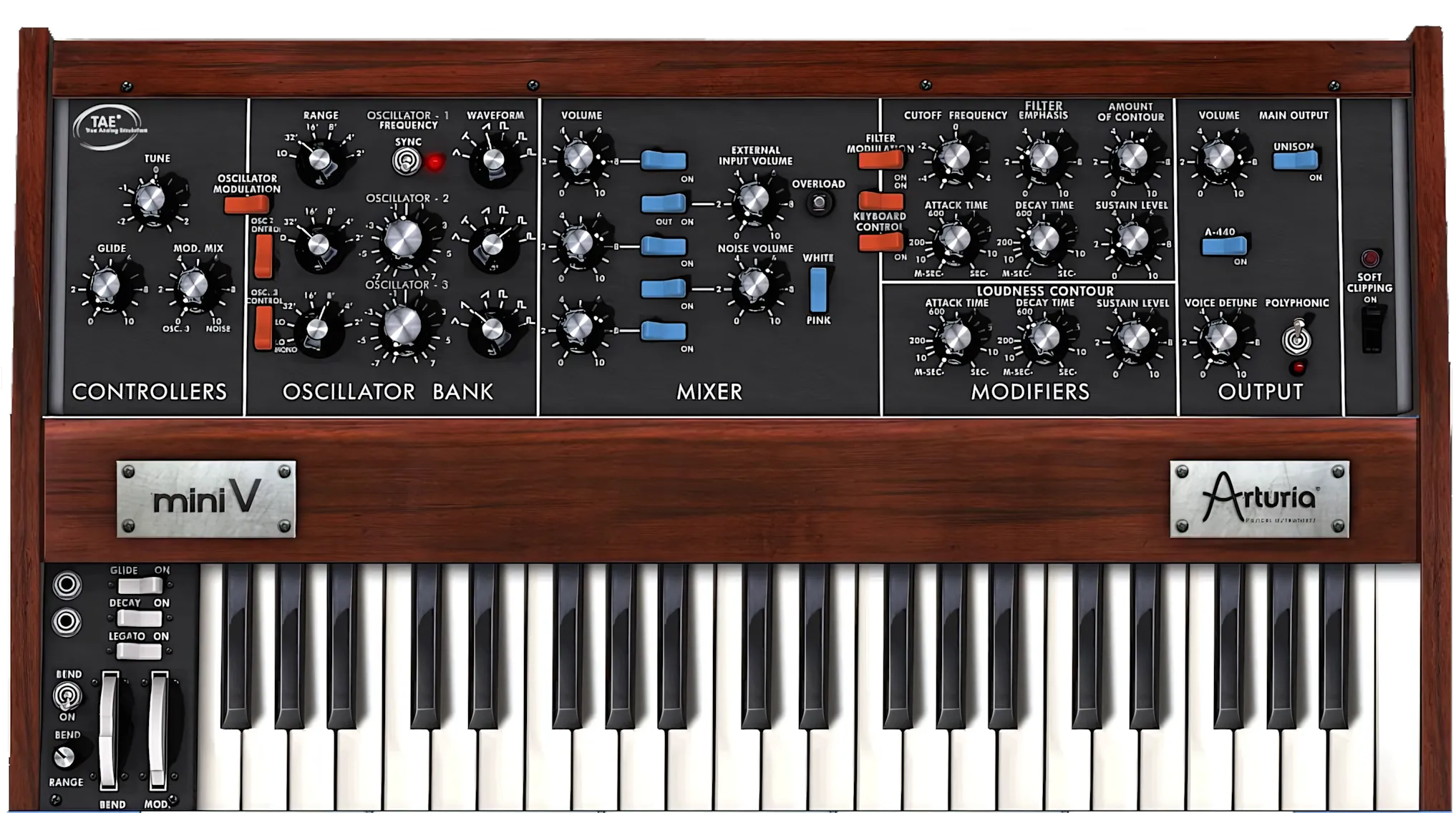
Arturia’s Mini V serves up a period-accurate recreation of the revered 1971 Minimoog Model D. Rich faux-wood grain textures and a 3D, top-down perspective make the interface look incredibly handsome. Excellent light and shadow techniques reinforce that genuine, premium feel.
Furthermore, Arturia carefully mimicked every original control in both placement and appearance. It looks so authentic you might find yourself trying to wipe dust off the virtual wood paneling.
You can choose from three GUI skins: Light (the default), Medium, and Dark. Together, they give the interface a cool, retro charm that instantly grabs your attention. It feels like vintage hardware, without the vintage repair bills.
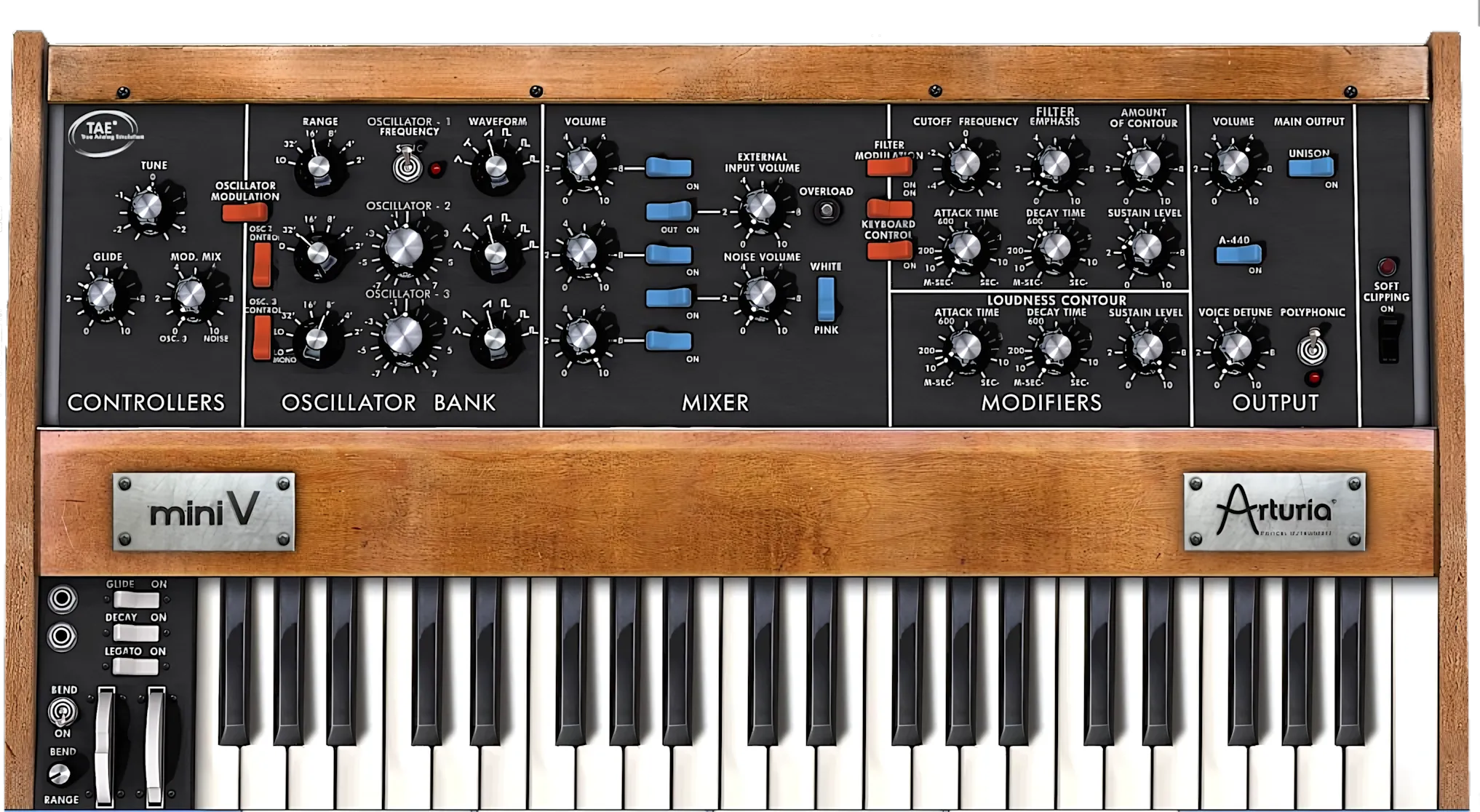
However, there is one important detail to keep in mind. The skinning feature only works in the standalone application. I cannot find any way to change skins inside the plug-in itself. So yes, your DAW will have to enjoy the default look, whether it likes it or not.
Orderly Controls – just like the original
All of the controls follow the layout of the physical instrument almost exactly. They stay faithful to the original design, both in style and in operation. You feel right at home if you know the hardware.
The control panel divides neatly into five sections: Controllers, Oscillator Bank, Mixer, Modifiers, and Output. Arturia then adds a subtle modern twist to the Output section. They enhance it with unison and polyphony, turning a classic layout into a far more powerful playground.
Virtual Keyboard can be Helpful
The virtual keyboard sits at the screen’s lowest portion, ready for action. It’s thoughtfully laid out—no surprises, just smart design.
Scan the keyboard’s left side. You’ll discover a column of three on/off rocker-switches commanding Glide, Decay, and Legato functions. Below them live the Bend and Modulation wheels, plus a dedicated switch to toggle Bend on or off.
Want precise bend control? A sweepable dial grants you command from a single semitone all the way through to 12 semitones. That’s serious flexibility in your hands.
Hidden Matrix – Arturia’s Enhancements
Click anywhere on the synth’s top “wooden” strip, and watch a delightful animation unfold. The control panel tilts upward to reveal a hidden matrix of power.
This panel houses the heart of Mini V’s enhanced features. You’ll find a Motion recorder, Vocal filter, and Modulation matrix waiting for your command. Plus, it offers Chorus and Delay effects to sweeten your sound. It’s like opening a treasure chest, except the treasure is endless sonic possibilities instead of gold coins!
Nowadays, bigger is actually better
Although this virtual instrument’s GUI looks attractive, well-equipped, and authentic, it can be somewhat difficult to use at modern screen resolutions.
When Arturia released Mini V in 2005, most users worked at resolutions of 1024 × 768 or 1280 × 1024 pixels. On CRT monitors and first-generation LCD panels, the interface felt quite substantial.
Today, however, 1366 × 768 pixels is about the lowest resolution commonly found, even on a typical 15-inch laptop. Most desktop systems run at much higher resolutions. As a result, Mini V’s interface can appear rather small by current standards.
** UPDATE **
You are in luck! Our friends at Arturia actually listened to those prayers. They completely overhauled their entire software lineup with fully resizable, high-DPI graphics.
To scale the window, simply click the upper-left menu icon inside the plugin interface. From there, hover over “Resize Window” to select your preferred display percentage. This layout choice makes working on modern, high-resolution screens an absolute breeze. It ensures you can clearly see every single vintage knob without squinting.
Operation and Control
Toolbar and Matrix Panel:
Along the top of the GUI, you see a feature-packed toolbar. It includes an extensive preset navigation system with full preset and bank import/export options. In other words, you can organize sounds like a pro instead of getting lost in preset chaos.
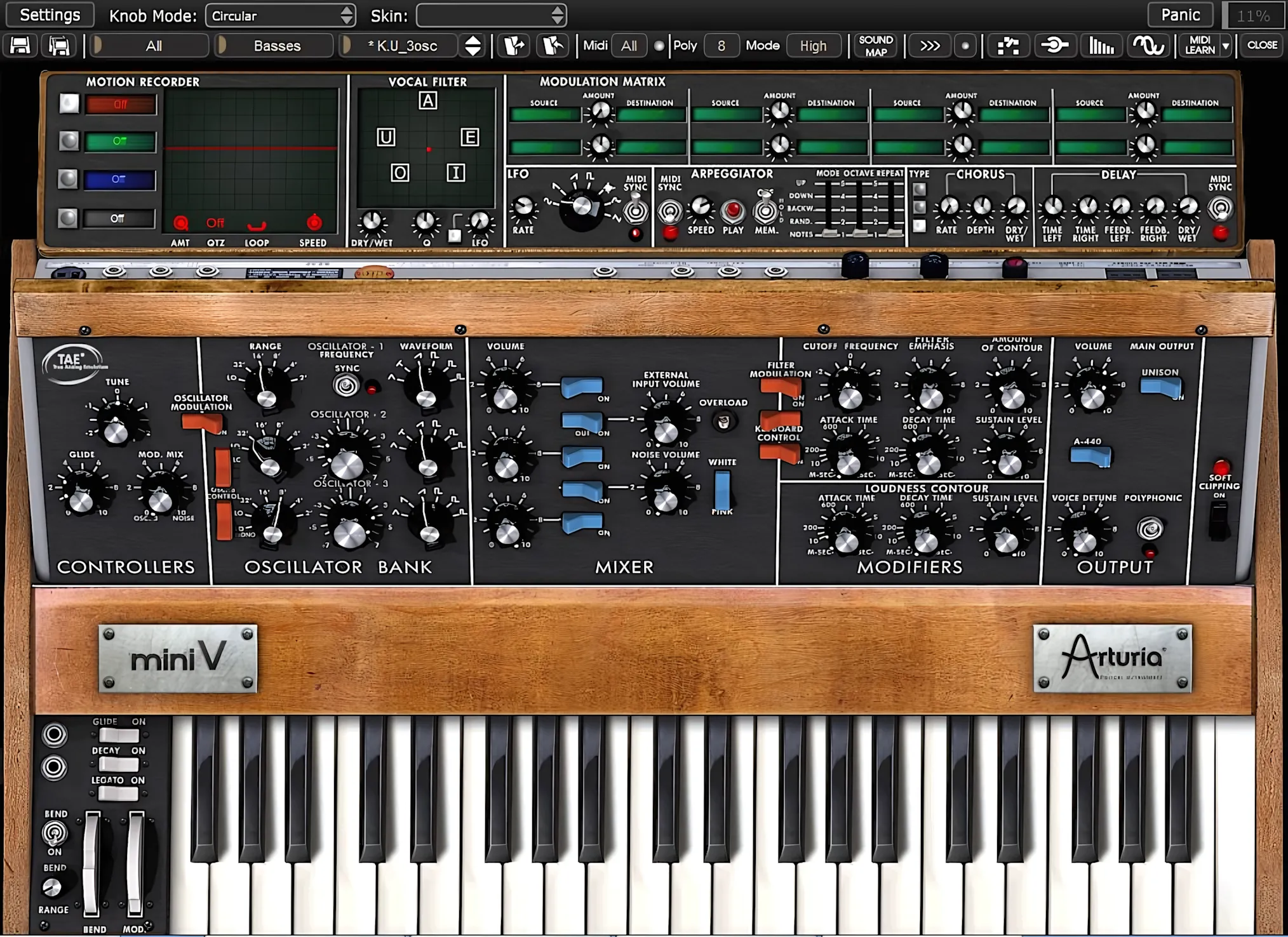
Mini V ships with 400 presets. The browser sorts them into three fields: Bank, Type (or sub-bank), and Patch. The categories follow the familiar lineup: Basses, Arpeggios, EFX, Keyboards, Leads, Pads, Percussion, Horns, and Synths. So you never have to wonder where that monster bass or silky pad might be hiding.
Beyond these, you also get a generous collection of template patches across Arpeggios, EFX, and various waveforms. They give you a solid starting point, so you can quickly shape and sculpt your own signature sounds with minimal fuss.
MIDI Channel Assignment and Polyphony:
Moving along the toolbar, you’ll encounter a MIDI channel assignment menu. Right after it sits a polyphony selection menu spanning one to 32 voices—a genuinely useful range.
Here’s the catch: polyphony isn’t a global setting; you configure it per-patch. This flexibility is certainly welcome, though it requires a bit more attention during setup.
Next up, the Play mode selection takes over. This menu controls how Mini V behaves in its original monophonic mode—giving you the final say on character and feel.
In “Low” mode we will hear the lowest note, in “High” mode the highest note, and in “Last” mode the last note played on the keyboard. In the two first modes, when the note is released, we will hear the lowest note (or respectively the highest) without triggering the envelopes. In the last mode, the envelopes are always active.”
Sound Map Panel:
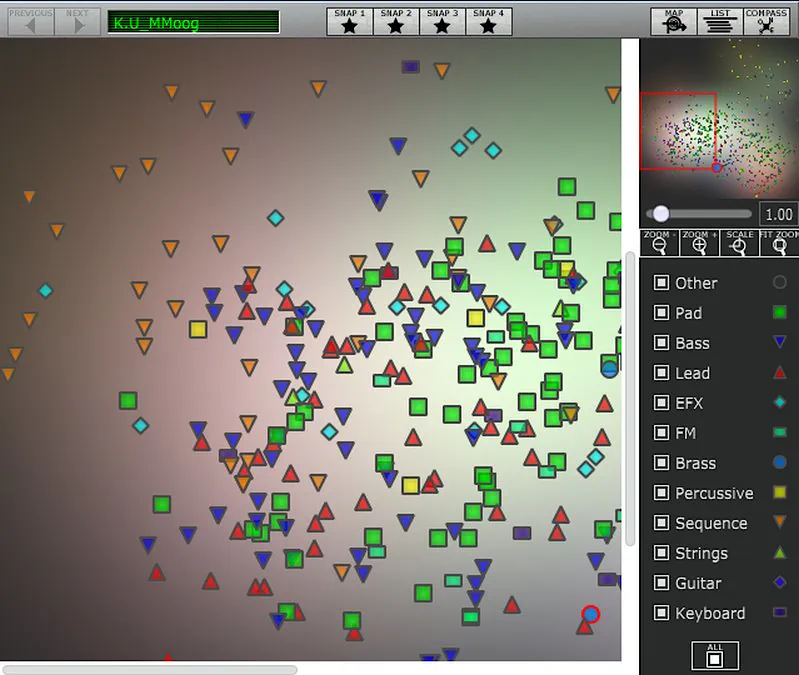
Look to the right for the Sound Map button. Click it, and Arturia’s unique sound map window springs to life. You’ll see a graphical representation of every preset, color-coded into neat categories. Use the zoom slider to get closer or pull back for a wider view. You can assign up to four presets directly to the Snapshot buttons at the top. Just hold Shift and click your desired pad.
The Sound Map also provides access to a neatly organized preset list. Users can quickly filter this list to display only the categories they want by selecting the appropriate checkboxes on the right.
Meanwhile, enabling Global Polyphony with the dedicated switch in the Output controls section sets the instrument to four voices by default. A modest starting point, perhaps, but sometimes four voices are all it takes to start a musical argument.
Motion Recorder:
Moving along the toolbar, we find the Motion Recorder button. Clicking it simply toggles the feature on and off.
However, you manage the actual recording details inside the “hidden” matrix panel. This nifty tool records your real-time parameter changes for up to 30 seconds. It also provides four separate slots to record or manually draw your automation. Think of it as a helpful robot assistant that remembers exactly how you twisted your knobs.
Each slot is dedicated to a single parameter, which you assign from a comprehensive drop-down list of available modulation destinations. This keeps things clear and intentional: one lane, one target, zero confusion.
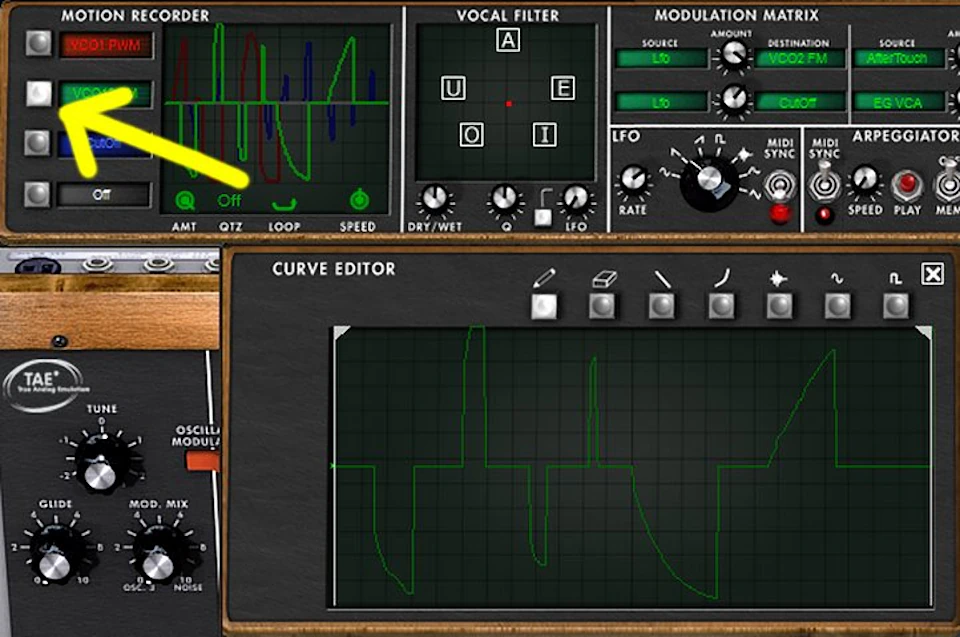
You can manually draw or edit modulation by clicking any of the four Motion Recorder selectors. Once selected, the lane becomes your canvas. Just like in a basic MIDI editor, you have a range of tools for shaping and manipulating the recorded curves—so you can refine raw movements into precise, musical modulation.
The Vocal filter:
Adjacent to the Motion Recorder icon sits the Formant filter, more commonly referred to as the Vocal filter. Also housed on the matrix panel, this section functions as a wonderfully groovy little vocoder‑style vowel shaper. Here you can fine-tune the oscillation rate, adjust the wet/dry balance, and dial in resonance, giving your patches everything from subtle vocal color to bold, talking-synth personality.
The Matrix Activator:
Next comes the Matrix activator—a powerful creative tool. It presents a matrix of eight modulation sources and eight destination slots, giving you complete control over intensity blending.
Here’s where things get interesting: a single, MIDI-syncable LFO joins the party as a modulation source itself. This opens up serious sound-design possibilities.
Take a practical example: in Slot 1, you select the LFO as your source and route it to Cutoff as the destination. Boom—instant dynamic movement.
The real magic? You’ve got scads of room here for creativity. Whether you’re chasing subtle texture or wild modulation chaos, the Matrix delivers.
Finally, the toolbar is rounded out with Chorus, Delay and Midi learn buttons on the far right.
A Couple of Knob Dysfunctions . .

The hosted plug-ins lack one key feature found in the standalone app: changing knob behavior from circular to linear mode. I personally find linear mode far easier to use, especially when controls are small and hard to see. The plug-ins also miss a convenient way to reset a dial to its default “zero” position.
Fortunately, the standalone version solves this with a quick “ctrl + click.” My final gripe is that you cannot manually type a value for any control; you must rely solely on the mouse or MIDI CC. It feels like being at a restaurant where you can only order by pointing at the menu, even if you know exactly what you want!
Main Controls:
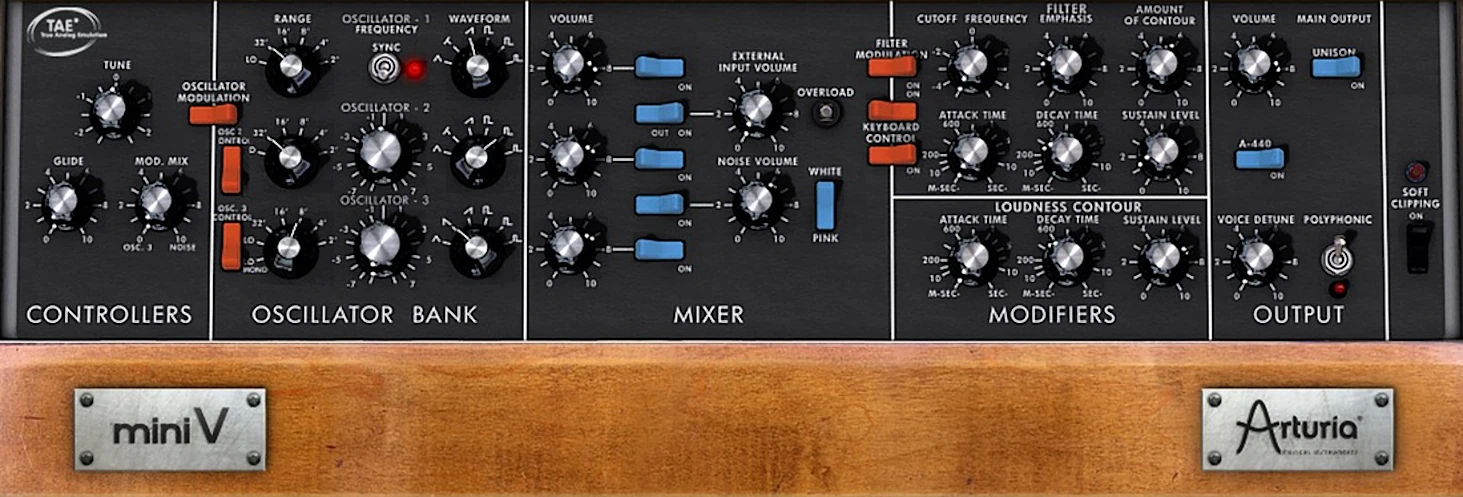
The Controllers section provides access to global tuning and glide (portamento time). It also includes the necessary controls for balancing noise and oscillator signals used for modulation.
In addition, two dedicated switches handle modulation duties. The first engages pitch modulation, which affects all three oscillators. The second removes oscillator three from voltage control, allowing it to operate independently. A small feature, perhaps, but one that seasoned synthesists tend to appreciate—sometimes an oscillator simply wants a little freedom.
Oscillators:
Next up is the Oscillators section. You can essentially consider this the ‘engine’ of the synth.
Within this control bank, you set the range and waveform types for the three oscillators. By the way, if you’re an organist, just read “range” as “pipe length”—much like the drawbars on a Hammond organ.
Unlike many of today’s ultra-modern variants, the Minimoog keeps it classic. It incorporates what we now consider ‘fundamental’ waveforms: Triangle, Sawtooth, Square, and Rectangle. However, the designers also threw in a couple of Sawtooth and Rectangle variations for good measure—because who doesn’t love options?
You can fine-tune OSCs two and three to dial in massive, “phat” detuned tones that few synths have ever matched, before or since. Even better, you can sync the oscillation speed directly to your DAW or host tempo, keeping everything locked in and musical instead of wandering off like a drunken LFO.
OSC three does double duty as a low-frequency modulator, giving you that legendary Moog vibrato and growl. It also works as an audio-frequency modulator when you need more aggressive, complex textures. To set this up, simply switch OSC three “off” in the mixer section. Then set its range knob to “LO” in the Oscillators strip. That is all it takes to unlock a whole new layer of character in your sound.
Mixin’ it Up:
You’ll find the Mixer controls smack dab in the center of the interface. The design philosophy here embraces simplicity with efficiency. Three rocker switches let you activate or bypass each oscillator independently. Better yet, dedicated volume knobs give you precise control over each one.
A dedicated switch lets you choose between pleasant white or pink noise. You then blend in the noise amount to taste using its own volume knob—because sometimes a little chaos keeps things interesting.
Here’s where it gets clever: the original hardware featured an intriguing routing option that allowed you to input an external source and blend it seamlessly into the signal path. The developers carefully modeled this feature and represented it with a clearly labeled knob, so you can enjoy that same creative flexibility today.
Modifiers:
Moog’s mighty oscillators lead the charge, and their lively filters—aka Modifiers—follow right behind.
You control Filter Frequency Cutoff, Contour (Resonance), and Contour Amount (that’s filter envelope depth for the uninitiated). These parameters grant you a vast degree of sonic osmosis, letting you sculpt sounds that range from buttery mellow to absolutely searing. Think of it as audio alchemy, except instead of turning lead into gold, you’re turning silence into glory!
The Minimoog’s famed 24dB ladder-filters have earned their legendary status through endless discussion—and yes, people still talk ad nauseum about them. Why? Because they deliver rich, organic sonic characteristics that simply sing. Arturia’s recreation captures this magic beautifully, proving that sometimes the old school really does rule the roost.
Now, here’s where things get interesting: two sets of Attack, Sustain, and Release controls live in this section. The first set manages the oscillators themselves, while the second handles overall output—or Amplitude, if you prefer proper terminology. It’s like having separate volume knobs for your brain and your brawn!
Output:
Mini V’s Output strip is largely self-explanatory. However, Arturia added two useful enhancements that the original hardware does not offer: Unison and Polyphony switches.
Keep in mind that you cannot use Unison and Polyphony at the same time—they simply refuse to share the stage. If you activate Unison and then enable Polyphony, the synth bypasses Unison automatically. Conversely, turning on Unison while Polyphony is already active has no effect.
By default, Mini V provides four voices of polyphony. However, as mentioned earlier, you can increase this number to as many as 32 voices on a per-patch basis.
Finally, a cool soft clipping feature allows for harmonically vibrant output that doesn’t supercede 0dBFs.
Sound Quality:
In my opinion, the original hardware practically defined electronic instrumentation. Arturia’s software recreation aptly claims that exact same legendary status.
The “Mini V” emits a glorious range of authentic tones. We can emphatically describe this sonic palette as phat, warm, organic, musical, and powerful. When it comes to this soft synth, forget about a massive feature count. It ain’t about quantity; it’s entirely about quality!
Over the past decade since its introduction, Arturia have kept refining and upgrading the Mini V, just as they have with all their virtual analog synths. They may not have given the Mini V a dramatically new GUI, but they have steadily improved what really matters under the hood.
Thanks to their ongoing work on TAE® technology, Arturia has consistently pushed its sound and performance forward. The interface may look familiar, but the engine is definitely not stuck in the past.
Audio Samples:
Original Waveform Goodness:
The Mini V’s ‘naked’ waveforms convincingly replicate those of the original hardware—at least by my estimation. The filters deliver that smooth, faithful reproduction of the famous (but notoriously elusive) Minimoog quality that made us fall in love with vintage synths in the first place.
The software makes it remarkably easy to craft deep, analog-esque tonality bursting with identifiable Moog character. You don’t need a degree in synthesis to dial in those lush, warm tones.
Moreover, Arturia has incorporated an impressive array of feature-set additions that significantly broaden the instrument’s usefulness and flexibility. These enhancements transform Mini V from a faithful recreation into a genuinely versatile tool—one that respects the past while keeping up with modern production demands.
The result? Mini V continues to deliver the classic Minimoog sonic palette with a contemporary edge. This synth proves that legendary sounds don’t age—they simply grow more musically relevant with time.
Making Comparisons:
When it comes to absolute sound quality, U-HE’s magnificent “Diva” from Germany likely reigns supreme at reproducing amazing analog synth sounds.
Don’t let that win fool you, though, because that digital beast demands a massive CPU toll. In fact, it can easily bring even a modern 4-core (or even 8-core) system to its knees! Your fans might start spinning so fast they look like helicopter blades ready for takeoff.
So, how do you decide? When you carefully weigh every pertinent factor against the reality of your hardware, the choice often becomes clear. If I had to pick just one Minimoog emulation to trust with my VST folder, “Mini V” would safely nestle right in there. It delivers the goods without turning your computer into an overheated sauna!
Native Instruments’ Monark is a serious contender for the crown, and U-HE Diva’s Minimoog module is equally impressive. GForce Software has also delivered a highly respectable alternative.
However, when you weigh features, system requirements, and price, Mini V still comes out on top. It continues to earn its place in the spotlight.
Arturia’s TAE® technology has evolved into one of the industry’s leading virtual instrument engines. It faithfully recreates the sound of vintage and classic instruments with remarkable realism. Better yet, it achieves this without introducing aliasing artefacts or relying on CPU-hungry DSP tricks. In other words, your processor can breathe a little easier.
Rounds out the Producer Pack Perfectly!
Personally, I’m very thankful Arturia included the “Mini V” in the Producer Pack. This single addition considerably boosts the bundle’s overall value.
Arturia could have selected any number of soft synths for this package. However, they featured the legendary instrument that more or less “started it all.” Honestly, it’s only appropriate. After all, you have to respect the elders of the synth world!
CPU Consumption:
Some of Arturia’s most recent synths can hit your CPU pretty hard, but this one stays friendly and light. Even if you run multiple instances at once, any four‑year‑old Mac or PC should handle it just fine.
On my i5 2600 laptop, a single instance usually nudges the CPU by only three or four percent. In other words, your fan can relax and stop auditioning for jet-engine duty.
Concluding Remarks:
I absolutely agree that most contemporary musicians and music lovers possess at least a passing familiarity with the Minimoog.
I’d even guestimate that it stands as the world’s most famous synthesizer. Why? Because, in all actuality, it was the very first “usable” portable keyboard synthesizer ever created! That’s quite a legacy for a box of knobs and sliders.
Furthermore, most nearly every synth player considers that iconic “Moog” sound an essential ingredient in their digital cupboard. You simply cannot bake a great analog-sounding cake without that secret sauce!
Given this undeniable status, I am convinced that Arturia’s “Mini V” remains one of the choicest recreations available. It captures that legendary warmth perfectly, ensuring your digital pantry never runs dry on flavor.
4.5 out of 5 Stars


:: Pros
- Highly realistic Minimoog soft synth clone.
- Accurate interface design.
- Impressive additional features such as Polyphony & Unison modes.
- Vocoder-style formant filter.
- The Matrix modulation panel expands the modulation capabilities of the instrument considerably.
- Flexible and Easy to understand signal path.
- High quality onboard Chorus & Delay effects.
- Exceptional documentation.
- Light on system resources.
- Available for both MAC & PC (32 & 64 bit, including AAX)
::Cons
It is definitely time for Arturia to update the interface as a resizable, scrollable GUI.
** UPDATE ** All of Arturia virtual Instruments feature gorgeous, re-sizable interfaces as of early 2016.- Configurable knob behaviour is omitted from the plug-in and only available in the standalone app.
- Also missing from the plug-in is a convenient way to reset the dials to default values.
- No direct typing input to set a parameter’s value.
Visit the Arturia website. www.Arturia.com
Intellectual Copyright – 2015 – All rights Reserved. This review may not be copied or reproduced in whole, nor in part, without express written permission from the author.

Leave a Reply