
Effects & Features:
GRID Panel:
Remember the ‘mask zones’ you read about earlier? This masking is the exceptionally innovative feature that is unique to Le Masque Delay.
These flexible mask zones let you precisely define which signal parts the plugin processes. The Delay Unit processes only the masked GRID zones, leaving all other audio data untouched.
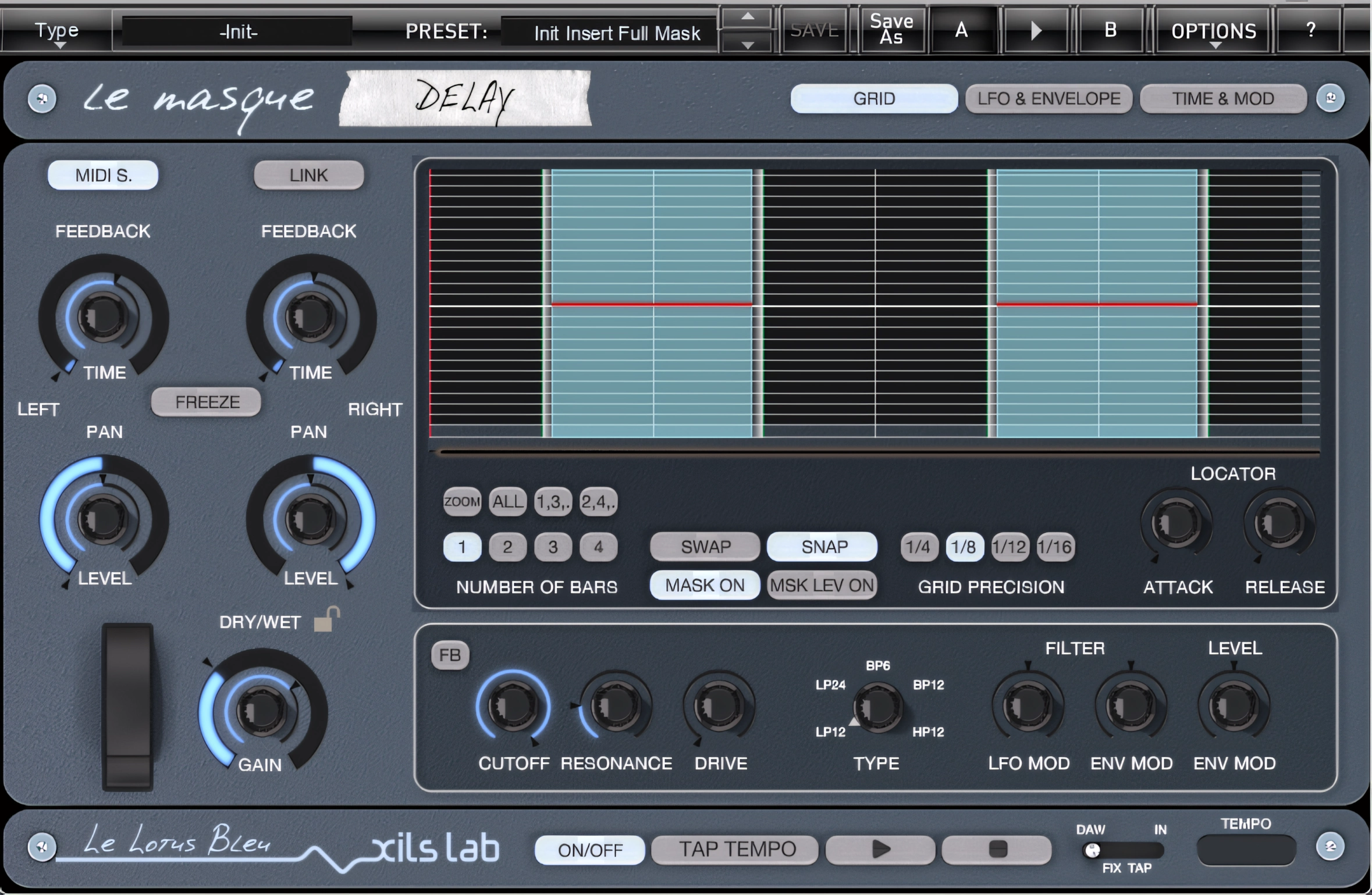
Q: Hey! Astro-boy, What is a ‘MASK’?
A: “A Mask is a high-lighted segment of the grid where the input is entering the delay unit. It is defined between two ‘LOCATORS’, left and right respectively.”
Q: What is a ‘LOCATOR’??
A: “Umdunnno. Maybe we can mind-meld with Mr. Oudin, the programming genius responsible for this nebula of “delay-dom” Seriously, stick n’ stay. I’ll tell ya later. Now hush! Pay attention, class.”
You can create up to 16 different Masks. When a single mask covers the entire GRID area, Le Masque Delay behaves like a Standard Delay. Left-click anywhere in the ‘GRID’ to create a new mask with a default length at that point. You can always change the length of the mask later.
A real-world example of this feature would be to consider a drum loop. Let’s say that it’s a standard 120bpm 4/4 straight beat. If the engineer wanted to set up a delay (either with typical delay or creatively modulated) on the snare hits on the 4th measure of the loop only, he could create a ¼ GRID and mask the 4th measure. The other three unmasked measures would remain unaffected.
The GRID can be synced to either your DAW, or to the plugin’s internal clock. You can set the internal clock in standard BPM measurements by clicking on the TEMPO field and keying in the desired value. The TEMPO field is located in the lower right corner of the GRID panel. Most users will find it easiest and most convenient to midi sync to the current project tempo in the DAW.
LFO & ENVELOPE Panel:
This panel is divided into two sections: LFO and ENVELOPE. Starting with the LFO section, the interface presents a convenient MIDI Sync button for tempo-based modulation control.
When engaged, the midi sync features locks the rate (speed) of the Low Frequency Oscillator to the DAW or host tempo. Below the ‘midi sync’ button is the ‘RATE’ knob. This parameter sets the rate (speed) of the LFO from 0 all the way up to 30hz (30 x per second).
The ‘FILTER MOD’ control sets the LFO’s modulation value to either drop in pitch or increase by the desired amount. Beware! The amount of modulation can be extreme, man.
Looking like a 1987 Atari console selector switch, the ‘RESET’ selector let’s the user specify which event the LFO will be triggered and reset by. There are three choices:
- Bar : The LFO will be reset at the beginning of each bar
- Locator: The LFO will be reset by the LEFT locator of each Mask (as viewed on the GRID panel)
- Free: The LFO is . . . well, ‘free’. Choose this option if you want dynamically changing modulations.
Into the ENVELOPE we go! Into the ENVELOPE we go!
By now, maybe you’re thinking you should have chosen the blue pill, Neo . . .
Hi, you! If you like these kinds of reviews,
be sure to subscribe.
There’s a lot to cover here, folks. After all, I did put the warning clearly in the introduction. You could have continued on your merry way; but no! You jumped into the rabbit hole.
ADSR [Defined as: Attack-Decay-Sustain-Release]
Le Masque’s ENVELOPE section gives the user control over modulation of the Filter’s Cut-Off frequency and/or the volume of the Delayed signal itself. (Not the source – only the delay). You can adjust the depth of the modulation with the Filter Mod and/or Level Knobs.
When the Filter Mod knob sits at the center position, the plug-in applies no modulation. As with the LFO modulation control, turning the knob clockwise or anticlockwise will increase the depth of the modulation in downward or upward oscillation. The same applies to the Level Knob, excepting that this modulates the level of the delayed signal.
ADSR Knobs: These control the Attack, Decay, Sustain, and Release time of the envelope. Please note that ADR are duration parameters, while Sustain is a level parameter.
The Loop Toggle: This toggles the envelope LOOP mode. When activated, the envelope enters looping mode and uses only the Attack and Decay parameters. Consequently, the loop length follows a very simple formula: L = A + D.
The TRIGGER selector gives you the three TRIGGER-event choices:
- Locator: The LEFT locator of each Knob will trigger the envelope.
- Off: Would you believe, it turns it . . . off? No more trigger. None. Hey, fuhget about it! This function cancels only the modulation generated by the envelope while leaving all current settings unchanged.
- In: The envelope responds directly to the incoming delay signal level. Each time the delay path detects audio, it triggers the envelope automatically. Additionally, you can adjust the trigger threshold for the envelope within the TIME & MOD panel.
“Speaking of which, join me on the TIME & MOD holodeck, Mr. Riker.”
TIME & MOD Panel:
It’s ironic. When I began to write this review, I felt that I ought to creatively write it with anecdotal comparisons to classic Sci-fi references.
Now here, months later, (Well, truthfully only a few days later) we observe that the Le Masque Delay manual refers to this section of the plugin as the “Modulation Matrix”. Matrix . . . get it? Oh, nevermind. Let’s continue.
In short, this GUI section lets you fine-tune parameters affected by the GRID ‘LOCATOR(s)’.
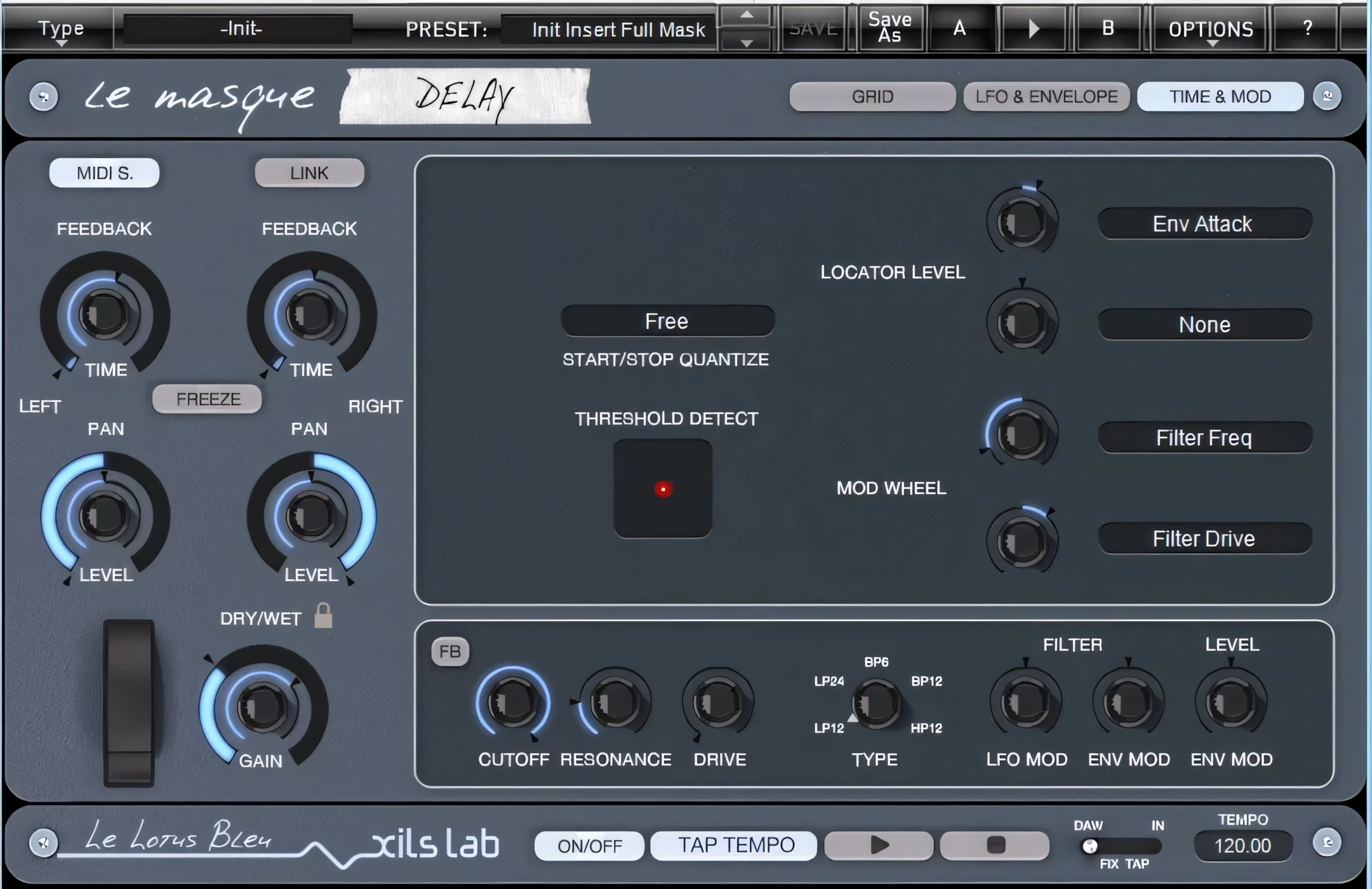
Q: Hey, Morpheus, what’s a ‘LOCATOR’?
A: “This is not 100% defined by Xils-Lab. Sometimes a ‘LOCATOR’ may be defined as either the right or the left marker of a “Mask”. A ‘LOCATOR’ may also refer to the name of the “Mask” itself.”
“I think it is better to keep the first definition : A Mask (the part of the grid where the input is entering the delay unit) is defined between two locators, left and right.”
Got it? Good! Please repeat it back to me so I can understand it too. Nah, just kidding. (Non, je plaisante.)
This section of the plug-in’s interface also lets users define which parameters the mod wheel controls, along with the exact amount of modulation applied.
The Le Masque manual explains it well.
“In this panel you can specify the Modulation targets of sources like the Mod Wheel and the Grid Level Parameter. You can also specify all the parameters of the incoming threshold function, and the adaptive clock specifications.”
This is where you specify the Mod Wheel and the Mask-Level parameters’ targets. Namely: Filter Cut-Off, Resonance, Drive, and LFO Rate.
NOTE: If you want to use a midi-controlled Mod Wheel for real time control of Le Masque’s parameters in your DAW, you certainly can. There is a short tutorial at the end of the manual to help you set it up.
Menu Preset System:
The Le Masque Delay manual is quite thorough is most nearly all aspects. The manual explains the preset categories very well.
- Insert Full Mask Sync: Designed for Insert mode operation, this configuration uses a single mask that covers the entire grid, allowing it to behave like a traditional delay effect. Meanwhile, the delays stay perfectly synchronized to either the internal clock or an external MIDI clock source.
- Insert MultiMask Sync: Designed for Insert mode use, this configuration employs between two and eight masks while keeping all delays tightly synchronized to either the internal clock or an external MIDI clock.
- Bus Full Mask Sync: Similar to Insert Full Mask Sync, but intended to be use on a auxiliary Bus.
- Bus MultiMask Sync: Similar to Insert MultiMask Sync, but intended to be use on a auxiliary Bus.
- Fix Tempo: The delay times do not synchronize with either the MIDI clock or the internal clock. Instead, the plug-in prefixes them with the corresponding BPM-based values for easier timing reference. Delay might be a bit different from a quantize sync delay to add some groove, or have an offset between the left and right channel to make some phase effects, or have some stutter FX on one channel, etc. This bank is for those who think that quantized delays can be boring, and un-synced delays very creative.
- FX and Experiment: Self-Explanatory: Welcome to the realm of S-boings, Resonators and huge Dub delays.
More Noteworthy Features:
This review would be incomplete without bringing well-deserved attention to Le Masque’s new ‘Dry/LOCK‘ feature. Dry/LOCK accords a user the ability to save the plugin’s current wet/dry mix settings when saving a user preset.
Le Masque Delay makes use of on-board precision EQ filtering to perform delicate EQ tasks, on the ‘wet’ signal (read: processed/delayed signal only). Such as: extracting the HighHats from a complete Drum loop, or the low mids tones from a guitar track.
The filter section includes 6 knobs and a 5-position Selector knob. The selector is used to select a choice of Low Pass 12dB, LP 24dB, BandPass 6dB, BP 12dB, or High Pass. This section also apportions control over the Cut-Off point, the Resonance, and the Drive (saturation/distortion) of the Filter. (Please refer to the LFO & Envelope section of the manual for more details about them.)
CPU Consumption:
This nifty plugin takes it easy on most nearly any up-to-date computer system (as of the time of this publication).
The CPU consumption of a single instance was only a paltry 0.7 percent draw (Intel i7 2nd gen).
LeMasque Delay stands out as a truly unique creative tool designed for adventurous musicians and producers who crave stylish, modern delay effects. For all its techno-topping grandeur, Le Masque particle-phases very nicely with our present-day, non-quantum computing devices amiably.
::HONORABLE MENTION
Mr. Xavier Oudin is the programming genius behind this powerful, innovative plugin. Mr. Laurent Bourgeon is the creative and inventive force behind the idea (especially the Mask/Locators concept).
Over the course of the past few months, my experience with these two fine gentleman has been pleasant and professional. Open, transparent communication and excellence in customer support is very high on Xils-Lab’s list of priorities. I am grateful for the opportunity to have collaborated, in some small way, with this company.
4 out of 5 Stars


:: Pros
- Unique. Offers Delay effects typically associated only with synths.
- Extensive Oscillation and modulation of the delayed signal.
- Typical Delay configuration retains the rich, analog warmth that Xils-Lab’s high-end synths are famous for.
- Excellent stereo imagery and perceived depth.
- Attractive, user interface well-coded in Steinberg Free SDK.
- A shipload of knobs, switches, and dials to control a plethora of parameters.
- Prompt, professional product support.
- Easily managed Serial Number activation. No dongles, call/response challenges, nor invasive piracy protection overhead.
- 32 & 64 bit for MAC(Intel) & PC
- Moderately priced. Considering the excellent C++ programming, stable operation, and innovative design, you get a lot for the MSRP of 59€ ($77usd)
::Cons
- Fairly steep learning curve. The plugin is immense in its scope of delay features. Make sure you download the owner’s manual and refer to it regularly.
Visit the Xils-Lab website. Xils-Lab.com
Intellectual Copyright – 2013 – All rights Reserved. This review may not be copied or reproduced in whole, nor in part, without express written permission from the author.

Leave a Reply