
What is Pro-L?
Pro-L is a professional mastering limiter plugin developed by Dutch audio software company, FabFilter. It’s designed for the final stage of audio production where you maximize loudness while maintaining audio quality and preventing clipping. This magic plugin’s secret formula makes it ideal for bringing your tracks up to competitive loudness levels, while preserving dynamic range and minimizing distortion. Throughout this in-depth FabFilter Pro-L review, we’ll concentrate on exemplary features like:
- True peak limiter with multiple limiting algorithms
- Mastering and loudness maximization for music production
- Available as VST, AU, AAX, and standalone formats for Windows and macOS
- Multiple limiting algorithms (including “Transparent,” “Aggressive,” “Safe,” and others)
- True peak limiting to prevent inter-sample clipping
- Integrated loudness metering (LUFS, LKFS)
- Lookahead capability for precise control
- Visual feedback showing gain reduction and output levels
- Zero-latency mode for tracking/live use
Introduction:
FabFilter Pro-L Review – Solid as a Brick!
Brickwall, that is . . . solid as a brickwall limiter.
Audio engineers constantly chase the perfect blend of punch, dynamics, and loudness. However, mastering a mix feels like chasing a unicorn sometimes. It requires deep experience, a tuned room, and top-tier studio monitors. Furthermore, you absolutely need premium equipment and software to cross the finish line.
Most people who try to create professional, modern recordings eventually want a mastering-grade brickwall limiter. Sooner or later, they realize they need one.
FabFilter Pro-L carries a price tag that clearly puts it in the pro league. Above all, FabFilter has already built a strong reputation for powerful, high-quality audio processing.
However, you can find several competing products on the market. So the real question is simple. Can the $229 USD Pro-L actually deliver the results you need, without making your final master sound like it was flattened by an audio steamroller?
We review it carefully and stay focused on our objective; that’s how!
** NOTE: FabFilter offers a 50% EDUCATIONAL DISCOUNT to qualifying students and teachers.
Mastering – the Elusive Art Form
Oy! Mastering this craft is truly an art form in itself. An engineer armed with the right toolkit has far better odds of nailing professional results. Yet, remember this: even the finest tools can’t fix a lack of skill or talent. Conversely, skimping on quality gear won’t magically grant you major-label polish either. After all, you can’t build a skyscraper with a butter knife!
FabFilter strives to create world-class plug-ins that empower professional audio engineers to deliver polished results. In any audio mastering studio, a reliable and transparent mastering limiter remains an essential tool.
However, simply making a track louder no longer meets today’s standards.
A finished project must compete with modern perceived loudness levels while preserving its musical dynamics. After all, nobody wants a track that sounds loud but feels as lively as a Monday morning before coffee.
Hi, you! If you like these kinds of reviews,
be sure to subscribe.
Remember the dawning of the Loudness Wars?
Back in the mid-90s, an unfortunate audio epidemic exploded onto the music scene. The industry quickly, and not-so-affectionately, dubbed it the “loudness wars.”
Initially, sheer brute-force limiting impressed many of us. We were easily seduced by huge volume levels. However, as the trend escalated out of proportion, sensible pundits cried, “Stop! Enough is enough.”
Thankfully, the industry matured. We finally realized that cranking the volume just for the sake of it ruined the art. Consequently, we were sacrificing the most critical elements of a professional mix—dynamics, clarity, and actual tone.
Enter FabFilter’s Pro-L
Pro-L delivers highly transparent and surprisingly powerful mastering limiting. It packs a generous set of industry-leading features. At the same time, it keeps your workflow extremely smooth and intuitive.
So, let’s pop the hood and take a closer look at what this digitally fuel-injected, high-octane audio processor can really do. Don’t worry, no wrenches required.
Installation and Authorization:
FabFilter takes a refreshingly different approach from many of its prestigious peers. Instead of burdening customers with online call-response systems or dongle protection mechanisms, FabFilter offers a convenient, personalized license key process.
Here’s how it works: after purchasing a product, customers receive a unique authorization code via email. They can then activate this code once on the FabFilter website, which generates a personalized license code just for them.
Kudos to FabFilter for making the process so seamless! It’s clear they’re more interested in getting customers up and running with their awesome plug-ins, than in creating unnecessary headaches.
FabFilter offers downloadable installers that double as both demos and full versions. You unlock the full experience instantly once payment clears and authorization hits. Simply paste your license key into the plug-in’s authorization field, and you’re good to go. Every authorized item then lives permanently in your “My Account” section on the FabFilter website.
Visuals:
FabFilter GUIs always make a visual statement uniquely their own.
Let’s face it, Pro-L’s creators didn’t just build a plug-in – they crafted a beautiful instrument that’s a joy to use. And who doesn’t love a good-looking interface, right?
Comparing FabFilter plug-ins to some competitors is like pitting a Ford Fiesta against a Porsche 911. The Fiesta gets you there, looks decent, and won’t break the bank. However, the Porsche zooms you to your destination faster, smoother, and with undeniable style.
FabFilter’s discrete, well-designed interfaces prove their obsession with detail and workflow fluidity. You won’t stumble over quirky glitches or erratic design choices here. It’s the difference between driving a reliable sedan and piloting a precision instrument—one works, but the other makes you want to hit the gas!
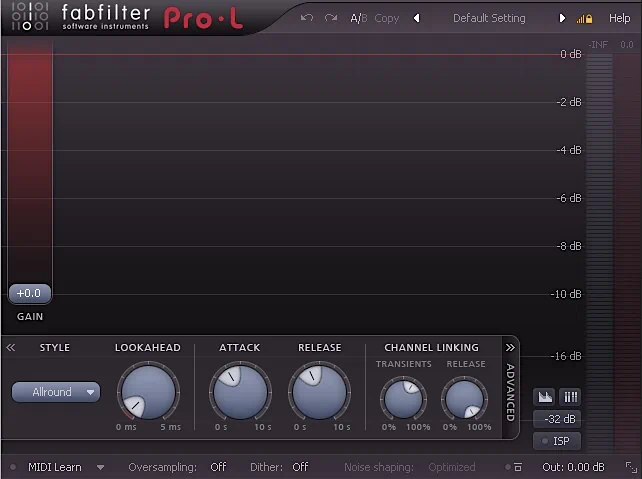
Pro-L continues FabFilter’s spectacular interface branding.
Pro-L proudly flaunts its intuitive and effortlessly navigable interface – and we’re not surprised, given its stylish pedigree. This plug-in inherits the sleek, user-friendly design that its FabFilter siblings are known for.
The attention to detail is impressive: think attractive lines, silky-smooth controls, and finely-tuned knobs that make you feel like a pro (pun intended). And then there’s the stunning waveform display, which sets a new standard in the industry.
The interface features a sophisticated charcoal-grey background with a subtle reddish-burgundy tint. As a result, it creates a refined and modern appearance.
Moreover, the dark background provides strong visual contrast. This allows the light-grey text elements to stand out clearly, ensuring excellent readability at a glance.
At 640 x 480 pixels, the screen real estate needed is quite moderate. Still, I found myself wishing the plug-in could resize to fit higher-resolution monitors. After all, who doesn’t love a little extra breathing room on a big display? It’s like having a compact car that wishes it could stretch its legs on the highway!
Important Update! As of 2015, FabFilter has indeed implemented a means of scaling and resizing their plugins. Yay!
Waveform Display:
The main body of the interface functions as a generous waveform display. As soon as the plug‑in processes audio, you immediately see how the signal changes in real time. It shows uncompressed parts of the audio in blue. In contrast, it highlights the limited sections in red, so you can spot them instantly.
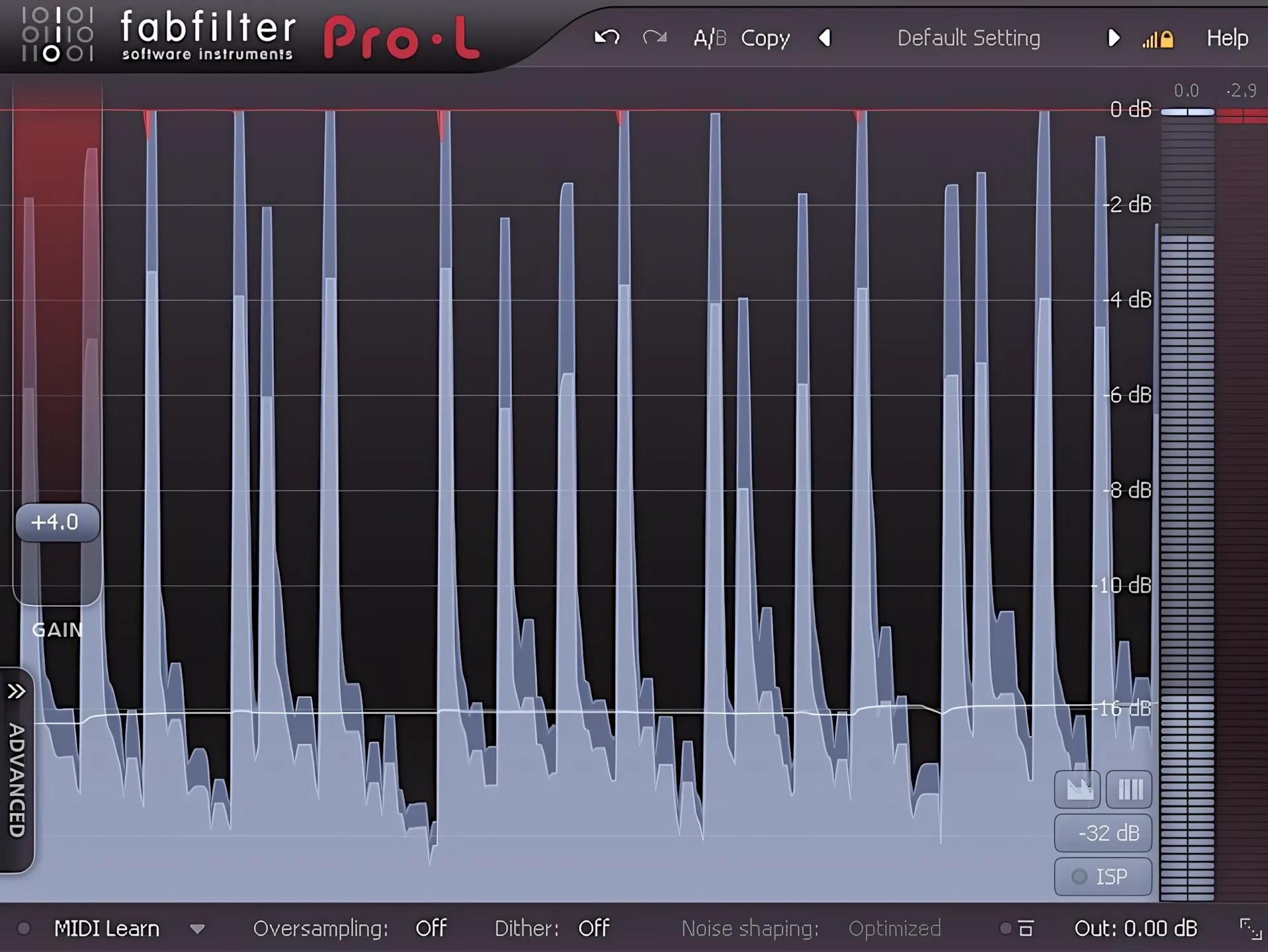
The waveform then scrolls smoothly from right to left, and, where possible, it even uses hardware acceleration. In other words, it stays responsive, even when your session looks like a plugin jungle.
Main Controls:
The input gain slider sits on the left edge of the GUI. This primary control offers values from 0dB to a NASCAR-style +30dB. Push it that far, and your mix might just break the sound barrier.
Meanwhile, a pair of meters occupies the right side. These track your output level and gain reduction. True to the FabFilter name, the interface feels cohesive and familiar.
The output level meter shines in blue, while red highlights the gain reduction. Both meters respond smoothly, especially on hardware-accelerated systems. Furthermore, my tests prove that this system is exactly what the developer claims: “surgically precise!”
Thankfully, FabFilter saves you from trudging through soul-crushing PDF manuals. Instead, they built a streamlined help system using concise files and interactive hints.
Simply hover your mouse cursor over any interface element. Instantly, an informative dialogue box pops up in the upper right corner to explain exactly what that knob does.
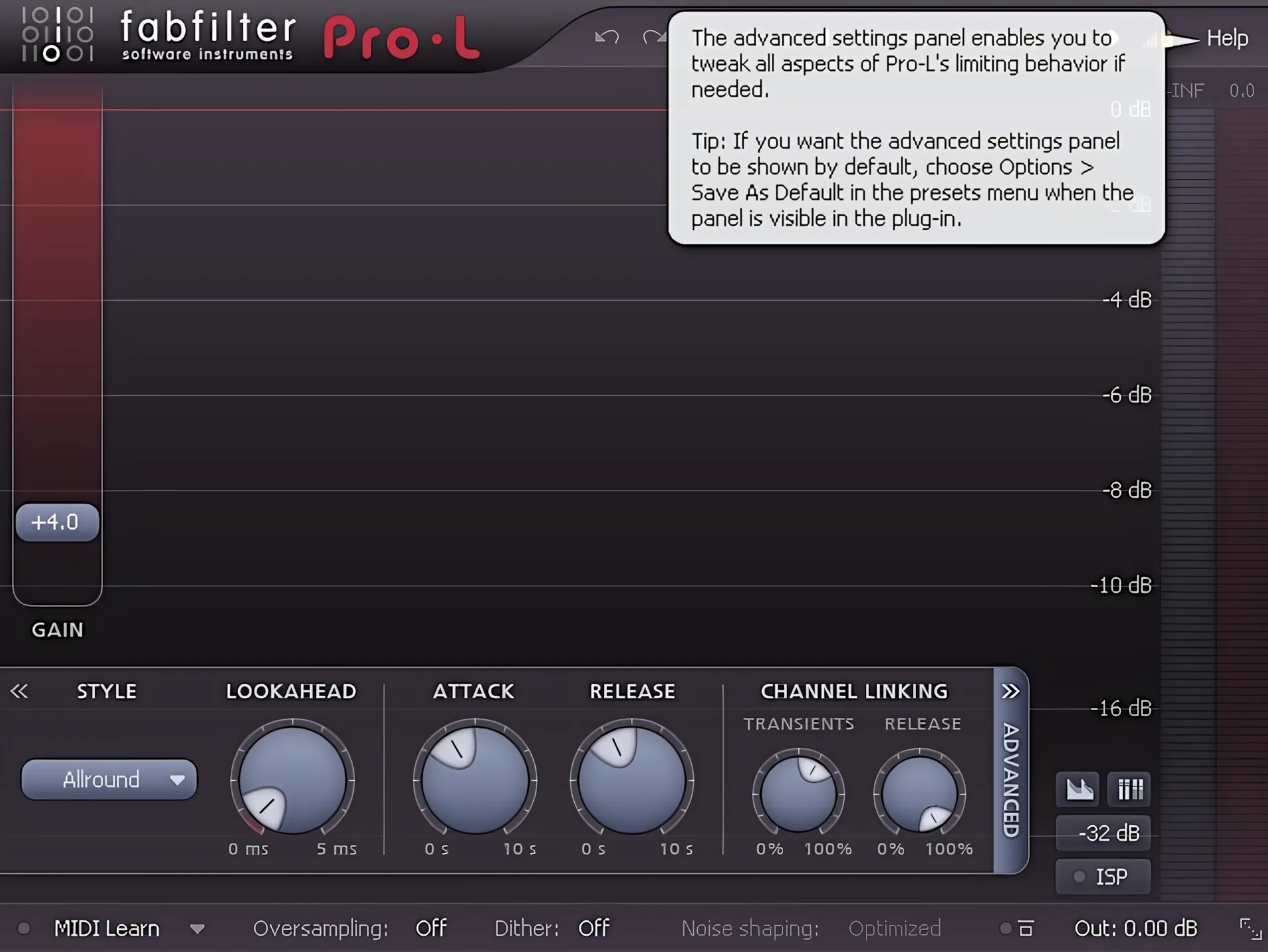
Opposite the “Advanced” tab, you find a small, tidy group of buttons that control the waveform display and meters. With a quick click, you can enable or disable both. You can also activate ISP (inter-sample peak) detection just as easily. In addition, you can adjust the metering scale to match your preferred standards. No studying the user’s manual required.
FabFilter, you light up my life . .
As you navigate the GUI, you’ll notice a delightful touch: subtle illumination effects that spring to life when you hover over any control. It’s like the plug-in is saying, “Hey, I’ve got a feature here – check it out!”
Adjusting the controls is a breeze, thanks to their silky-smooth responsiveness to mouse movements. You can tweak to your heart’s content, and the attractive, well-placed GUI elements make it easy to get the sound just right.
But wait, there’s more! For precision adjustments, you can type in values directly by double-clicking on the buttons or gain slider.
Need to reset controls? – No problem.
If you ever get lost, don’t worry – simply hold down the “ctrl” key and left-click to reset any control to its default value. It’s like having a safety net… or an “undo” button, but without the hassle!
Operations and Control:
Presets – your launching pad . .
Across the top of Pro-L’s interface, users can quickly access FabFilter’s Fab-u-lous preset management system. The system intelligently organizes presets into six categories: Acoustic, Clipping, Dance & Electronica, Pop, Rock, and Single Channel.
In particular, the Single Channel category offers a carefully curated collection of presets for individual bass, drum, guitar, and vocal tracks. This targeted approach helps users find suitable starting points without wasting time scrolling through endless options.
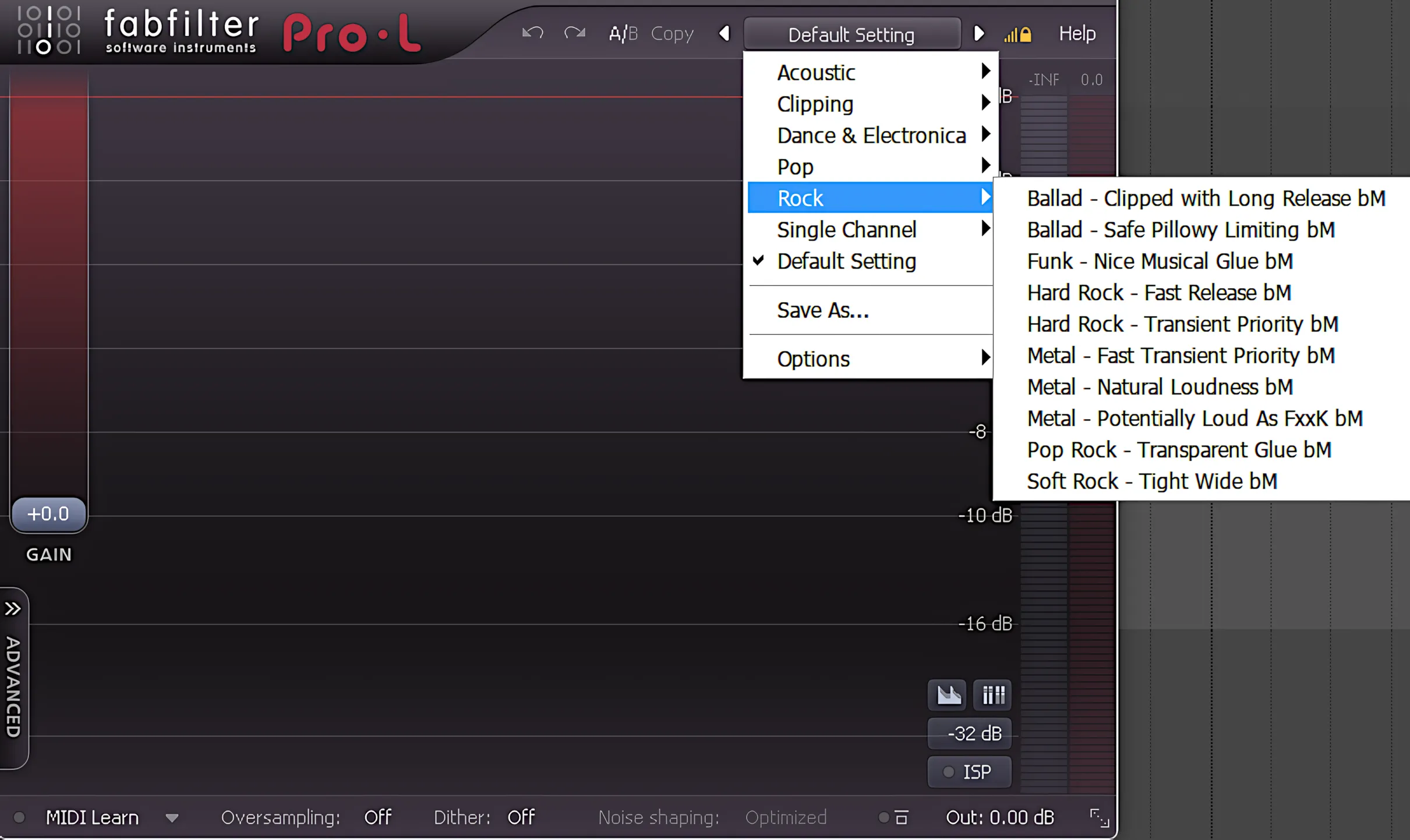
Naturally, users can also tweak any preset to suit their needs and save their customized settings. Once saved, these presets appear in the preset menu alongside the factory offerings, ready for future sessions. After all, a great preset is even better when it is your own.
You can easily A-B compare presets to find your perfect sound. Additionally, a handy undo/redo feature quickly rescues you from any accidental mix disasters.
Metering Options:
Pro-L includes a fully K-System compliant metering section, so your levels stay honest and consistent. You can select between K-12, K-14, and K-20, depending on your target loudness and genre.
You can also set the output meters to one of three operating ranges.
Choose the precise 16 dB scale, the more moderate 32 dB scale, or the wide 48 dB dynamic range. In short, you see exactly as much detail as you need, without squinting at your screen.
The final important bits on the bottom . .
At the bottom of the interface, you’ll find a handy row of essential controls, including Midi Learn, Oversampling, Dithering, Dithering Options, Global Bypass, and Output. It’s like having all the important bits in one convenient spot – no digging around required!
The verdict? The entire range of user-adjustable controls and GUI functionality is a dream to work with. Everything feels smooth, intuitive, and precise, making it an absolute pleasure to get creative with. FabFilter plug-ins truly are a joy to use – it’s like they were designed to make your workflow easier, not harder!
Sound Quality:
Powerful and Transparent!
Unless you push this limiter to the zenith, it remains incredibly effective and transparent. Even with excessive input gain, Pro-L tames the audio without flattening the music or draining its life.
Pro-L dramatically boosts perceived volume while preserving dynamic range and fidelity. Thus, it earns Olympic gold for its agility in making things loud while keeping them crystal clear. Honestly, it’s the audio equivalent of a heavyweight boxer who can also dance ballet!
Is Pro-L a one-size-fits-all device, or does it supply different kinds of limiting algorithms?
No – FabFilter Pro-L is most definitely NOT a one-size-fits-all deal. As a matter of fact, there are four individual limiting algorithms dedicated to differing musical applications. Switching between Pro-L’s four algorithms produces subtle yet meaningful changes. As a result, professional engineers can tailor the limiter’s behavior to suit a wide range of musical styles and production requirements.
Consequently, what works brilliantly on one track may behave differently on another—a reminder that audio processing still rewards careful listening.
Algorithm | “All Round”
In most situations, the “All Round” mode delivers consistently strong results. It also tends to achieve the most noticeable increases in perceived loudness. Among the four algorithms, this mode appears to be the most program-dependent, as its performance closely reflects the characteristics of the source material.
Algorithm | “Transparency”
Transparency easily restrains headroom-stealing peaks. However, if you push it too hard, occasional signal spikes will slip through. Treat it gently, or your peaks will escape like a cat at bath time. Personally, I find the Transparency algorithm well-suited for controlling individual tracks. For instance, it works wonders on a bass track or a drum bus.
Algorithm | “Punchy”
If you want a tasty, clearly audible “pumping” style of limiting, choose the Punchy algorithm. It keeps distortion nicely under control, yet it still adds a touch of attitude. This character works especially well on electronica and dance tracks, where a little extra edge never hurts—unless your speakers are very sensitive.
Algorithm | “Dynamic”
Meet the Dynamic mode, the clear champion of delivering loudness with – you guessed it – clarity. This algorithm is a precision instrument, finely-tuned to preserve as much transient information as possible. The result? It ventures into territory usually dominated by high-end processors like Slate Digital’s “FG-X”, but with a unique twist that sets it apart.
Optional Oversampling
In many cases, the default non-upsampled settings deliver superb results. However, engaging 2x or even 4x oversampling yields an even cleaner, higher-fidelity outcome. FabFilter’s proprietary linear-phase oversampling is highly effective, avoiding ugly “pre-ringing” or “smearing.”
Throughout my FabFilter Pro-L review, no matter what audio I fed into the plugin, the output stayed remarkably clean and dynamic. My bench tests confirm the company’s claim: this plug-in is truly transparent. It’s like a magic mirror that reflects your sound perfectly without adding a single wrinkle!
CPU Consumption:
This stealthy audio workhorse sits quietly within your DAW when operating at its default, non-oversampled settings. It performs its job efficiently without drawing attention to itself—often the hallmark of a well-designed mastering tool.
Even a modestly powered system built in 2010 or later should handle several instances of the plug-in with relative ease. In a busy mix, engineers can deploy multiple instances of Pro-L to tame peaks on individual channels without placing significant strain on the CPU.
However, enabling oversampling naturally increases processing demands. While the additional load is rarely surprising, your CPU will certainly notice that Pro-L has decided to work a little harder behind the scenes.
Concluding Remarks:
The Verdict: Five Stars
Reviewer’s Revival proudly awards 5 Stars to FabFilter for this powerful, transparent limiter. At first glance, FabFilter plugins might seem to carry a hefty price tag. However, the amazing results quickly justify every single penny. Your bank account might cry a little, but your ears will thank you. 😉
I suspect that any serious engineer—whether a seasoned pro or an enthusiastic hobbyist—will greatly appreciate this industrial-grade plugin. It delivers whenever you need transparent, high-fidelity brickwall limiting.
Ultimately, loudness balanced with great tone and well-defined dynamics provides that final “polish.” This critical touch effortlessly elevates a decent mix into a professional masterpiece.
5 out of 5 Stars


:: Pros
- Absolutely a studio-grade mastering limiter.
- Doubles as a very effective, transparent track clipper.
- Attractive, well designed interface.
- Highly effective and Transparent!
- Powerful dynamics control – even in a FULL mix.
- Full range of features.
- Extremely fluid workflow.
- Modest system requirements.
- Honourable, customer oriented company.
- Available for both MAC & PC (32 & 64 bit, including AAX)
- Concise, well-prepared help documentation.
- Fair cost in ratio -> product quality – Equitable bundle pricing.
::Cons
Maybe it would be nice if the GUI were resizable in order to accommodate higher screen resolutions.
This neutralizing comment is no longer relevant – as of 2015, all FabFilter plugins can be scaled and resized.
Visit the FabFilter website. www.FabFilter.com
Intellectual Copyright – 2014 – All rights Reserved. This review may not be copied or reproduced in whole, nor in part, without express written permission from the author.

Leave a Reply