
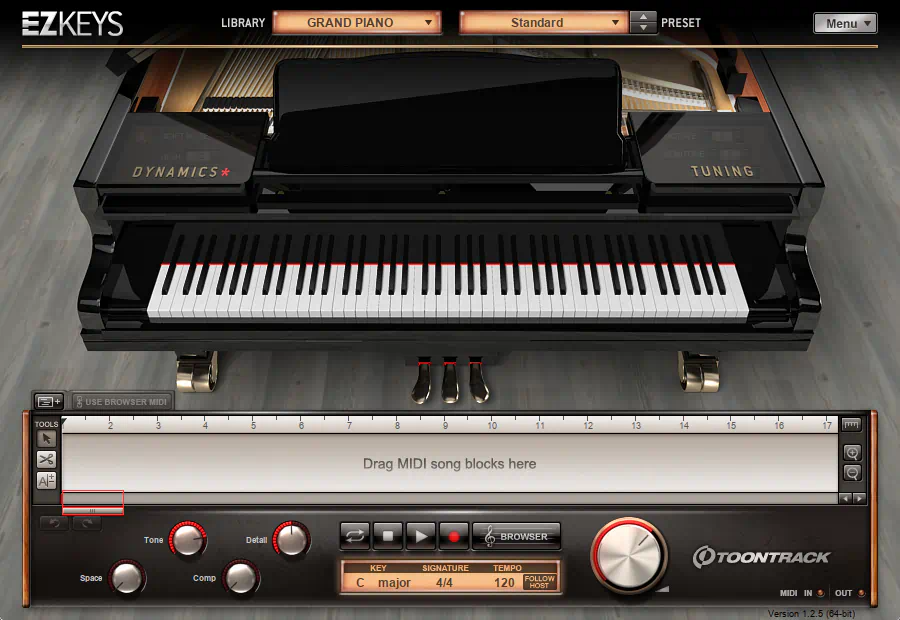
What is EZkeys?
EZkeys is both a super cool virtual instrument AND a composition tool. Musicians, producers, and songwriters can now create hyper-realistic piano, keyboard, and electric piano parts without mastering advanced playing skills. This tool empowers creators at all levels to bring their visions to life. In this exhaustive Toontrack EZkeys review, we’ll investigate nifty features such as:
- MIDI Library: It comes with an extensive library of professionally recorded MIDI patterns covering various genres (pop, rock, jazz, classical, etc.). Users can drag and drop these patterns into their Digital Audio Workstation (DAW) to instantly generate chord progressions and melodies.
- Virtual Instruments: EZkeys includes high-quality sampled instruments (like grand pianos, upright pianos, electric pianos, and organs) that play the MIDI data.
- Chord Progression Tool: One of its standout features is the ability to generate chord progressions based on music theory rules. Users can select a key and style, and the software suggests harmonically correct chords, which can then be customized.
- Integration: It works as a plugin within major DAWs (like Logic Pro, Ableton Live, Cubase, Pro Tools, etc.). It also functions as a standalone application.
- Customization: You can edit the generated MIDI notes, change voicings, adjust velocity, and modify the sound parameters to fit your specific production needs.
Introduction:
I was more than a little “jazzed” when I first heard that sampling giants, ToonTrack, were adding pianos and keyboards to their industry-leading EZ lineup. I had already been a satisfied ToonTrack customer for a couple of years. Vis a vis, I rely on various EZdrummer modules as my go-to drum construction software.
As soon as I heard the news about the groundbreaking “EZkeys Grand” piano library, I knew songwriters and home producers would be elated. I don’t mean to sound pretentious, but my assumption was absolutely correct.
Honestly, predicting this success felt less like a guess and more like reading the tea leaves of the music industry. And let’s be real: if ToonTrack says “jump,” the rest of us usually ask “how high?” before hitting the keys!
The initial release of EZkeys Grand made more than a small ripple in the sampling pool; it made waves. It not only stood its ground sonically against larger, multi-gigabyte competitors, it often matched or surpassed them in practical use.
More importantly, it gave non-keyboardists something no other piano library offered at the time: built-in MIDI phrases and true song-construction tools. Instead of just handing you a great piano, it handed you great piano parts.
Toontrack delivers first-rate piano sounds, a range of musical styles, flexible transposition, drag-and-drop song building, and an attractive, photo-realistic interface. You sit down, and everything feels familiar within minutes.
The EZkeys lineup empowers novice songwriters and non-keyboardists with professional-grade piano parts that sound like a seasoned player recorded them. At the same time, it gives professionals a powerful way to fast-track song ideas quickly and easily. So, the only thing slowing you down is deciding which idea to finish first.
Quick Checklist
This article is an exhaustive inspection of the cross-platform “EZkeys Essential Pianos” collection. This wonderful suite brings together three distinct piano experiences.
- EZ keys Grand delivers an impeccably sampled Steinway “Model D”—the gold standard in concert pianos.
- EZkeys Classic Keyboards features a totally vibing pair of electric pianos: the Wurlitzer “A200” and Rhodes “Mark I”, each with its own character and warmth.
- EZkeys Upright rounds out the trio with a harmonically pleasant, old-time upright piano that captures vintage charm.
Pricing breaks down nicely for different budgets. Each package sells individually for €139/$179, while additional EZkeys libraries cost just €69/$89 USD. However, grab the entire suite as a bundle, and you’ll pay €249/$325 USD—a solid value if you want the complete package.
And here’s the cherry on top: I’ll also explore a generous selection of EZkeys MIDI libraries spanning R&B, Gospel, Jazz, Country, Blues, and Pop styles.
Hi, you! If you like these kinds of reviews,
be sure to subscribe.
Does Toontrack’s EZkeys borrow ideas from their previous golden child, EZdrummer?
For sure! There is a strong family resemblance between EZkeys and its older brother, EZdrummer. You can easily recognize this resemblance in the tabbed layout design. Most especially, you observe the same DNA in both applications’ browser panels.
When ToonTrack first hit the scene, they introduced one of the earliest—and still most highly regarded—drum kit sample libraries ever released. Their drum samples didn’t just sound great; they worked brilliantly. Suddenly, home producers and small-budget studios gained access to amazingly realistic drum sounds and extensive MIDI patterns.
The innovative “drag-and-drop” MIDI browser gives users the power to build professional drum tracks easily and quickly. Competing drum software suites have emerged since then, yet most serious enthusiasts still agree: EZdrummer remains one of the very best.
ToonTrack didn’t just enter the market; they set the bar so high that everyone else is still trying to reach it. It’s like they brought a sledgehammer to a knife fight, and the rest of the industry is still picking up the pieces!
All in the family . .
EZkeys delivers equally impressive features for piano and keyboard production. These fantastic samples are well-balanced and articulate. The dynamics levels are second-to-none, and the built-in effects are top-drawer.
If you are a songwriter or producer needing a great-sounding demo in a hurry, ToonTrack’s sequencing software delivers! Producers aiming to craft excellent piano tracks can rest assured: you won’t settle for subpar sounds. These blisteringly fast samples match standard CD-quality perfectly.
ToonTrack’s proprietary compression algorithm keeps library sizes surprisingly small, so they load incredibly quickly. In a word? I “love” the EZkeys libraries.
Honestly, finding software that loads faster than my morning coffee brews is a rare treat. It’s like magic, but with better sound quality and no caffeine jitters!
Familiar family traits . .
Toontrack crafts its piano and classic keyboard packages with exceptional care and precision. These high-quality sample libraries deliver impressive sound quality, and that alone makes them well worth serious consideration.
Furthermore, much like their pioneering percussion cousins — EZdrummer and Superior Drummer — these keyboard instruments combine ease of use with robust MIDI sequencing features. Thankfully, they do far more than just sit there looking pretty in the plugin folder.
ToonTrack offers these polished “dillies” for both Mac and PC systems. They support 32-bit and 64-bit environments in VST, AU, and RTAS formats.
Visuals:
The four instruments bundled in the EZkeys Essential Pianos package all share a consistent graphical design. As a result, the collection maintains strong visual continuity from one instrument to the next.
I greatly admire this approach to interface design because it promotes familiarity and encourages quick results. Instead of wrestling with unnecessary learning curves, users can simply sit down and make music — a refreshingly rare concept these days.
Furthermore, Toontrack selected colors that allow all four instruments to blend comfortably into a wide variety of musical styles and production environments.
Very much in the tradition of EZdrummer, each keyboard loads into a single GUI shell through the “Library” dropdown menu. This streamlined approach keeps navigation simple and efficient. No archaeological expedition through endless menus required.
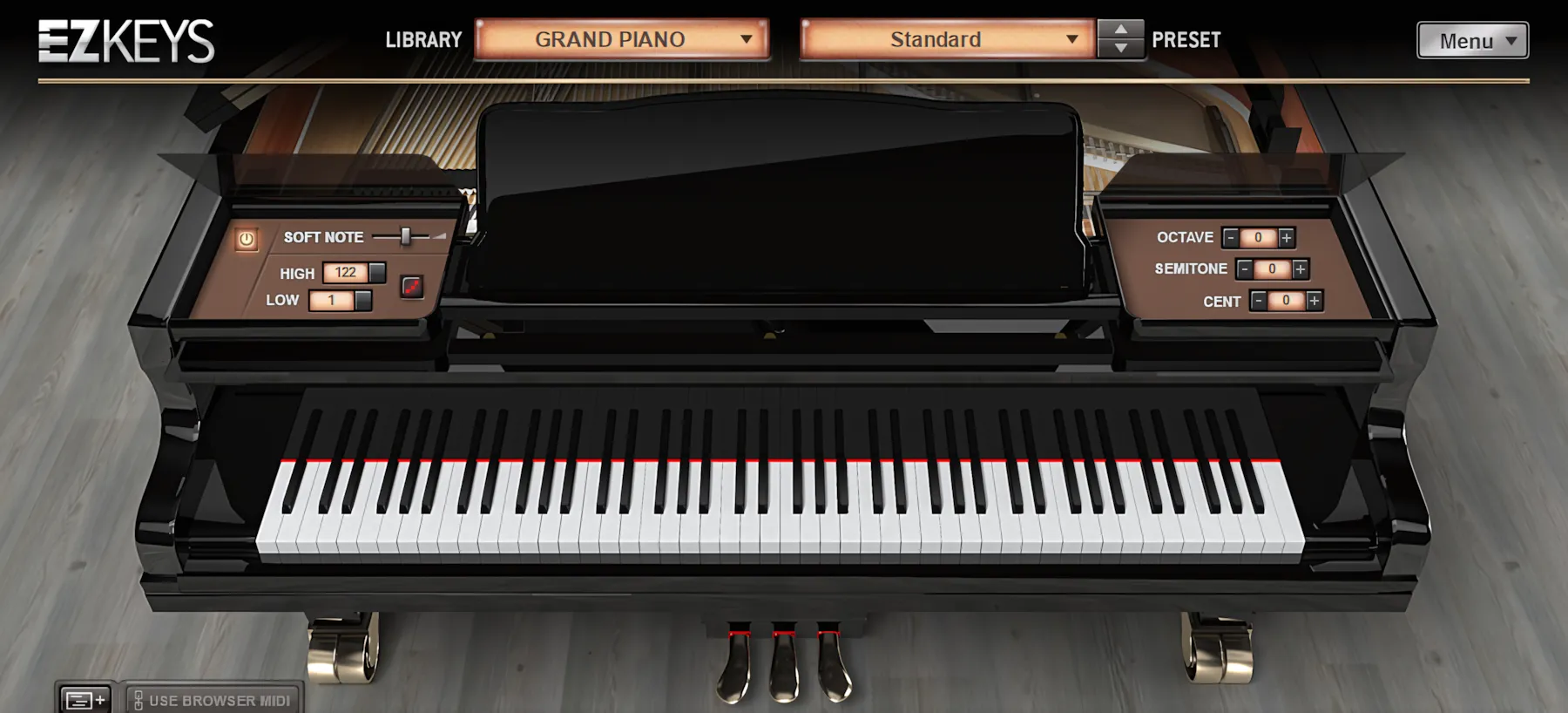
In addition, each piano and keyboard shares a familiar set of user-adjustable parameters positioned along both sides of the interface. Toontrack wisely hides these controls beneath the “Dynamics” and “Tuning” panels, keeping the workspace clean and uncluttered. Users can instantly reveal the controls with a simple mouse click.
Installation and Authorization:
Upon purchase, the fortunate new owner receives an email from Toontrack containing direct download links for the sample libraries, along with the required registration codes. Thankfully, the process feels refreshingly painless and modern — no carrier pigeons or cryptic activation rituals involved.
Each individual library weighs in at roughly 500 MB, give or take a few megabytes. Fortunately, the downloads arrive quickly thanks to ToonTrack’s fast and reliable servers.
Toontrack uses a challenge/response copy-protection system for its software. Normally, I would sharpen the editorial axe for that decision, but ToonTrack’s long-standing reputation softens the blow considerably.
How many activations are allowed per license?
Toontrack lets you activate its products on two computers at the same time, with a total of four activations before a license expires. This setup gives you flexibility without turning license management into a full-time job.
Although Toontrack does not actively advertise it, they will review a genuine customer’s request for additional activations on a case-by-case basis. In other words, if you have a legitimate need, they will listen—and they are generally quite reasonable, as long as you are not secretly trying to license your entire neighborhood.

Personally, I remain firmly anti-dongle and anti–challenge/response when it comes to audio software. Dongles rarely provide a pleasant experience, especially for laptop users who already carry enough gadgets to stock a small electronics shop. Furthermore, challenge/response systems can sometimes limit valid activations or leave customers stranded if a company ever closes its doors.
Nevertheless, I genuinely appreciate that several developers — including Toontrack, Modartt, and FXpansion — work hard to make their implementation of challenge/response protection as customer-friendly and painless as possible.
The Pianos:
The Grand
Beginning with EZkeys Grand, Toontrack presents a gorgeous, photo-realistic 3D image of a polished, ebony-black grand piano. You see it from a standing position, directly in front of the keyboard, as if you are about to sit down and play.
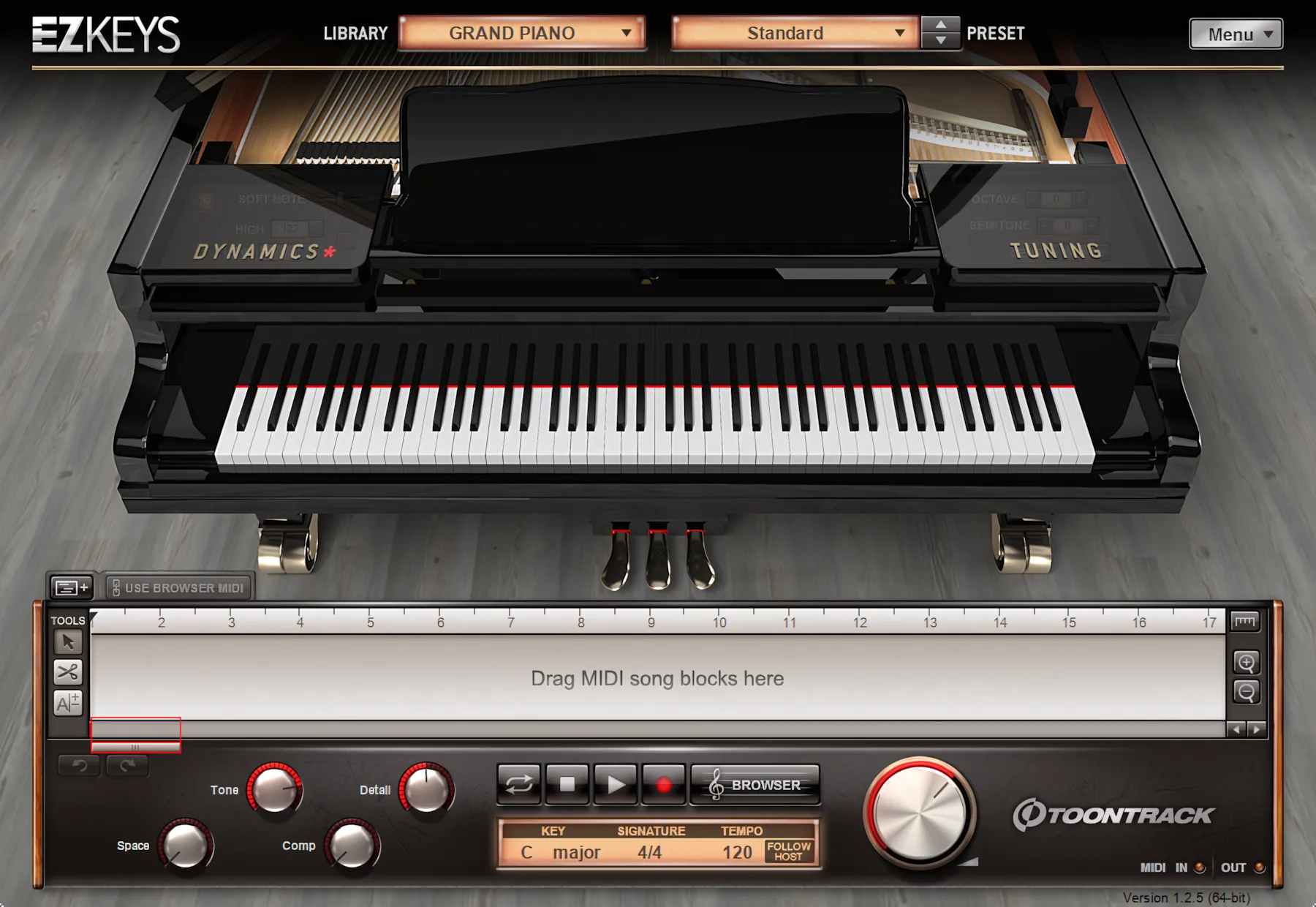
Light barn-grey flooring adds a warm, calming atmosphere. It quietly invites you to step a little quicker, take your place, and let your fingers rest—thoughtful, eager, and ready—on the elegant, inviting keys.
EZkeys Grand presents itself with poise and grace. The pleasant lighting, subtle shadows, tasteful textures, and gently rounded edges all work together to create a mood of elegance and charm.
Yet despite its classy design, the interface never feels pretentious. It looks refined, not snobbish—more “welcome to the concert hall” than “do not touch the piano.”
EZkeys Classics – Mark 1 and Electric W200
The pair of “EZkeys Classics” instruments — the Wurlitzer A200 and Rhodes Mark I — radiate a wonderfully old-school charisma that immediately grabs the user’s attention. These vintage-inspired beauties trade polished elegance for raw stage personality, and they wear that attitude proudly.
Instead of presenting a pristine studio environment, Toontrack drops the user right into the heart of a large, smoky club atmosphere. The interface flooring resembles a well-worn stage, complete with tasteful gritty texturing that adds character without looking dirty or overdone. Frankly, one can almost hear imaginary applause and the clinking of glasses between chord changes.
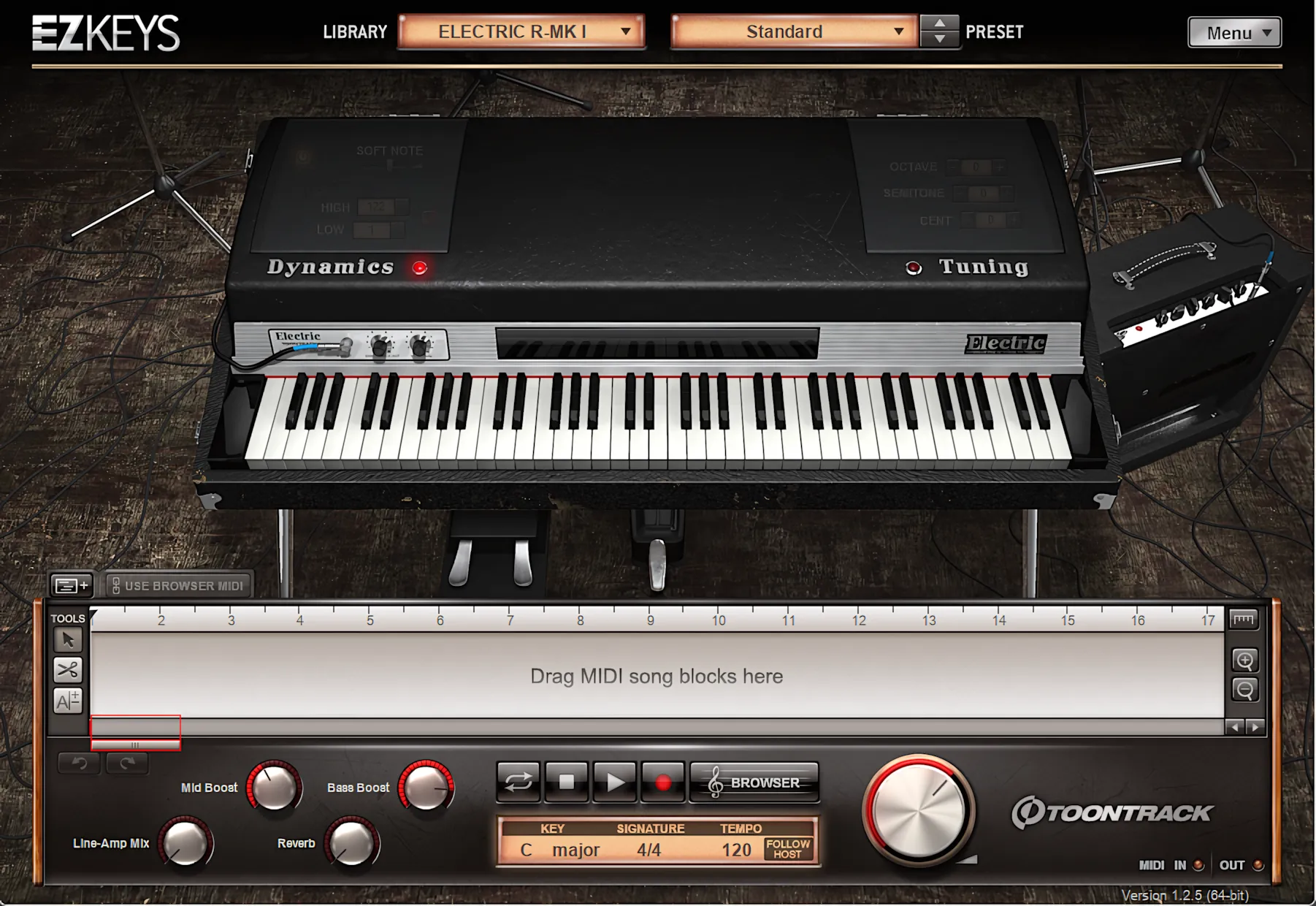
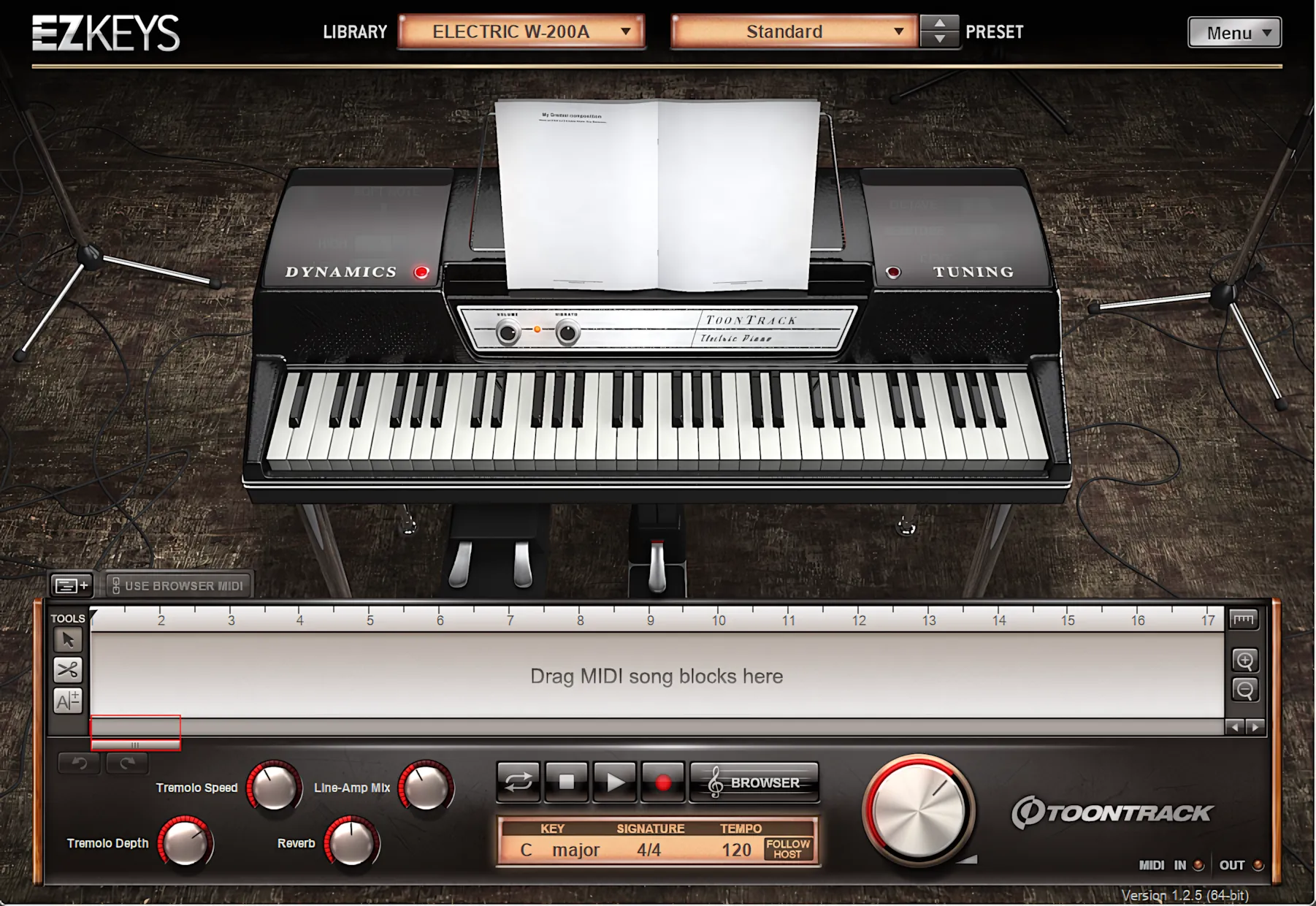
The stage lights ditch all subtlety. Instead, bright beams blast down like half a dozen PAR64 lamps hotly tracking your every move. They practically dare you to nail those iconic Ray Charles or Supertramp licks.
Moving further into the rig, you will spot a cool little combo amp and a realistic scattering of cables. Then, you load up the Rhodes MK I. This legendary keyboard clearly survived a few grueling tours, leaving it with some beautiful, hard-earned marks n’ knicks of character.
The Upright:
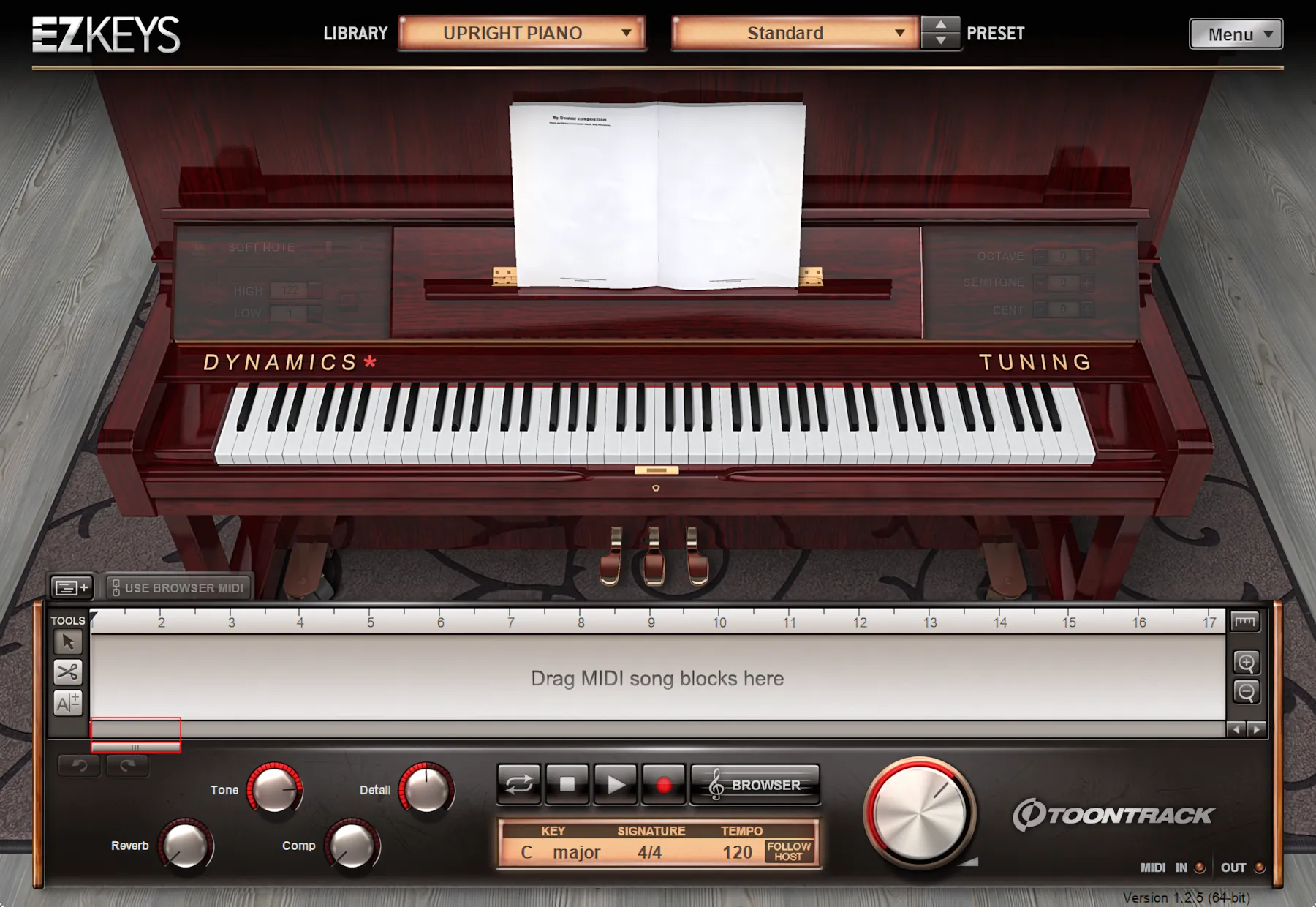
The “EZkeys Upright” radiates pure charm. It channels a well-cared-for, quality piano from Grand Mama’s parlor or an elite recording studio.
Beautifully buffed, rich mahogany wood coats this gorgeous instrument. It rests gracefully upon an expensive, grey, patterned rug. Just like its elegant big brother, “EZkeys Grand,” this version features immaculate, aged barn-wood flooring textures.
Finally, delicately rounded edges and subtle shadowing create a stunning interface. It practically begs you to pull up a stool and start playing. (Just wash your hands first; Grand Mama is watching).
Operation and Control:
The Dynamics Panel:
On the left, the Dynamics panel gives you a pair of scrollable controls for both minimum and maximum velocity levels. You can quickly dial in how soft or hard the instrument responds, without wrestling with your hardware.
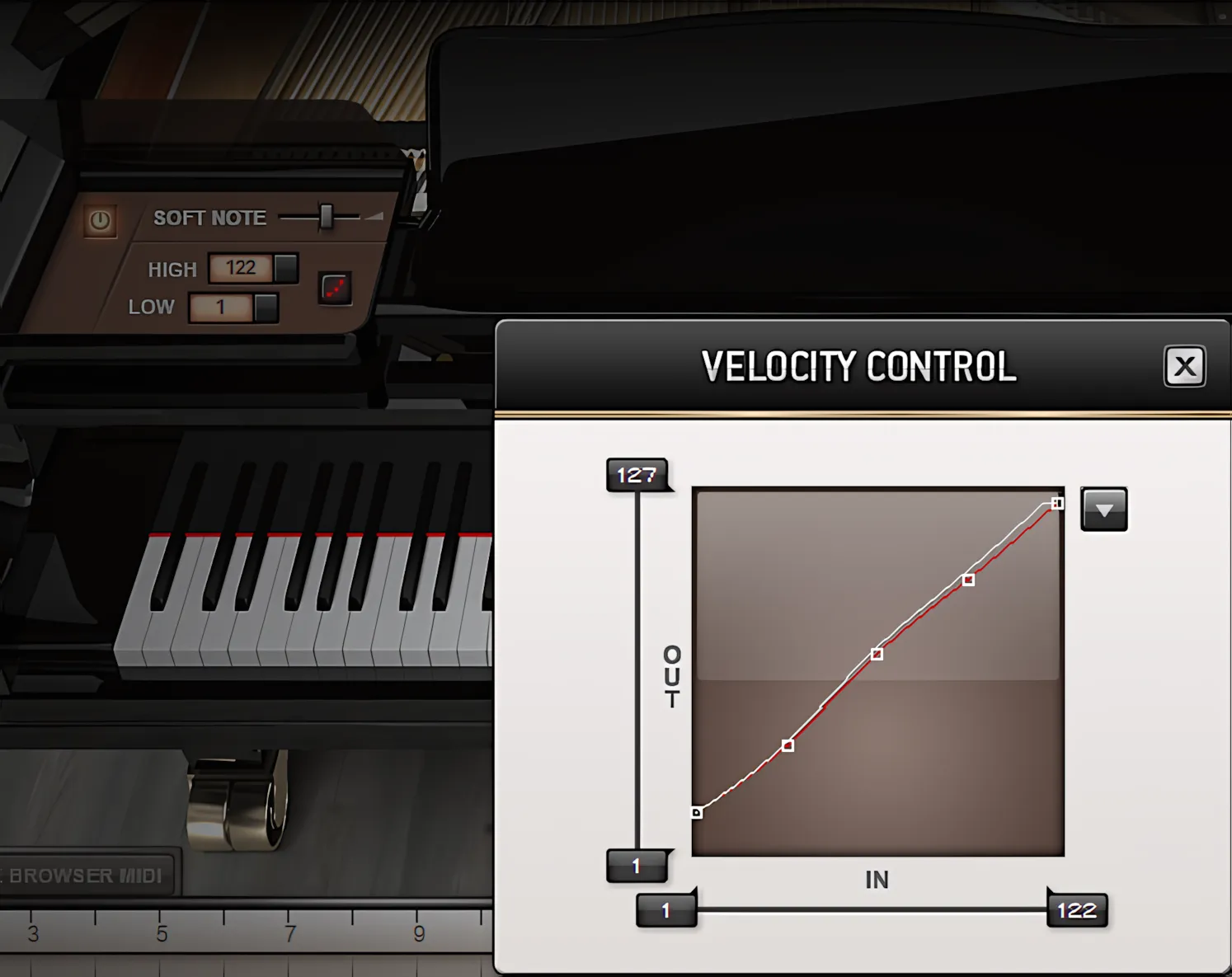
This becomes especially useful if you are playing on a finicky keyboard that does not offer enough velocity control. It also shines when you would rather use these onboard dynamics controls instead of manually tweaking velocities in a piano roll editor. Work smarter, not hunched-over-the-mouse harder.
The “Soft Note” slider lets you dial in the keyboard’s attack character—dial it up for more bite, or pull it back for a gentler touch. To access deeper velocity control, click the small rectangular icon next to the “Hi” and “Low” velocity buttons. This opens an advanced velocity control window featuring a familiar X/Y dynamic graph.
Here, you can sculpt your ideal velocity curve, giving you precise control over how the keyboard responds to your playing dynamics.
The Tuning Panel:
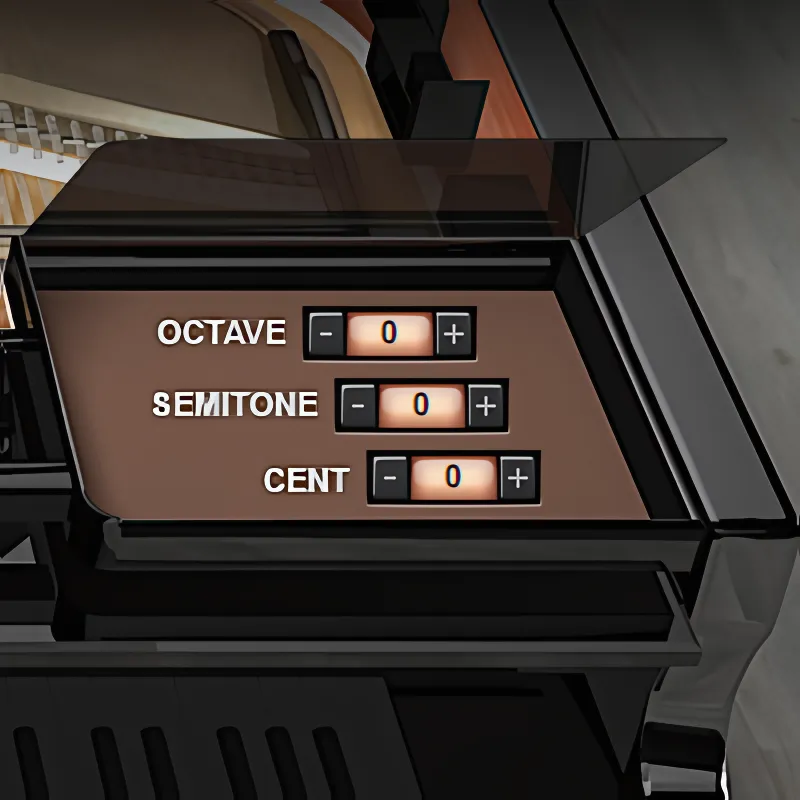
The tuning panel on the right gives you complete control over transposition. You can adjust it by octave, semitone, or even cents. Click the panel covers again to close them.
By the way, these panels slide open and shut with some cool, “bling-bling” animation. This flair really enriches the user experience. Attractive red accents on the buttons and knobs add a perfect crowning touch.
It’s like the software puts on a little light show just for you. Honestly, if my toaster had animations this flashy, I’d never burn a bagel again!
Bottoms Up:
The bottom section of the EZkeys interface houses the MIDI browser and sequencer timeline. Here, you can easily create and manipulate highly complex chord progressions and musical patterns.
Meet the MIDI Browser:
Now, let’s inspect the MIDI browser.
Click the “BROWSER” button to bring the MIDI browser into focus. You’ll find it near the center of the transport area, just below the timeline.
Once visible, you’ll notice ToonTrack borrowed the comfortable workflow from their EZdrummer products. Familiarity makes navigation a breeze. The MIDI browser features four evenly-spaced columns. These separate Libraries, Genre/Styles, Patterns, and finally, Variations.
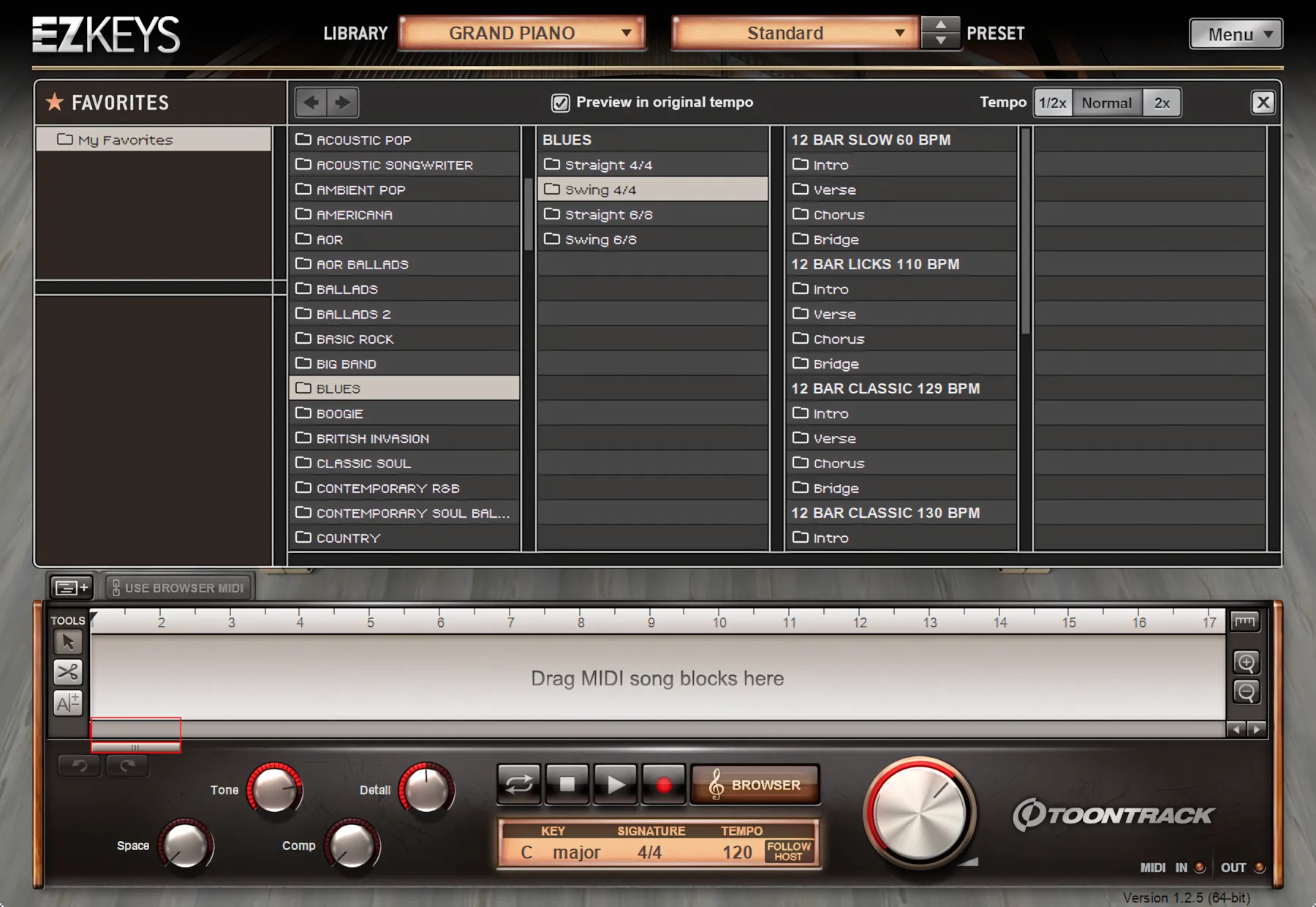
By default, EZkeys syncs directly to your host’s tempo. However, during standalone operation, you take full control of the speed. You can type numeric values directly on your keyboard or simply drag the tempo slider. You can also reshape the time signature across the entire timeline.
EZkeys easily handles typical pop signatures. Furthermore, Toontrack went the extra mile for jazz, world-music, and avant-garde composers. They included less common signatures like 5/4, 6/8, and 7/4. So, go ahead and channel your inner prog-rock wizard!
Drag any variation down to the timeline from the MIDI browser. It’s as easy as pie!
Q: Can I change keys, chords, and tempo after dragging them down to the timeline?
A: Absolutely!
Once you lay out a chord progression or full composition in the sequencer timeline, you can transpose the entire piece with ease or instantly switch it to its relative minor—for example, from C major to A minor—with just a couple of clicks.
Directly beneath the transport controls, the track overview area includes dedicated boxes for key, time signature, and tempo values. Click any of these fields to adjust them on the fly. In practice, all three of these functions perform extremely well, and the automatic major-to-relative-minor conversion is spot-on.
In this reviewer’s opinion, Toontrack has built a fantastic suite of sample libraries powered by smart, understated artificial intelligence—clever enough to help you, but subtle enough to stay out of your way.
Timeline and Chord Editing:
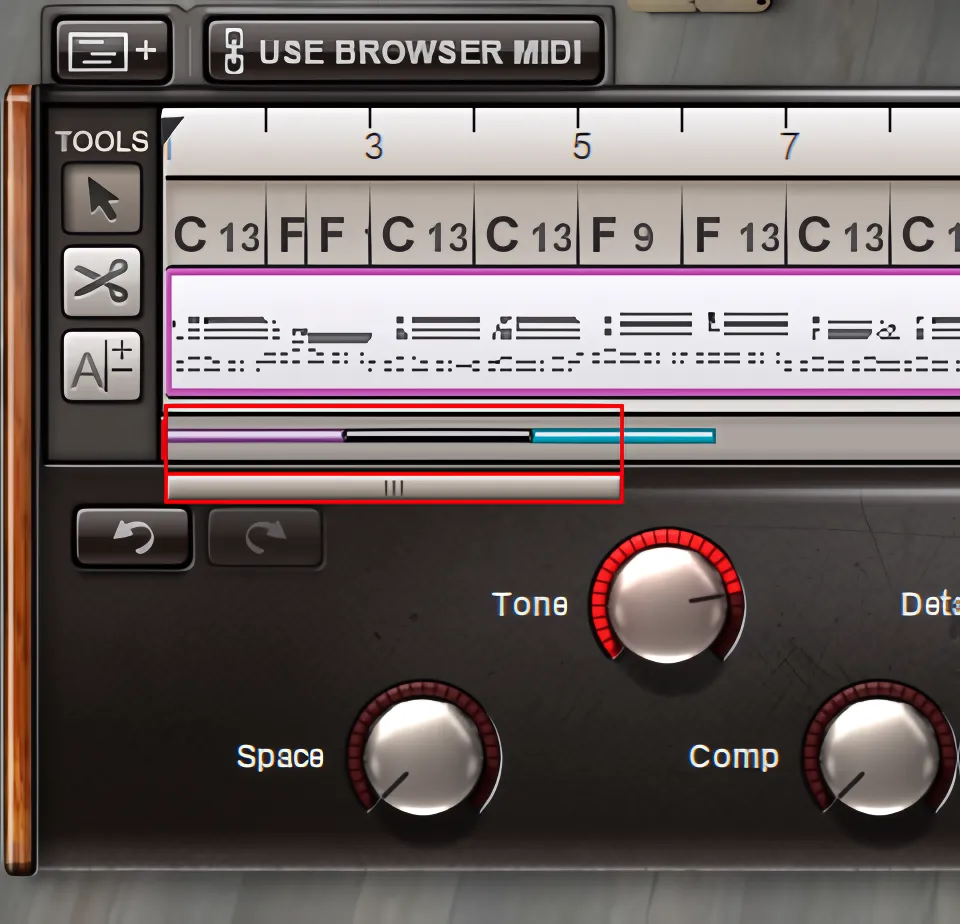
On the left side of the interface, three tool buttons handle cutting chord blocks, dragging operations, general item selection, and chord-notation editing. Toontrack keeps these essential functions close at hand, which makes workflow feel quick and intuitive.
When dragging along the timeline, users can shorten a chord block, but they cannot extend it beyond its natural musical measure. Fortunately, extending a chord across multiple measures remains very simple. Users merely add a second chord block, shorten it if necessary, and merge the two together.
To perform the merge, users simply select both chord blocks, right-click, and choose “Merge.” The process feels straightforward and efficient rather than unnecessarily technical — always a welcome surprise in music software.
In addition, the undo and redo buttons sit directly beneath the timeline on the left-hand side. These controls allow users to reverse or restore editing actions instantly. Thankfully, this safety net encourages experimentation without the usual “Uh-oh… what did I just do?” moments.
You can zoom the timeline in and out by clicking the magnification buttons on the far right. However, scrolling with your mouse wheel accomplishes this task much faster.
Circle of Fifths Wheel:
By default, the “Add Chord” button drops a “middle C” chord across a full measure. Want to change the voicing or pitch? Simply click the chord name directly above the measure.
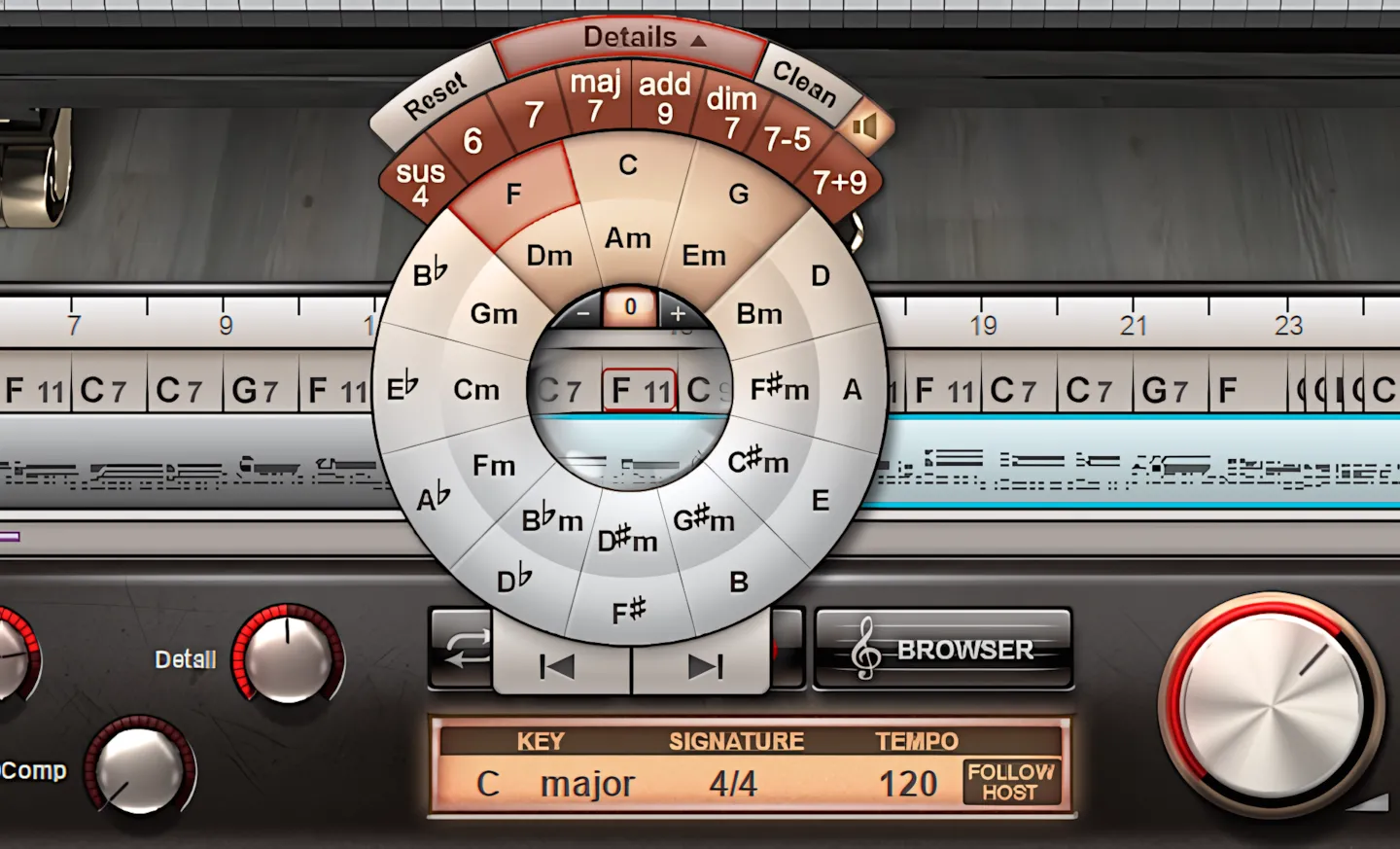
This action opens a nifty Circle of Fifths chart, which handily hovers right above your selected chord block. If you already know basic music theory, this chart makes perfect sense. If you don’t, congratulations! You just found a fantastic, headache-free learning aid.
On the “Circle-of-Fifths” wheel, the interface always positions root chords alongside their relative minors. This thoughtful layout keeps harmonic relationships easy to visualize and speeds up the songwriting process considerably.
Furthermore, the “Details” tab located at the top of the wheel expands the system even further. From there, composers can manipulate chord inversions and voicings to an almost dizzying degree. Diminished chords, Major 7ths, add 6, add 9, add 11, add 13, and countless other variations remain instantly accessible.
Thankfully, the feature never feels overwhelming despite its depth. Instead, Toontrack presents these advanced harmonic tools in a clean and remarkably approachable manner. Even theory-phobic musicians may find themselves experimenting like seasoned jazz professors after a few minutes.
Do you like your chord progression, but need to change the style and/or rhythmic pattern?
With the MIDI browser open, simply highlight any pattern and apply it to your selected chord block or timeline range. Just click the “Use Browser MIDI” button in the top-left corner, directly above the sequencer.
It’s like having a magic wand that drags and drops perfect rhythms onto your track. Honestly, if dragging and dropping was an Olympic sport, this interface would take home the gold!

Leave a Reply