
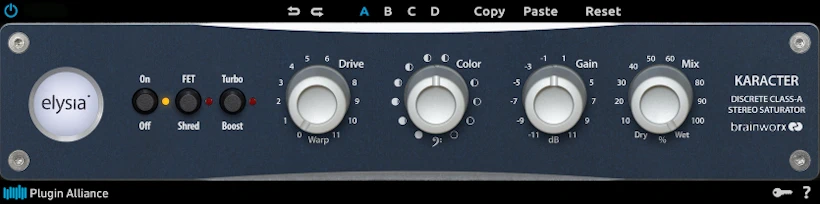
What is Karacter?
Elysia Karacter is a saturation and distortion plugin bundle developed by Plugin Alliance. It faithfully emulates the original Elysia Discrete Class-A hardware saturator. Karacter handles everything from subtle mix enhancement to full “harmonic destruction,” making it popular for mixing engineers who want one flexible saturation tool. In this deep-dive Elysia Karacter review, we’ll take a look at must-have features such as:
- Tube-inspired distortion
- Mid/Side mode for spatial enhancement
- Three distinct saturation modes (subtle harmonic addition to aggressive distortion)
- Adding analog-style warmth and “glue” on bus/master tracks
- Gentle THD (Total Harmonic Distortion) for coloration
- Aggressive distortion for creative sound design
- M/S processing to widen or focus the stereo field
“Affectionately known as ‘The Coloring Box’ by its fans because of the various ways in which it fattens and adds sparkle to tracks. Karacter’s unique sounds separate it from the pack.”
Introduction:
I finally woke up and joined the audio world a few months ago, realizing saturation plugins actually do something useful. Frankly, I spent way too long writing them off as one-trick ponies only good for electric guitars and keyboards.
Thankfully, I saw the error of my ways and finally realized how powerful a bit of harmonic saturation can be for dull audio. It can turn lifeless tracks into something that actually sounds alive. And the timing could not have been better. Plugin Alliance dropped yet another saturation plugin into an already very saturated market. *Deliberate pun intended..
I immediately asked myself: “Is this just another ho-hum distortion plug, or does it truly deserve its flashy name?
Over the past few days, I’ve been putting Karacter through its paces. I compared it to every saturation plugin I could find. The verdict? It delivers smooth, controllable harmonic color—and does it with serious style. Honestly, it’s quite nice!
A pair of colouring boxes . .
Karacter isn’t just a single plug-in. It combines two versions of the processor into one package. The Mix variant tackles individual track duties with ease. Its bigger, feature-packed sibling, Master, handles buses and even full mixes. Think of it as the heavyweight champion of the pair—without the boxing gloves.
Maybe I’m just getting old. Or maybe we engineers spent too much time “cleaning” things up. Either way, $199 (USD) is a wildly aggressive price for a distortion plug-in – in my honest opinion. Stick around for a few minutes. Let’s see if this steep price tag is actually justified.
Saturation – What’s it actually good for?
If you mix entirely inside the computer, you have definitely stared at a totally lifeless track at some point. This happens to literally any element, from a stray drum hit to a massive lead vocal or even your entire master bus.
Everything appeared fine on paper, but your mix still came out sounding like sterile audio cardboard. You twisted EQ knobs, swapped compressors, and—in an act of absolute desperation—pushed some faders up. Naturally, none of it helped.
Enter saturation. It’s the fastest way to inject a convincing dose of analog-style mojo into a digital recording.
Hi, you! If you like these kinds of reviews,
be sure to subscribe.
Used with intention, Elysia Karacter doesn’t just process your lifeless digital tracks. It gently caresses them with harmonic weight and sheen, and suddenly they come alive. They start sounding bigger, fuller, and like they finally had their morning coffee.
The fruits of Collaborative Labour . .
You might not have noticed, but many of Plugin Alliance’s products come from powerful collaborations. Hardware experts like Elysia or SPL team up with the DSP wizards at Brainworx, and together they cook up some seriously impressive tools.
Brainworx once again shows off its trademark obsession with detail. They’ve painstakingly modeled every tiny nuance of the original Elysia hardware. Then they baked all those details straight into the digital versions. In other words, they did the nerdy heavy lifting so you can just sit back and enjoy the sound.
Licensing and Authorization:
Upon payment, and you can instantly grab the installer from your Plugin-Alliance account. Elysia’s Karacter weighs in at a tidy 60 MB for Windows (both x86 and x64). Mac users? You’re looking at 140 MB. Don’t worry—you get AAX, VST3, and standard VST formats in every single package. Best of all? You can demo the full thing for a generous 14 days. No strings attached!
Activation relies on a straightforward challenge/response (C/R) system. With your DAW connected to the internet, authorization is quick and painless. If your studio machine lives off the grid, an offline activation option is equally well supported.
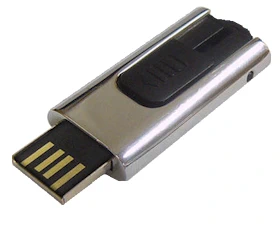
Each license permits up to three concurrent activations across separate computers. Better still, you can authorize the software to a standard USB flash drive or SD card and use it as a portable dongle. It’s an elegant solution for engineers who regularly move between studios or sessions. The experience feels much like working with an eLicenser or iLok, but without committing to another proprietary piece of hardware.
** PLEASE NOTE: You can activate PA plug-ins with a standard SD card. However, Windows often changes hardware IDs for these devices. This means your activation might vanish.
I contacted PA tech support about this. They recommend using a USB flash drive instead. Plug it directly into your computer, not a hub.
One last pro tip: avoid SanDisk. Their memory sticks and SD cards simply aren’t supported.
Visuals:
The Karacter plugin totally channels its legendary hardware ancestor. Brainworx’s design crew nailed every subtle nuance of the original physical rack unit. The sleek blue-and-gray color scheme saves your eyes from burning out—plus, let’s be honest, it just looks cool.
Thoughtful spacing between controls and razor-sharp text labels make tweaking tones an absolute breeze. From top to bottom, the interface is remarkably clean, crisp, and intuitive.
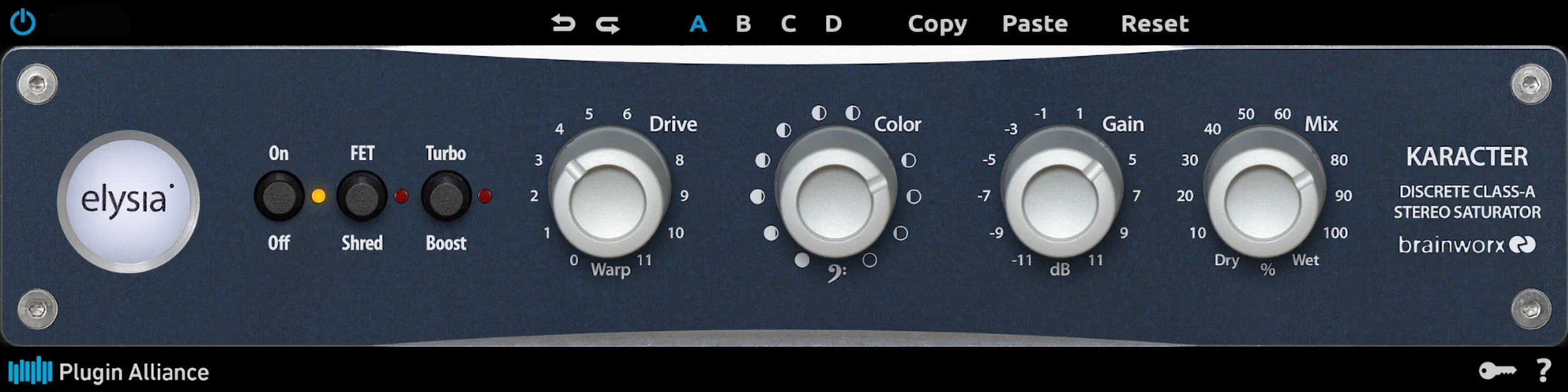
Plugin Alliance keeps things familiar along the top of the GUI. They give you a clean, simple toolbar with Undo and Redo buttons, a group of four temporary preset slots, plus Cut, Copy, and Reset. You can quickly copy settings from one slot to another and compare them without losing your place. No menu-diving, no drama.
Starting from the left, they equip you with a tidy little trio of push buttons: On/Off for bypass, FET Shred, and Turbo Boost. These are your “fun switches,” and yes, they do exactly what their names suggest.
The four main knobs take up most of the front panel: Drive, Color, Gain, and Dry/Wet. That’s it. No clutter, no knob forest. This minimal set of controls keeps everything fast, intuitive, and painless to dial in.
Master Karacter . .
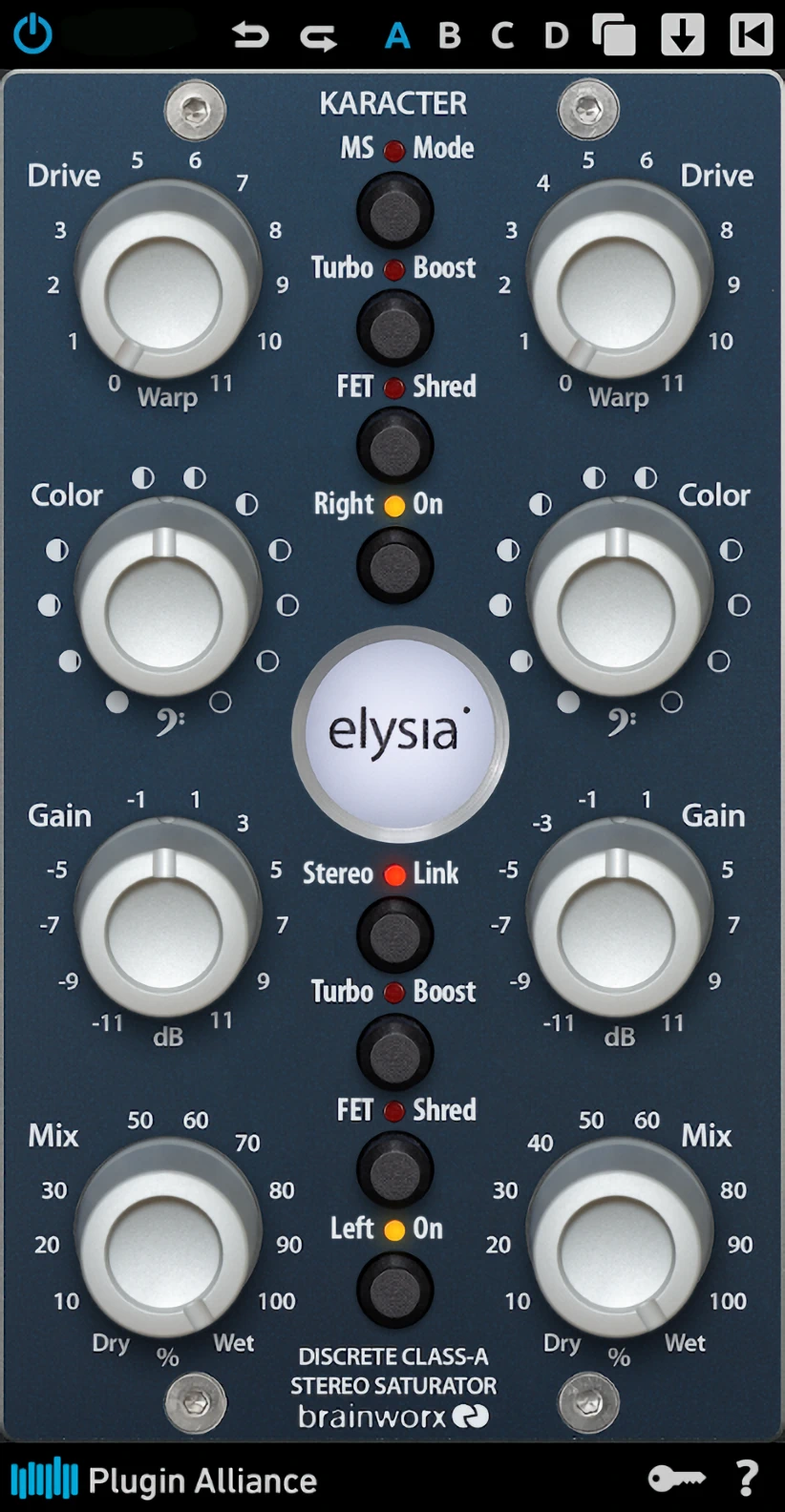
The Master Karacter does everything the minimalist “Mix” version does—but with a twist. You get individual controls for each stereo side or a mid/side setup.
Flip switches to activate or disengage each channel whenever you like. The design? It screams hardware heritage, mimicking that sleek vertical 500-module look. Your rack unit just got a digital twin!
Ctrl-click resets any knob to its default center position. Hold the Shift key while adjusting a control to make finer, more precise changes. You can also left-click any parameter’s value readout to enter an exact value directly. It’s a small touch, but one that seasoned users will appreciate when precision matters.

I have one tiny gripe with the GUI. In Samplitude Pro X3 and Mixcraft, the knobs only respond to circular mouse movements. I prefer linear up-and-down movements. They are much less fiddly.
The good news? Linear mousing is the norm in Ableton Live 9, PreSonus StudioOne Pro 3.5, and Reaper 5.
Helpful help on Hand:
Good help documentation is an absolute lifesaver. The manual reveals a fun little secret: holding down your “alt” key instantly flips your mouse controls between circular and linear modes. Best of all, this manual skips the fluff, keeping things short, sweet, and actually helpful.
Performance and Functionality:
Presets:
Let’s start at the top.
Undo and Redo buttons let you jump between previous control states in a split second. You don’t have to touch a single knob. Now, you can undo a move, then redo it just as easily, so you always feel safe experimenting.
You can also copy settings from one slot to another with the handy Copy and Paste buttons. This makes comparing different ideas quick and painless. The A-B-C-D preset states even stay intact when you save plugin settings, which is genuinely useful.
There is one catch. You can only store plugin configurations using your DAW’s preset manager, because Karacter doesn’t include its own internal preset system. That limitation feels a bit old-school. I’d much rather see built-in preset management, so you can move your favorite setups between DAWs without playing preset Tetris.
Main Controls:
Both variants rock the same core controls: Drive, Color, Gain, and Dry/Wet.Since they share the same DNA, let’s skip the basics and dive straight into the big brother—the Master Karacter. It’s the more generously endowed unit, after all! Why settle for less when you can have extra knobs to play with?
Drive does exactly what you’d expect: it cranks the saturation straight into the processor. Keep it between 1 and 3 for lovely, light harmonics that add a touch of sweetness or fullness to your audio. Turn it up further, though, and you’ll hear pronounced distortion coating your source in many shades of “color.”
Engage Turbo Boost alongside it? You’re in for oodles of wild, fuzz-like effects. Hit the FET Shred button, and asymmetrical, tube-inspired overdrive kicks in. Leave it off, and things stay subtle and symmetrical—because sometimes, you just want to be good!
** Think of the mild, creamy overdrive sounds of an Ibanez Tube Screamer, minus a mid bump.
Color:
Turn the knob counterclockwise to reduce high-frequency content while gently lifting the lows and low mids. The result is a warmer, fuller sound with added weight.
Rotate it clockwise to bring forward the upper mids and highs, while subtly trimming the low end and low mids. The effect adds clarity and sheen without resorting to a conventional EQ.
In practice, the Color control behaves much like a tilt EQ. Leave it centered for a flat frequency response. I generally keep the control at its center position. That said, a slight clockwise nudge often flatters male vocals. It teases out a touch more presence and helps them sit forward in the mix without sounding forced.
Gain:
I was pleasantly surprised. Increasing the ‘Drive’ actually lowers the volume instead of bumping it up. Think of the ‘Gain’ control like makeup gain on a compressor. It brings your signal back to unity. This makes the Gain knob a lifesaver.
Dry/Wet:
This beauty handles easy, breezy parallel processing like an absolute pro. If you want to get wonderfully wild with distortion, just blend some saturation right into your dry signal.
There’s zero muss and zero fuss. You can completely skip duplicating tracks or setting up messy auxiliary channels.
MS Mode:
Widen the perceived stereo image and pour on harmonically enhanced vibe at the same time. Once you enable M/S Mode, the left column of controls handles the mid channel, and the right column shapes the sides.
This setup is incredibly practical. You can saturate the center elements while leaving the sides perfectly clean. Your vocal or kick stays focused, but gains character where it matters.
Prefer some zing or sizzle on the sides instead? Go for it. You can brighten and excite the stereo edges without smearing the clarity in the middle. With gentle saturation, your M/S-encoded audio won’t obviously “sound” saturated. It will simply feel wider, deeper, and more dimensional.
Of course, you’re not locked into widening. If you want to narrow the stereo field of a track or bus, you can do that just as easily. Sometimes, less width is more impact.
Turbo Boost:
It’s pretty self-explanatory: this boost cranks saturation and distortion by at least double—maybe even more! Pair it with ‘FET Shred,’ and you’ve got a guaranteed ticket to overdriven chaos. Buckle up, because things are about to get “colourful“!
FET Shred:
Think of this as a factory-installed saturation mod that lets you flip between symmetrical and asymmetrical modes.
Guitarists will instantly get the vibe: it’s like choosing between a yellow BOSS SD-1 and a green Ibanez Tube Screamer. The SD-1 slams your signal with asymmetric even harmonics, while the Tube Screamer uses a symmetrical circuit for smoother, creamier odd-harmonic saturation.
Pick your poison—smooth jazz or gritty rock? The choice is yours!
Stereo Link:
“In this mode, both channels are linked and controlled by just a single set of controls for comfortably processing stereo sources.”
“The left controllers and bottom switches become the master for both channels. The obvious benefit is that you don’t have to compare and match the settings of your left and right channels all of the time when processing stereo material.“ – Karacter User’s manual
Sound Quality:
To be very honest, I really like what Karacter does. As a conservative saturator, it’s smooth and velvety. When excessive amounts of Turbo Boosted distortion are inflicted upon unsuspecting tracks, the sound remains controlled and lush. This not to say that the extreme distortion effects that Karacter is capable of are always useful or appropriate; howbeit, they don’t suffer from cheap, aliased garble.
I typically run my projects at 44.1kHz/24-bit. We could debate oversampling all day, but let’s avoid that rabbit hole. Here is my honest take. You don’t need oversampling for clean signals. This applies as long as you stay at or below 0dBfs.
Is Karacter’s hard-coded oversampling really necessary?
Oversampling does heavy lifting for heavily saturated and distorted signals. Dictionary definitions call distortion a negative mangle, but modern audio culture treats saturation as a warm, harmonic magic trick.
Creative distortion remains a brilliant weapon of choice. In those moments, oversampling slashes aliasing and inter-sample peaks. You get gorgeous, velvety saturation instead of cheap, grainy digital garbage.
Brainworx had a very clear goal in mind, so they hard-coded intelligent oversampling into Karacter. When you load the plugin in a 44.1 or 48 kHz project, it automatically runs at 4x oversampling. In a 96 kHz project, it cuts that to 2x, because you simply do not need as much help at higher sample rates.
At 192 kHz and above, Karacter does not use oversampling at all. The project’s native resolution already does the heavy lifting, so the plugin saves your CPU instead of burning it for no audible benefit.
Q: Does it actually make Karacter sound better?
A: Absolutely, it does! You get all the sexy, beautiful benefits of Karacter’s delicious saturation without artefacts and aliasing.
Karacter truly earns its “coloring box” reputation. At mild, symmetrical settings, it adds pleasant, expensive-sounding vibe to your tracks.
Engage ‘FET Shred’ and crank it up, and the plugin adopts an authoritative stance with serious growl.
Whip out ‘Turbo Boost,’ and you’re in full-blown audio distress territory. Your mix just got a whole lot louder!
While it may not shape tone as extensively as something like FabFilter’s “Saturn,” the Color knob makes sonic flavoring incredibly simple.
Is your synth lead sounding a little too shrill? No worries. Turn the Color knob counterclockwise to add warmth and tame the harsh highs. Your ears will thank you.
Does your kick need more oomph? Easy fix. Roll the Color knob to the left to strengthen the low and low-mid harmonics. At the same time, it softens that unwanted upper-mid “clickiness.” No heavy lifting required.
Need a bass line or rhythm track to cut through the mix? Give the Color knob a gentle nudge to the right. A small adjustment often makes a surprisingly big difference.
CPU and Memory Consumption:
CPU consumption is moderate, though it leans toward high. Most average PCs from 2013 onward can handle a few instances of Karacter easily enough. You shouldn’t run into much trouble.
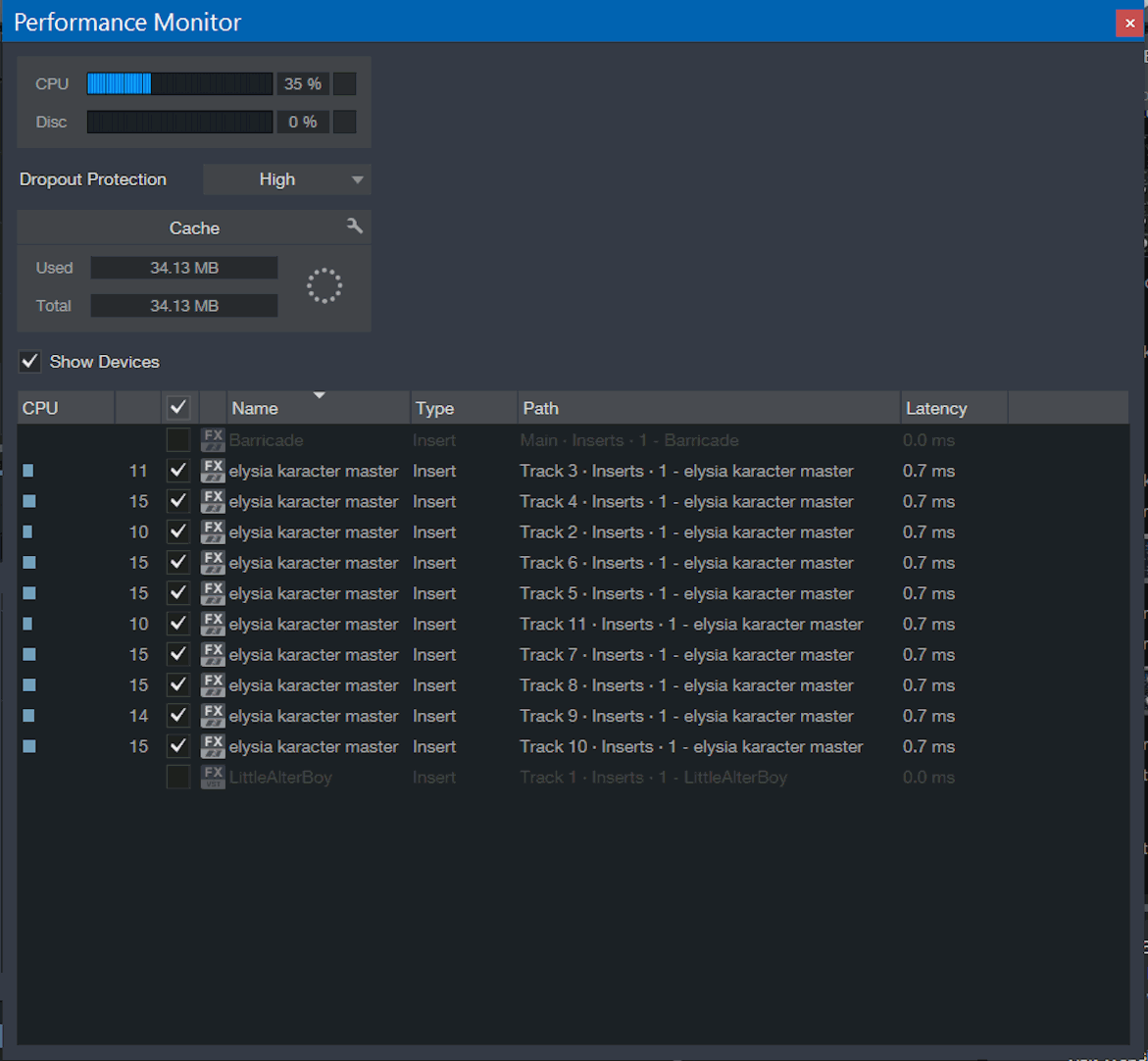
I loaded ten instances of Karacter into an empty Studio One project using my Core i7 7700HQ. My CPU hit 35 percent.
Karacter forces 4x oversampling. You can’t lower the rate or disable it entirely. Naturally, this makes it hungrier for CPU power than non-oversampled plug-ins.
Be sure to view the full-sized image; it shows the amount of latency and load per plugin instance.
Concluding Remarks:
The Elysia Karacter is quickly snatching the crown as my favorite saturation plugin. You can dial it in ridiculously fast. However, its heavy 4x oversampling makes it a massive CPU hog, so I use it sparingly.
Even so, any vanilla track sitting in your project will instantly transform into a gourmet masterpiece once you season it with some Karacter.
The Mastering unit can genuinely work magic on your mains or stereo bus. It adds width, subtle harmonic enhancement, and extra dimension that make your mix feel finished, not just “loud enough.”
Karacter dazzles your audio stream so effectively you might swear someone sprinkled fairy dust on it. And while that might not be my most scientific description, you definitely get the idea.
Audio Samples:
BEFORE
AFTER
4.5 out of 5 Stars


:: Pros
- Elysia authorized, approved and sponsored.
- Intuitive, well laid-out GUI.
- High quality and diverse saturation/distortion effects.
- Super simple to configure.
- Works as expected, NO finicky surprises.
::Cons
- I appreciate the processing quality that oversampling provides, but it would be nice if a user could choose the oversampling rate for themselves.
- Pricing could be more competitive – at full MSRP, Karacter is somewhat pricey.
Visit the Plugin-Alliance website. www.Plugin-Alliance.com
Intellectual Copyright – 2017 – All rights Reserved. This review may not be copied or reproduced in whole, nor in part, without express written permission from the author.

Leave a Reply