
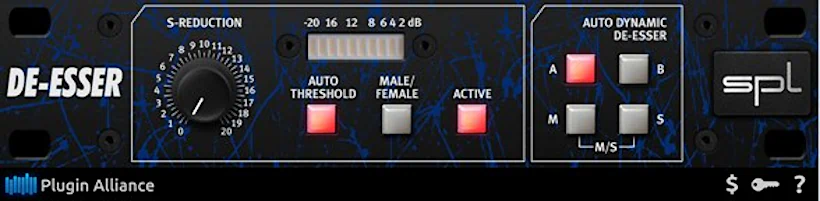
What is SPL DeEsser?
Plugin Alliance SPL DeEsser Collection is a vocal processing plugin bundle that emulates two of SPL’s classic hardware de-essers. Its particularly useful for mix engineers who want the character of SPL’s hardware de-essers without the cost and space requirements of physical units. The dual-band version offers more surgical control, while the single-band provides a more natural, vintage-style de-essing character. In this complete SPL DeEsser Collection review, we’ll investigate nifty features and advantages such as:
- Classic Single-Band DeEsser – Emulates the original hardware unit
- Modern Dual-Band DeEsser – Emulates the updated dual-band version
- Analog Code emulation technology for authentic hardware sound
- Two distinct de-essing approaches in one collection
- Professional-grade vocal processing
Introduction:
An all too frequent scenario . .
The vocal track sounds just about perfect. The tracking went smoothly, and the latest take is blessedly free of pitchiness. The mic placement and EQ sit exactly where they should. You dial in your favorite ’76 and 2A compressors and get that tasty, controlled sound. The sweet top-end on the vocal feels spot on.
Then, suddenly, your ears are no longer being romanced. They get stabbed by one of a vocalist’s most lethal enemies: SIBILANCE! It barges in like an uninvited guest at a quiet dinner party, ruining the whole mood.
Nasty, in-your-face, brash, piercing sibilance attacks your mix. Next, you reach for those once-celebrated VSTs from years gone by. Afterward, you tweak EQ. Finally, you test a couple of shiny, modern pricey De-Esser plugins. Yay! It works . . . sorta.
But, then the vocal air disappears, and the track suddenly sounds flat and lifeless. So, at last, you surrender to the most old-school solution of all. You open Wavelab, Sound Forge, or Acoustica Premium and start editing the sibilance by hand—one painful slice at a time.
Editing out plosives and sibilance by hand is no fun at all. You burn time, lose patience, and start questioning your life choices. It eats up hours, and worse, your DAW sometimes rewards your hard work with ugly, audible editing clicks.
Sibilance has tortured engineers for decades. Those nasty, piercing SSSs don’t just annoy you. They flat-out suck the joy out of mixing.
Now imagine something different. Imagine you tame sibilance easily, with just one or two knobs. You keep the vocal’s tone, keep the air, and keep the emotional impact fully intact.
Sounds dreamy, right? But it doesn’t have to stay a dream.
Enter SPL DeEsser Collection:
One simple word perfectly reviews the $199 USD SPL DeEsser Collection plug-in: “Necessary.”
So, if I stopped typing right now, you would already know everything important. This powerful, specialized plug-in bundle genuinely deserves your investment if you want a serious home studio.
Hi, you! If you like these kinds of reviews,
be sure to subscribe.
The Long Version (Because I Like My Job)
Fortunately for my landlord, I actually enjoy writing. So, stick with me for a moment. I promise to keep this brief, but I am incredibly excited to share my experience with you.
Quick Saving Tip!
Act fast, because the manufacturer has slashed the price to $149 usd until July 15th (2013). Your wallet will thank you.
Who cares – what makes SPL DeEssers such a big deal?
Professional audio engineers worldwide respect SPL’s DeEssing hardware. In fact, SPL designs some of the most transparent, effective sibilance-reducing technology on the planet. Your high-frequency woes don’t stand a chance.
Pro Power, Bedroom Budget
Fortunately, SPL encapsulated this exact technology into cross-platform plug-ins. This gives small studio owners a massive advantage. Finally, average home recording enthusiasts can grab high-grade, professional sibilance control. Best of all, it won’t require selling a kidney to afford it.
SPL’s DeEsser technology delivers impressive results while staying virtually invisible.
Here’s why: the company employs extremely narrow, dynamically changing frequency band monitoring. Most DeEssers take a different approach—they cast a wider net and lean heavily on compression algorithms. SPL’s approach? Far more subtle. The technology preserves that natural sound without making you wonder if a robot hijacked your vocal track.
I can personally vouch for this. The company’s claim holds up remarkably well in my experience. Their DeEsser genuinely excels at eliminating sibilance without compromising the original character and timbre of your vocal. Most importantly, you get a cleaner take without sacrificing what made the performance compelling in the first place.
Here’s a short personal story . .

At eight years old, playing hockey cost me one of my front teeth. I never replaced it. And yeah, I’ll own it—I’m a big ol’ 200(+) lb. wuss who’d rather rock the Alfred E. Neuman look than face the evil dentist’s chair.
The funny thing? My missing tooth has never really screamed “obvious defect.” That’s the good news. The bad news? Being a Gospel singer, I pay the price every time I open my mouth. That missing tooth forces me to pronounce my esses much too strongly. No lisp exactly, but I’ve definitely got an “S” malfunction on my hands.
I’ve battled this sibilance curse my entire life. Trust me, buddy—when I first laid my eager hands on the SPL DeEsser plug-in, I knew I’d found my perfect test case. Here was a product claiming to tame sibilance without wrecking vocal character. Who better than a guy with a decades-long “S” problem to prove or disprove that?
Well, I can tell you this: Praise the Lord and pass the Shure SM58—my esses are finally tamed!
Installation and Authorization:
Grumble, grumble, grunt. I rant, stomp, and mutter. I strongly dislike nasty old C/R systems and dongle protection. By contrast, I appreciate digital watermarking and serial-number protection because they stay out of my way. And honestly, chasing a missing dongle feels like an unnecessary side quest.
Charles folds his arms, scowls at the dongle, and mutters darkly about “the good old days” when a serial number and a handshake were enough.
Plugin Alliance secures every plugin with robust Call Response protection. To be fair, this isn’t some fly-by-night operation likely to vanish overnight. To clarify, it’s unlikely that you need be concerned about Plugin-Alliance closing up shop and leaving you dangling on the digital cliff with no way to activate your purchased plugins. Customers can also activate and deactivate licenses whenever they need to.
You can even run a single plugin on up to three devices simultaneously. Honestly, that’s a refreshingly fair approach to copy protection.
If you actually “prefer” dongles, you can register any run-of-the-mill USB stick as a device. Honestly, a company cannot get any more fair or considerate than that.
When it comes to current anti-piracy methods, Plugin Alliance sets the gold standard. They truly live by the motto, “Don’t punish the paying customers.” (What a radical concept, right?)
Hey, all you developers still clinging to clunky dongles and challenge/response systems—pay attention. This is exactly how you do it. Major kudos to Plugin Alliance for showing everyone how it’s done.
You Kids bundle up; it’s cold out there . .
Plugin‑Alliance always bundles savings, even without a sales campaign. The more items you buy at once, the bigger the discount—so stock up and grin.
The downloadable installers work as demo versions first. Once you pay and authorize the product, they unlock instantly. To authorize, simply point the plugin at your license file, which you’ll find in the “MyPlugins” area of the Plugin‑Alliance website.
Bonus tip: Think of the license file as the key that turns a demo‑only car into a high‑performance roadster—just a click away.
Visuals:
These plug-ins boast clean, clear, and comfortable designs that make getting work done a breeze. Their straightforward, easy-to-navigate interfaces prioritize productivity over flashy “bling”.
To take them to the next level, I’d love to see the developers add a simple size adjustment feature or make them larger overall. A bigger size would be a welcome change, don’tcha think?
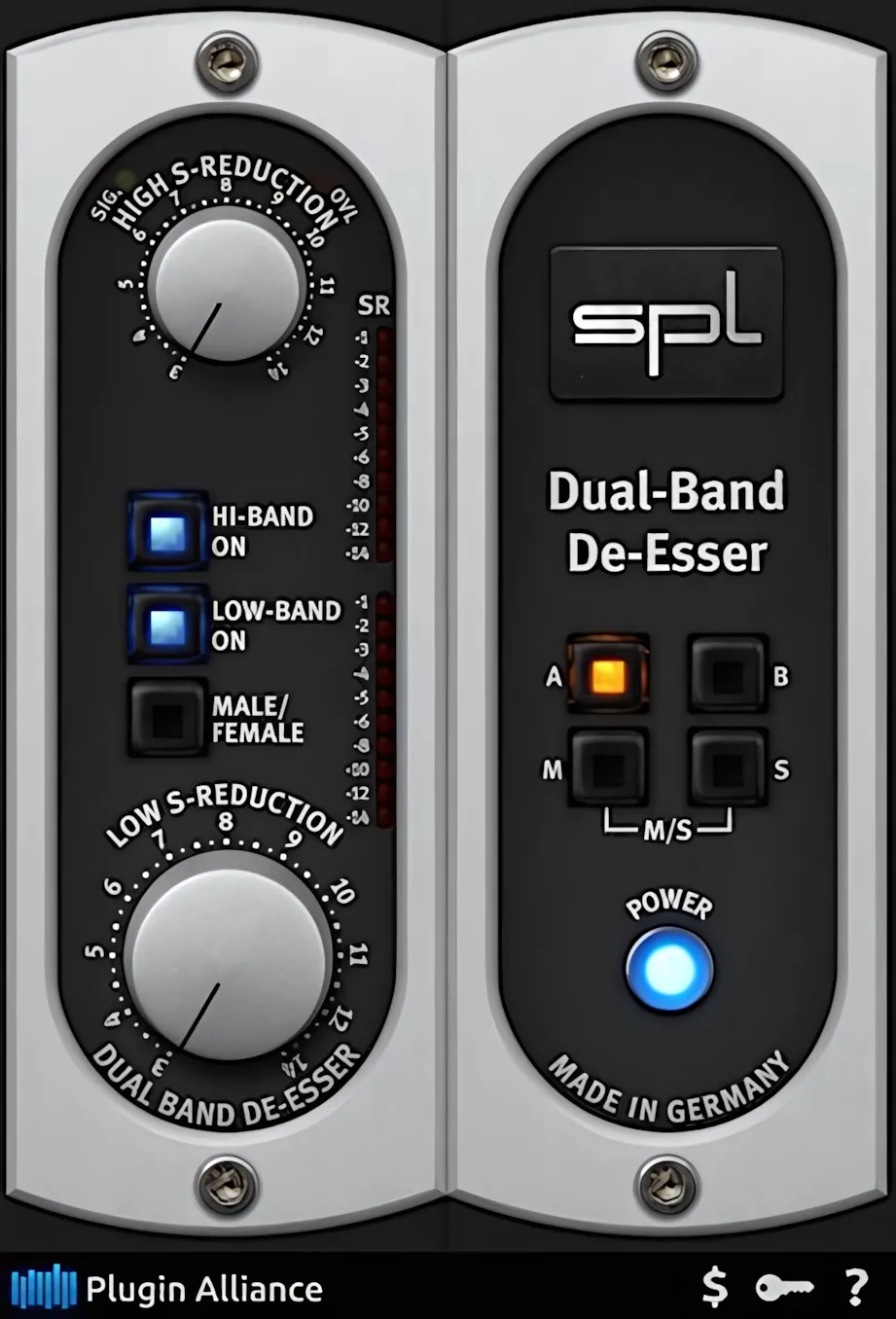
The activation buttons highlight, lighting up brightly to give you a clear indication of whether their function is enabled or disabled. No more guesswork or frustration – just a clear, unmistakable signal that lets you know exactly what’s going on.
The knobs respond somewhat abruptly to mouse movements. However, once you get the hang of them, this quirk becomes a minor issue.
I’m more than willing to overlook this GUI misstep, because the sound quality is exceptional – we’re talking top-notch, here.
To get the most out of the controls, I’ve found that simply clicking on the desired potentiometer designation is the most reliable approach.
Dragging the mouse to “turn” the knobs can be a bit hit-or-miss, and the knobs may respond erratically. So, if you want a smooth experience, it’s best to stick with clicking.
If you hold down the Ctrl key while you click, the knobs instantly jump between zero and their most recent detent position. This little trick makes precise A/B comparisons fast and painless.
Classic hardware goodness, inside your DAW
Both the Classic DeEsser and the Dual Band DeEsser plug-ins promise to stay true to their hardware ancestors. They faithfully mirror the original SPL units in both behavior and tone. On top of that, they carry over the familiar color schemes and overall design of the SPL hardware.
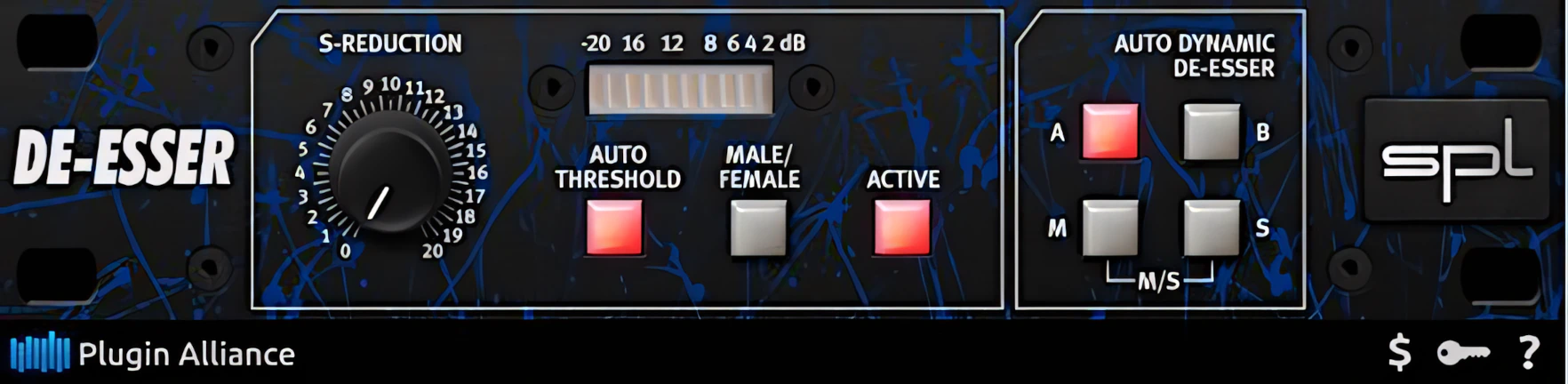
So, your eyes see “classic hardware,” while your DAW quietly does all the heavy lifting.
Operations and Control:
These blessed little gems are so easy to manipulate, I’m only filling in space here . . . ha ha.
The standard one knob Classic SPL DeEsser delivers gradual, predictable control via its single “S Reduction” dial. Large, intuitive buttons instantly toggle between male or female modes, as well as M/S or standard stereo. You can even save and swap between two distinct presets using the dedicated A/B buttons.
Mid Side can be a Mix saver . .
Engineers will find the M/S mode invaluable for taming sibilance in stemmed stereo mixes. This feature isolates the center “Mid” audio, ensuring your stereo instruments remain untouched by the DeEssing process. Although this technique isn’t strictly best practice, it can absolutely rescue a troubled mix. Think of it as the audio equivalent of a Hail Mary pass—risky, but sometimes the only way to score!
What’s better than a single band? Why, Dual Band, of course!
SPL’s Dual Band DeEsser strikes an excellent balance between user-adjustable control and straightforward operation. It remains remarkably “dummy proof“. (And hey, don’t blame me—IDG Publications earned millions from its “For Dummies” series.) 😉
This module provides separate de-essing controls for the lower and upper frequency bands. When you use either band on its own, it operates independently. However, when you engage both bands together, they interact with one another. As a result, the amount of Low Band de-essing directly influences the activity of the Upper Band.
Both plug-ins share several core characteristics. However, subtle differences set them apart. For example, the Classic DeEsser uses a fixed center frequency of 6.4 kHz when you engage Male mode. Likewise, it switches to a fixed center frequency of 7.2 kHz when you select Female mode.
Dual Band version features a “Male” mode operating with a Low Band center frequency of 6.4 kHz. Switch to “Female” mode, and the center frequency shifts to 7.6 kHz. For the Upper Band, the Dual Band DeEsser utilizes a 3 kHz bandwidth centered at 11.2 kHz.
Because both plug-ins use dynamically intelligent sibilance monitoring, they deliver incredibly effective, transparent results. As a result, they quietly do the heavy lifting without making your audio sound like it’s ‘weawing a wisp“, er, I mean, lisp. Honestly, it is a major WOW factor.
Audio Quality:
In a word, this plug-in is effective – and I’m a huge fan! When I was considering other DeEssers, I had high hopes, but the SPL folks have really knocked it out of the park.
I’m thrilled that it can retain a vocal track’s presence, air, and definition, even when aggressive DeEssing is applied. That’s a game-changer!
SPL DeEsser Collection Review – Real World Example
Recently, I used SPL Dual Band DeEsser to prep a simple video and 45-second radio voiceover for a Gospel music event in my city. The voiceover turned out great, with a nice, big, round ‘radio’ tone. However, those pesky Esses were, as usual, a bit too pronounced.
That’s when this handy-dandy plug-in came to the rescue! With its help, I was able to tame those harsh Esses and get a much more polished sound.
This detailed SPL DeEsser Collection review wouldn’t be complete if I didn’t provide an audio sample showcasing the subject in action.
Audio Snippets:
Typical musical use case . .
On musical vocal tracks, these plug-ins truly shine – and I mean, they really light up the stage! I can tweak a vocal track’s EQ to achieve a modern, crisp sound, whether before or after compression, without worrying about sibilance artifacts.
This freedom from sibilance worries applies to both male and female voices, by the way. It’s a huge relief to know that I can focus on getting the perfect sound, without those pesky sibilance issues getting in the way.
The SPL DeEssers’ dynamically-changing frequency band monitoring is a masterstroke. You really need to experience it to appreciate its genius. Even when I push the plug-ins hard, the vocal track remains remarkably true to its original timbre.
I’m hugely impressed by the SPL DeEssers’ performance, and I’m confident you’ll be too. In sum, these plug-ins have earned a spot in my top favorites list, and I’m excited to see what they can do for your music.
Great results, FAST!
In many mixes, the standard one-knob Classic version more than gets the job done. You just set it, listen, and move on with your life. However, some situations demand a bit more precision. In those cases, the extra control of the Dual Band version can deliver even better, more polished results.
In the past, I always had to fall back on EQ sweeping and painstaking volume automation to hunt down the exact sibilant range and figure out the best frequency span to target. It felt like playing “find the hiss” with a magnifying glass and way too much patience.
With the SPL Dual Band DeEsser, that whole process becomes almost laughably easy. You dial in effective, musical sibilance control quickly and efficiently, without endless EQ sweeps or frustrating trial and error.
Instead of wrestling with problem ESSes, you simply tame them and get back to making the vocal sound amazing.
Choose a mode: Male or Female. Turn the Upper and/or Lower bands off or on. Twist dials. Listen. Done.
SPL DeEsser Collection helps even beginners turn into mix-engineering “rock stars”.
CPU Consumption:
Ah, the beauty of refined DSP code. Few things compare to having a powerful and effective tool that does not punish your system for using it. Fortunately, these excellent vocal-processing workhorses deliver impressive results without demanding a heavy toll from your DAW.
Better yet, they sit quietly and efficiently within your session. They consume only a modest share of CPU and memory resources—more pauper than prince. Consequently, you can focus on shaping vocals rather than worrying about system performance.
Concluding Remarks:
I award SPL a solid four out of five stars for this magnificent DeEsser collection. At first glance, the price tag might seem steep, yet the results are undeniably worth the investment.
The hardware version costs $399 in the US, which makes the software alternative look like a steal by comparison. Any serious engineer will appreciate these tools for delivering transparent, invisible sibilance control. After all, polished vocals free from piercing “esses” is what separates a decent mix from a professional one.
SPL handles those tricky “esses” perfectly, leaving you to just worry about the “popping plosives”—which, honestly, is half the battle won!
Here’s a quick YouTube clip I prepared to showcase SPL DeEsser’s abiltiy to deal with nasty, over-hyped sibilance.
4 out of 5 Stars


:: Pros
- Effective sibilance taming.
- Well designed interface and super-easy to use.
- Very light on CPU and memory.
- Honourable, customer oriented company.
- Available for both MAC & PC (32 & 64 bit)
- Very concise, well-prepared documentation in PDF.
::Cons
- GUI would do to be made larger, and preferably resizable.
- Knobs respond abruptly and somewhat herky-jerky to mouse movements.
Visit the Plugin-Alliance website. Plugin-Alliance.com
Intellectual Copyright – 2013 – All rights Reserved. This review may not be copied or reproduced in whole, nor in part, without express written permission from the author.

Leave a Reply