
What is PSP audioware PianoVerb 2?
PSP PianoVerb 2 is a creative resonant reverb plugin. The plugin simulates twelve resonant strings tuned like a piano, creating a natural piano-style ambience. In this PSP Audioware PianoVerb 2 Review we’ll see that it is designed with piano resonance in mind. PianoVerb 2 produces some way cool spatial effects for other instruments too.
Key Features:
- Modulation section for added movement and texture
- Multiple independent time and damping controls for precise shaping
- Decay freeze function via the A/B comparison mode
- A/B comparison mode for easy tweaking and sound comparison
Use Cases:
- Adding natural resonance to weak or thin piano tracks
- Vitalizing lead guitar with sustain
- Applying unique reverb textures to various instruments
- Creative sound design where piano-like sympathetic resonance is desired
Preamble:
I’ve always really dug reverberation and ambience effects, kids. Even as a teeny bopper, I could never resist the urge to sing whenever I found myself in a space with lively acoustics. As an illustration, I loved singing in a (hopefully empty) public restroom, the school gymnasium, an unused community hall, under a highway overpass, and so on.
If there was a natural ambient space that I could listen to, I made noise. I would sing, shout, or clap. I was digging the ambient sounds; ya know? Do you suppose that Eddie Kramer or Mutt Lange ever did the same? I hope so – then I wouldn’t be considered such a spaz in isolation!
One of my absolute favorite types of naturally-occurring ambience is that which happens inside of an old upright-grand piano case. When I was an ankle-biter, I would squirm in behind the old 5ft’ tall, upright grand piano in our living room so I could sing – and make who knows what other awful squawks – into the back of the piano.
Sometimes I’d stand up on the bench so that I could open the top and yell/sing into it. Maybe some would think I was ‘off-the-noodle’, but I didn’t care . . .
Accordingly, when I first heard of PSP Audioware’s PianoVerb 2, my attention and interest were immediately peaked.
Introduction:
PianoVerb 2 is just too cool, Kats. I enjoy and appreciate all of the products that I review, but this one brought a silly smile to my face from the very first moment I heard it in operation. The unique character of the reverb effect is incomparable. To my knowledge, there isn’t anything else quite like it (as of the time of this publication).
Forget any Lexicon-ish comparisons here, Kids. This groovy little $49 treat is a one-of-a-kind, Baby.
Visuals:
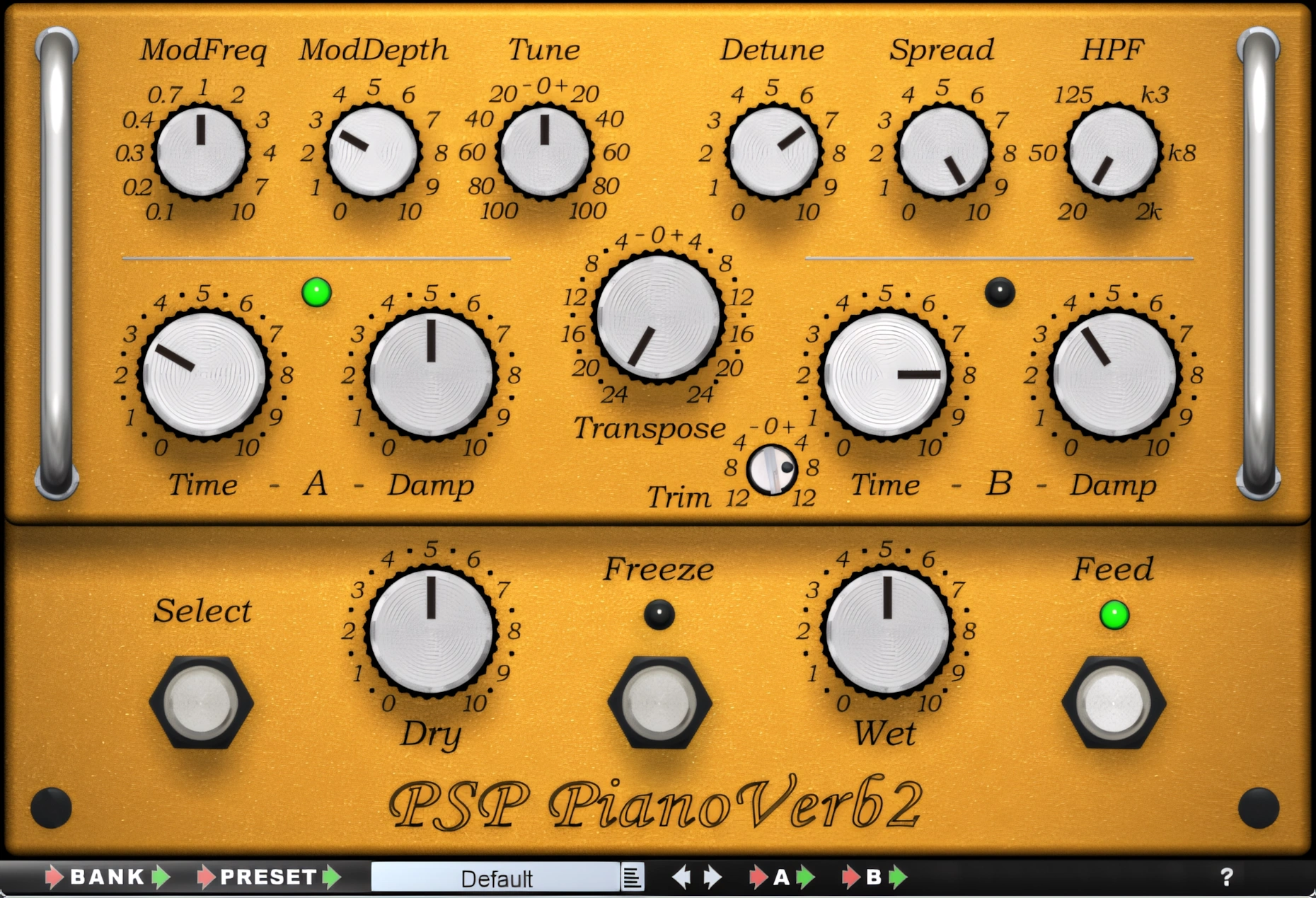
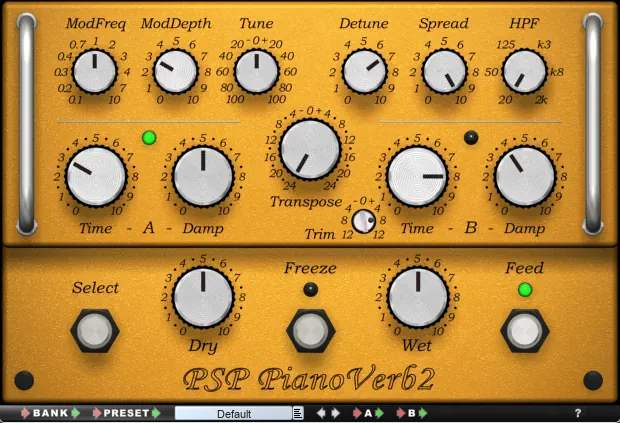
I’ve nicknamed PianoVerb 2 as “Mr. Mustard” because of its Dijon Mustard-colored interface. Measuring 630px wide x 430px high, Mr. Mustard sits comfortably on most nearly any DAW’s work screen.
The plugin’s GUI is as wonderfully unique as its sound is. Make no mistake though, gang; Mr. Mustard is very cool – not the least bit mean. ~Beatles Reference (Mean Mr. Mustard)
PianoVerb’s fan-tab-ulous retro vibe is complimented by the clear, serif font used for its labels. Thank God, I don’t need the Windows magnifier to read the text; because it’s all “Right on, Daddy-O.”
The controls respond nicely to mouse movements. You won’t get bummed out with any uncool, flakey GUI controls.
Hi, you! If you like these kinds of reviews,
be sure to subscribe.
The decked-out style of the notched-buttons is far out, man. The buttons remind this reviewer of those used on a hip ’68 SONY Solid State radio. Or better yet, maybe they are more accurately described as having an ‘Abbey Roads Studio-like’ aura.
Tastefully added virtual rack mount handles and subtle round-beveled edges give this delicious little pluggie a very nice 3D-esque appearance. Meanwhile, the stylish offset in the upper section adds extra visual flair, making the lower portion resemble a built-in rack power module.
I can see clearly now – no purple haze! The bright green indicator lights are keen as all get-out. All the buttons and virtual indicator lights are legit, ya know; super easy to see at a glance, man. You dig?
Overall, PSP have crafted this plug-in to be very unique – inside and out. The interface is definitely jamin’. Foxy, subtle shadow and lighting is lavished on the edges, rack handles, and knobs.
Classy. Cool. Ivy-League all the way, Baby.
Sound Quality:
PianoVerb 2 has such a copious amount of unique charm and character, it has practically invented and defined a new genre of reverberation. I slipped this beauty into the effects chain of a few of my electric guitar and keyboard tracks. “Whoa! What is that?!” – I exclaimed to myself.
Being the ol’ skool kind of guy that I am, I’ve always chased the best spring reverb I could get my hands on—until now. This clever little gadget is an outright formidable reverb for guitars, and it doesn’t stop there. Why?
Because it delivers impressively cool results on a wide range of acoustic and electric instruments, making it far more versatile than you might expect.
If you’re still hobbling along on some old, subpar piano sample library, or limping along with a dilapidated synth VSTi, don’t huck them into the trash bin just yet. Give PianoVerb 2 a tryout first.
Prepare to hear your tired, old virtual instruments sound as though they got a new lease on life. If it were possible for an inanimate VSTi synth to be born-again, then PianoVerb 2 is definitely the Prophet to herald the message. (Synth . . . Prophet . . . word association . . . get it?)
Dandy Presets:
I’ll be honest with you; I haven’t ventured too far from the factory presets. I don’t feel that I have to – the presets sound that good. I am one of those home-producers that tends to use factory presets simply as a catalyst to creating tweaked custom settings. Not so with PianoVerb 2. I think the presets are already outta sight!
With modulation and resonance transposition controls, you have endless creative boundaries to explore, yet the factory presets hit the mark perfectly.
Potent, harmonically-decadent ambience wraps around your aural senses like plush, silky sonic cushions. There is delightful, opulent, chorused modulation at your beck and call.
I don’t know what PSP have done to create this lush modulation, but I do know that it is probably one of the best reverb modulations that I have heard. I’m not making that statement lightly. I’m including my Lexicon VST bundles, various reverb plugins I’ve previously reviewed, and the other high quality plug-ins that I own or have demoed.
PianoVerb’s modulation is exquisite; delicate, yet abundant. It stands out among its peers.
Stereo Imaging and Depth Perception:
Oh yeah, Baby! This verb is totally fab at giving the listener a sense of harmonically-rich, dimensional space. The righteous score, is that this unique, one-of-a-kind plugin doesn’t sound like any other typical reverb.
It’s not a Plate, Room, Hall, or Deep Space 9 type of deal. This one sounds like the insides of a big ol’ upright-grand piano case. All the resonance, shimmer, and sonic tickle you could ever imagine is right here.
The reverb effects that PianoVerb 2 produces seem to surround the sound source. No, I don’t mean that in a clichéd, over-used market buzz kind-of-way.
A Resonance Scenario . .
Let me lay this on ya, man: Imagine what the encompassing resonances inside of a large upright piano case would sound like – complete with the sympathetic shimmering of 230 metal strings vibrating across eight octaves – on a brass soundboard. PSP Audioware has given this imaginative scenario a name and some fine C++ coded substance. It’s called PianoVerb 2.
Nah, man, I’m not trying to lay a heavy trip on ya, but please try to expand your imagination a bit more. Crank the “Time” knob up to 2 or 3 o’clock and prepare to be mesmerized. Crank it up full-tilt, and prepare to be awe struck.

It’s one thing to imagine the natural resonance and reverberations described above, but to experience the effect multiplied by a factor of 5, or even 10, is just about amazing.
I can’t describe the sound as being cavernous, because that term isn’t really appropriate for this unique type of reverb. However, the effect is deep and immense.
Lush, modulated reverbrations that can carry on for 10 seconds (maybe longer) are only a twist of a dial away. I suppose if you could create a piano case as large as an Arizona cave, then we could call it cavernous . 😀
Effects & Features:
Top Row:
Across the top of “Mr. Mustard”, excuse me, PianoVerb 2, you see a row of six knobs: ModFreq, ModDepth, Tune, Detune, Spread, and HPF.

The ‘ModFreq’ and ‘ModDepth’ accoutrements control the frequency and amount of the reverb’s modulation.
The ‘Tune’ knob “tunes” the virtual piano strings 100 cents (+/-).
Twiddling the ‘Detune’ knob lets the user detune a set of virtual strings to re-create the effect of an improperly tuned instrument. It contributes to the uniqueness of this reverberator.
The ‘Spread’ knob . . . spreads the sound, Man. Like width, you know? HPF = High pass filter. HPF Knocks out those low-end rumbles. You dig?
Middle Row:
Section A’s ‘Time’ and ‘Damp’. These control the length of the reverb tail/decay and high frequency roll-off, respectively.
At the center of the interface sits the intriguing “Transpose” control. This parameter lets you shift the pitch of the virtual strings by up to 24 semitones, allowing dramatic octave-up or octave-down transpositions with ease. In conjunction with the modulation controls, a user can create interesting reverb effects befitting the most discriminating audio production projects.
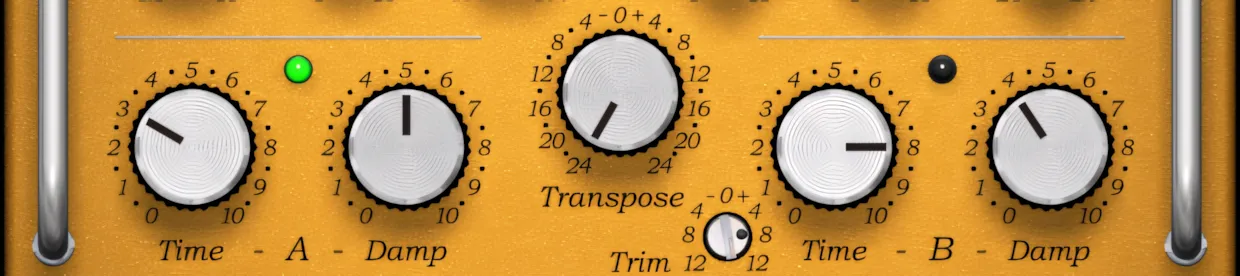
The smaller ‘Trim’ knob grants the user fine control over input gain-staging for Section B.
“Yeah man, groovy. Hey! Wait a minute, Man. What do you mean Section A and Section B?”
Answer:
PSP have kindly given us the nifty “Select” button to instantly switch between two reverb levels. The Tuning and ‘Spread’ parameters are shared between both Sections, but don’t “pooh pooh” this feature as being trivial.
Let me present you with a scenario: You’re working on the snare track in a slow 100 BPM ballad. Let’s say that the drummer tastefully alternates between sidestick on verses and normal snare hits on the choruses and bridge.
The sidestick in the verses needs big, long reverb tails, but the snare hits need to be reeled back in. Customizing each section (A and B) of PianoVerb 2 for sidestick/snarehits is easily set up; and easily switched between. Capice?
“Freeze, Scumbag!” – The muscularly-lean, squint-eyed detective calmly spits out his words through a leather-worn grimace he thinks resembles a smile.
The gaunt, wild-eyed ringleader hysterically yells to his trembling cohort, “C’mon, Man! We gotta split! The pigs are here!”

“I said FREEZE, Scumbag! Wut cha gonna do Punk? Go ahead – make my day.”
Harry advances with cocky assurance, defiantly challenging opposition.
You’re wondering why the brief, out-of-the-blue segue into a classic “Dirty Harry” movie scene; right? Quite simply, I wanted a creative way to introduce the topic of “FREEZE.”
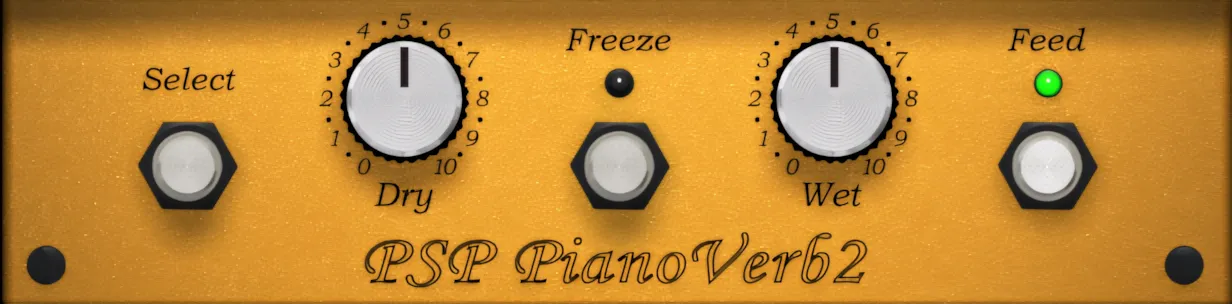
PianoVerb’s ‘Freeze’ function is just that – a freeze. While it is activated, the ‘Time’ and ‘Damping’ parameters remain at the settings they were when Freeze was engaged. Thus, they can not be altered again until freeze is disengaged.
Presets:
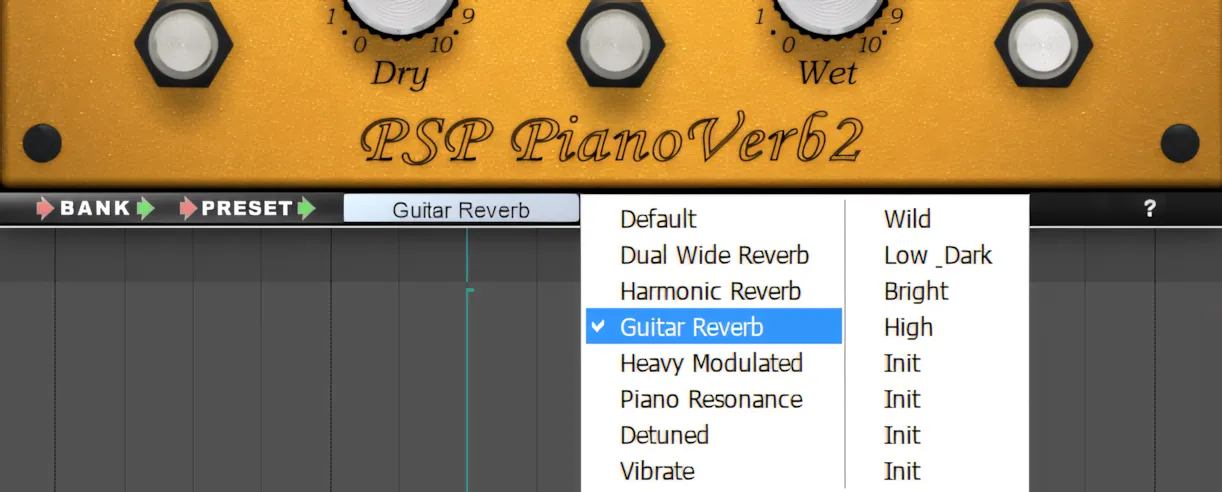
A convenient, built-in preset tool-bar is inconspicuously arranged at the bottom of the GUI. A broad selection of 12 distinctly different presets is included. Of course, the user is free to create as many custom user-presets as desired.
CPU Consumption:
This plug-in, like most nearly all of PSP’s wares, is very light on system resources. It’s immediately responsive and lends itself to insert chains with great ease.
Concluding Remarks:
PSP Audioware may not rival industry giants like Native Instruments or Waves, yet their products remain absolutely top-tier. Nevertheless, if you are a budding or budget-conscious home producer seeking high-caliber reverb plugins, I strongly urge you to preview and demo PSP’s offerings immediately.
PSP Audioware prices EasyVerb and PianoVerb 2 above the bargain-bin range, yet both plug-ins remain quite affordable compared to many competing products. More importantly, the impressive DSP quality hidden beneath the sleek, inventive interface easily justifies the investment.
Honorable Menton:
Mr. Antoni Ozynski, the driving force behind PSP Audioware, has been the perfect European gentleman throughout the course of time that I have interacted with him. His graciousness, patience and support of Reviewer’s Revival is positive and encouraging.
When I interact with developers, I evaluate more than just their products. I also look for professionalism, integrity, and a respectable business model. By those standards, Piotr Ozynski and PSP Audioware earn top marks in my book. Five stars!
5 out of 5 Stars


:: Pros
- Very cool, unique interface design.
- Unique reverb algorithm – PianoVerb 2 has practically invented a new genre.
- BEST-in-CLASS stereo imagery and perceived depth.
- Groovy, easy-to-see knobs & labels.
- Well-written user’s manual.
- No dongles, call/response challenges, nor invasive piracy protection overhead.
- Fast, courteous customer support.
- Well established & well respected independent audio-software company.
- Affordably priced. Excellent Price vs. Quality ratio.
- Available for 32 bit & 64 bit systems. MAC & PC.
::Cons
- N/A – I honestly haven’t found anything about this plug-in that I consider to be a negative.
Visit the PSP Audioware website. PSPaudioware.com
Intellectual Copyright – 2013 – All rights Reserved. This review may not be copied or reproduced in whole, nor in part, without express written permission from the author.

Leave a Reply