
MDynamicEQ & MAutoDynamicEQ Review – Part II
Bands Panel:
The lower panel of the main interface goes by the name “Bands” panel. This area primarily lets you configure each of the five, or in some versions seven, bands of every Melda MDynamic EQ. By default, you adjust each frequency band using smooth-responding sliders. Specifically, you control Frequency, Q, Gain, and Dynamics (gain). Meanwhile, the more fully featured MAutoDynamicEQ adds ‘Attack’, ‘Release’, and ‘Threshold’ controls, so you can immediately and conveniently fine-tune the Dynamics properties.
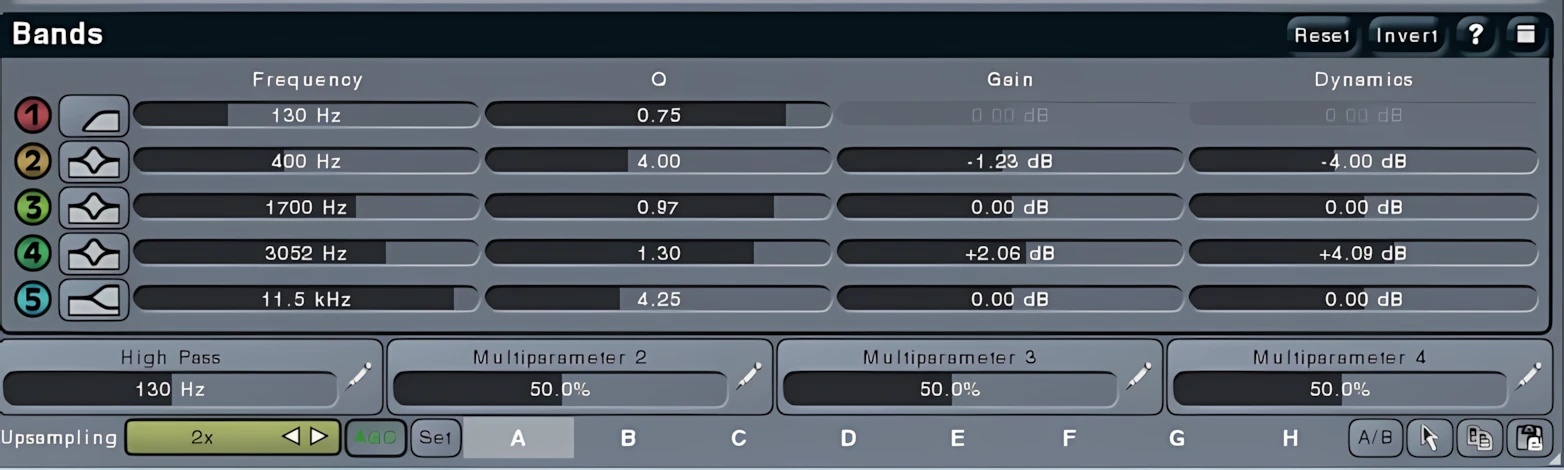
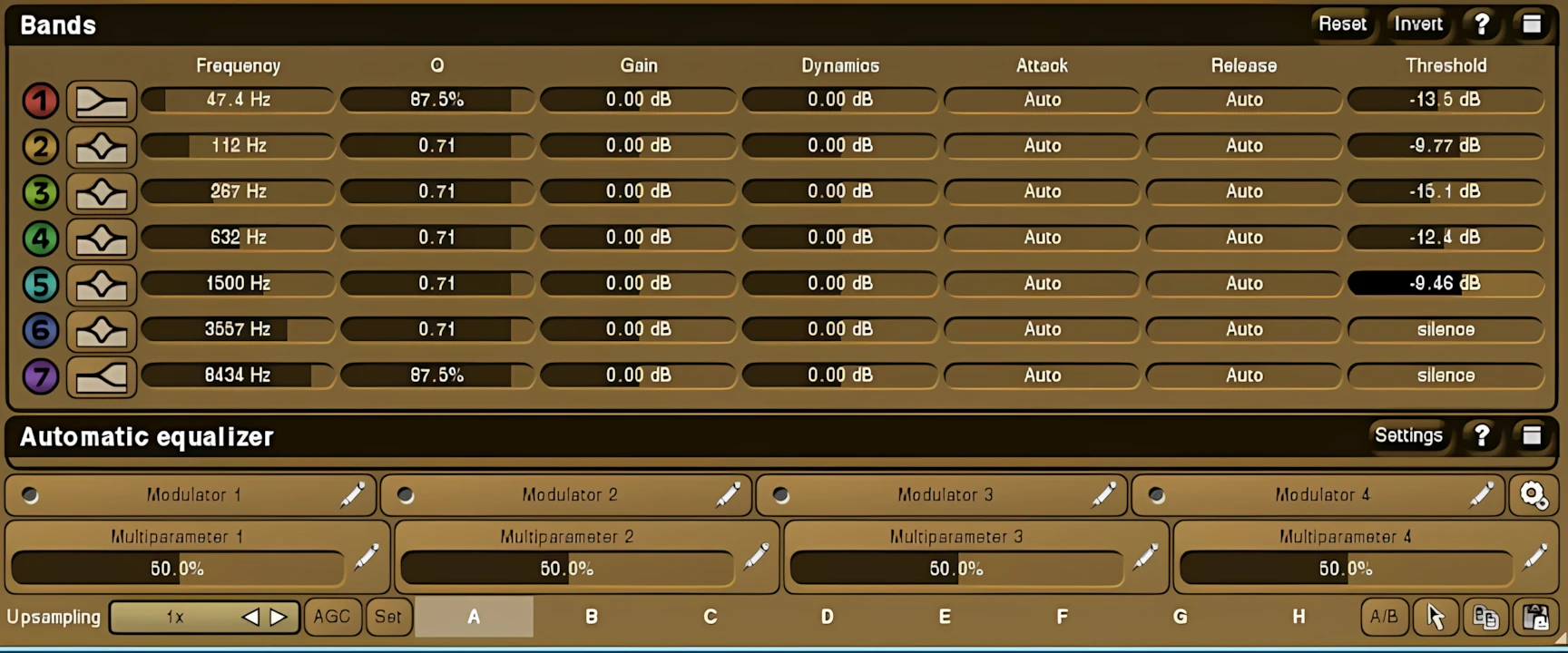
If a user wants to make a quick, approximate adjustment to a band, they can simply use mouse click-drag movements in the “Equalizer Shape Graph.” Alternatively, for more precise control, users can adjust the sliders in the Bands Panel.
For the most refined, detailed control, users need only click on any slider while holding the Shift key on their keyboard. Then, an attractive, easy-to-read virtual numeric pad appears, allowing direct input for entering precise values.
Directly below the Bands Panel, eight tabs store preset variations. Furthermore, creative users can activate a morphing mechanism that causes the plug-in to transition between saved presets. Consider this: instead of a simple A/B comparison, you get an “A” to “H” comparison.
Outstanding Differences – MDynamicEQ or MAutoDynamicEQ?
MDynamicEQ:
This plugin provides five highly malleable equalization bands. Specifically, any of these five bands can be configured to function as one of twelve distinct types: Band-shelf A, Band-shelf B (12dB/octave), Low-shelf, High-shelf, Low-shelf (resonant), High-shelf (resonant), Low-slope, High-slope, Band-pass, Notch, Low-pass (resonant, 12dB/Octave), and High-pass (resonant, 12dB/Octave).
You can individually manipulate the ‘Dynamics’ temperament of each band. To do this, simply click the button located to the far left of the desired band on the lower panel of the main interface. This action immediately opens the ‘Equalizer Band Settings’ window.
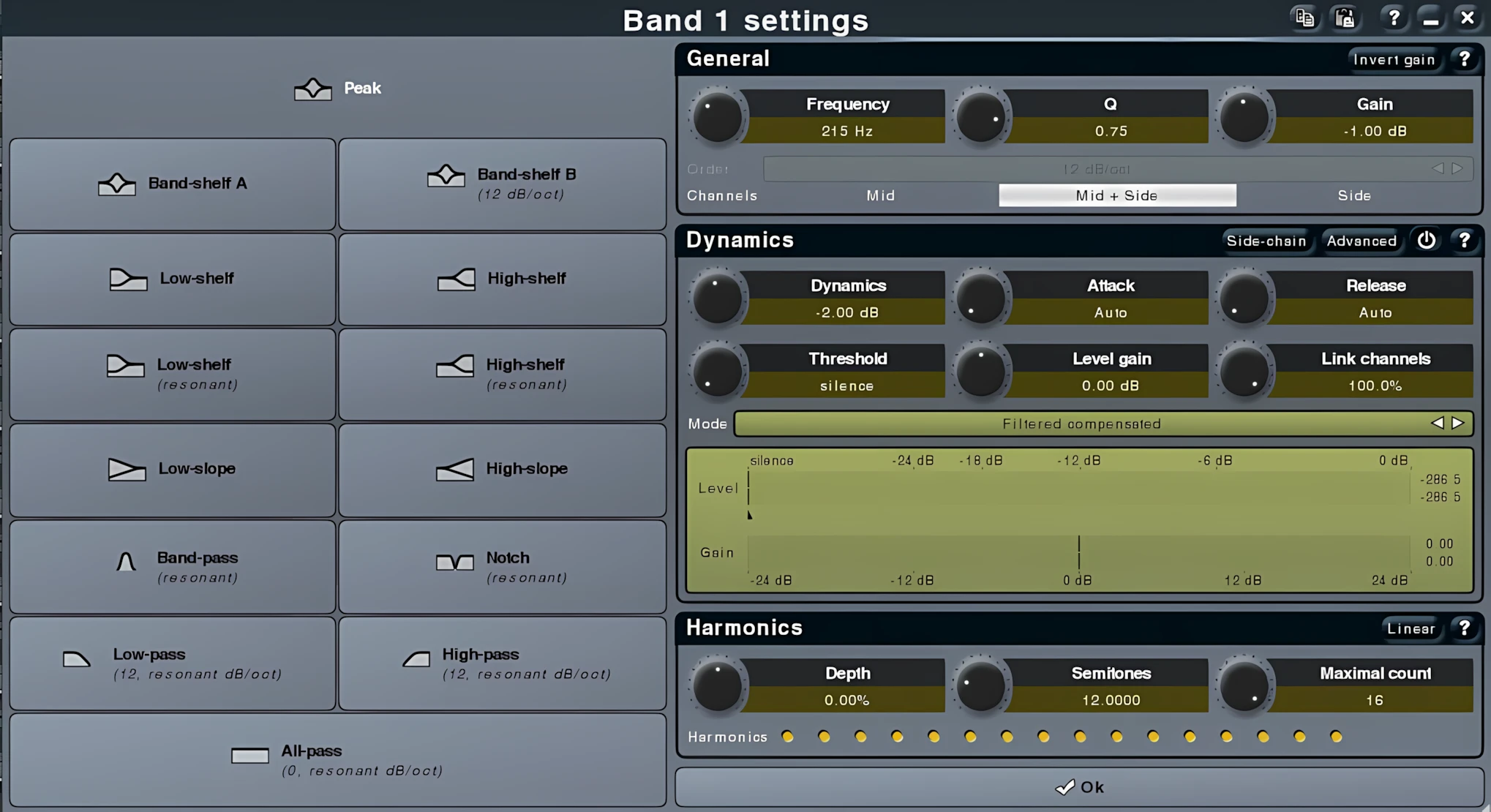
In this window, you can adjust the full scope of Dynamics and Harmonics characteristics. Both feature sets offer plenty of options and give you access to the most common parameters you’d expect in a stand‑alone compression plug‑in and harmonics enhancer. Furthermore, in addition to the five EQ bands, you also get two extra frequency bands dedicated to High‑pass and Low‑pass filtering.
The “Equalizer Shape Graph” displays these dedicated High/Low‑pass filters as two thin, vertical red lines. You can set these filters with slopes ranging from 6 dB per octave all the way up to a frankly ridiculous 120 dB per octave. As a result, you gain incredible surgical precision over the extreme, opposite ends of the audio spectrum.
MAutoDynamicEQ:
AutoDynamicsEQ does everything its smaller sibling does and then goes even further by giving you more direct control over the range of ‘Dynamics,’ right on the main interface. In addition, it provides two extra equalizer bands. Altogether, MAutoDynamics equips an engineer with nine editable frequency centers, including the High/Low‑pass filters.
Even more impressively, MAutoDynamicEQ adds a powerful ‘frequency match’ feature. This capability becomes insanely useful whenever an engineer needs to nail down an individual track—or even an entire mix—so it closely matches the tonality of a reference track.
Moreover, you can apply the amount of EQ curve matching by degrees, anywhere from 0 to 100 percent, instead of just going all or nothing like a reckless sonic maniac.
MAutoDynamicEQ gets its name from the powerful ‘automated’ EQ features built into it.
This functionality instructs the plug‑in to analyze the incoming audio and automatically configure the bands based on advanced scientific audio calculations. Still skeptical? Download the demo and try it yourself—it will absolutely amaze you.
Hi, you! If you like these kinds of reviews,
be sure to subscribe.
I’m not claiming that the auto function works perfectly in every situation, but it definitely helps you reach professional, accurate results much faster. In addition, you can draw from a built-in library of previously analyzed material, taken from famous recordings, and use these as your base reference points.
Of course, you can also draw your own desired curves directly on the “Shape Graph.” Finally, to smooth out the effect and prevent it from becoming too pronounced, you simply adjust the dry/wet ratio slider.
The MAutoDynamicEQ auto function stands out as the most accurate option I have tested to date! Consequently, this indispensable tool belongs in every serious home producer’s (or small studio owner’s) musical toolkit. However, I do not recommend this plug-in for collectors who simply hunt for new plugins, or seek a quick, magical fix. Instead, treat this as an engineer’s surgical instrument, not an expensive ‘Look what I got‘ toy.
Modulate for me, Baby:
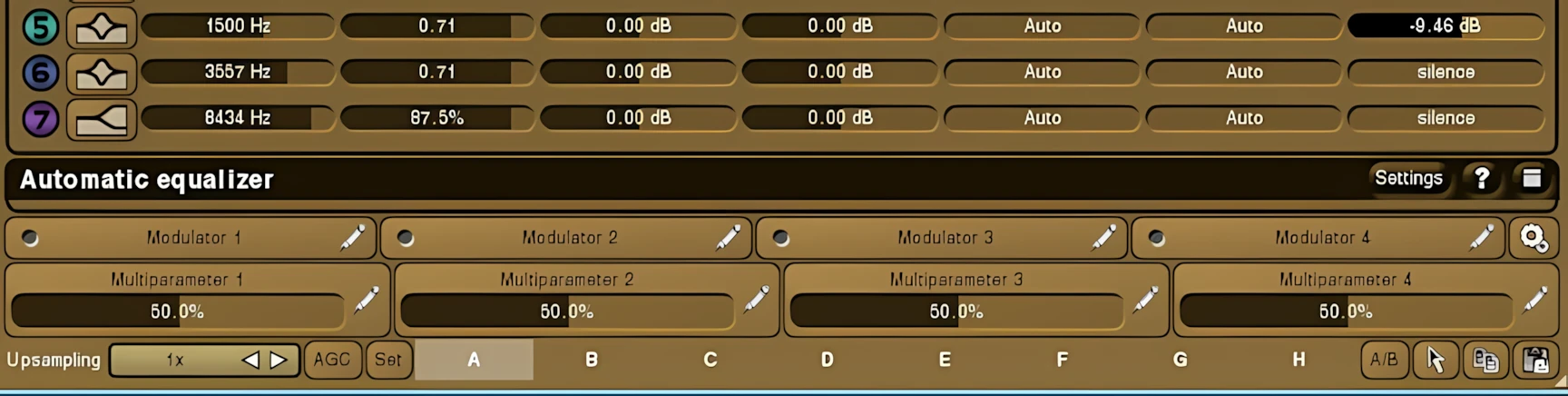
Finally, let me draw your attention to the four ‘Modulator’ buttons at the base of the MAutoDynamicEQ panel. These buttons empower users to get creative by controlling any parameter—or even multiple parameters, simultaneously.
With them, you can craft Wah or auto-Wah effects, as well as dynamics filtering that adjusts both gain and frequency based on input levels. Moreover, you can assign each modulator to function as an LFO, monitor input levels, react to MIDI commands, generate random changes, or even detect input pitch! Truly impressive work, Mr. Meluzín.
Sound Quality:
If MeldaProduction only came up with cool, innovative ideas, you might dismiss their products as mere novelties. However, that is definitely not the case. This reviewer clearly hears that Vojtěch Meluzín and the MeldaProduction team work diligently to create audio software that delivers exceptional sound quality. As a result, it’s no surprise that so many professional engineers favor their plug-ins.
In the lower-right corner, you’ll find the “Upsampling” button, more commonly known as an oversampling function. When you run it in its higher-quality modes, which you can set in the “Settings” menu, the upsampling sounds exceptionally clean and preserves the upper frequencies remarkably well.
*Note that high-quality upsampling induces latency, which usually is not reported to the host.
The dynamic compression and expansion characteristics of the MDynamic and MAutoDynamic EQs make them ideal for subtle master‑mix polishing. Even when you push these EQs with aggressive gain boosts or cuts, they still sound musically smooth and transparent.
As an audio engineer, I understand the frustration of hearing harsh, sterile digital EQ processing. Sometimes even the smallest EQ move can sound bad if you’re not working with a high‑quality processor. As your listening skills sharpen, you become increasingly sensitive to harsh or brittle tones, over‑compression, loss of dynamics, and over‑saturation.
In contrast, MDynamic and MAutoDynamic EQs give you exactly what your mixes need: precision, musicality, and a sound that truly serves the music. This, dear reader, is just what the doctor ordered.
On individual tracks, these EQs dominate the digital domain with remarkable scientific precision, as well as genuine elegance and charm. More importantly, their dynamic architecture delivers exceptionally smooth and transparent frequency control throughout the entire process.
Even when applying steep and highly noticeable frequency-band adjustments, MDynamicEQ and MAutoDynamicEq remain impressively clean and non-destructive. Although the source signal’s tonal balance and character inevitably change, the plugins consistently preserve the core integrity and natural quality of the original audio signal.
Enhanced Control
Saturation:
Remember! MDynamic & MAutoDynamic EQs are NOT intended by the developer to be character or coloring processors. Nevertheless, given the exceptional quality of MeldaProduction’s Digital Signal Process (DSP) programming, is it any wonder that the “Saturation” feature they’ve included here is especially good?!
The soft-saturation effect warms the signal using a carefully calculated code schematic. Melda’s software design accurately recreates the pleasant harmonic saturation associated with analog components in old‑school equalizers. Moreover, you can adjust the saturation amount completely, so you can choose to use as much or as little as you want.
Side-Chaining:
MDynamic & MAutoDynamic EQs are both fully capable of being integrated and used in side-chained situations. In particular, the preset named, “Bass vs. Bass Drum Fix” makes the intimidating task of spacing kick drum/bass guitar a breeze!
Stereo Imaging, M/S and Multi-Channel Processing:
Don’t limit yourself to using these powerful equalizers in just stereo or mono modes. Instead, you can choose from eight distinct channel modes:
- L+R (Stereo)
- Left side only
- Right side only
- Sides only
- Mid and Sides
- L+R neg (right channel inverted)
- Surround
Notably, the Surround mode handles up to eight channels, enabling 7.1 surround sound EQ processing.
When combined with the Analysis and Sonogram screens, these tools deliver immense precision in mid/side equalization control. Having benched-tested and reviewed some of the industry’s finest mid/side capable plug-ins, I can confidently state that the Melda 7.x series ranks near the very top of my current ‘BEST-OF’ list.
The stereo width and imagery of any and all audio material that I processed with these two MeldaProduction ‘Dynamic’ EQs was focused, and remained “seated” in the sonic field; whether stereo, single channel, mono, or mid/side.
Audio Snippets:
CPU Consumption:
You can configure MDynamic and MAutoDynamic EQs to run very lightly on the CPU. Alternatively, you can set them for spectacularly high-quality rendering, though this makes them quite demanding on your system.

Perhaps many of my regular readers are tired of hearing about my six-year-old AMD dual-core system. Nevertheless, I find this AMD-powered Toshiba laptop highly effective for bench-testing and reviewing audio software. If a plug-in performs well on this machine, I know it will run effortlessly on a more up-to-date computer, including my own Intel 2nd Gen i3-based production rig.
Concluding Remarks:
MDynamicEQ and its even more powerful sibling, MAutoDynamicEQ, unleash remarkable frequency-equalization control as incredibly powerful, cross-platform plug-ins. Despite their potency, engineers of all experience levels can harness these tools with ease.
MeldaProduction has stood as a distinguished and valiant force in the industry since late 2008. Driven by their fresh, innovative plug-in developments, the company has earned high regard across the field. While their vast range of specialized, ‘out-of-the-box’ designs may resemble some other products, Melda remains a definitive industry leader—not just an an other trend ‘follower.’
It is no surprise that renowned, industry-approved engineers like Ian Shepherd choose MeldaProduction software; its immense feature set and innovative design demand attention.
Note: Ian Shepherd is not involved with Reviewer’s Revival, nor has he ever been. He is simply a highly skilled engineer whom I know personally uses MeldaProduction tools.
Specifically, MAutoDynamicEQ stands out as one of the most versatile, yet easy-to-use equalizers for mixing, mastering, and sound creation. Thanks to their tremendous flexibility and the wide variance between CPU and quality settings, MDynamic and MAutoDynamic EQs tackle every modern equalizing challenge with excellence and power.
4 out of 5 Stars


:: Pros
- BEST-in-CLASS, multi-purpose equalization!
- Price vs. Value ratio is incomparable for this degree of scientific audio-software engineering.
- Can be configured to be light on system resources.
- Excellent oversampling.
- Par Excellence Mid/Side and multi-channel processing.
- Vast range of highly configurable preferences & options.
- Well-designed, Resizable GUI.
- Broad selection of customizable color-themes.
- Good selection of usable presets.
- Smooth GUI parameters.
- Immense configurability for all features.
- Complete, and well-written documentation.
- Large library of video tutorials available on company web site.
- Polite, professional product support.
- Exceptional reliability.
- Regular, consistent updates and improvements – FREE for the life of the product.
- No dongles, call/response challenges, nor invasive piracy protection overhead.
- Multi-platform MAC & PC & 64 bit.
::Cons
- There is a large number of GUI parameters to be seen at any one time. Unfortunately, the typeface has to be quite small to fit everything in.
Visit the MeldaProduction website. MeldaProduction.com
Intellectual Copyright – 2013 – All rights Reserved. This review may not be copied or reproduced in whole, nor in part, without express written permission from the author.

Leave a Reply