
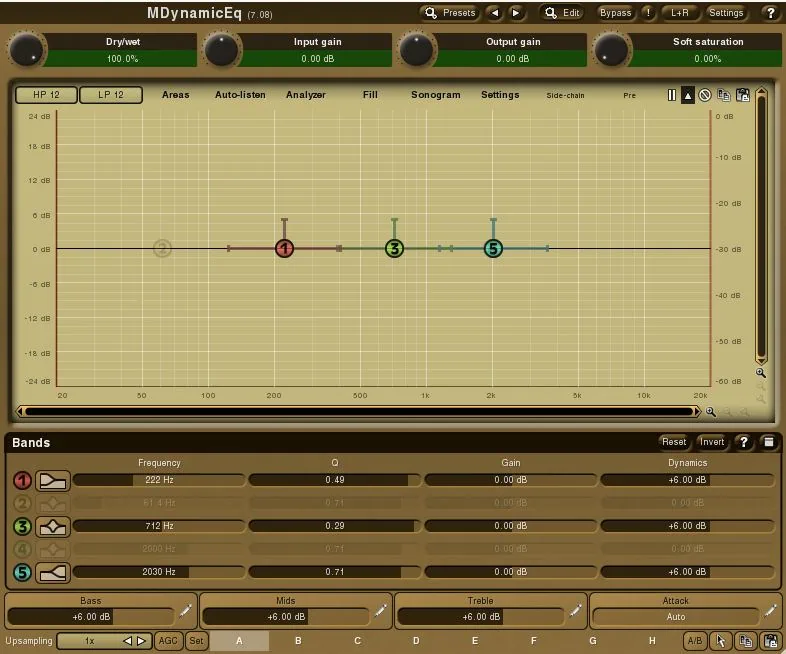
What are MeldaProduction MDynamicEQ and MAutoDynamicEQ?
MDynamicEq and MAutoDynamicEq are advanced dynamic EQ plug-ins that specialize in complex frequency processing. At their core, both plug-ins combine parametric Equalization, Compression/Expansion, and dynamic frequency control. Instead of applying a fixed EQ boost or cut all the time, they can react dynamically to individual frequency bands. In this detailed MeldaProduction mDynamicEQ and mAutoDynamicEQ review, we’ll explore their amazing features and capabilities.
For example:
- tame harsh vocal sibilance only when it appears
- duck bass frequencies when the kick drum hits
- control resonances dynamically
- reduce masking between instruments
- enhance punch and clarity without overprocessing
Introduction:
MeldaProduction has long established itself as one of the most avant-garde audio plug-in specialists on the market. In fact, their digital tools are not only innovative and feature-rich, but their overall quality pushes them to the forefront. Engineers and producers use MeldaProduction plug-ins on numerous professional recordings around the globe.
Among these, MDynamic and MAutoDynamic EQs stand out as two of Melda’s cutting-edge “must-have” processors. These binary wonders demand to be experienced in order for engineers to fully grasp their power.
Once an engineer grows accustomed to relying on these astounding “go-to” EQs, returning to any former fan-favorite quickly becomes extremely difficult.
Priced modestly at €60/$78 for MDynamicEQ and €120/$156 for MAutoDynamicEQ, these elaborate compilations of highly optimized DSP code reward any wise, self-starting engineer who purchases them. After conducting exhaustive, carefully controlled analysis, our lab has delivered the final reports. Consequently, Reviewer’s Revival is very pleased to share these test results with you.
MeldaProduction – Excelling in Innovation and Trust
Under the Reviewer’s Revival microscope, we dissect two fascinating Dynamic EQs. Their plethora of configuration choices and sound‑shaping options are overwhelming.
Far from posing as an entry-level offering, MDynamicEQ confidently delivers five bands of compelling sonic‑shaping indulgence. Then its big brother, MAutoDynamicEQ, raises the bar even higher by unleashing seven bands of frequency sculpting along with superior dynamics control.
Melda’s products attract top-tier engineers from around the world, including Ian Shepherd of production-advice.co.uk. To be perfectly clear, MeldaProduction audio tools are undeniably professional-grade. Moreover, the company often offers many of its superb products in value-packed bundles, and as individual components during holiday promotions and special events.
As a rule, these plug-ins are not cheap, yet they never cross onto the overpriced class. Take MDynamicEQ, for example. Its price-to-performance ratio clearly leans in favor of performance. In addition, Melda extends genuine goodwill to the home-producer community by releasing an excellent freeware bundle, which users can upgrade for a nominal fee.
Free Updates for Life:
MeldaProduction works diligently to improve their product line through regular, lifetime-free updates. This developer earns strong customer loyalty by delivering excellent support and providing clear, well-crafted instructional materials. Furthermore, MeldaProduction consistently strives to offer innovative, forward-thinking audio-processing tools that empower both professionals and passionate enthusiasts alike.
What makes MDynamic and MAutoDynamic EQs so Good?
MDynamicEQ and MAutoDynamicEQ are replete with powerful, extensive features. Very few EQ plug-ins can share the same DAW space that these occupy.
First, prospective buyers might initially balk at the $78 or $156 price tag for a single EQ plug-in. However, the reality is far more exciting! These monumental digital architectures brim with such extraordinary features that they quickly become absolutely invaluable to any engineer eager to master their potential.
Hi, you! If you like these kinds of reviews,
be sure to subscribe.
Melda unleashes an incredible arsenal of features, delivering 4x oversampling, a stunning sonogram view, and superior real-time frequency analysis! Furthermore, these plugins empower you with an auto-listen mode, extensive parameter configurations, customizable GUI themes, a fully resizable interface, diverse channel modes, and seamless side chaining—the possibilities are truly endless.
To top it all off, you can activate optional saturation to craft that perfect analogue warmth whenever you need it. Ultimately, the exceptional sound quality of Melda plug-ins demands the undivided attention of every serious engineer.
Take note of this impressive engineering feat: these tools are optimally coded using a powerful blend of low-level programming languages—specifically ASM, C, and C++—which are proven to deliver maximum performance gains!
To put it simply, I am utterly stunned by the sheer magnitude of tonal and dynamic control they offer. I put rigorous study, bench-testing, and review into them to come to this conclusion. Moreover, these EQs effortlessly conquer multiband compression, expansion, and DeEssing tasks with remarkable ease. And the cherry on top? They are fully side-chainable!
In summary, the MDynamic and MAutoDynamic Equalizers each represent the absolute pinnacle of frequency manipulation and dynamics control, all fused into one highly-evolved audio processing powerhouse.
Installation, Setup and Authorization:
All Melda plug-ins seamlessly support both VST and VST3 interfaces! Additionally, dedicated installers are ready for you in both 32-bit and 64-bit versions, ensuring perfect compatibility across MAC and PC systems. Cheers to that! 🎉
Authorizing Melda plug-ins is a delightfully smooth experience! Customers never have to lug around cumbersome dongles, nor are they shackled by restrictive vendor-controlled Call-Challenge/Response schemes.
In fact, I enthusiastically champion the localized license key and serial number authorization method! Why? Because wrestling with companies over licensing headaches is a total nightmare, especially when you simply need to install your legally purchased software on a new machine, or recover from a failing hard drive.
Furthermore, let’s be clear: a determined thief will steal software regardless of the protection level, so why complicate things for honest users?
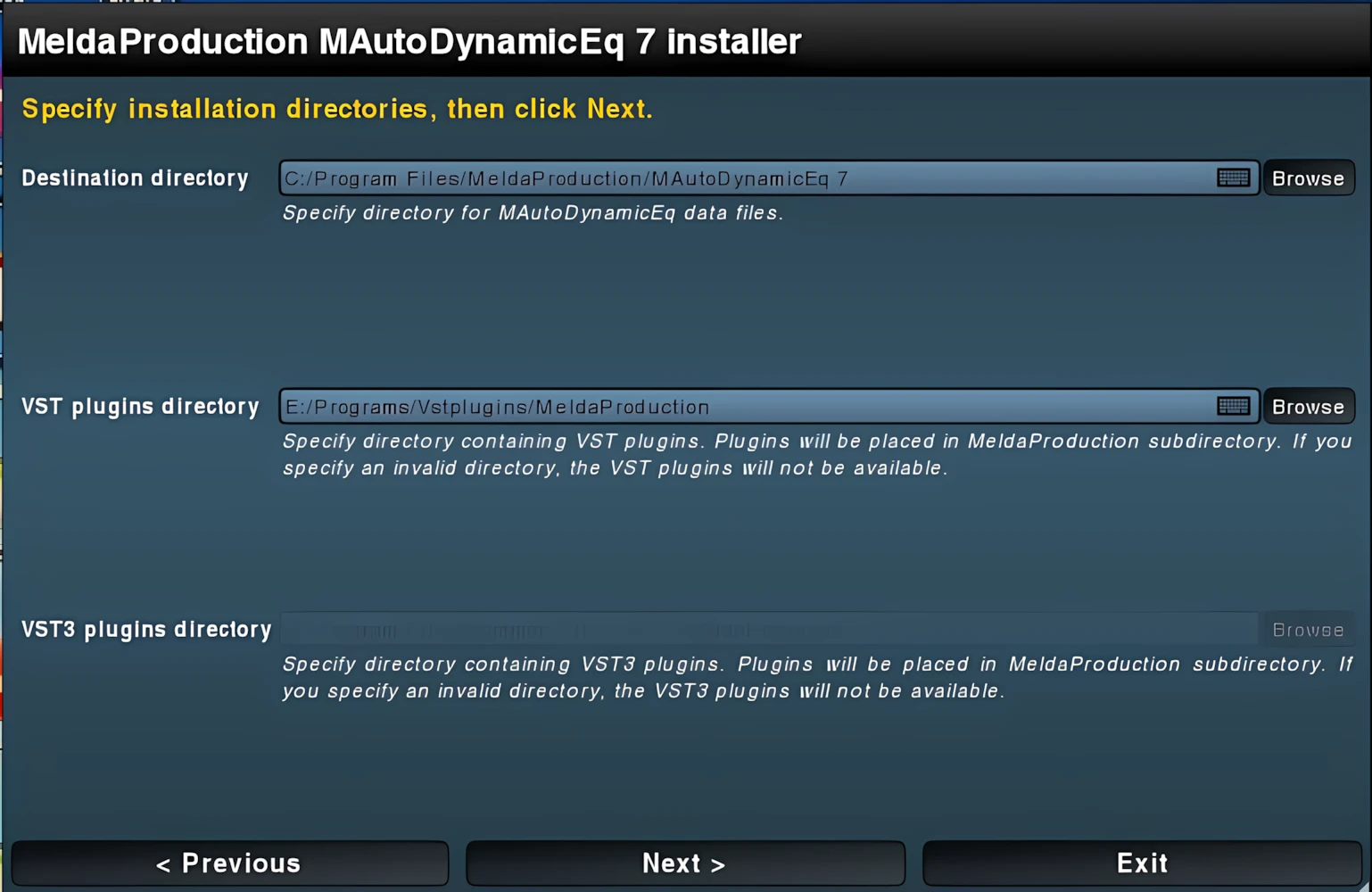
MeldaProduction products stand out as unique in every aspect, including their installers. However, I found the installer slightly more convoluted than many software installation utilities. Specifically, the typeface appears small, and the navigation system requires spending some ‘quality time’ before becoming intuitive.
On the positive side, the installation process completes very quickly. Nevertheless, exercise caution during installation: Melda installers automatically create subdirectories. If you’re already a Melda customer, you’ll likely recognize this characteristic behavior.
However, if you are new to MeldaProduction software, please note that installing the plug-ins into your “Program Files” directory causes the installer to automatically set the path to “Program Files\MDynamicEQ”. While this is not a major issue, it is worth keeping in mind.
Visuals and Interface:
Certain developers absolutely master the art of crafting distinctive GUI styles that brand their products with unmistakable identity! Voxengo and ValhallaDSP execute this brilliantly. And MeldaProduction joins them with equal flair!
Their interface stands out with impeccable layout and radiates a professional, refined appearance. Just as innovative qualities power what lies beneath the hood, the interface itself boldly rejects any classic or vintage aesthetic. Instead, Melda plug-ins project an almost scientific, medical-analysis precision that commands attention! Have you ever seen an MRI scanner’s software interface in a hospital lab? If you have, you’ll appreciate the analogy. *Grin.
An example of the excellent craftsmanship observed in these plug-ins is the dynamically resizable interface. A user may simply click-drag the bottom right corner of the GUI to resize it. By default, these plug-ins take up a moderate portion of screen real-estate, measuring 786px wide by 654px high.
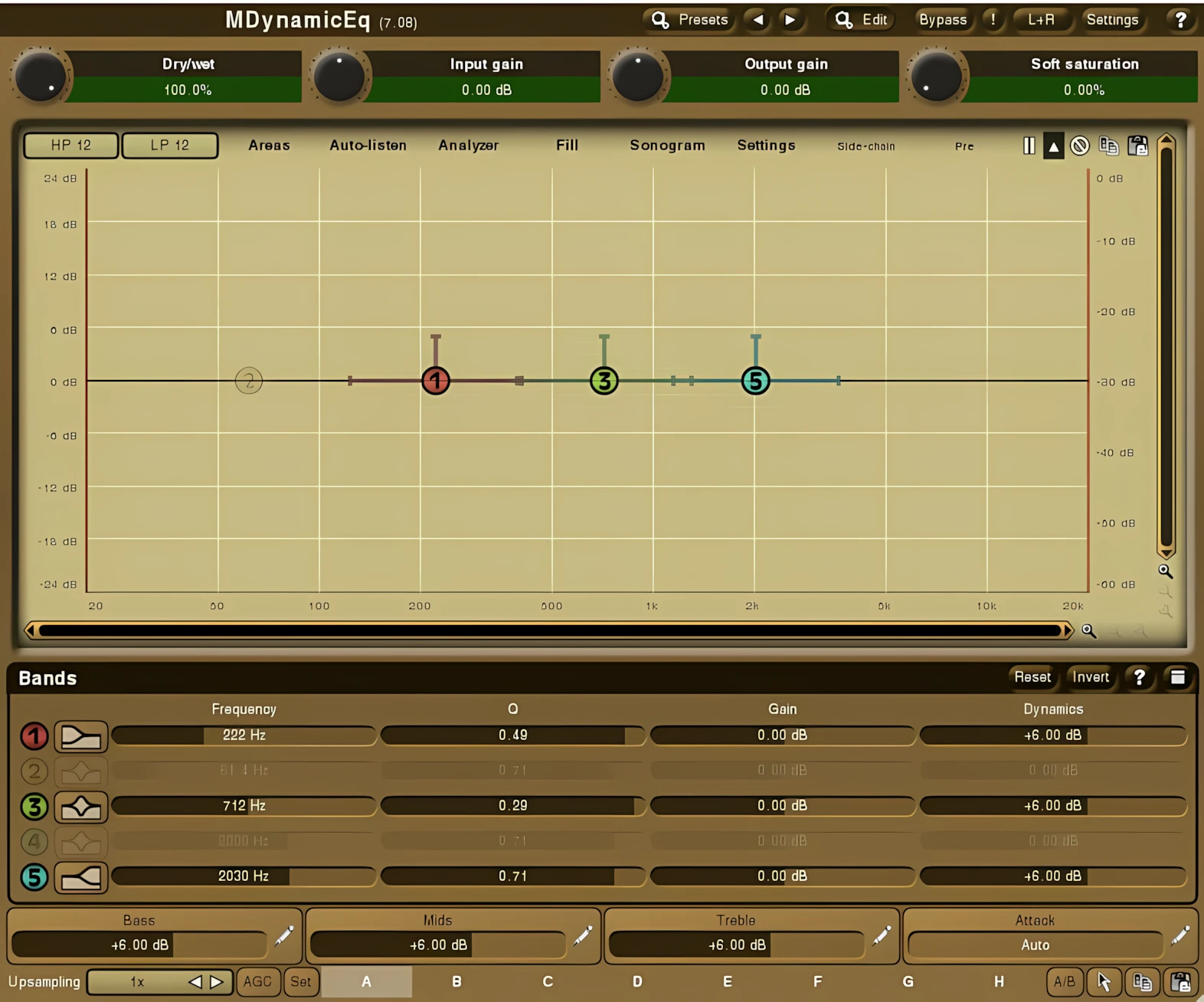
Generally, the contrast between the white typeface and the GUI backgrounds shines brightly! While some color themes offer superior readability, the experience remains crisp across the board. By diving into the advanced settings, users take full control: they can craft entirely custom color themes or instantly select from the many vibrant sets included right out of the box!
Bird’s Eye View:
Along the top bar of the GUI, the plug-in clearly displays its name and current build number. To the right, a row of buttons then gives you direct access to an all-inclusive preset management system, advanced preset editing, true bypass, channel modes (including M/S), program settings, and finally, a highly detailed “About” page.
Instead of opening this “About” page inside the plug-in, I chose to view it in my browser. However, the text appears far too small for my forty-something-year-old eyes to read comfortably. By contrast, anyone blessed with Steve Austin–level vision will probably manage just fine.

Fortunately, the interface does provide a way to zoom the x/y proportions, which does increase the text size. Even so, my 15-inch laptop screens limit how far I can realistically magnify the display, so I still cannot enlarge the text as much as I would like.
Presets:
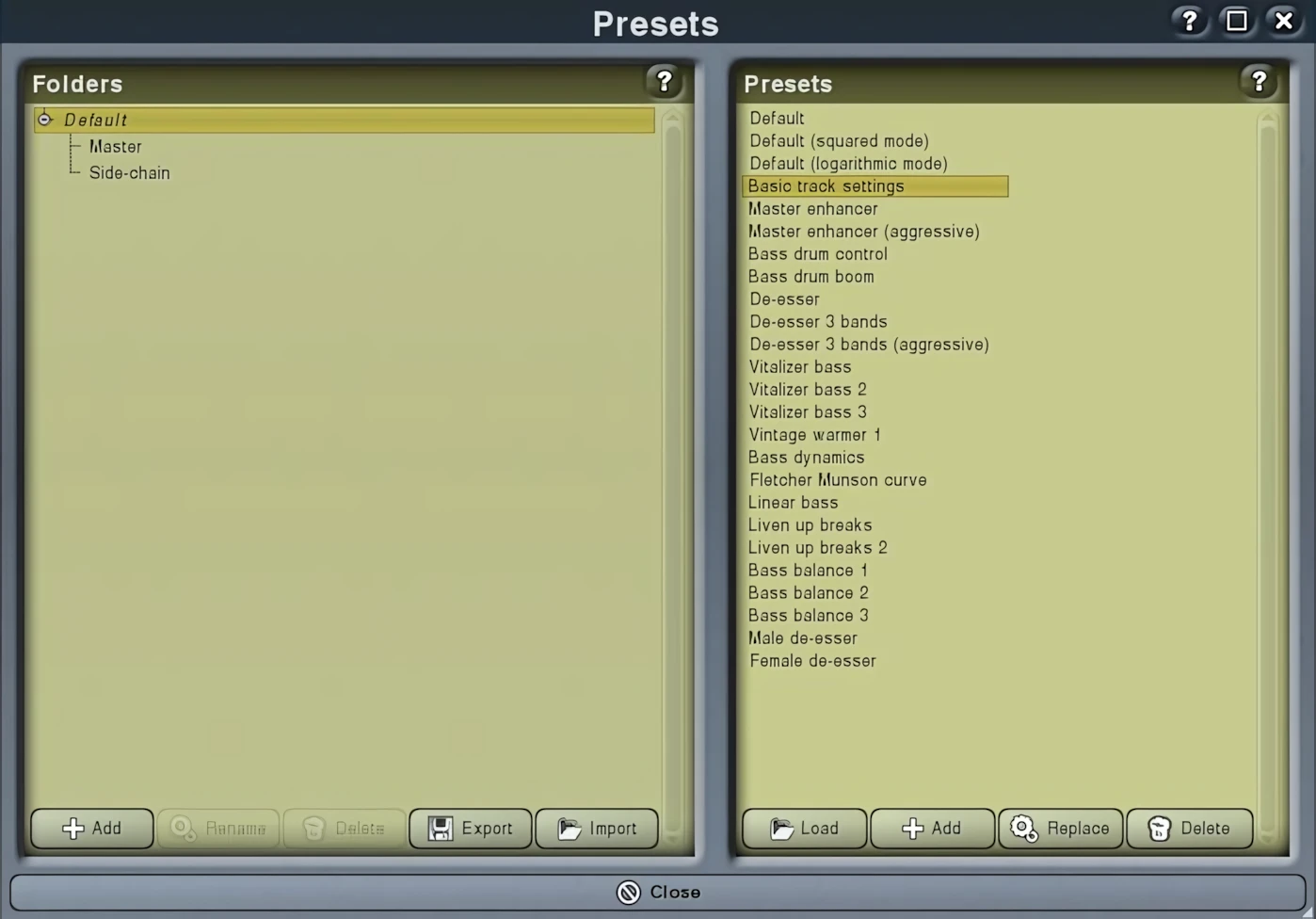
MDynamicEQ and MAutoDynamicEQ include a robust collection of factory presets. These presets cover three main production areas: Mastering, Default (channel mixing), and Side-Chaining. In particular, the side-chaining presets take full advantage of the powerful ducking features that MAutoDynamicEQ and MDynamicEQ offer. For example, a preset called “Bass vs. Bass Drum” makes separating low-end fundamentals remarkably easy.
Multi Parameter:
Presets can group multiple parameters together inside the Multi-Parameter Editor. In addition, the user can create what MeldaProduction calls “Active Presets.” To access this area, the user simply clicks the “Edit” button. From there, the user can create custom adjustment groupings that simultaneously change multiple parameter values within a single preset.
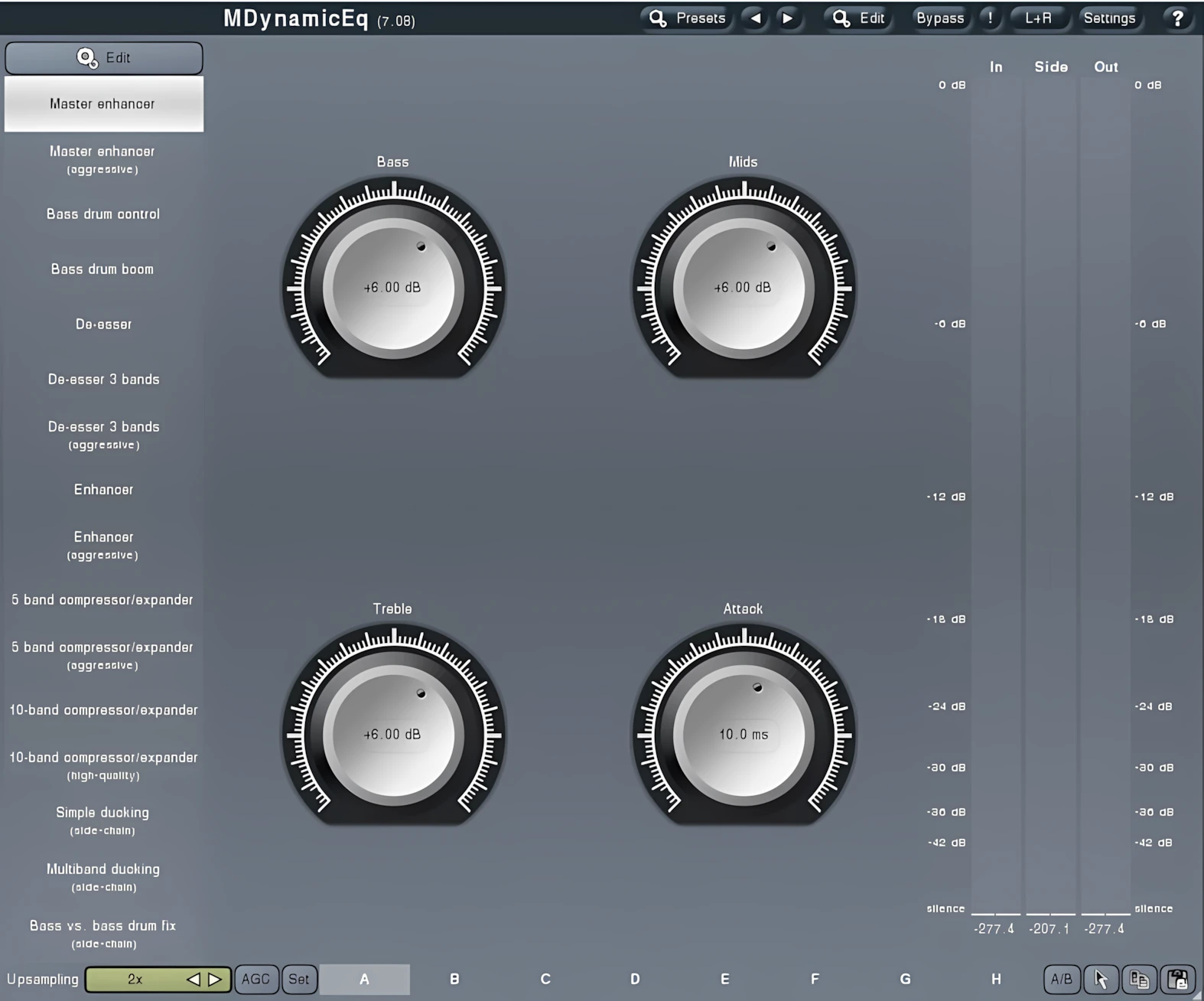
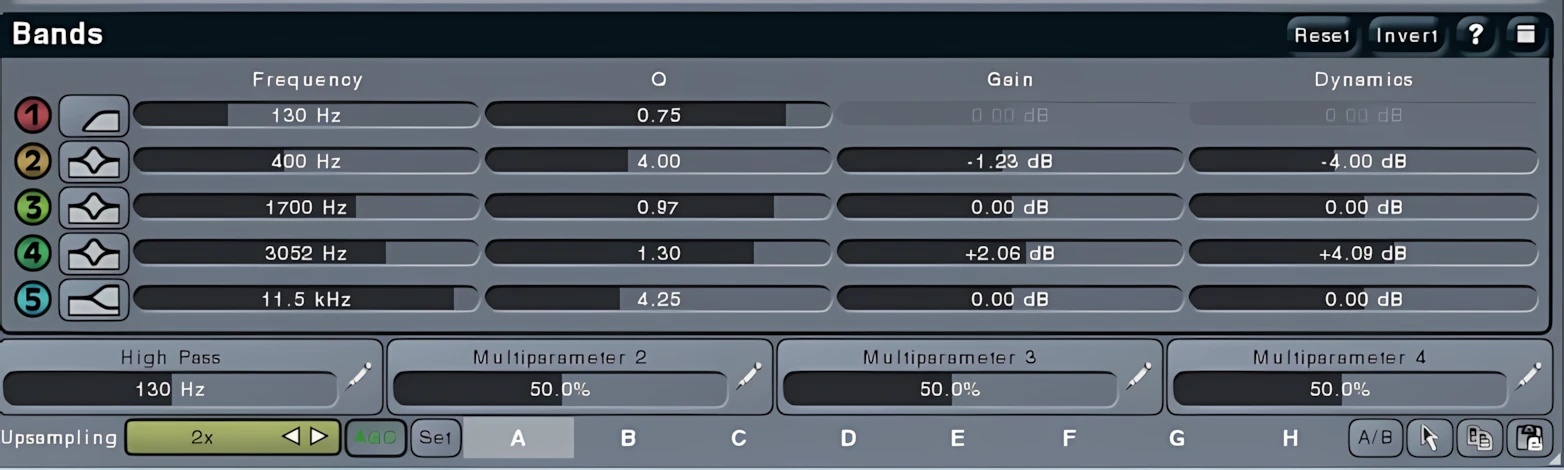
For instance, users can configure and save a node’s “Dynamics” gain to change simultaneously with its standard frequency gain, directly within the Multi-Parameter editor. Better yet, they can assign the “Dynamics” gain values of three or four separate nodes to a single multi-parameter control for incredibly fast, intuitive workflow customization.
Meanwhile, like every slider, knob, switch, and button throughout Melda’s plug-in lineup, these large, easy-to-navigate controls respond to mouse movements with exceptionally smooth, silken fluidity.
Configuring Multi Parameters Tabs:
Along the bottom of MDynamicEq, four “Multi Parameter” tabs connect directly to the “Active Presets,” giving users immediate access to powerful macro-style control. Each tab contains a single slider or button assigned to the pre-defined — or fully user-defined — controls within a selected “Active Preset.” As a result, users can trigger multiple parameter changes simultaneously with remarkable speed, flexibility, and precision.
Choose you Style:
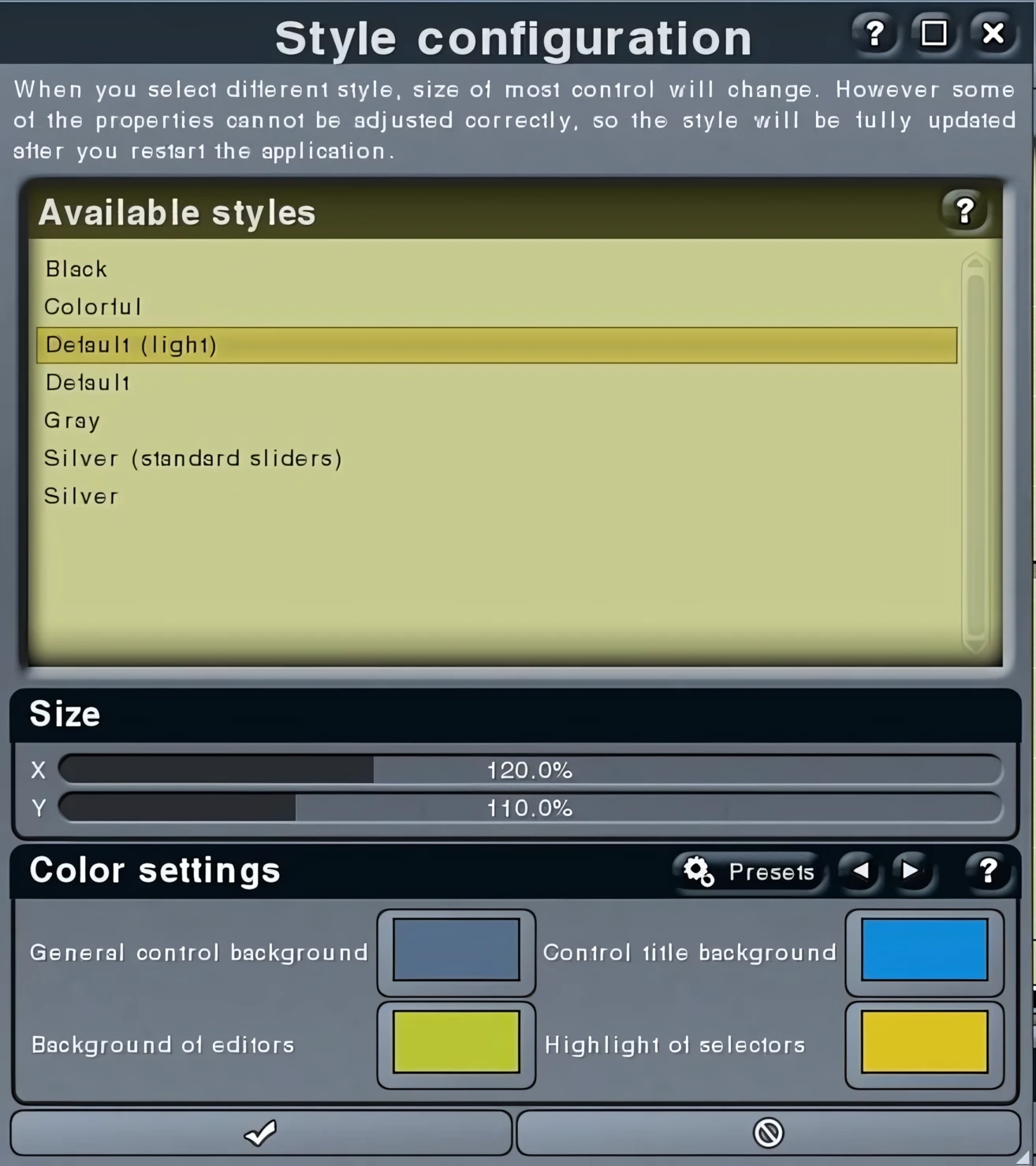
The advanced menus offer a myriad of color-theme options. The user accesses these preferences by clicking the “Settings” button in the upper right corner of the GUI. Once clicked, this button expands a substantial list of additional, previously hidden configuration options. Within this extensive list, the user can also choose whether to control parameter editing with sliders, buttons, or knobs.
You can conveniently reset the plug-in to its default size and style from this menu. In addition, you can set the current GUI dimensions as the new default size right from the same list. This menu also lets you check for program updates, open links to the developer’s home page, and access the help files. From here, you can also launch the Melda tutorial site with a single click.
Directly beneath the top-bar/menu area, you then see a row of four controls, which you can display as sliders, knobs, or buttons via the settings menu. From left to right, these controls manage Dry/Wet, Input Gain, Output Gain, and finally, Soft Saturation.
Visuals – Equalizer Shape Graph:
The “Equalizer Shape Graph” dominates the GUI, serving as the powerhouse where engineers execute the bulk of their workflow. This dynamic graph defines the frequency response with crystal clarity. You can swiftly manipulate every EQ band—represented as intuitive “Nodes” on the graph—or seamlessly switch to the dedicated editors below for meticulous, fine-tuned adjustments.
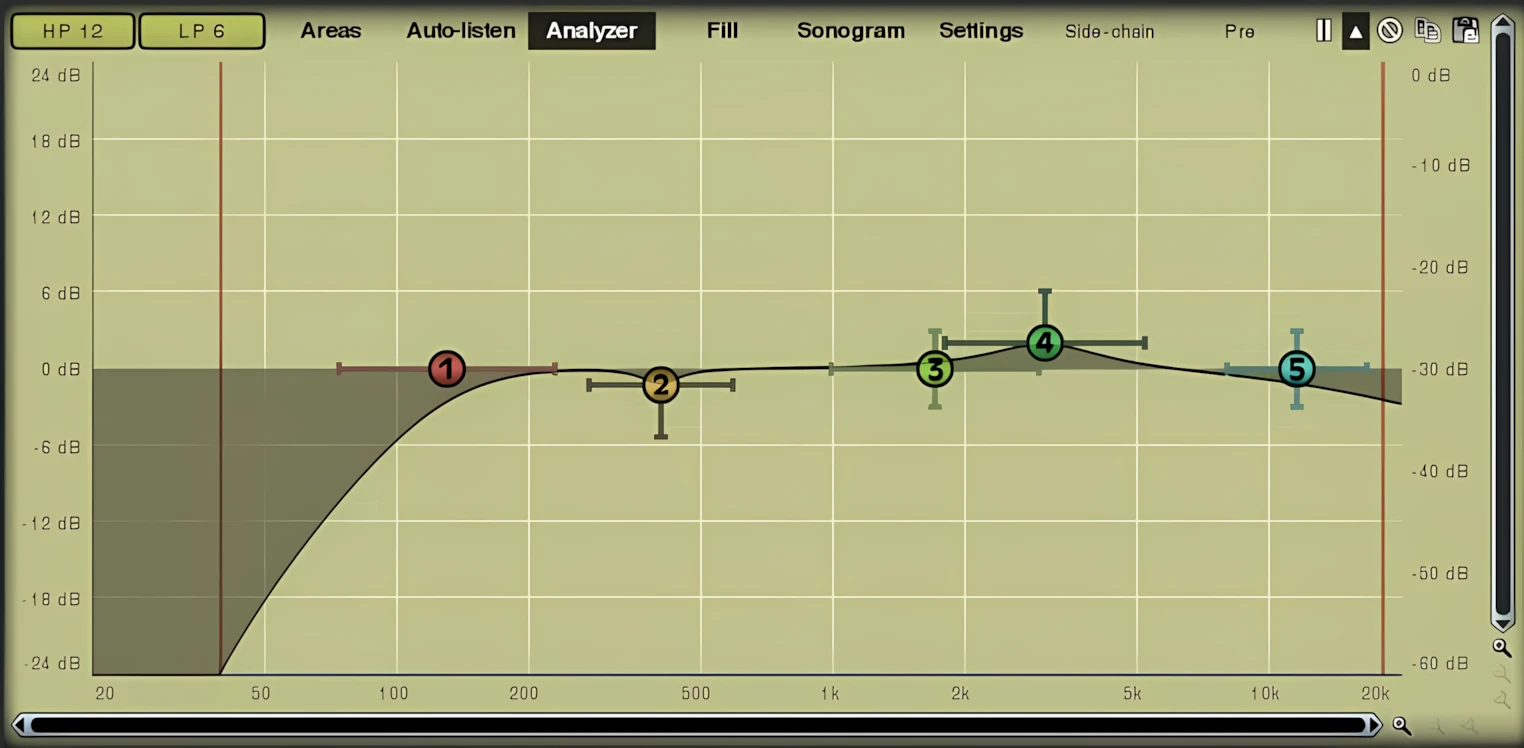
Double-click any band point to instantly toggle it on or off. Right-click a point to unlock a suite of additional settings. Need precision? Shift-click to lock the node against horizontal movement, allowing you to drag it strictly up or down. This clever feature guarantees you never accidentally shift an assigned frequency point—you adjust only the attenuation with total confidence!
A sleek row of eight tabs lines the top of the “Equalizer Shape Graph,” offering powerful control at your fingertips: Areas, Auto-listen, Analyzer, Fill, Sonogram, Settings, Side-chain, and Pre. Let’s dive into a quick breakdown of what each one delivers.
Areas:
Displays settings of visual areas, which are useful for better orientation in the frequency spectrum. To streamline your workflow, you can use the “Areas” to visually guide you through the frequency spectrum.
Auto-Listen:
Enables auto-listen feature, which temporarily changes the equalizer shape when dragging a band to let you show what the particular band is actually doing. For example, when dragging a peak filter, the equalizer disables other bands and changes this one to a band pass filter, so that you would listen to the frequencies the peak filter is modifying.
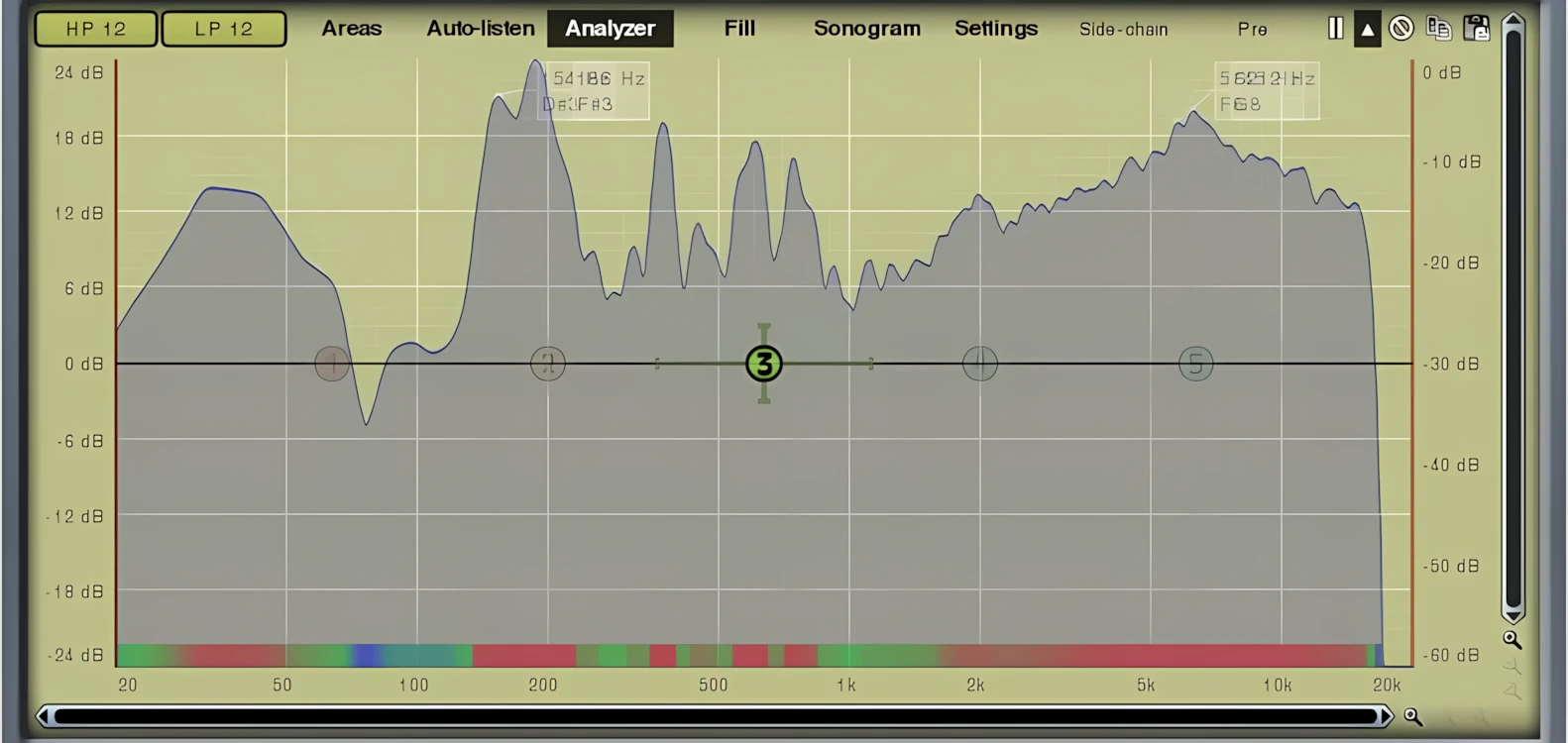
Analyzer:
Enables or disables the analyzer. The analyzer response is smooth and reacts in real-time. It provides a nice amount of visual feedback, letting you “see what’s going on” with the frequency spectrum of the source material. The analyzer can be configured to render its analysis in nine different formats; the default is “Hann”. Other well-known reference types, such as “Blackman” and “Lanczos” are also available.
Sonogram:
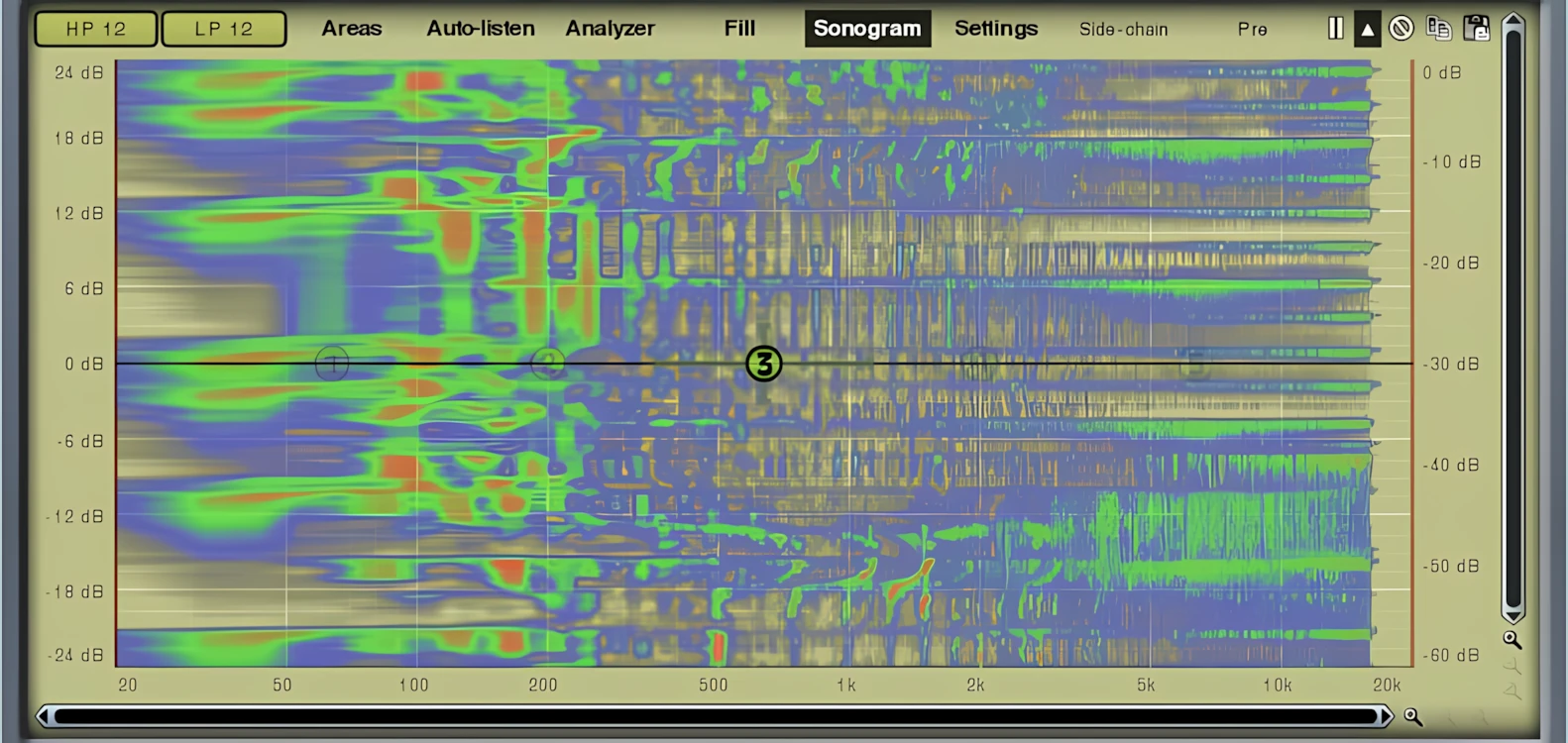
Enables or disables the sonogram. The sonogram provides good quality, high-resolution visual feedback of frequency energy. For example, it’s easy to find the bass guitar or kick drum frequencies by looking for the “red” areas marked within the sonogram. The sonogram remains dynamic by scrolling upward in time with the music. Personally, I find this easier to understand than trying to follow side-scrolling graphs. It’s easy to spot the “baby” frequencies too.
Settings:
Shows settings of the analyzer and sonogram. The user can adjust the “smoothness” of the curves, the opacity-levels of the analyzer and sonogram, slope, resolution (measured in dB), Overlap, Decay time (how long the analysis graph “holds” the peaks), FFT size, and lastly, an interesting feature named “Deharmonization”. In essence, this feature allows the user to desensitize the analysis of harmonics and focus more on the root frequencies.
Side-Chain:
Makes the analyzer & sonogram work with the sidechain signal instead of the normal input.
Pre:
Tells the analyzer & sonogram to work with the input signal instead of the output.

Leave a Reply