
What is Pro-DS?
Pro-DS is designed to control sibilance—the harsh “s,” “sh,” and “T” sounds that can become overly pronounced in vocal recordings. It excels in music production, podcasting, voice-over work, and post-production. In this deep-dive Fabfilter Pro-DS review, we’ll take a close look at its noteworthy features such as:
- Dual detection modes: You can choose between “Fullband” mode for simple, transparent de-essing or “Splitband” mode for more surgical control that affects only the problematic frequency range
- Frequency selection: Lets you target specific sibilant frequencies rather than applying broad compression
- Visual feedback: FabFilter is known for its intuitive interface with real-time spectrum visualization showing exactly where sibilance occurs
- Lookahead function: Helps prevent clipping and artifacts by anticipating peaks
- Stereo linking options: Allows independent or linked processing across channels
Introduction:
Let’s tackle those audio nightmares head-on! First, nasty, ear-piercing sibilance has plagued recording engineers since Harry Shure met Sally Tascam. Those overbearing “esses” and “tees” frequently ruin otherwise stellar vocal tracks. Meanwhile, sizzling cymbals often bleed through a perfectly mixed drum bus. Do either of these sonic disasters sound familiar to your engineering career?
I have fantastic news to share with just one word: Pro-DS! If you need a top-tier de-essing tool that is easy to use, brilliantly designed, and exceptional in quality, then this article is a must-read for you. After all, who wants to spend hours wrestling with harsh “esses” when a digital wizard can fix them in seconds? 🎛️✨
How much does it cost?
You can purchase Pro-DS as a standalone plugin for a reasonable $199 USD. While some might initially view this price tag as steep for such a specialized tool, that perspective changes instantly once you try it. After all, paying a bit more now saves you from the eternal struggle of manually editing every “s” sound later—which is basically free therapy for your sanity!
FabFilter sales are rare, to put it mildly. The company positions its products firmly in the premium tier—and for good reason. Across the board, its plug-ins consistently deliver industry-leading design and exceptional audio quality. On a virtual mixing board, they often set the benchmark rather than follow it.
This time, the plug-in under the reviewer’s microscope is no exception.
Individually, FabFilter plug-ins do not come cheap. However, the company softens the investment with a dynamic bundle pricing system. As customers expand their collections, they unlock increasingly attractive discounts. After purchasing a single product, they automatically receive reduced pricing on future purchases. As a result, buying multiple plug-ins can lead to substantial savings.
The FabFilter Pedigree . .
For more than 10 years now, FabFilter has produced some of the finest dynamics plug‑ins ever loaded into a DAW. In fact, many engineers reach for them almost on instinct—sometimes even before the coffee kicks in.
Moreover, the company’s very name has become synonymous with top‑tier DSP development. People place FabFilter in that rare group reserved only for the most refined and prestigious audio tools. As a result, both home producers and commercial engineers consistently hold FabFilter plug‑ins in the highest esteem.
In many studios, they are not just an option; they are THE standard.
Licensing and Authorization:
Unlike many prestigious competitors, FabFilter doesn’t force you to use online Call-Response authorization or annoying USB dongles.
Hi, you! If you like these kinds of reviews,
be sure to subscribe.
Instead, they offer a convenient, personalized license key.
Here’s how it works:
First, you buy the product. FabFilter immediately emails you a unique authorization code. Next, you activate this code just once on their website. Finally, the system generates your personalized license code and hands it right over.
Seriously, major kudos to FabFilter for keeping our USB ports free and our sanity intact. 🤗
FabFilter’s downloadable installers serve as both demo and full versions – a clever two-in-one deal. Once you’ve paid for and authorized a product, you can easily unlock its full potential.
To authorize, simply paste the license key text into the plug-in’s authorization fields. It’s a breeze.
As a bonus, each authorized item will be neatly listed in your “My Account” area on the FabFilter website, so you can keep track of your licenses with ease. No more digging through emails or paperwork – it’s all right there.
Visuals:
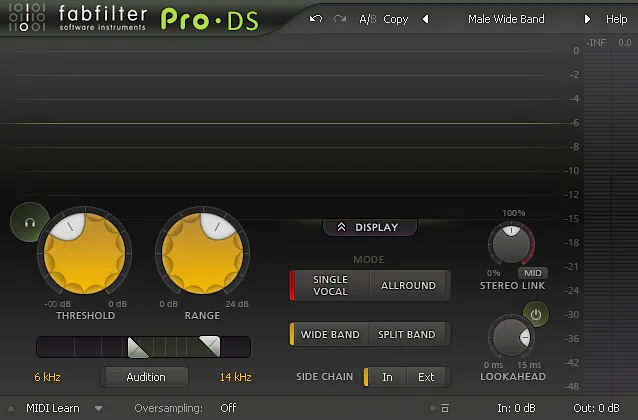
As with all FabFilter plug-ins, Pro-DS features an intuitive, easy-to-navigate interface that keeps you productive and focused. At the same time, it overflows with visual appeal that makes you actually want to keep it open on your screen.
This discreet, well-designed GUI clearly demonstrates FabFilter’s meticulous attention to detail and its commitment to effortless workflow. You will not run into quirky behavior or random visual glitches. Instead, you can simply get on with mixing, without feeling like you need a PhD in interface design—or a stress ball—just to use your de-esser.
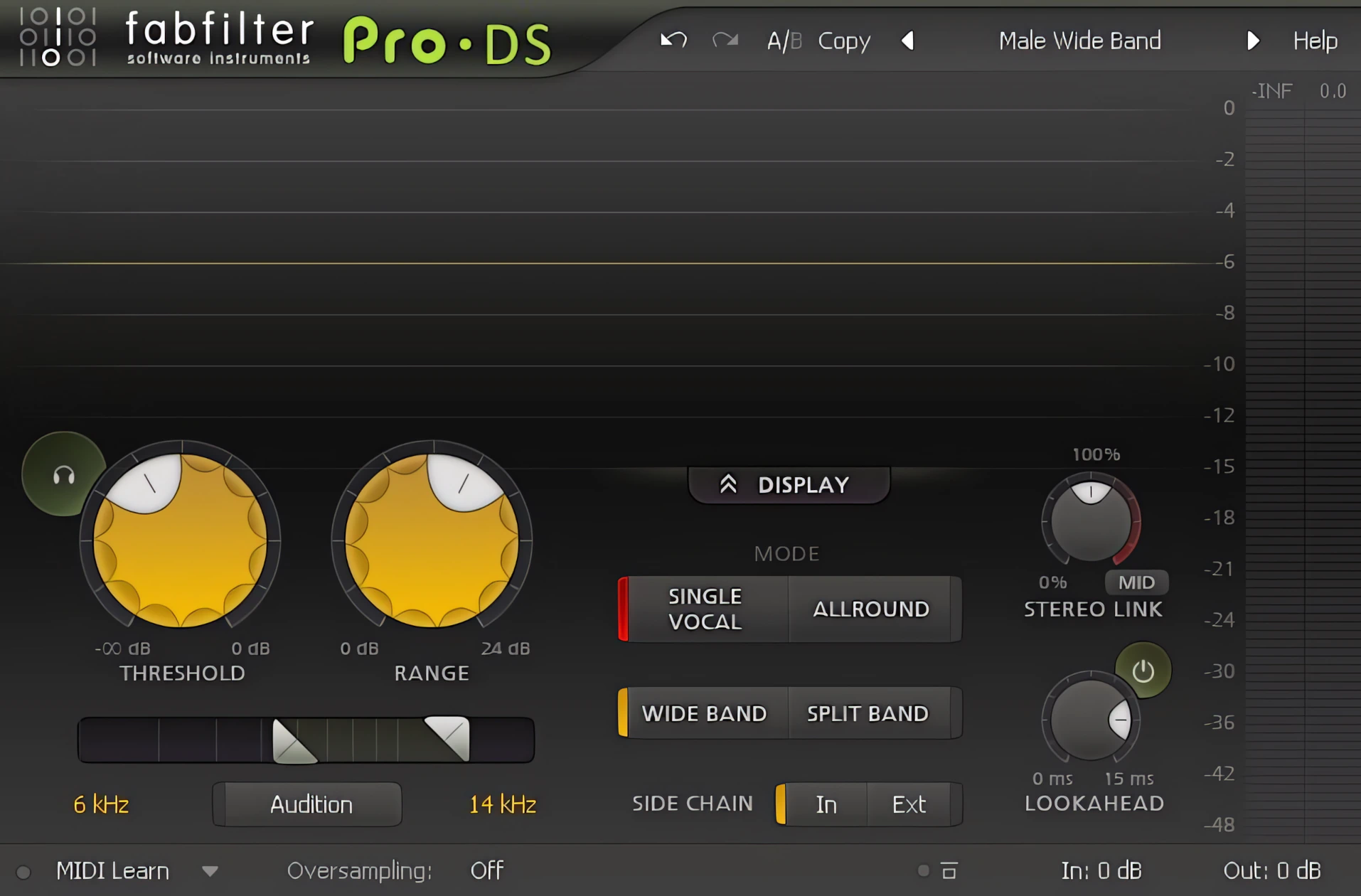
The interface greets you with a sleek, charcoal-grey background that provides instant, crystal-clear contrast with light-grey text elements. It’s a stylish start.
As you navigate, hovering your mouse cursor over any GUI control triggers elegant, subtle illumination effects. It’s a nice touch that adds a bit of visual flair.
The GUI controls themselves are not only attractive and well-placed, but also silken-smooth to adjust with mouse movements. You can tweak them with ease.
But that’s not all – you can also type in values directly by double-clicking on any button or slider. Talk about precision control.
And if you ever want to start fresh, simply hold down the “ctrl” key and left-click with your mouse to reset any control to its default value. It’s a convenient shortcut that saves you time and hassle.
At 640 x 420 pixels, the plugin demands only moderate screen space. Yet, I found myself wishing it could resize to fit those glorious, ultra-wide monitors. After all, nothing kills a mixing vibe quite like staring at a tiny window on a massive display!
** As of 2015, FabFilter plugins do indeed provide resizing/upscaling.
Operations and Control:
At the top of Pro-DS, users can quickly access FabFilter’s Fab-u-lous preset management system. The software organizes its presets into two main categories: Mastering and Single Vocal. The Single Vocal category offers a thoughtfully curated selection of presets tailored to suit a wide range of male and female voices.
FabFilter further divides these presets into Wide Band and Split Band processing modes, making it easy to find an appropriate starting point. Naturally, users can fine-tune any preset to match their specific needs. Once saved, those custom settings appear alongside the factory presets, ready for future sessions.
The Level Display Window
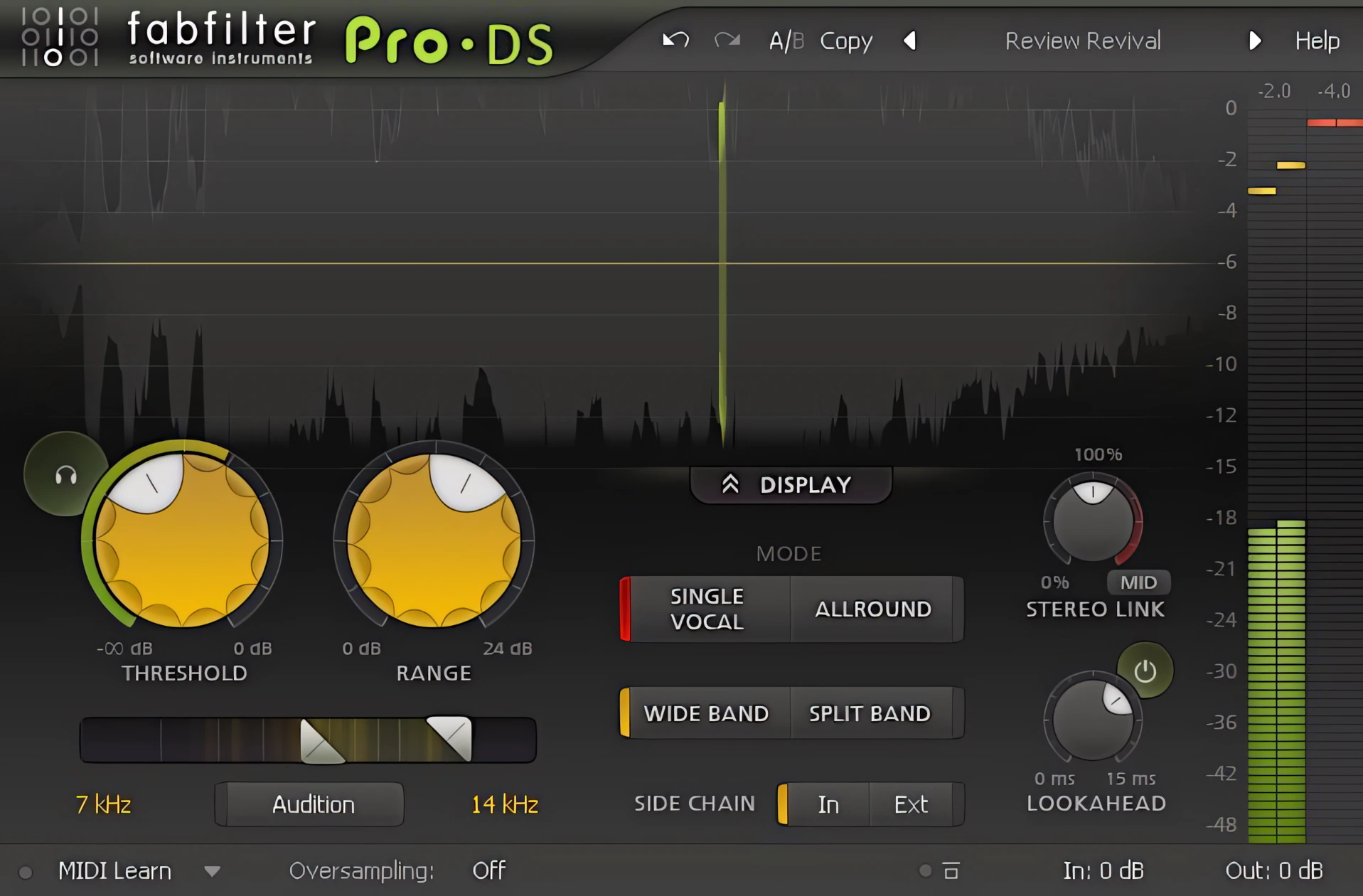
The default GUI’s upper section—the Level Display—shows a slick, real-time overview of your processed waveform.
Admittedly, this moving visual might distract some users. FabFilter thoughtfully lets you compact the interface and hide this section entirely.
Even better, I noticed a hidden perk during my tests. The plug-in consumed fewer system resources with the Level Display hidden. Your CPU will definitely thank you for the extra breathing room.
A place for everything, and everything neatly in its place
Although the interface is relatively compact, Pro-DS makes excellent use of its available space. A pair of generously sized knobs dominates the display, giving users immediate control over Threshold and Range settings. Their large format encourages quick, precise adjustments without the need for pixel-perfect mouse movements.
Directly below these controls sits a frequency range slider for setting the high-pass and low-pass filter points. Pro-DS offers impressive flexibility here, allowing users to target frequencies as low as 2 kHz and as high as 20 kHz. In other words, it can hunt down troublesome sibilance with the determination of a bloodhound.
The Audition button proves particularly useful during setup. With a single click, users can monitor exactly what the processor removes, making it much easier to dial in transparent results.
Meanwhile, a neatly organized row of buttons occupies the center of the interface. These controls provide quick access to the available processing modes and bandwidth options, keeping essential functions within easy reach.
Stereo Linkage and Look-ahead
Two knobs on the right side of the GUI control the stereo linkage and look-ahead functionality. Naturally, you can toggle the look-ahead feature on or off whenever you want. Just to the right of those controls, a smooth LED-styled meter tracks your audio.
These meters display your input level alongside the amount of sibilance reduction. They give you instant visual feedback, so you actually know how much “ess” you’re deleting from existence.
The bottom section is tops!
Along the bottom of the interface you will readily find Midi Learn, Oversampling, Global Bypass, Input and Output controls.
Overall, the entire range of user-adjustable controls and GUI functionality is smooth, easy-to-use, and precise. FabFilter plug-ins are an absolute joy to use.
Sound Quality:
In a word, Transparent!
Sheesh, I’d go so far as to say that this baby is most nearly “invisible” within the context of an average mix.
Pro-DS easily corrects and pristinely repairs vocal tracks distressed by sibilance.
Now, I can tweak a vocal track’s EQ curves for a modern, crisp sound—either before or after compression—without worrying about harsh artifacts. This trick works flawlessly on both male and female vocals.
Even under aggressive settings, the plug-in preserves the track’s original timbre. Essentially, you can hammer the audio without making your vocalist sound like a lisping robot. I am hugely impressed.
Does Pro-DS offer oversampling?
Yes indeedy, it certainly does!
In many cases, the default settings deliver excellent results right away. However, when you engage 2x or even 4x oversampling, you get an even cleaner, higher‑fidelity sound. This extra polish comes largely from the program‑dependent, linear‑phase processing under the hood.
Throughout my FabFilter Pro-DS review, I noticed a consistent pattern. No matter what I routed into this delightful plugin, the output always sounded better than the original. So, when it came to taming sibilance, Pro‑DS behaved like it knew exactly what I wanted—sometimes a little too well, like it was reading my mind.
My own bench tests fully support the company’s claim that this plug‑in is both “highly intelligent” and “transparent.” In practice, it does the hard work for you, then quietly steps out of the way.
If I don’t have access to individual stems, can Pro-DS still help me?
Absolutely!
Pro-DS truly shines with its impressive ability to process a full mix while effectively taming sibilance and other high-frequency annoyances. It’s a remarkable feat that sets it apart.

In this regard, the software earns high marks as an intelligent and transparent signal processor. It gets the job done without getting in the way – a badge of honor for any plugin.
This is, by far, my favorite de-essing plugin to date. I also reviewed the SPL DeEsser Collection some time ago, and was duly impressed with it as well. Notwithstanding, I entered this investigation with high hopes. The FabFilter team has clearly taken home the gold.
I am absolutely thrilled that vocal tracks retain their presence, air, and definition—even after aggressive de-essing. Finally, a tool that tames the “esses” without turning your singer into a robot!
CPU Consumption:
Ah, the beauty of refined DSP programming. Few things are more satisfying than wielding a powerful, highly effective tool that does not punish your CPU in the process.
Pro-DS delivers exactly that. This remarkably capable vocal-processing companion sits quietly and efficiently within your DAW, handling its duties with impressive restraint. Even systems built in 2010 or later should be able to run multiple instances without breaking a sweat—or at least without reaching for a cold towel.
That said, enabling oversampling naturally increases the processing load. The additional CPU demand remains a reasonable trade-off. However, given the potential gains in audio quality it is likely worth it.
Concluding Remarks:
I easily award 5 stars to FabFilter for this magnificent de-essing tool.
At first glance, their plug-ins might look a bit expensive. However, the amazing results absolutely justify the price tag.
I suspect any serious engineer—whether a pro or an enthusiast—will love this industrial-grade tool whenever they need transparent sibilance control. After all, well-balanced vocals free of piercing “Esses” provide that final polish. It is the exact touch that elevates a decent amateur mix into a professional masterpiece.
5 out of 5 Stars


:: Pros
- Undeniably BEST-in-CLASS sibilance taming.
- Attractive, well designed interface.
- Highly intelligent and Transparent!
- Powerful sibilance control – even in a FULL mix.
- Full range of features.
- Modest system requirements.
- Honourable, customer oriented company.
- Available for both MAC & PC (32 & 64 bit, including AAX)
- Concise, well-prepared help documentation.
- Fair cost in ratio to product quality – Equitable bundle pricing.
::Cons
Maybe it would be nice if the GUI were resizable in order to accommodate higher screen resolutions.
** EDIT ** – As of 2015, all FabFilter plugins are scalable and resizable.
Visit the FabFilter website. www.FabFilter.com
Intellectual Copyright – 2014 – All rights Reserved. This review may not be copied or reproduced in whole, nor in part, without express written permission from the author.

Leave a Reply