
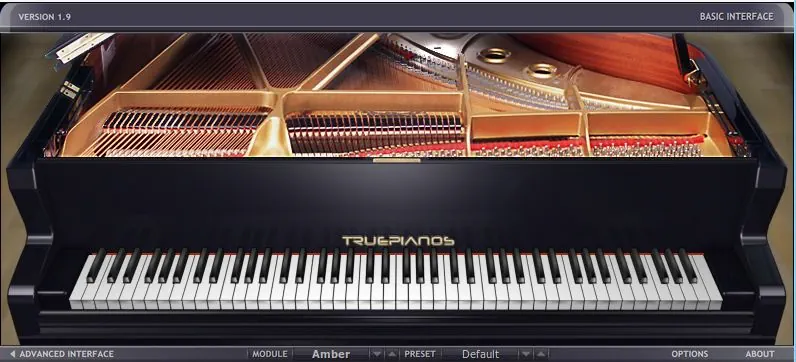
What is 4Front True Pianos?
True Pianos is a classy virtual instrument that uses three different programmatic techniques: physical modeling, synthesis, and sampling. As a result, True Pianos is a hybrid piano plugin that feels responsive and expressive while using relatively little CPU and disk space. True Pianos sounds great, even though its digital footprint is diminutive. In this thorough 4Front Technologies True Pianos review, we’ll look into impressive features, such as:
- Multiple piano “modules”/models (American, German, Italian, Bechstein-style, Bösendorfer-style, etc.)
- Fast loading and low memory usage
- Good playability with varied MIDI keyboards
- Built-in resonance and pedal behavior
- Optimized for live performance and low latency
Introduction:
Many of today’s virtual piano offerings disillusion a lot of pianists. In the seemingly never-ending quest for glorious tone, authentic playability, and modest system requirements, most offerings are too large. Most musicians have neither the physical space nor the bankroll to invest in a baby grand, or even a high-end “Digital Grand”.
Many keyboardists struggle to keep their computers afloat in the sea of multi-gigabyte sample libraries. Each new library promises to deliver finer sound and greater piano realism, but how much drive space is required!?
I own a few substantial piano sample libraries, and for the most part, they are all very good. However, they consume a great deal of precious hard drive space, and available system memory.
For those who own up-to-date computers housing fast SSD drives, and copious amounts of blistering-fast RAM, this isn’t as much of a concern. However, that all might change in another year or two when new sample libraries will be much more demanding.
But all is not lost! We can thank God and the good folks at 4Front Technologies for finally making the dream a reality. For a moderate price of only £121.55, or $180 (USD), 4Front’s pianos suite is nothing short of spectacular. Lastly, True Pianos is truly multi-platform. It is available for Windows PC (32 bit & 64 bit), Mac (Intel & PPC), Receptor, and vMachine!
What makes True Pianos Different and Viable?
The only true competitor to 4Front’s modelling excellence is Moddart’s illustrious “PianoTeq”. Each of these great packages exhibits its own uniqueness and allure.
I always try to find that “special something” about a product that causes it stand out and ahead of the other race horses, even if only by a nose. In this case, that “something special” is True Piano’s very conservative system requirements.
This beautiful-sounding piano suite impresses me with how light it is on CPU and memory. Now, dear reader, before you glance up at the “back” button thinking that “light on CPU” means “light on sound-quality”, rest assured that nothing could be farther from the truth.
When 4Front Technologies released True Pianos in January of 2007, it became immediately obvious to the digital-instrument community that this software was indeed “something different”. True Pianos creates a highly evolved digital-symbiotic relationship between sampling, synthesis, and physical modeling.
Collectively, these attributes work synergistically to reproduce piano realism whilst demanding very little memory and processing power. (Comparatively speaking, that is.) Accordingly, 4Front’s technology generates sound programmatically ‘on the fly’, eliminating disk streaming and hard drive caching.
With five distinct piano types to choose from, True Pianos is sure to provide the perfect tone for any given project. The good folk at 4Front do not specify which actual piano models the five modules reference. However, each module delivers excellent sound. We’ll delve into each of them a little later.
Hi, you! If you like these kinds of reviews,
be sure to subscribe.
In general, you can certainly consider True Pianos able to replace most nearly any large piano sample library.
Who is 4Front Technologies?
4Front Technologies is a partnership between George Yohng and Roel de Wit.
Many developers and composers highly respect 4Front’s lead programmer, George Yohng. George spearheaded and developed the audio engine that powers the Vienna Symphonic Library.
The specialized sampling technology evidenced in True Pianos is the brain child of Mr. Roel de Wit.
I pointedly asked 4Front Technologies some questions about their virtual piano development. Mr. George Yohng and Mr. Roel de Wit both replied to my queries with more detail than I was expecting. Most of the information reached me in confidence, but I’d like to pass on some of the scoop that may be freely shared.
Quotes from 4Front HQ:
“For each TruePianos module we create from what I (Roel) call a footprint, as a base to start working from, which through mathematically analysis is derived from actual samples. In the case of the Amber module, we rented a studio with a certain model of grand piano in it.”
“We did a sampling session to obtain the raw material we needed to create the footprint required for starting work on this module. The Amber module has some characteristics of the original sampled piano, but doesn’t sound like the original instrument if you would do a direct comparison.”
“Two and a half years later we released the Atlantis module which we consider our best publicly released module to date. We also previewed the long overdue TP v2.0 technology, which from a computational point of view, is approximately 10x more complex than any previously released module.”
“The Atlantis module sounds very different from the Amber module, but fact is that the footprint of both modules is generated from the very same sampling session. The difference in sound is due to the use of newer and more refined techniques that we have developed for what will become TruePianos v2.0.”
Installation and Setup:
4Front spares you from tedious, time-consuming installation routines. True Pianos’ individual components were all installed and playable within 5 minutes on the 6 year old dual core laptop that I use for reviewing purposes. Of course, the installers are each downloadable from the secure customer-area on 4Front’s web site.
The company sends customers their login credentials via email once they have remitted payment. If you are one of those chappies who is in the habit of downloading large, multi-gig sample libraries, this will seem like child’s play to you. The whole blessed lot of installers requires just 390 MB (one installer for the core engine, plus the five piano modules).
Product authorization finalizes the quick and painless installation process. Simply type or copy/paste the authorization details that you received at time of purchase. Bam! Just like that, the software is activated and ready to be loaded on a midi track in your DAW. Alternatively, you can launch True Pianos as a standalone application.
Yay! No dongles or online authorization required!
Regarding 4Front’s personalized licensing model, I really, really wish that all developers would sit up and take notice. Some anti-piracy and software-licensing mechanisms are wearisome and a real pain-in-the-noodle.
For example: Dongles are inconvenient and can be costly to replace. If your iLok dongle is lost, stolen, or fails, iLok will restore your licenses for $100. Else, you can elect to proactively pay iLok.com $30+ a year for their “Zero Downtime” service (PLUS $50 for a new dongle).
In the same way, If a company folds or stops production, then challenge/response protections will fail. If the user has a serious computer failure or migrates to a new system, C\R licensing can be cumbersome and difficult.
In view of this, some data disasters might even require “arm wresting” with the developer or company to obtain new license codes. It is this reviewer’s opinion that companies such as 4Front, SKnote, ToneBoosters, PSP Audioware, and others of their ilk, provide the BEST customer experience.
Editor’s Update: As of 2018, PSP Audioware products now use iLok protection.
What are the five piano types in True Pianos?
Atlantis True Pianos 2.0 technology preview:
By my estimation, this is the richest sounding module in the collection. It is also the most CPU intensive module. 4Front won’t claim any module imitates a specific piano, but this one sounds convincingly like a Steinway Model D to my ears.
I own a few Steinway sample libraries, so I’ve become quite keen in recognizing the unmistakable warmth and presence of a Steinway. Then again, maybe Atlantis sounds like a Bösendorfer? *Grin. In sum, the Atlantis module deeply satisfies owing to its robust lower register, full-bodied mids, and lovely, clear top end.
Sapphire:
A dynamic piano module with a versatile stereo sound. Sapphire is a sparkling, clean piano module with a high dynamic range and versatile stereo sound. In a word, it’s good for orchestral and subtle pieces. Some beta-testers dubbed it the ‘ice-piano’.
Emerald:
A roomy piano with lots of ambience and a stricter sound. Its distinct character helps to shape the mood of your musical piece.
Diamond:
This is a clean versatile piano with a neutral yet brilliant character. Diamond may just be the most versatile piano in the collection. I found it to be very at home with more jazz-like arrangements, or mellower compositions. However, you can also make it sound quite lively and boisterous. All in all, Diamond sings out nicely in a busy pop or blues mix.
Amber:
This is more or less the default module. 4Front describes this piano as a grand piano with wide dynamics and rich timbre. I completely concur. Amber can sit confidently in a busy rock mix or it can masterfully reproduce the graceful tones of a classical, recital hall grand.
Visuals and Interface:
Clicking anywhere along the top bar, or either side of the interface, allows the user to choose between the “Basic” and “Advanced” screens. The plug-in’s interface fits easily on modern monitors; maybe even ‘too easily’ – it’s a bit small. The GUI measures off at 796px wide by 362px high.
On a current high-res monitor, you might easily overlook the beauty of this attractive GUI, so it would be nice if the interface offered a resizing option.
Double-clicking any control automatically resets the control back to its zero or default values. The control’s accompanying “Value Box” displays its numeric value. The user may simply click on any of these and key in a value using the numeric keypad on your computer keyboard.
Basic Screen:
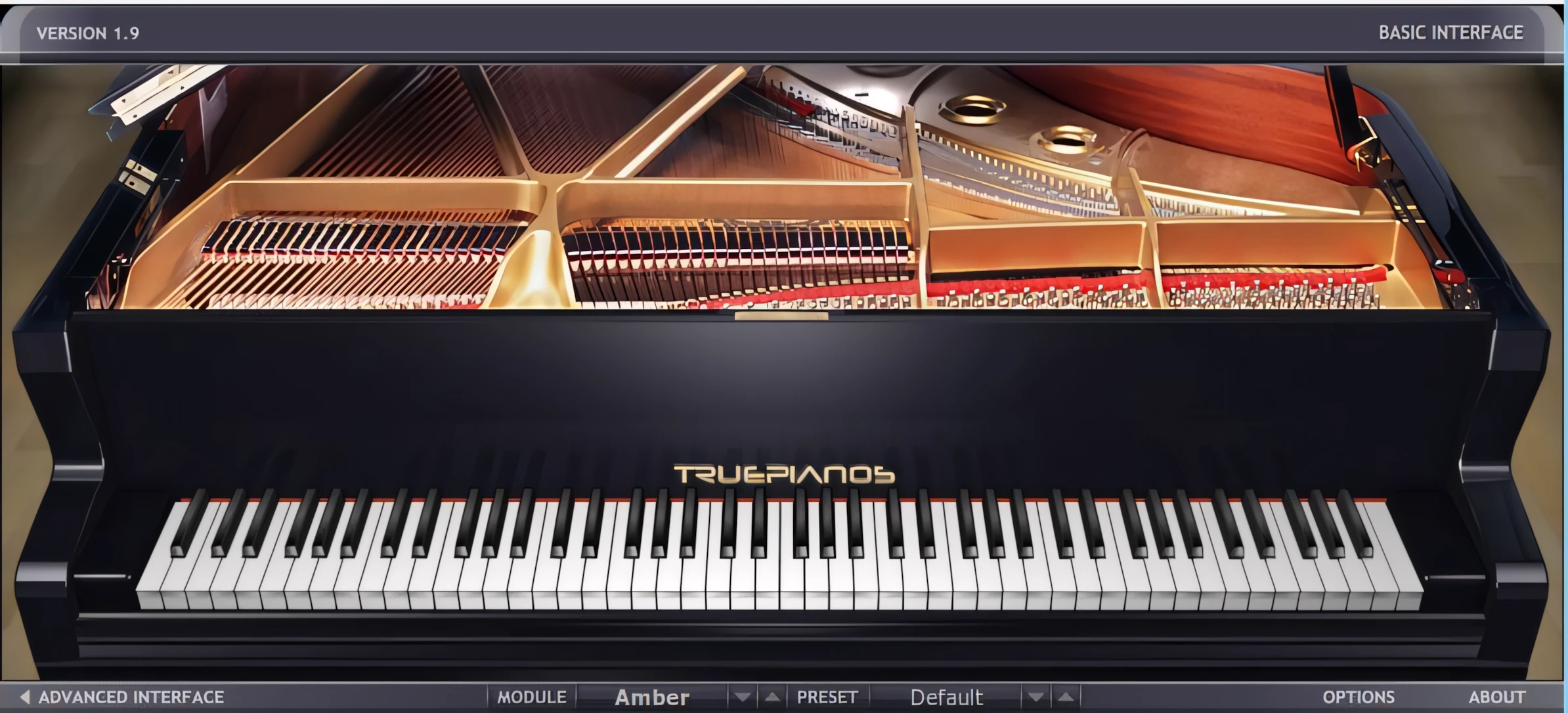
When True Pianos first debuted a few years ago, people considered this interface beautiful, and it introduced a new standard of VSTi GUI excellence. For the record, I am still very partial to it.
Firstly, the “Basic” screen depicts a tres chic, non-descript grand piano, as seen from the player’s perspective. The piano keys move in real-time as the player strikes the keys on his/her midi keyboard. Secondly, effective lighting and shadowing, and slightly rounded edges, all contribute a delicate sense of class and photo-realistic charm. Finally, attention to detail is obvious here – even the piano-lid hinges and hardwood flooring are tastefully and accurately drawn.
Along the bottom of the “Basic” interface are four menu options; Module, Presets, Options and About.
The ‘Module’ menu displays the list of five piano modules; the ‘Presets’ menu contains the list of factory presets per module. This list changes dynamically depending on the selected module.
The ‘Options’ menu opens an easy-to-navigate window containing only three checkboxes and a vertical, keyboard-dynamics slider. These allow the user to select a multi-core CPU option, sympathetic resonance level, and keyboard dynamics. Lastly, you can also set a maximum range of polyphony.
The interface is attractive, functional, and most importantly, it’s blisteringly quick. No lags, no pauses. The visual components of this ‘Speedy Gonzalez of pianos’ are as finely tuned as its powerhouse sound engine.
Advanced Screen:
The Advanced screen is equally as well designed. Subtle, elegant 3D elements tastefully enhance this easy-to-read screen. You can clearly see all control labels in a clean, white, anti-aliased typeface. The controls respond very smoothly to mouse movements and “shift-click & drag” provides very fine, granular parameter changes.
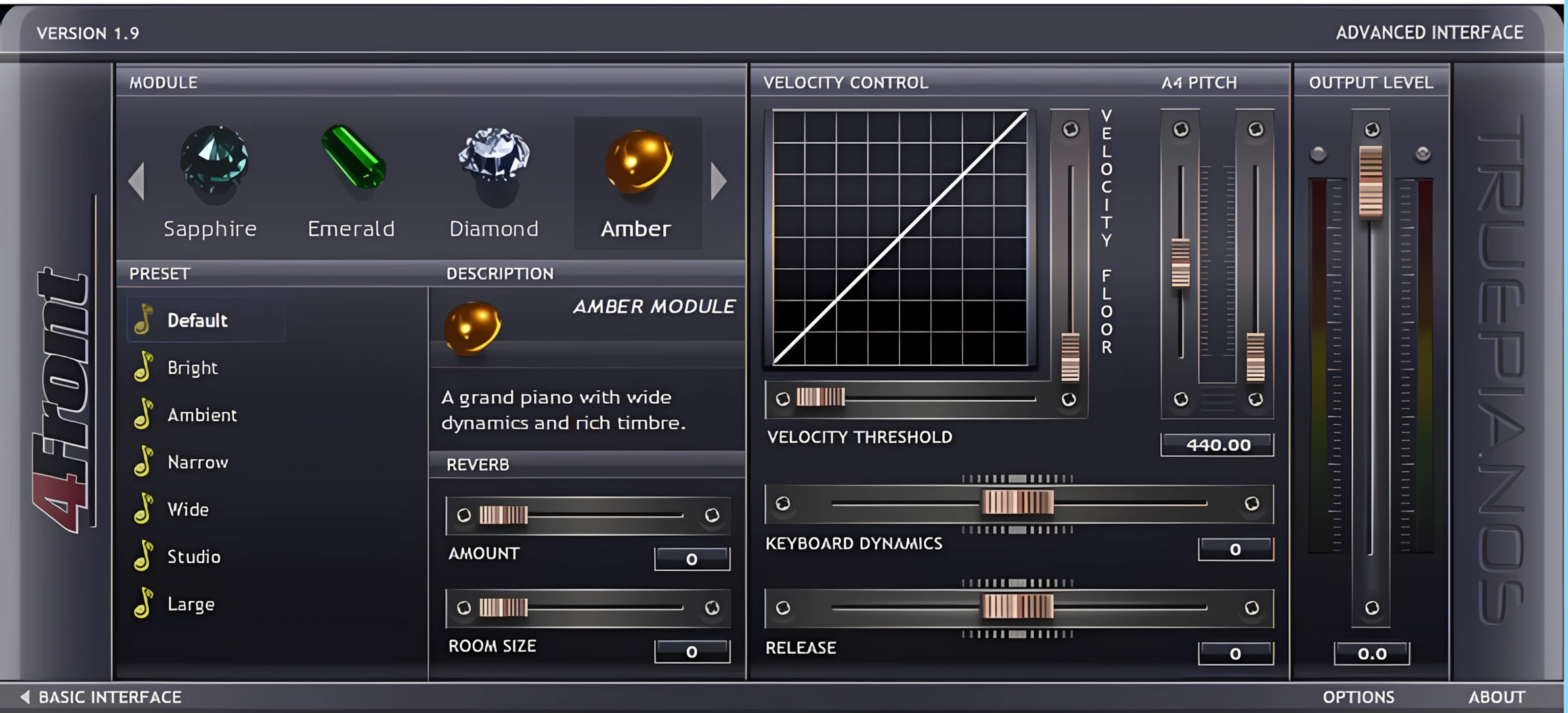
Along the top left-most part of this screen you will see the five piano modules listed with their corresponding gem-stone icons. The naming conventions and icon styles reinforce the classiness of this elegant VSTi suite of pianos. As you select each of the five modules, the preset list dynamically changes.
Whenever you select a piano module, the description box briefly displays a description of that module.
Presets are located directly beneath module panel. To the right of the presets list, you will see the module description area and the ‘Reverb/Room’ panel.
Onboard Reverb:
The reverb/room panel facilitates a means of adding reasonably natural-sounding ambience to the mix. Use the ‘Amount’ slider to set the reverb/dry mix, and the ‘Room Size’ slider to shape the room’s perceived size.
The quality of the reverb algorithm is adequate and pleasing enough, although it isn’t as good as a higher end, dedicated reverb plugin.
I recommend Valhalla Room.
Velocity Settings:
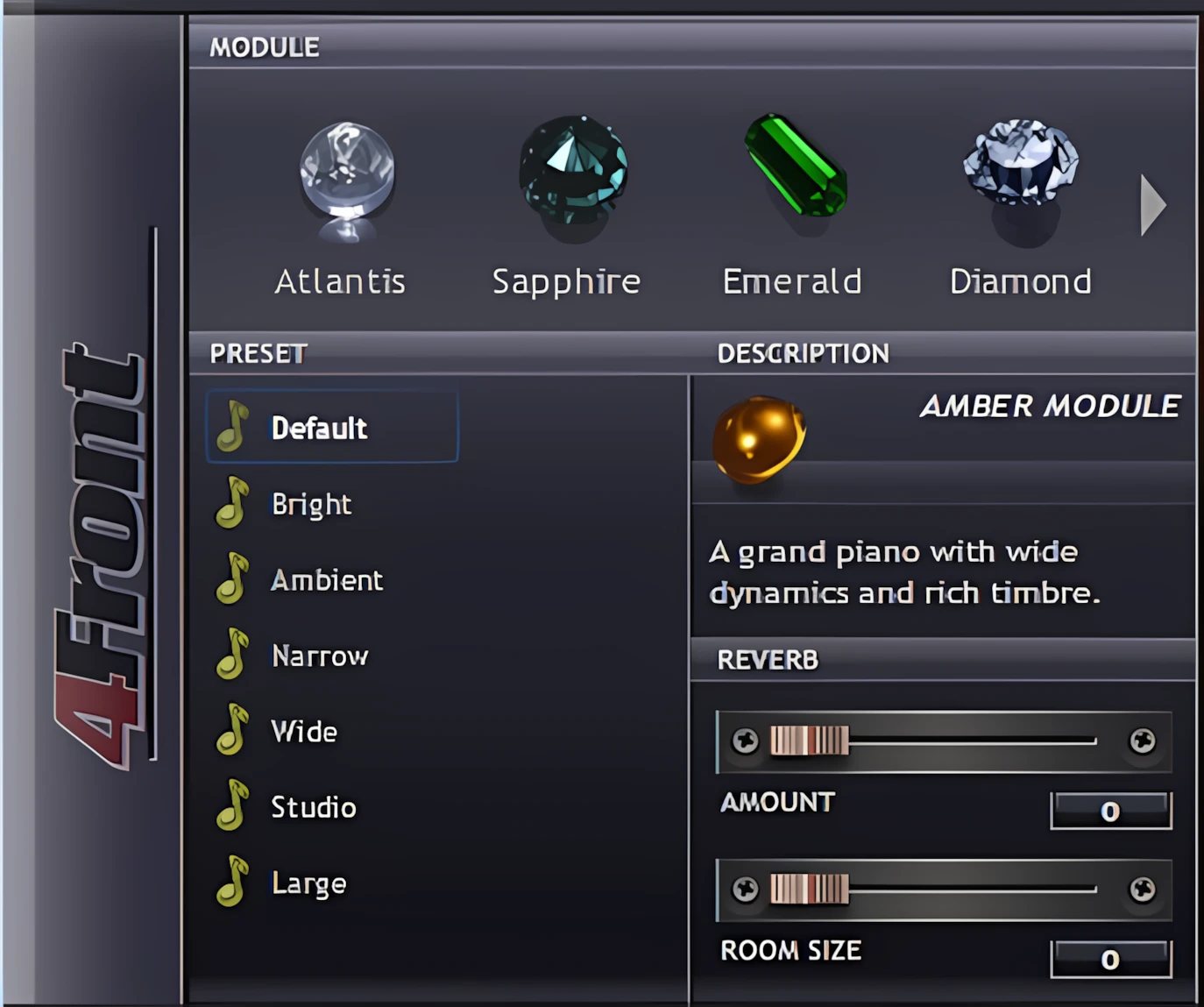
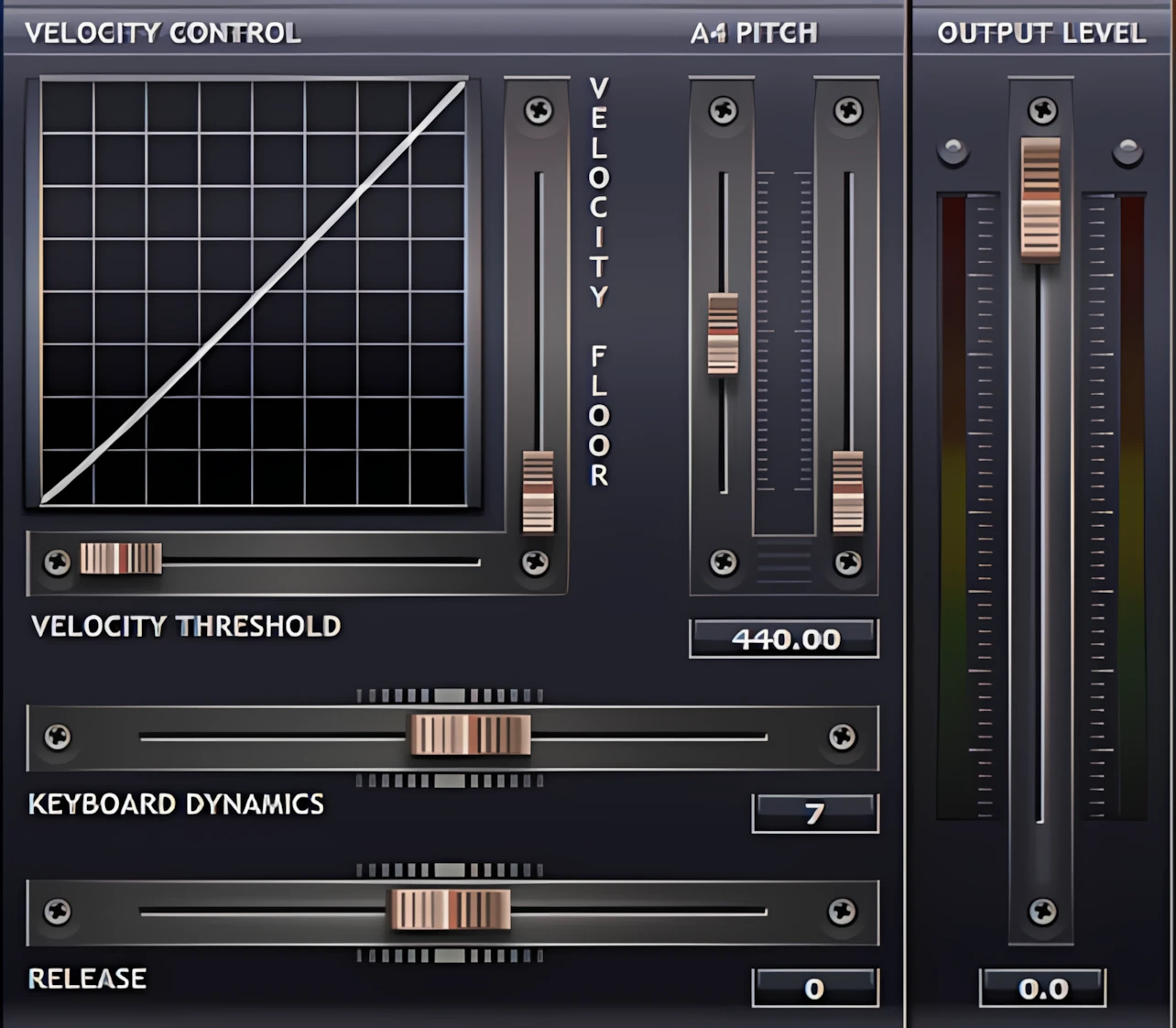
On the left of the advanced screen, the “Velocity Control” panel facilitates advanced manipulation of True Pianos’ midi sensitivity and behaviour. This panel is a grouping of velocity-relevant parameters that strongly influence the realism of this magnificent virtual piano suite.
The “Velocity Floor” slider allows you to bring up the mellower piano sound of playing a piano softly, at much higher perceived volume levels. To clarify, you can use it to compensate for less-than-perfect MIDI keyboards that don’t respond well at lower velocities.
To illustrate, I have a Roland E-50 61 key workstation. It’s a dandy midi controller for synth and organ playing, but sucks for piano and e-Piano tasks. Because the E-50 uses a touch-sensitive controller, and lacks weighted hammer action, it feels too “elastic” for realistic piano performance. To address this issue, I set True Piano’s “Velocity Floor” to -37 dB, which dramatically improves my piano tracks.
The “Velocity Threshold” slider sets the minimal MIDI input velocity value that True Pianos will react to. This option is especially useful to those with sensitive, non- and semi-weighted keyboards.
Moving this slider a bit to the right avoids accidental notes while resting your hands on the MIDI keyboard. Again, with my Roland E-50, this option is a very, very welcome feature. Additionally, the user-friendliness, and variance of control that both of these velocity sliders provide, is quickly making True Pianos one of my favourite virtual piano VIs. In summary, the sound is fantastic, and so is the playability.
Keyboard Dynamics:
The “Keyboard Dynamics” slider seen in the Advanced section is the same parameter we already saw on the “Basic” screen. In short, it affects the velocity sensitivity curve, character, and other aspects of how True Pianos’ modules respond and sound.
Dynamics Release Timing:
The “Release” slider lets you set how long notes continue to decay after you’ve released a key on your MIDI keyboard. Note – this only has affect while the sustain pedal is up.
Collectively, these advanced parameters allow the player to achieve tremendous acoustic piano realism. True Pianos is capable of reproducing “True” piano sound – aka “True Pianos”.
To complete the options on the “Advanced” interface, there is a pair of sliders to allow ‘fine tuning’, and a pair of Output Level sliders. The default pitch of True Pianos is A-440, but the pair of Pitch/Tuning sliders are greatly effective for ‘on the fly’ tuning adjustments. This is especially useful when you are playing alongside other acoustic instruments that are not perfectly tuned to standard A-440. The left slider changes the tuning frequency in 1 Hz steps, while the right slider works in 0.01 Hz steps (cents). Meanwile, the volume sliders . . . adjust the output levels.

Leave a Reply