
Softube Volume 1 Review – Part 2
Fix Flanger and Doubler:
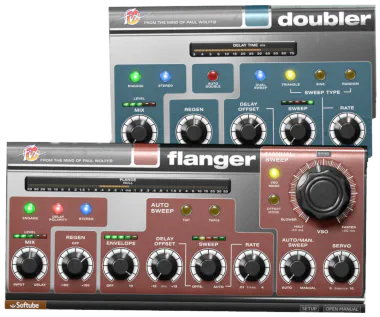
This delightful duo delivers a generous helping of rich, flexible modulation. Although both processors share a similar concept, separating them into individual plug-ins makes each one feel more focused and purposeful in practice.
Softube built both models from original 1970s hardware prototypes designed by old-school audio guru, Paul Wolff. The result is a pair of digitally crafted effects that blend vintage character with modern convenience. Sometimes, two really are better than one.
Fix Flanger:
True to its name, Fix Flanger excels at creating dervish, swirling flange effects. Alternatively, it can dial in a subtle, phase-meets-chorus texture.
Under the hood, the plugin splits your audio into delayed and pre-delayed signal streams. It also provides “Auto” and “Manual” Sweep controls. Best of all? You can blend these two modes together seamlessly, giving you the power to play mad scientist with your stereo field.
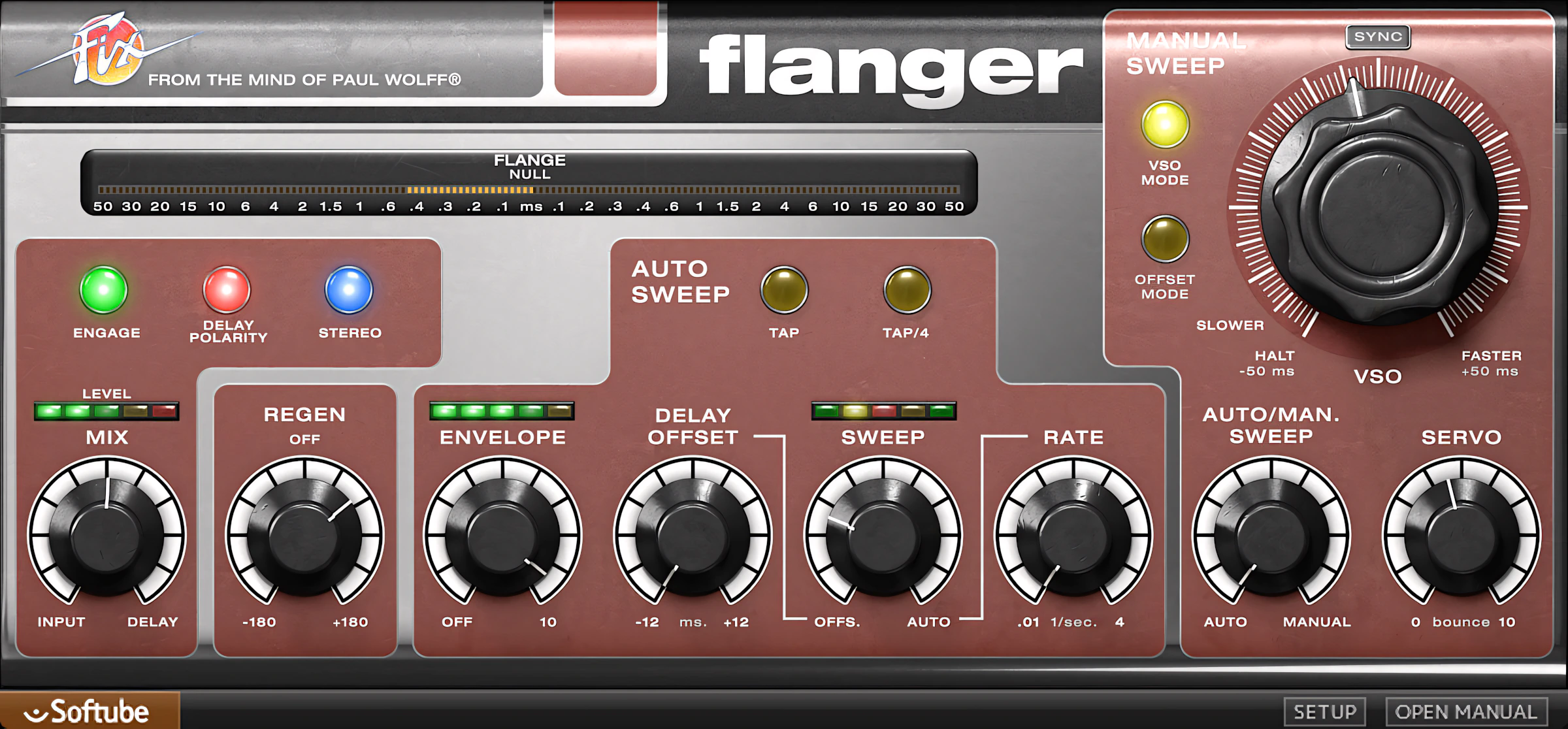
The first mode, Auto, behaves like a classic LFO and lets you shape the envelope of the input signal, which directly affects the flanging. The Envelope knob controls how closely the effect follows that incoming signal.
In practice, when you set this control higher, louder input signals push the flange’s delay time closer to zero. The result feels dynamic, responsive, and just a bit addicting once you start playing with it.
You can introduce some ‘Delay Offset’ to unlock more profuse flanging effects without compromising your source material’s integrity. It’s a clever move that keeps things sounding natural.
Tap and ‘Tap/4’ buttons let you tempo-tap the LFO sweep rate and divide it by quarter note values. This gives you real rhythmic control without the guesswork.
Manual Sweep delivers a dandy emulation of out-of-sync tape machines—think John Lennon at Abbey Road. You get that gloriously organic, slightly wobbly vibe that defined an era.
In “VSO” Mode, the large, attention-grabbing VSO knob behaves much like a Variable Speed Oscillator dial would on an old studio tape recorder. Here’s the magic: you can easily create a very believable facsimile of double-tracking through two speed-differentiated tape machines. Suddenly, you’re channeling vintage studio magic without the tape deck footprint.
Fix Doubler:
The Doubler acts more like a chorus processor. It closely emulates the “FIX AD-2,” a classic piece of real-time auto-doubling hardware. Don’t worry about a steep learning curve here. This processor stays incredibly simple to dial in, thanks to its straightforward—if slightly sparse—set of controls.
Consequently, the Doubler enhances your source audio with lush modulation. It stays perfectly polite and well-behaved, too. That is, until you crank up the ‘Regenerate’ knob. Push that too far, and you will aggressively hijack your sound straight into flanging territory. You’ve been warned!
Hi, you! If you like these kinds of reviews,
be sure to subscribe.
Even so, when it comes to producing classic, authentic doubling effects, this tool is absolutely brilliant.
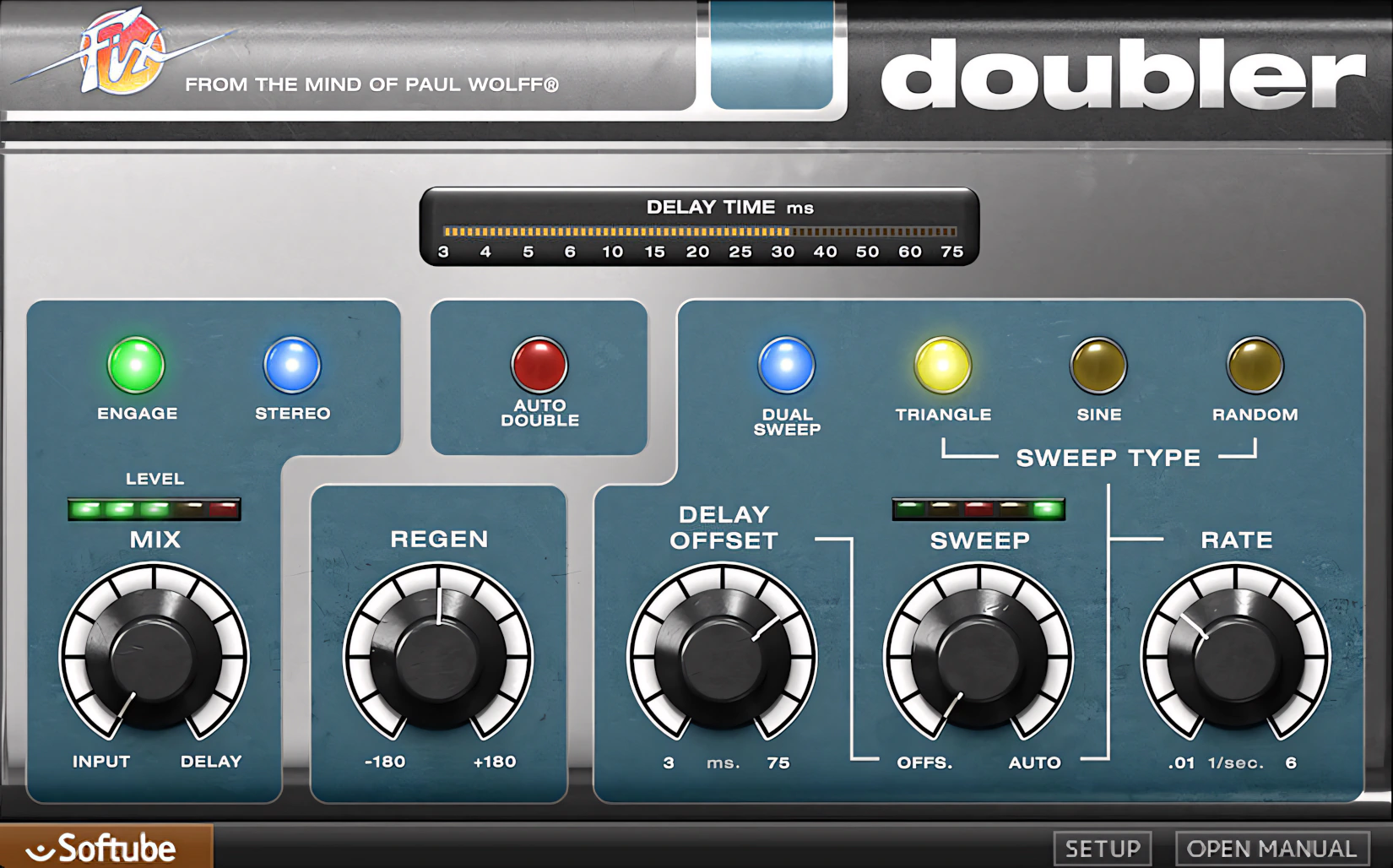
I prefer to work in “Auto Double” mode because it creates that classic Eventide H3000‑style dimension almost instantly. It spreads the source with subtle delays of just a few milliseconds on each stereo side. As a result, you hear a clear sense of extra breadth and width. It is like your sound takes one small step in time, and one giant leap in stereo image.
Dual Sweep mode creates an auto-panning effect that produces an obvious—yet surprisingly pleasant—’swish and sway’. Here’s where it gets interesting: fine-tuning the Sweep control delivers genuinely titillating sonic results. Better yet, you can easily check mono compatibility without breaking a sweat.
Of course, a ‘Mix’ knob lets you run parallel processing when you insert “Doubler” as a track effect. This means you get flexible blending without the hassle.
Tube Delay:
“A tasty echo effect that can go from clean to rude.”
It looks cool, it sounds cool, and it does what it says on the tin. In a word, you get a dope little echo/delay pluggie that can slap the rock-a-billy out of ya, or dub you all the way to ‘dee Islands, Mon.’
Tempo sync aligns seamlessly with modern production workflows, so you’re covered right out of the gate. The controls stay refreshingly minimal — each one explains itself. You won’t find yourself hunting through endless menus, which keeps your creative momentum intact.
Familiar knobs like Time and Feedback lead the charge. Naturally, they team up with Bass and Treble controls, but those EQ knobs only touch the processed signal. In other words, your dry sound remains untouched and pristine.
As for the delay range, you get everything from a barely-there 1 ms, up to a solid 1000 ms. Whether you need a subtle thickening effect or a full-blown echo, this unit has you sorted.
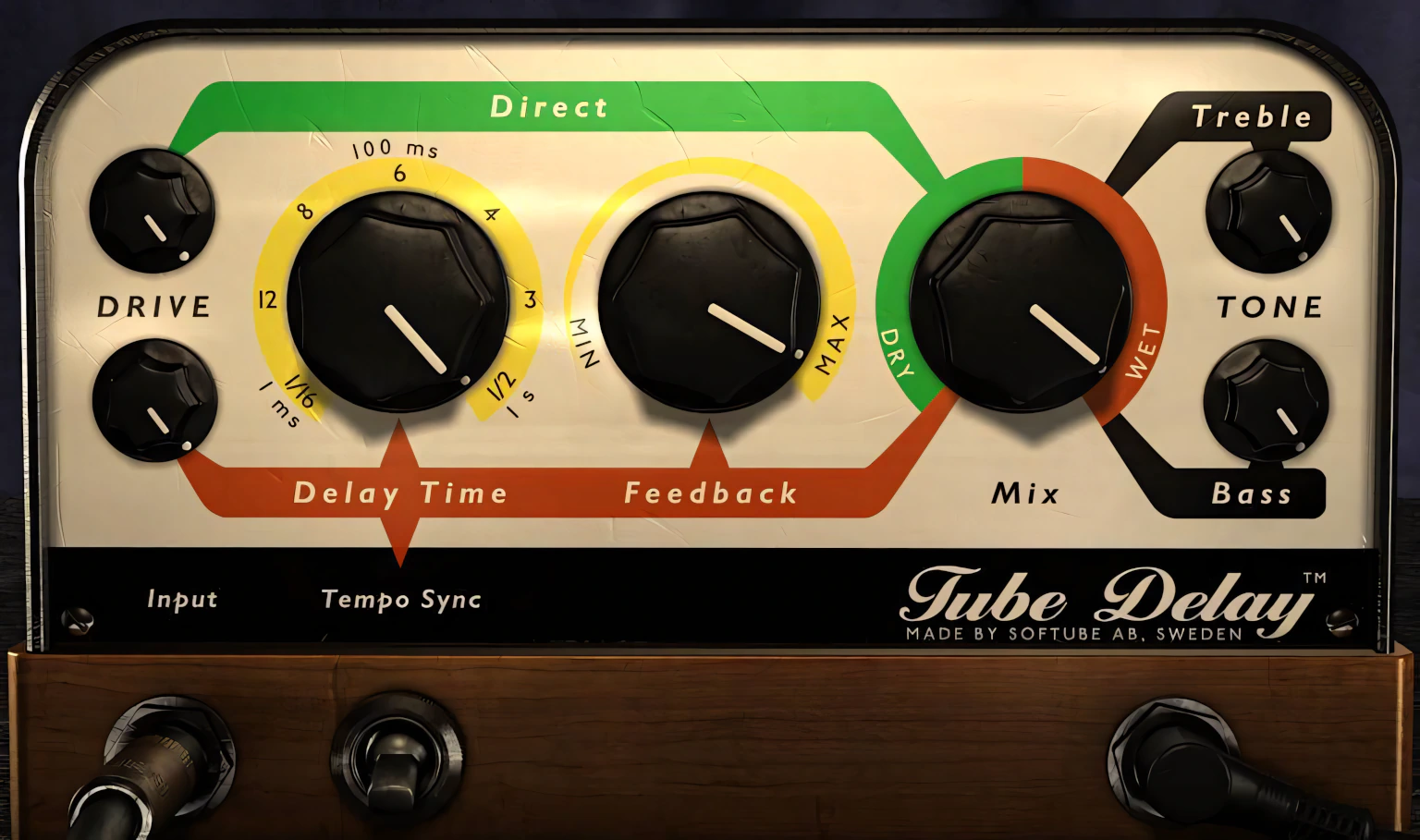
Tube Delay packs a rich, colorful saturation and overdrive algorithm. According to Softube, the effect uses a triple-stage tube design. Each stage builds on the last to create bigger, juicier tones.
More importantly, this design helps Tube Delay stand out from the crowd. It delivers everything from subtle harmonic warmth to gritty rock ‘n’ roll attitude.
Better yet, the Drive control serves up generous helpings of vibe-filled echo and delay. Consider it the sonic equivalent of adding hot sauce—just enough brings everything to life, while a little more can make things wonderfully unruly.
Tube Delay delivers an unmistakable analog character and immense tonal depth. It pumps out full-bodied sonic textures that will easily please both your mix engineer and your audience.
Want to get weird? Use DAW automation to twist the ‘Feedback’ knob. This triggers a wave of chaotic, ‘Hendrix-y’ oscillation mayhem. And yes, before you ask, the creators thankfully included a mix/dry knob. You can easily blend the chaos back into reality.
Virtual Instruments
Modular Synth:
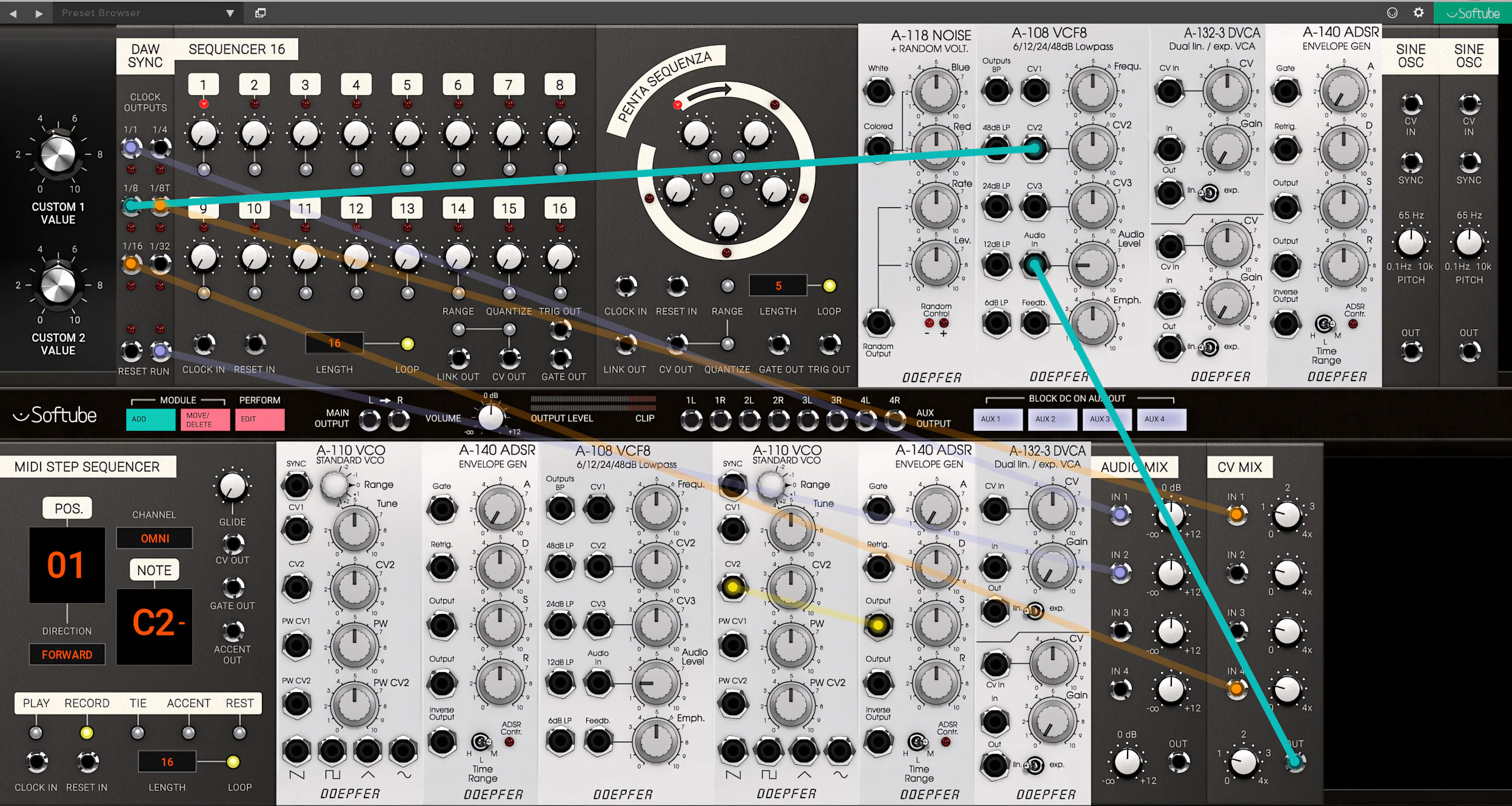
Modular is a flexible, expandable modular synth that showcases a close collaboration between Softube and Doepfer. Together, they helped create the original Eurorack modular synthesis environment, and this instrument proudly carries that legacy forward. In other words, it is like having a legendary hardware playground living right inside your DAW.
DISCLAIMER: This instrument hides far too much depth to uncover everything in a single “Volume 1” bundle review. There is simply too much to explore and reveal beneath the surface.
To really understand what Modular can do, watch Nick Bate’s comprehensive video presentation over at SonicState. He walks through its features in detail, so you do not have to pretend you understood it all from just skimming the manual.
What exactly is Modular?
Modular deeply emulates Doepfer’s Eurotrack patchbay-appointed modular system at its core. The concept mirrors Bob Moog’s “5U” Moog Unit designs—but here’s the kicker: the Eurotrack standard exploded in popularity during the mid-90s for a compelling reason.
The platform offered a lower price point than its competitors while delivering (for the era) genuinely cutting-edge innovation. This combination proved irresistible to musicians and producers hungry for modular possibilities without the astronomical cost.
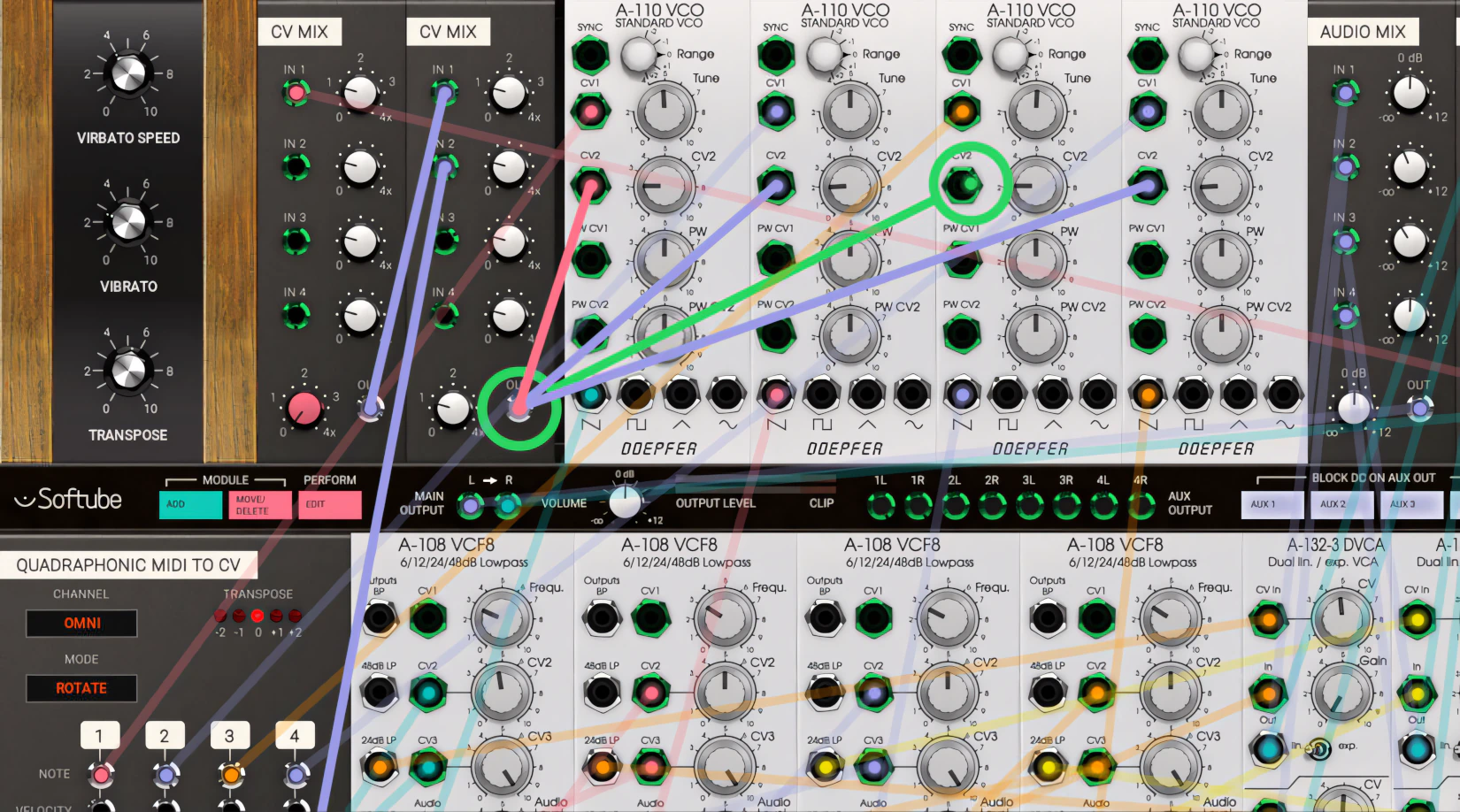
Softube’s synth is parceled with six of Doepfer’s best known modules – those being: A-110 (VCO), A-108 (VCF), A-132-3 (Dual VCA), A-140 (ADSR), A-147 (LFO), and an A-118 Noise & Random Generator. Indeed, the modules were all painstakingly modeled in exquisite detail.
Now, six modules might sound a little light at first glance. But here’s the good news: you can drop as many instances of each module into the synth’s rack as your heart desires. Well, at least until your CPU waves a white flag.

There’s a caveat – Softube are doing their “upsell” tricks here too.
The platform already ships with expansion in mind. Three additional Intelijel add-on modules are available right now for separate purchase, and more are on the way from other developers as the ecosystem grows.
So while the starting lineup may look modest, it’s really just the opening act.
Performance Modules:
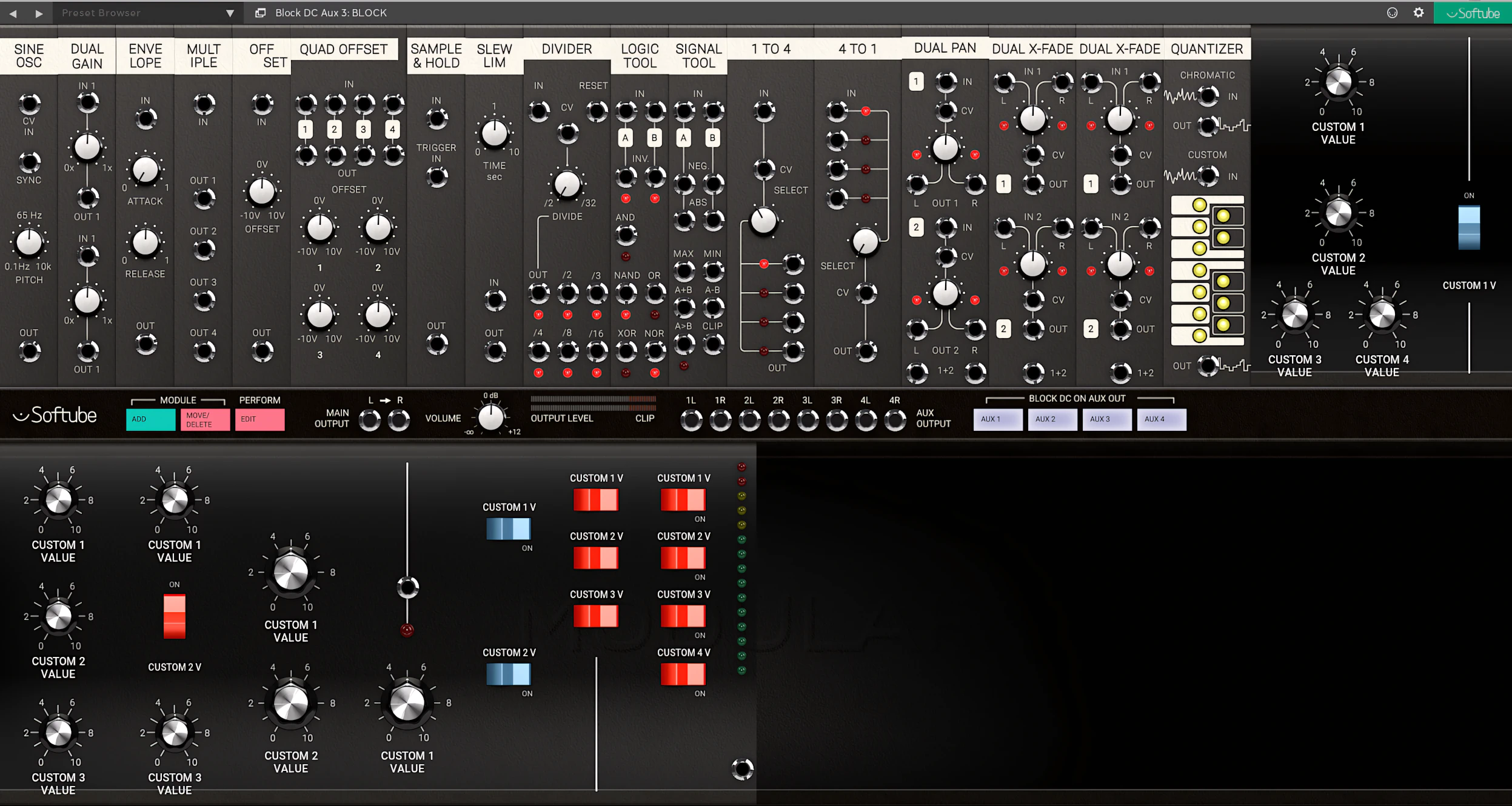
More than 20 performance modules make Modular even more versatile. These include a sine oscillator, envelope follower, multiples, offset, sample-and-hold, clock divider, slew limiter, and much more.
Better still, owners of Softube’s Heartbeat virtual drum machine can import its sound modules directly into Modular. It’s a bit like giving an already well-stocked toolbox an extra drawer full of shiny new gadgets.
MIDI Flow and Sequencing Modules:
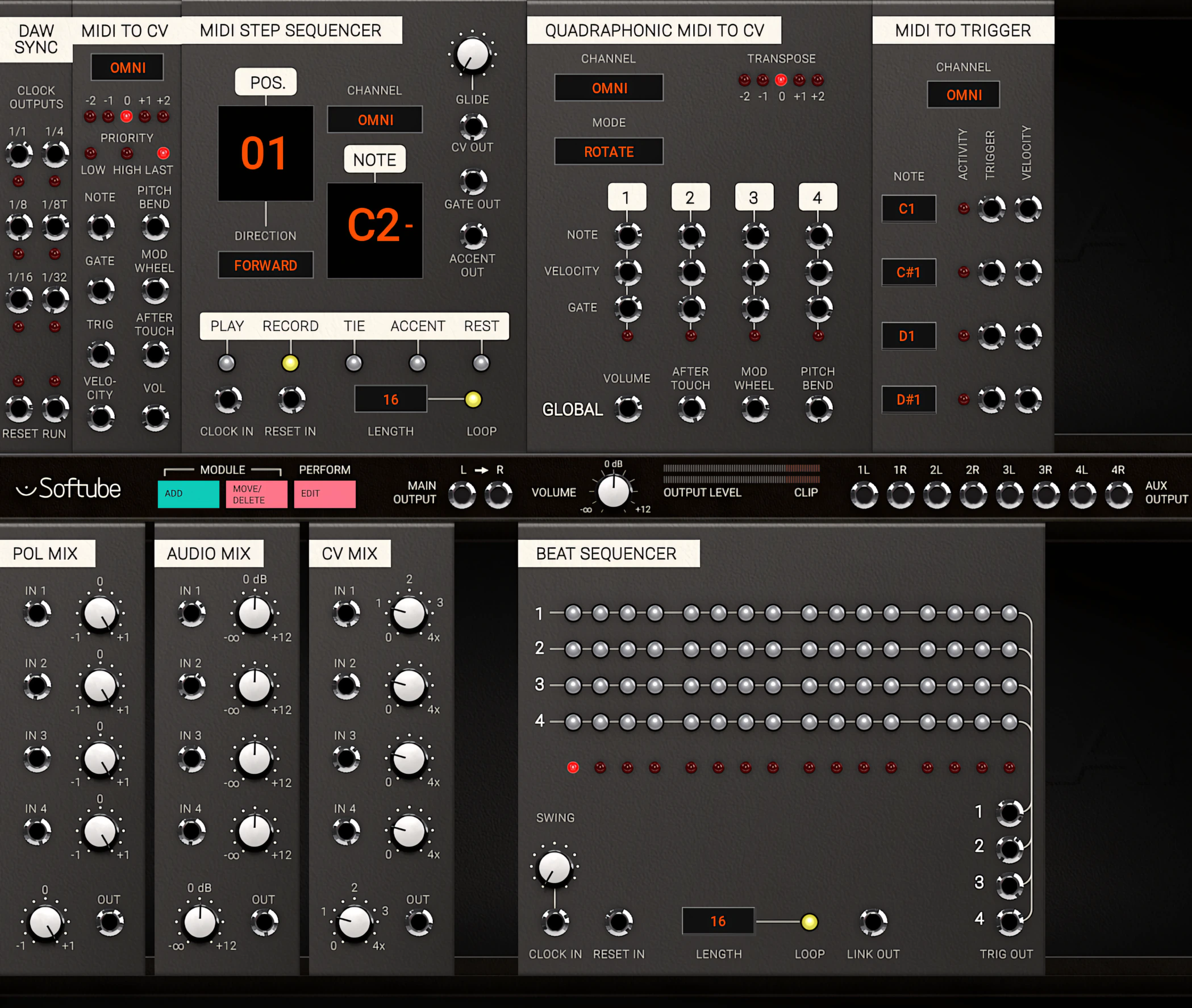
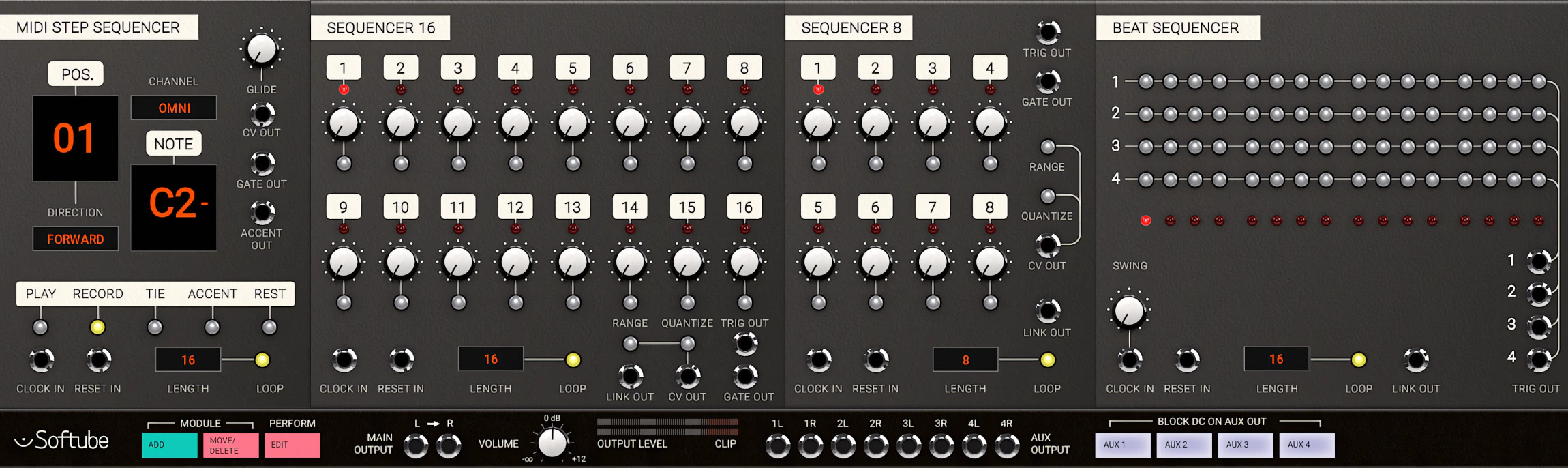
Four DAW and MIDI interfacing modules, an FX module, and three distinct mixers kick off this massive feature set. These mixers handle your audio input, control voltages, and polarizing needs. Next, four versatile sequencers—covering 8-step, 16-step, and the 5-step Penta—complete this substantial array of building blocks.
Here is the best part: you can link these sequencers together. This unlocks 24-step sequencing and beyond, giving you nearly infinite room to experiment.
It’s called Modular for a reason . .
The developers did not just code in the components of the Doepfer synth modules. They also built in the original workflow. If you already know your way around a Eurorack, you will feel at home with this instrument almost immediately.
True to modular form, you can basically connect anything to everything. You simply drag the brightly colored virtual cable ends and drop them wherever you want on the patch bay. As you move around, the available inputs light up in green, so you can spot them instantly. It feels a bit like modular “connect the dots,” except the reward is glorious sound instead of a farm animal drawing.
Presets:
You get roughly 200 preset patches, and most of them brilliantly showcase the deep, lavish sonic palette that this synth delivers. Softube’s “Modular” generates roaring, thunderous lows—we’re talking seriously impressive bottom end. The mids sit warm and well-balanced, while the highs float in feathery, airy splendor.
Here’s where the magic happens: these aural factors combine to produce genuinely satiating tonal tonics. Now, there’s a trade-off (isn’t there always?): the synth demands serious CPU horsepower to keep everything running smoothly.
WARNING!
I originally crowned u-he’s Diva as the undisputed heavyweight champion of CPU consumption. Turns out, I was wrong. Softube’s Modular snatches that title and runs with it.
To put things in perspective, Diva in ‘fast mode’ pushes Studio One’s Performance Monitor to around 20–25% on certain patches (on my 2nd gen i5). Respectable, sure. Meanwhile, Modular happily cranks that same meter past 50% — and sometimes even higher. Ouch!
Make no mistake, the sounds Modular produces are absolutely stellar. But let’s be honest: that kind of CPU appetite makes everyday use a tough pill to swallow.
It’s like owning a sports car that drinks premium fuel — thrilling, but you’ll think twice before taking it to the grocery store.
Heartbeat Drum Machine:
“. . combining modeled analog drum synthesis of yesteryear with forward-thinking features and flexibility.”
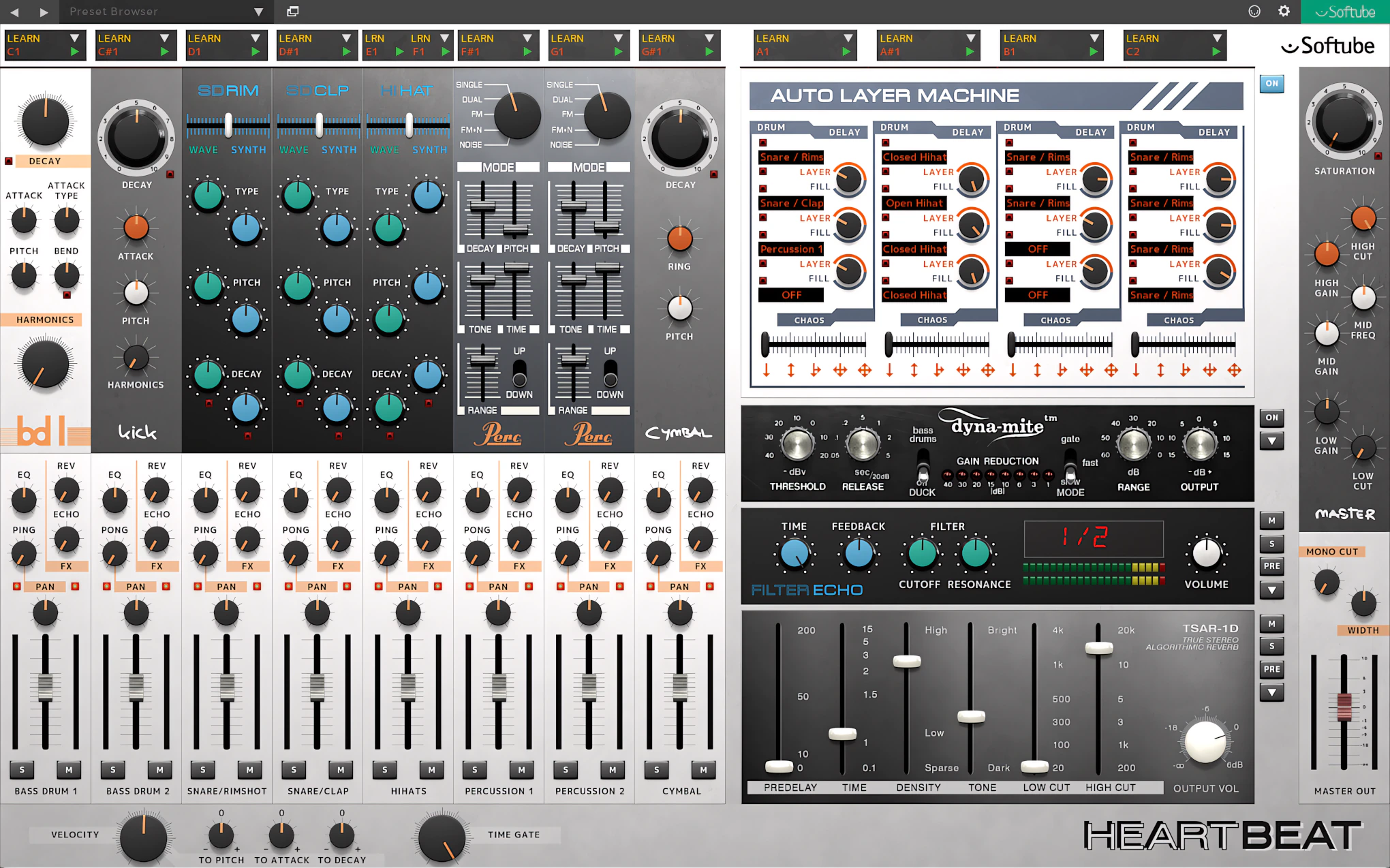
Pardon the pun, but at its heart, “Heartbeat” is a vintage-sounding drum machine deluxe. It can kick like a mule and snap like a matador’s whip. With its attractive interface, which strongly echoes the iconic Roland 808, this spirited digital drum machine invites experimentation and rhythmic fun. It encourages you to play, explore, and build grooves with ease—because making beats should feel as enjoyable as hearing them.
Eight drum modules power this beat-making box. This lean lineup keeps your workflow and configuration incredibly simple. Inside, you get two kicks, two snares (plus claps), percussion, hats, and cymbals.
Furthermore, every single channel commands its own dedicated controls. For example, the kicks give you immediate access to ‘decay’ and ‘pitch’ knobs. Over on the percussion strip, you tweak ‘tone’ and ‘type’. Finally, a unique tag-team of ‘wave’ and ‘synth’ dials runs the snare, rim, clap, and hi-hat strips.
Mixer Elements:
Each element feeds directly into the mixer section and gets its own channel, where you can add reverb and delay effects. You can also apply automated panning with the “Ping or Pong” control, which keeps your sound moving in a pleasing, musical way.
Each channel includes a single EQ knob, but do not let its simplicity fool you. This EQ is tailored specifically to the element in use. It works like an intelligent auto-tracker, dynamically adapting itself to its source. In other words, it does the smart listening for you, but you can take the credit.
Cool Built-in FX:
Softube refuses to skimp on ambience effects quality—and they prove it by benevolently including the outstanding reverb algorithm from their illustrious “TSAR-1”. This isn’t some watered-down knockoff; they’ve brought the real deal to Modular.
Better still, the channels all route through an adaptation of the Softube “Valley People Dyna-mite” dynamics processor. Translation: you get professional-grade compression and dynamics control built right in.
Keeping with Softube’s modus operandi, “Heartbeat” is more than capable of slamming out an explosive barrage of analogue-like beats. At the final output stage, the elements are channeled into a “master bus”.
Here, we find a global saturation knob, three-band EQ, High & Low pass filters, and finally, ‘Width’ and ‘mono cut’ controls. The latter determining the frequency ceiling under which lower sounds get summed to mono.
Sound Quality:
These are Softube goodies – nuff said!
Seriously though, once you step up to professional-grade audio plug-ins, your choice largely comes down to personal preference. Design and features matter, but so does the way a plug-in inspires you to work.
If authentic analogue-style character appeals to you, and you enjoy vintage-inspired interfaces, Softube remains one of the strongest contenders. Since 2003, this team of Swedish audio wizards has crafted premium plug-ins that capture the spirit of classic hardware. They clearly know their craft—and they’ve had more than two decades to prove it.
The results speak for themselves. Thousands of professional recording studios around the world rely on Softube products to help produce chart-topping records. That’s not to say the plug-ins write hit songs for you—but they certainly don’t hurt. 😉
None of these plugins will ever sound cheap, generic, or ‘vanilla’. Instead, scrupulous component modeling injects a highly convincing analog vibe straight into your sterile digital project.
To my ears, every single tool in the “Volume 1” bundle delivers superb audio quality and distinct sonic character. This stellar range of compressors and EQs easily crushes the competition. They rise above the common fray while generating zero aliasing and absolutely no nasty artifacts. Your CPU can thank me later.
Saturate to clarify . .
For instance, the Summit TLA-100A plug-in convincingly captures the magic and essence of its original hardware namesake. It delivers plenty of clean, analog-style warmth, without ever slipping into mud.
The TLA-100A treats its audio source with gentle, breathing, organic compression when you want subtle control. Or, when you are ready to get a little bolder, it can dim the lights and seduce your ears with rich saturation and vibrant color.
The same excellence extends to every peripheral packed into “Volume 1”. Use them judiciously, and something magical happens: Softube plug-ins consistently impart warmth (without the mud), harmonics, ‘air’, and genuine 3D dimension to your audio. They even add that elusive vibe-y-ness everyone chases.
Drive them with deliberate intent, and your tracks transform. They’ll develop colorful, vintage character in all the right ways. You’re looking at rich, soul-stirring saturation—the kind of ‘hair’ that makes professional engineers nod approvingly.
Predictable . .
If pressed, I’d call Softube’s FX plug-ins predictable — and I mean that as a genuine compliment. Predictable in the way a trusty hammer is predictable. Every swing lands exactly where you intend it to.
Ease them in gently, and they breathe wonderful dimensionality into your mix. Push their front ends hard, though, and they respond with real gusto. Honestly, making these plug-ins sound bad takes serious effort. At that point, the problem isn’t the tool — it’s probably you. Just sayin’.
Visual Design – the Positive:
I dig Softube’s plug-in GUIs and I’m grooving on their well-laid out, simplified interface designs. They facilitate fast workflow and immediate results.
Better yet, the photorealistic graphics faithfully recreate classic analogue gear. Every time I load one up, it brings a satisfied grin to my face. After all, if a plug-in looks this good and sounds the part, that’s a welcome bonus.
The designers spaced the knobs and sliders perfectly. Consequently, not a single one of these plugins suffers from a cluttered, disoriented, or clunky layout.
Every single control features clear markings and provides accurate visual feedback. Typically, you will find these helpful indicators lining the bottom of the plugin windows.
Speaking of the GUI controls, I really like them. In fact, I like them a lot. The knobs and faders offer just enough “resistance” to stop those annoying, fiddly mouse slips.
Instead of forcing you into awkward circular-style knob moves, the interface uses straightforward linear up-and-down dragging. It feels natural and precise.
Furthermore, when you need fine control, simply hold down the Ctrl key while you drag (or the Command key on a Mac). Suddenly, tiny adjustments become effortless. It is like giving your mouse a set of studio-quality stabilizers.
Visual Design – the Negative:
Screen resolutions keep climbing, and plug-in developers must adapt accordingly. I genuinely enjoy Softube’s overall GUI aesthetic—but here’s the thing: I strongly encourage their team to revisit GUI development now.
Softube, I highly recommend that you release updates that feature resizable, scalable interfaces across your entire product line. Arturia’s “V Collection 5” already nails this approach. U-He’s “DIVA” proves it too: a beautiful, resizable interface actually enhances the user experience rather than cluttering it.
Softube has the talent and track record to pull this off. Make it happen.
Here’s the thing: on my current system running 1920 × 1080p, many of Softube’s GUIs come across as simply too small. Reading the text elements strains my eyes. Worse still, the knobs and sliders feel like they belong on a dollhouse mixing console.
To be fair, Softube released several of these plug-ins back when 1366 × 768 counted as a typical resolution. Times change. These days, high-end displays serve up crisp 4K and even 5K resolutions without breaking a sweat. So naturally, tiny plug-in interfaces just don’t cut it anymore.
It’s like watching an old standard-def movie on a massive 4K TV. The charm is there, but you can’t help squinting.
** EDITOR’S UPDATE **
Effective 2019 and forward, Softube has indeed re-released many of their plugins as “version 2” variants – complete with larger, resizable GUIs. Here’s the thing: they command fairly steep upgrade prices. I appreciate that it takes time and talent to refashion the old plugins, but Softube is overly optimistic with their upgrade pricing, in my honest opinion.
Performance and Functionality
You will have an absolute blast coaxing awe-inspiring sounds out of these babies. Don’t let the intuitive interfaces fool you, though. Under the hood, Softube packs some seriously complex, exacting DSP code.
Furthermore, rookie engineers can easily drop these effects onto a track and pull up massive results. In fact, you won’t even need to crack open the user manual—unless, of course, you just miss the smell of digital paper.
Free 90 Minute Tutorial Included with Purchase:
If you want great insights and practical tips, watch, listen, and learn from Grammy-nominated engineer Ryan West. He has worked with Jay-Z, Eminem, and Kanye West, so he knows a thing or two. Dive into the included 90-minute mix-tutorial video, and let him walk you through the process step by step—no Grammy required on your end.
Built-in Parallel Processing – the easy way
Today, developers are building parallel processing directly into their DAWs. This feature used to demand some pretty elaborate workarounds—think complex routing mazes and track-duplication headaches. Softube recognized this pain point early and acted. They introduced ‘Direct Injection’ to address what burgeoning engineers and busy pros desperately needed: simplicity.
The difference is striking. You tweak a single knob instead of wrestling with parallel routing or cloning tracks (which, let’s face it, gets messy fast). Direct Injection streamlines the entire workflow by eliminating duplicated tracks and unnecessary AUX channels. The result? Cleaner sessions, faster iterations, and engineers who actually finish their projects on time.
CPU Consumption:
The collection’s CPU footprint varies from negligible to moderate, depending on which plug-in you fire up. Overall, I’d call it a light to modest drain on system resources—your computer won’t need a nap halfway through a session.
For instance, on my Intel Core i7 7700HQ, TSAR-1 hovers around 6%–7% at 44.1kHz/24-bit with a 512-sample buffer in Studio One Pro 3.5’s performance monitor. Meanwhile, Ableton Live 9 reports a slightly friendlier 5%–6% hit under identical project settings.
For a quick comparison, IKM CSR Plate sips a mere 3%–4% in Studio One on the same machine. On the hungrier end, both 2c-Audio’s Aether and FabFilter’s Pro-R land between 8%–11%. So, nothing here will send your CPU into a panic—unless you stack a dozen instances, and at that point, that’s on you!
Modular Synth is a Different Matter Though . .
The modular synth pushed my system to its limits — even very basic patches cranked the CPU up to 50%. I tested it in Studio One Pro 3.5, Ableton Live 9.72, Mixcraft Pro Studio 8.1, and Samplitude Pro X3. Every DAW delivered the same result, so there was nowhere for the synth to hide.
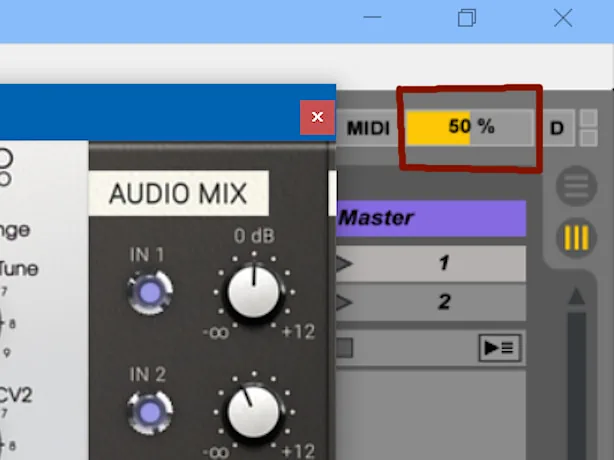
By contrast, the FET Compressor barely breaks a sweat. Here on the reviewer’s test bench, it sits comfortably at just 2% CPU usage in Studio One 3.5.
4 out of 5 Stars


:: Pros
- An ample compliment of some of the vibe-y-est, coolest audio
- plug-ins around.
- World renowned Softube quality and dependability.
- Attractive, easy-to-use GUIs.
- Lush, expensive-sounding processors.
- Highly believable & convincing analogue-like sound.
- Works as expected, NO finicky surprises.
- Reasonably-priced as compared to individual purchases.
::Cons
- GUIs need an overhaul to facilitate resizing and HDI scalability.
- There is a bit of “bundle filler” and redundancy.
- Some features are VERY CPU demanding.
Visit the Softube website. www.Softube.com
Intellectual Copyright – 2017 – All rights Reserved. This review may not be copied or reproduced in whole, nor in part, without express written permission from the author.

Leave a Reply