
What is VerbTone?
VerbTone is a physically modeled plate reverb plug-in designed for music production. It earns praise for its lush, detailed sound and impressive affordability. In this SKnote VerbTone Review, we’ll take a good, close look at it.
Key Characteristics:
- Type: It uses physical modeling rather than convolution or standard algorithms. This means it simulates the actual physics of a plate reverb unit (the vibration of a metal plate) to generate the sound, allowing for dynamic and organic behavior.
- Sound Profile: Critics and users alike praise it for delivering a luscious plate reverb tone that sounds both warm and richly detailed.
- Vocals: Adding warmth and space to rock vocals.
- Drums: Creating powerful ambience for genres like nu-metal.
- Control: Because it models physical properties, it offers extensive control over the behavior of the simulated plate, giving users detailed shaping of the reverb tail and character.
Unlike StageSpace, Verbtone is specifically dedicated to emulating the classic, dense sound of hardware plate reverbs. These were a staple in recording studios from the 1960s onwards.
Introduction:
If you’re looking for an “expensive” sounding plate reverb, without it costing as much as a typical week’s worth of groceries, I have some GREAT news for you! Twenty ($20) US dollars will get it done. No dongles required. No call/response protection mechanisms.Within 24 hours of purchase, the company sends a direct download link straight to your email inbox.
Mr. Quinto Sardo concentrates on creating VHQ plugins without spending precious programming efforts on arduous licensing schemes or layers of bothersome piracy protection. The one caveat? No downloadable demo.
The plus? SKnote’s VerbTone is an excellent, well-modelled Plate reverb plugin.
Many professional recording engineers will tell you that plate reverb continues to be the “Go To” reverb type for great sounding vocals and snare tracks. Quality plate reverb used to cost a lot of electricity, a considerable area of space, and could weigh up to 600lbs. This very well modelled plugin only requires about 2MB of space on your hard drive.
For those whom are not exactly sure what a “Plate” reverb is, here is a wonderful definition that I’ve borrowed from bsidebeats.com:
“It’s a matter of sending an audio signal to some type of transducer (in this case a speaker) which vibrates a piece of sheet metal (the plate). The vibrations travel though the plate as waves – like ripples from a pebble dropped in a pond – from the speaker at the centre to the edges where they’re picked up by another transducer (in this case 2 piezo buzzers). These convert the wave – it’s shape now altered by the plate – back into an electrical signal and returns it as reverb to be blended with the original sound.”
Again, I tell you: SKnote’s VerbTone is an excellently modeled Plate reverb plugin.
Sounds great, but is there a catch?
In order to get the “what’s the catch” question out of the way, I’ll quickly disclose the one quirk that I wish wasn’t inherent in this otherwise impressive product.
Latency.

“Oh NOOO!” “We doesn’t like nasty orks’s latency, does we, Precious?”
Hi, you! If you like these kinds of reviews,
be sure to subscribe.
How much latency, you ask? I’ve measure it to be around 4ms – 5ms. Does it introduce a difficult problem to manage? For the most part, no. If you follow the industry-standard best practice of placing reverb plug-ins on a send track or Aux bus, the plug-in reports latency correctly to your DAW or host application.
Your DAW compensates the latency automatically, and the latency becomes undetectable. Even when you use VerbTone as an insert effect, the plug-in still reports latency correctly to your DAW or host application.
However, there is one plugin/latency quirk that I have experienced while using a multi-out VSTi, such as EZ Drummer. Adding VerbTone as an insert effect on a “child” track prevents the DAW from reporting latency. It throws the timing of the child track off by 4ms-/+
I like this reverb plugin very much — especially on snare tracks. I simply “bounce” or “mixdown” my snare tracks to a new audio file(s). This allows me to use VerbTone as my insert reverb effect of choice on snare tracks. I repeat the process for toms, when necessary. This is a few extra steps, and does negate some of the ease of using a convenient “multi-out” VSTi, such as EZ Drummer. However, the tasty sound quality of this Plate reverb plugin makes it worthwhile.
Visuals:
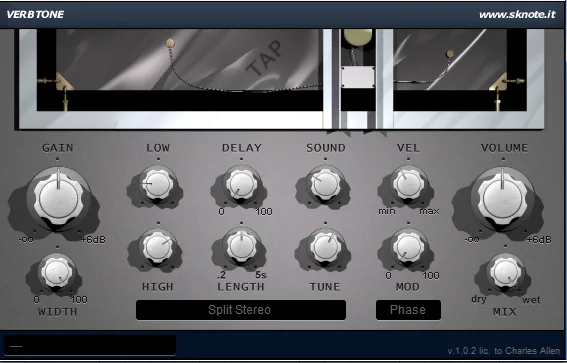
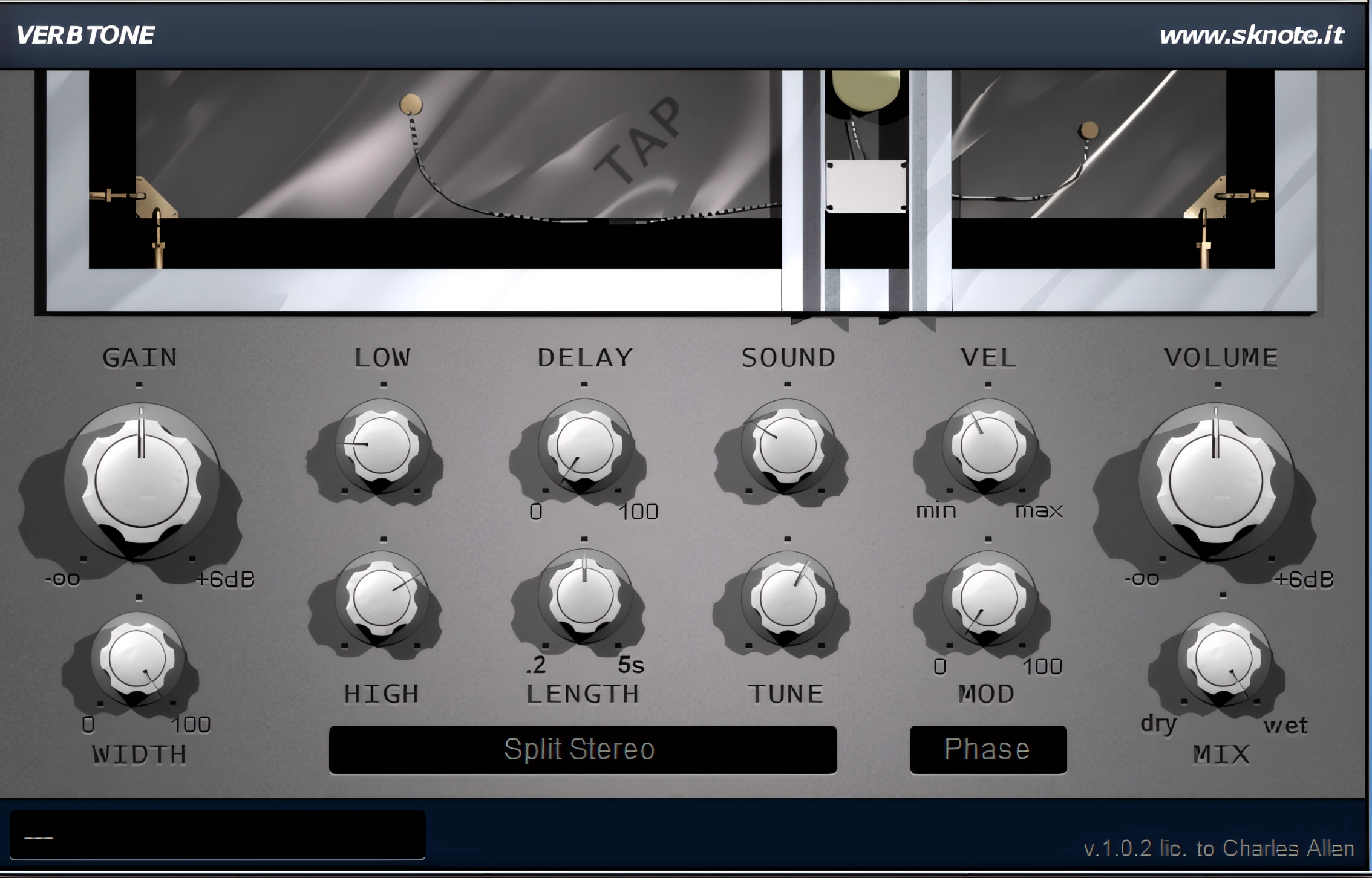
The SKnote GUI offers pleasant, eye-appealing charm at a moderate size of approximately 600 pixels wide, 400 pixels high. The silver/grey background and shadowed 3D”ish” appearance of the buttons lend themselves to a polished look that gives the visual impression of a truly professional product. The text is easily legible, albeit a little bit small. Your mouse smoothly controls the buttons. The button movements result in smooth, graduated changes to the signal processing.
The upper portion of the interface resembles a shiny metallic plate complete with electric transducers and wires. With your mouse, you can “TAP” on the plate to hear its sound while configuring a new reverb and changing parameters.
Stereo Imaging and Depth Perception:
Your ears will delight in the magnitude of perceived stereo width and depth that this little reverberation plugin is capable of. This acurately-modeled plate reverb is certainly diverse in its configurability.
You can modulate the reverb tails, by varying degrees, if you are looking for the famous Lexicon-ish effect. The ‘Width’ knob will facilitate tightly focused effects when set to minimum, or envelop your aural senses with incredibly wide, surround-like resonance when fully engaged.
The initial transients of the reverberated source remain intact. They avoid messy, invasive reverberation entirely. Applied to vocals, this plugin delivers ear-pleasing depth and space without unwanted ringing or echoey mush.
The reverb is wonderfully rich and can be shaped to sound deep, wide, and dense, yet it never feels like it’s just “sitting on top” of the vocal or smothering it in a heavy blanket. Instead, it blends naturally, enhancing the performance rather than obscuring it. VerbTone is rich and deep – not obnoxious.
Sound Quality:
I am particularly impressed with Quinto’s attention to detail in regard to the variance of the plate’s “dimensions” (thickness and weight). The ‘Sound’ and ‘Tune’ buttons alter the effect of the Plate’s thickness and weight” respectively.
If you want a bright, crisp sounding (thin, shiny sheet of metal) plate reverb, you keep the knobs set at their minimum values. To get a fuller, more dense sounding plate (heavy, thick sheet of metal), simply turn the ‘Sound’ and ‘Tune’ knobs clockwise. From bright and airy all the way down to thunderous and dark – VerbTone delivers!
Like SKnote’s other fine quality reverb plugins, you won’t hear any metallic after-effects. Even with the reverb time pushed to its full five-second maximum, the tails remain clear, rich, and remarkably smooth.
What you will hear, however, is a very believable-sounding plate reverb effect. Your ears will hardly trust your noggin, that they aren’t “really” hearing the lofty warble of an actual, shiny sheet of electrically charged sheet metal.
Yes, there are handy onboard filters. .
Arguably, the best practice is to apply high and/or low pass to the input stage of any reverb/delay send track. However, for those who would rather color or control the equalization of the reverb effect itself, VerbTone provides effective, smooth-sounding low and high pass filters.
Configuring VerbTone’s effect level and density is somewhat unusual. In most cases, users expect a “Mix” or “Blend” knob to control the dry/wet ratio, although some plug-ins provide separate dry and wet controls instead.
VerbTone departs from this convention in that it provides control of the reverb level by means of the ‘Gain’ knob. When you set the “Mix” knob fully to Dry, the plug-in delivers the maximum dry signal level. However, the sound will still contain plenty of reverb unless you reduce the “Gain” knob to zero.
Turning the “Mix” knob fully clockwise to Wet removes the dry signal completely, allowing only the processed signal to be heard. It is the ‘Gain’ knob that controls the level (or volume) of the reverb effect. The “mix” knob simply determines how much of the “dry” signal you retain.
I personally own the Lexicon LPX Bundle. For only $20, you’ll be amazed at how well this plate reverb plugin can fill the void for anyone looking for the LEXICON-ish sound. I’m serious here, folks — buy it and try it for yourself. SKnote offers a “NO QUESTIONS ASKED, REFUND” on all their products. I’m pretty sure that Lexicon doesn’t offer that . . .
CPU Consumption:
I would describe this plugin as “Moderately CPU Friendly”. On a modern i3, i5 or equivalent AMD processor (as of the time of this publication), you can easily run 6 or 7 instances of this robust, high quality reverb simultaneously with negligible CPU load. Obviously, the number of instances can be increased on a higher end quad core (or greater) system.
I will be reviewing SKnotes’ Necklace reverb plugin in the very near future. Have you read my review of SKnote’s StageSpace reverb?. Keep an eye out for those reviews as well.
I really dig this plugin, but the latency might be a problem – upwards of 10ms(-/+) of latency is noticeable. Mind you, as long as you are using VerbTone on a Send track or Aux bus, you won’t notice it as much — especially if your DAW handles plugin latency well, and you’re mixing down rather than tracking with it.
4 out of 5 Stars


:: Pros
- Affordable.
- High quality, modelled Plate reverb.
- Very smooth sounding.
- Exceptional stereo imagery and perceived depth.
- Fun, attractive, functional user interface.
- Included high & low pass filters.
- Cool modulated reverb available.
- Deep, wide sound stage.
- Very broad range of plate types.
- Perfectly suited for snare and vocal tracks.
- Friendly, professional product support.
- No dongles, call/response challenges, nor invasive piracy protection overhead.
- 32 & 64 bit
::Cons
- Some latency, but generally not enough to hurt — especially on a send during mixdown.
- No downloadable demo.
Visit the SKnote website. SKnoteaudio.com
Intellectual Copyright – 2013 – All rights Reserved. This review may not be copied or reproduced in whole, nor in part, without express written permission from the author.

Leave a Reply